
Are you struggling with getting your WordPress site to run smoothly? File permissions might be the hidden culprit behind many of your headaches.
Knowing the right file permissions for WordPress isn’t just a technical detail—it’s a crucial step in safeguarding your site and ensuring it functions seamlessly. Imagine having full control over your website’s security and performance with just a few tweaks. Intrigued?
Understanding file permissions can empower you to protect your content, enhance site speed, and prevent unwanted intrusions. Ready to unlock these secrets and take your WordPress experience to the next level? Let’s dive into what file permissions you need and why they matter.

Credit: torquemag.io
Basics Of File Permissions
File permissions tell computers who can do what with files. Three types exist: read, write, and execute. Read lets people see files. Write lets them change files. Execute lets them run files.
Every file has permissions set for three groups: owner, group, and others. The owner made the file. The group shares the file. Others are everyone else.
Files have owners. Owners decide who can touch their files. Owners can change file permissions. Groups are like teams. Each team has special access. Access depends on group rules.
Groups help share files. Groups make work easier. Users need to follow rules. Rules keep files safe. Safe files mean happy users.
Default WordPress Permissions
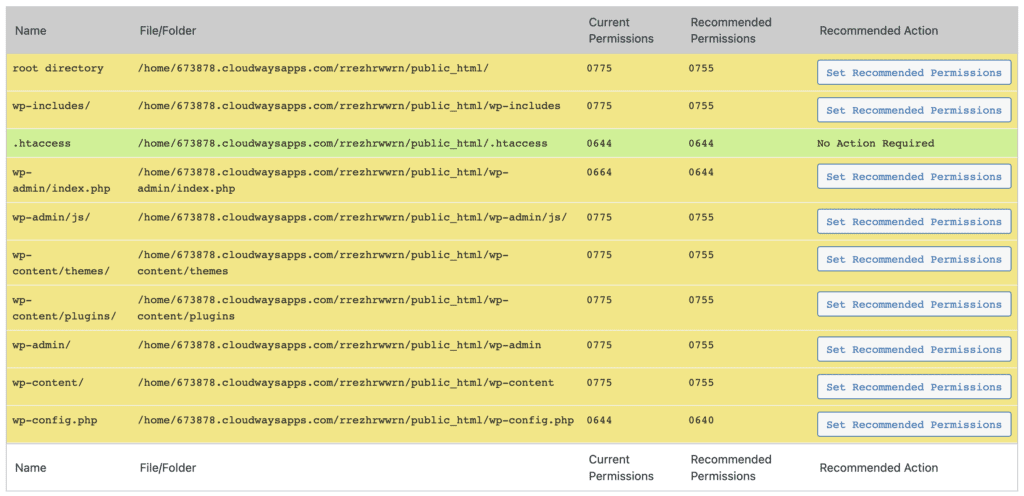
WordPress directories should have safe permissions. The common setting is 755. This means the owner can read, write, and execute. Others can only read and execute. Having the right permissions keeps your site secure.
Files in WordPress should be set to 644. This allows the owner to read and write. Others can only read. These settings help protect your files from unwanted changes. Always check your permissions after updates.
Configuring Permissions For Security
The wp-config.php file holds important settings. It should be protected from unwanted access. Set its permissions to 440 or 400. This keeps it safe. Only the server can read it. No one else can change it.
The .htaccess file controls website behavior. Make sure it is safe. Set permissions to 444. This means read-only access. No one can change it. This keeps your site safe. Hackers can’t mess with it.
Credit: www.malcare.com
Common Permission Issues
Permission errors can block access to important files. These errors occur when files have incorrect permissions. WordPress needs specific permissions to work properly. Use a FTP client to change permissions. Set files to 644 and folders to 755. This allows WordPress to read and write files. Always check permissions after updates. Ensure settings are correct. Mistakes can cause problems. Keep backups ready. Fix errors quickly to maintain your site.
Unauthorized access can harm your site. It can lead to data loss. Set strong permissions to protect files. Use secure passwords for user accounts. Limit access to sensitive files. Regularly update your WordPress site. Ensure plugins and themes are secure. Restrict file access to only trusted users. Check permissions often. Keep your site safe from unwanted visitors.
Tools For Managing Permissions
WordPress requires specific file permissions for smooth functionality. Files typically need 644 permissions, ensuring readability without execution. Directories are best set to 755, allowing access and modification while securing the site. These settings help prevent unauthorized changes and maintain security.
Properly managing permissions is crucial to protect your WordPress website.
Using Ftp Clients
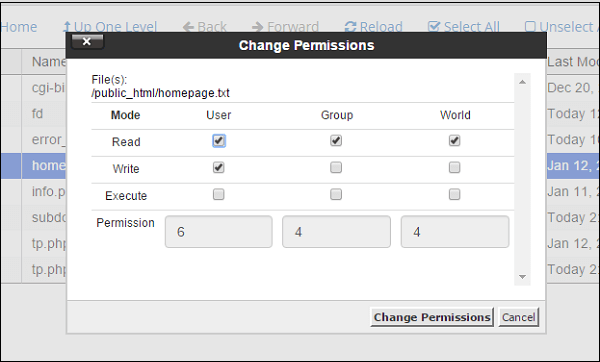
FTP clients help manage files on a server. They offer a user-friendly interface for changing file permissions. Most FTP clients show files and folders in a simple layout. You click on a file to view its properties. Then, you can adjust permissions with a few clicks. It’s straightforward for beginners. FTP clients like FileZilla are popular. They make it easy to navigate and edit permissions. You don’t need advanced skills. Just basic computer knowledge is enough to use FTP clients effectively.
Command Line Techniques
Command lines are powerful tools for managing permissions. They require text-based commands. This method is used by advanced users. You type commands to change permissions. For example, “chmod” alters file permissions. It’s fast and efficient. But it needs some practice. Command line helps in detailed control over files. It’s useful for large websites. With command lines, you can manage many files at once. It saves time and effort.
Credit: solidwp.com
Best Practices For File Permissions
Regular Security Audits help keep your site safe. They check for weak spots. It’s like a health check-up for your website. Regular checks find and fix problems early. This keeps hackers away. Always use tools that are reliable. Keep your audit schedule regular. This keeps your site strong and safe.
Backup and Recovery Plans are a must. They save your data from being lost. Backups should be frequent. Store them in a safe place. Recovery plans help you bounce back fast. If something goes wrong, you can restore your site. This means less downtime and worry. A good plan keeps your site running smoothly.
Frequently Asked Questions
What Are Basic File Permissions In WordPress?
Basic file permissions in WordPress are crucial for security. Typically, directories should be set to 755 and files to 644. These permissions ensure proper access control, allowing authorized users to read, write, and execute files while preventing unauthorized modifications.
How Do I Change WordPress File Permissions?
You can change WordPress file permissions using an FTP client or hosting control panel. Access the file or directory, right-click, select “Permissions” or “Attributes,” and set the desired numeric value, like 755 for directories and 644 for files. Ensure changes align with security best practices.
Why Are File Permissions Important In WordPress?
File permissions in WordPress protect your site from unauthorized access and potential security vulnerabilities. Incorrect permissions can lead to malware attacks or data breaches. Setting proper permissions ensures only trusted users can modify files, maintaining your site’s integrity and security.
What Happens If Permissions Are Set Incorrectly?
Incorrect file permissions can expose your WordPress site to security risks. Unauthorized users may access, modify, or delete files, leading to data loss or site downtime. Setting proper permissions helps prevent these issues and ensures your site remains secure and operational.
Conclusion
Understanding WordPress file permissions is crucial for site security. Proper settings protect your site from unwanted access. They ensure smooth functionality and prevent errors. Simplifying permissions can save you time and headaches. Always check files after updates. Regular audits maintain security standards.
Avoid common mistakes by following best practices. Adjust permissions to fit your needs. Stay informed about changes in WordPress security. Knowledge empowers you to safeguard your site. Protect your WordPress site with the right permissions. Keep your data secure. Enjoy a safe and efficient website experience.



