
Are you diving into the world of WordPress and feeling a bit overwhelmed by all the templates and files? You’re not alone.
Understanding which file serves as the template for a WordPress post can seem like a daunting task. But fear not! Grasping this concept is not only simpler than it seems, but it can also unlock a whole new level of customization and control for your website.
Imagine having the power to craft your posts exactly how you envision them. By the end of this article, you’ll know precisely which file to tweak to make your WordPress posts stand out. Get ready to transform your WordPress skills and captivate your audience like never before!
WordPress Template Hierarchy
Every WordPress post uses a template file. This file tells the website how to show the post. Different files make posts look different. The right template is important for design. It helps keep the website neat. Templates use PHP and HTML coding. They change how a post looks. The most common template file is single.php. This file usually shows single posts.
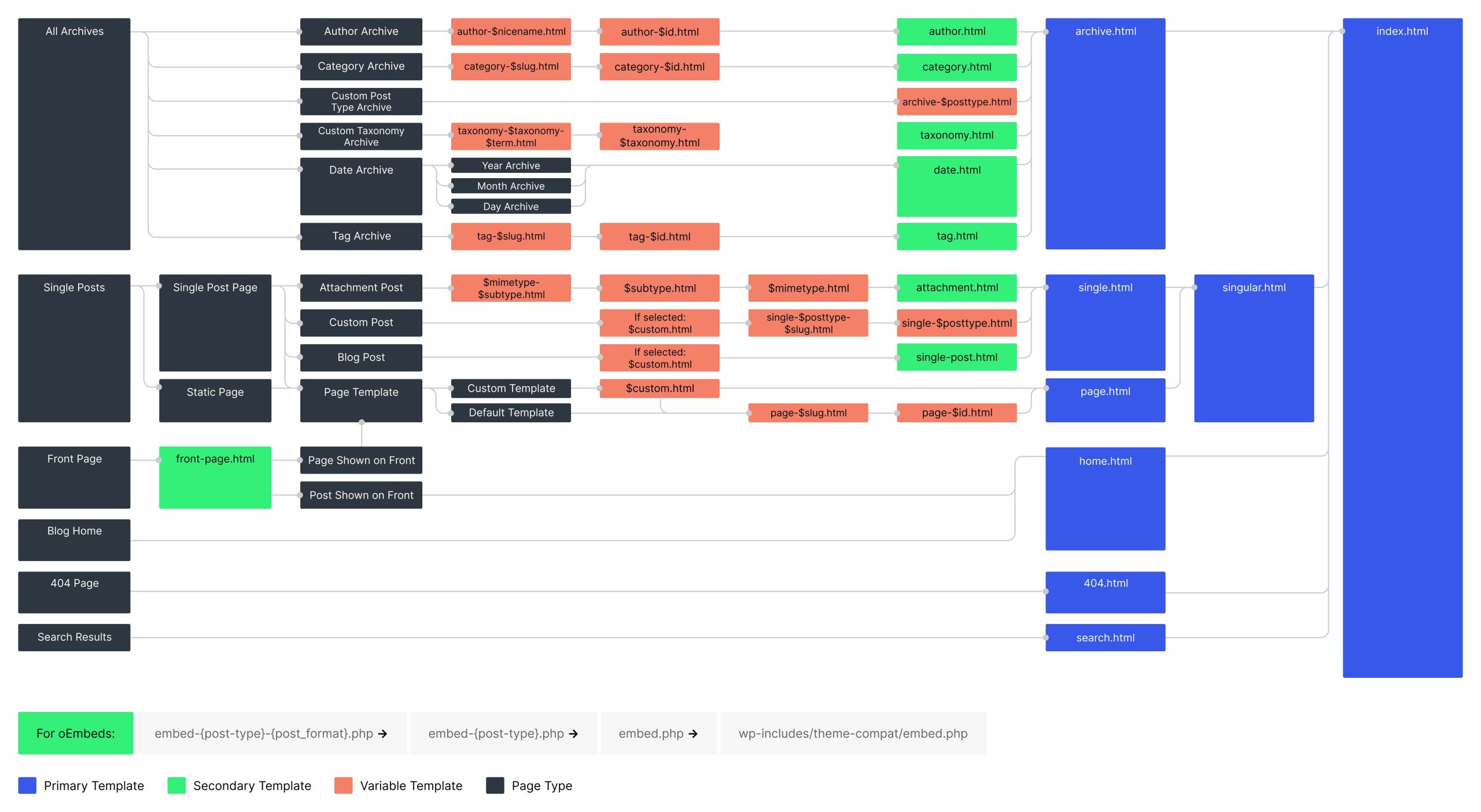
Picking the correct template file is key. Some themes have many template files. Others have just a few. The template hierarchy decides which file is used. This makes sure the post looks good. If a file is missing, WordPress uses another file. It follows a set order. This makes the site work smoothly.
Key Template Files
Single.php is the main file for a single post. It shows one post at a time. Many themes use this file. It helps display the post in a nice way. This file often includes the header and footer. It makes the post look complete. Customizing this file can change how posts appear.
Content.php holds the main content layout. It defines how content looks on the page. Themes often use this to display articles. It can be styled in different ways. This file is often used inside other template files. It helps keep the layout consistent.
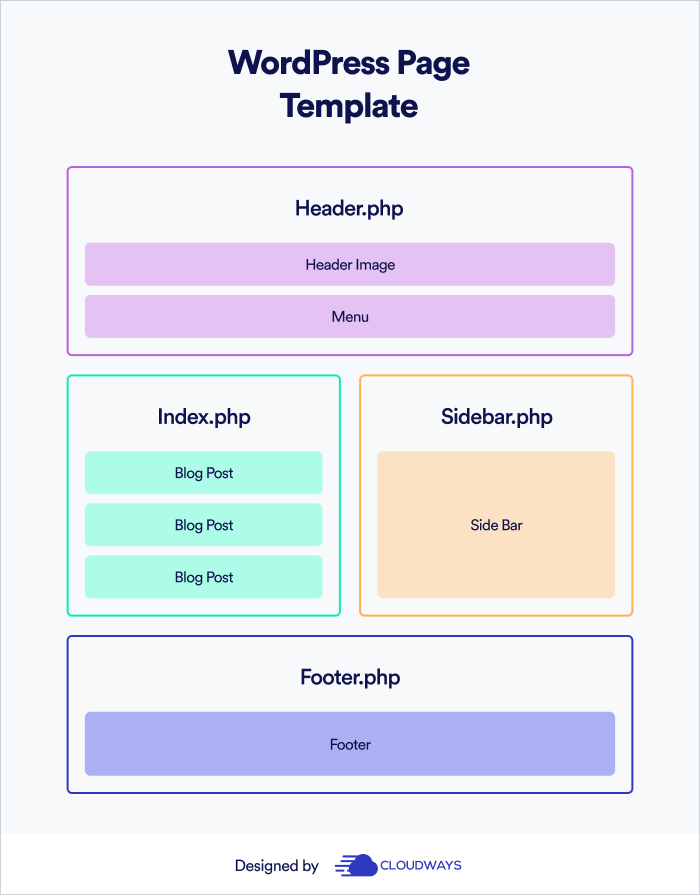
Index.php is the default template file. It shows a list of posts. If no other file is set, WordPress uses this. It is often simple. This file can be a backup for other templates. It ensures posts are always shown. Themes usually build on this file.
Role Of Single.php
The single.php file is very important in WordPress. It helps show each post. Think of it as a template. This template gives each post a similar look. Readers find this helpful. They know where to find things. The title, content, and comments are in the same spots.
Themes use single.php to set the post layout. This keeps your site neat. Each post shows a title, date, and author. You can see comments too. This makes reading easy and fun.
You can change many things in single.php. Want a bigger title? You can do it. Maybe you want to hide the author? That’s possible too. These changes make your site special.
Plugins can help add features. They make changes simple. Even beginners can use them. This makes WordPress flexible. Anyone can make their site look just how they want.
Credit: www.cloudways.com
Content.php Functionality
Content.php is a key file in WordPress. It helps show posts to users. This file works with themes. Each theme might change how content looks. But content.php keeps things smooth. It ensures posts appear correctly. The file also lets developers add features. These features can make posts more interesting. Without this file, posts might not show well. So, it is important for every WordPress site.
Integration is important for WordPress. Content.php connects with other files. These files include header.php and footer.php. This connection ensures the site looks complete. Each file plays a role. Together, they make the site work. Content.php is like a puzzle piece. Without it, the site might miss key parts. Integration helps the site run smoothly. Developers often use it to add new things. This can make sites more fun for users. Integration is key for a good WordPress site.
Importance Of Index.php
Index.php is like a backup plan for your WordPress site. It shows content if no other template is found. This file helps display various post types. Without it, your site might not work well. It’s a safety net for your site’s design.
Index.php manages different types of content. Blog posts, pages, and archives all use it. This file makes sure everything looks good. It helps your site show content correctly. Every WordPress site needs it to work properly.

Credit: docs.themeisle.com
Customizing Post Templates
Child themes are a great way to change your website. They allow you to modify themes without losing changes. This is perfect for beginners. You can learn by doing. Every child theme has its own folder. It needs a special file called style.css. This file tells WordPress about your new theme. It also needs a functions.php file. This helps the theme work better.
Start with a simple task. Change the background color. Or try changing the font style. These small changes can make a big impact. Always save your work. That way, you won’t lose any changes. Enjoy creating!
Custom template files give you control over your posts. You can decide how each post looks. Use a single.php file for single posts. For a special layout, create a new file. Name it with a unique name. Make sure it ends with .php. Add your design ideas there.
You can add images. Or place text in different areas. Make each post special. This makes your site interesting. Remember to test your changes. Check on different devices. This way, everyone can enjoy your site!
Template Tags And Functions
Template tags are special codes in WordPress. They help display information in posts. They make it easy for users to show content. For example, the the_title() tag shows the post’s title. The the_content() tag shows the post’s main text. These tags are very useful for customizing post layouts. They save time and make tasks easier.
WordPress posts can look different using template tags. Use tags to change the look of posts. For example, you can use the the_date() tag to show the post’s date. This makes the post more interesting. Tags help in making posts more readable. They also help in organizing content better. Use them to improve your blog.
Best Practices For Template Design
Templates should work well on all devices. Phones, tablets, computers. Everyone uses different devices. Responsive design helps keep things looking good. It helps users enjoy your site. The layout must change size to fit screens. A good template is flexible. Images should resize automatically. Text must be easy to read. Buttons should be easy to click.
Fast loading
Seo Considerations
SEO-friendly templatesclean code
Titles and headings need keywords. These help search engines understand your content. Meta descriptions are important too. They describe your page in search results. Good templates help you add these easily.
Credit: developer.wordpress.org
Frequently Asked Questions
What Template File Is Used For WordPress Posts?
The template file used for WordPress posts is `single. php`. It defines the layout and structure of individual posts. You can customize `single. php` to modify post appearances. Ensure your theme supports custom templates for flexibility in design. Always backup files before making changes to prevent data loss.
Can I Customize The Post Template File?
Yes, you can customize the post template file. Locate `single. php` in your theme folder. Edit it using a code editor to change the design. Consider using a child theme for safe modifications. This preserves changes during theme updates and ensures a personalized site experience.
What Happens If Single.php Is Missing?
If `single. php` is missing, WordPress uses `index. php`. `index. php` serves as the fallback template. It displays posts with default styling. This may affect the post’s appearance and layout. Ensure `single. php` is present for optimal design control. Check theme documentation for template hierarchy details.
How Do I Locate Single.php In WordPress?
Locate `single. php` in your theme’s directory. Access your WordPress files via FTP or hosting panel. Navigate to `wp-content/themes/your-theme-name/`. Look for `single. php` in this directory. Use a code editor to open and modify the template file as needed.
Conclusion
WordPress templates simplify post creation. They guide design and functionality. Choosing the right template enhances user experience. It also boosts your site’s appeal. Templates make content management easier. They save time and effort. You can focus on writing quality content.
Ensure your template matches your site’s theme. This creates a cohesive look. Explore different templates to find the best fit. Each offers unique features. Experiment with options. Tailor them to your needs. This maximizes your site’s potential. Templates are a valuable tool in your WordPress toolkit.
They help you create engaging posts effortlessly.



