
Ever found yourself wondering, “What version of WordPress am I on?” You’re not alone.
Many website owners and bloggers face this puzzle, and it’s more important than you might think. Knowing your WordPress version isn’t just about keeping up with the latest features; it’s crucial for security and performance. Imagine your website running like a well-oiled machine, free from bugs and vulnerabilities.
Sounds great, right? This article will guide you step-by-step to easily identify your WordPress version. Let’s dive in and ensure your site stays up-to-date and protected.

Credit: www.interserver.net
Checking Your WordPress Version
Find your WordPress version easily. Go to your Admin Dashboard. Look at the bottom of the screen. You will see the version number. It’s right there. No need to search anywhere else. It takes only a few seconds.
Open your website in a browser. Right-click the page. Choose “View Page Source.” Look for meta tags. You will find the version number there. It is hidden in the code. But not hard to find. Just a little searching required.
Use an FTP client to connect to your site. Navigate to the “wp-includes” folder. Find the “version.php” file. Open this file. Inside it, you will see the version number. This method is for those who like exploring files. It gives exact information.
Credit: kinsta.com
Importance Of Knowing Your WordPress Version
Security Considerations are vital for your website. Knowing your WordPress version helps keep your site safe. Older versions might have security holes. Hackers can easily attack. Always update to stay secure.
Compatibility with Themes and Plugins is crucial. New WordPress versions offer better features. Some themes need the latest version. Outdated versions might not support certain plugins. This can cause your site to break. Ensure everything works smoothly by updating.
Access to New Features keeps your site fresh. Updates bring cool tools and options. These can make your site better. Missing out on updates means missing out on growth. Stay up-to-date for a better website experience.
Updating WordPress Safely
Always backup your site before updates. It protects your data. Use a plugin for easy backup. Or ask your hosting provider for help. Keep the backup file safe. This ensures your site can be restored.
Ensure all plugins and themes are updated. Outdated plugins may cause problems. Visit your WordPress dashboard. Check for updates regularly. This keeps your site secure and fast.
Testing is important after updates. Visit your site like a visitor. Check if everything works well. Look for broken links or images. Test on different devices. This ensures a smooth user experience.
Credit: www.hostinger.com
Common Issues With Version Updates
Plugins can stop working after updates. This happens because of conflicts. New versions might not work with old plugins. Developers need time to fix these issues. Always check if plugins are updated. This helps to avoid problems.
Themes may not match with new WordPress versions. This can break your site. Always test themes before updates. Use a backup to save your work. This way, you can restore it if needed. Choose themes that have regular updates.
Database errors can happen during updates. This affects how your site runs. Always back up your database. Updates might change database structure. This can lead to errors. Regular backups keep your data safe.
Tools For Managing WordPress Versions
Plugins help keep WordPress up-to-date. They handle updates automatically. No need to worry about missing updates. Popular plugins include Easy Updates Manager and WP Auto Updater. These plugins provide safety and security for your site. Regular updates reduce vulnerability to threats. Managing updates becomes simple with plugins.
Tools like WP Rollback assist in managing versions. They allow easy rollback to previous versions. Users can quickly revert changes if needed. These tools are useful when updates cause problems. WP Downgrade is another tool for version control. It ensures compatibility with themes and plugins. These tools make version control efficient.
Staging environments are safe for testing updates. They prevent issues on the live site. Users can test new versions without risk. Staging sites mirror the live site. This ensures smooth transitions to new versions. Popular platforms for staging include WP Stagecoach and Local by Flywheel. They offer a safe space for testing.
Frequently Asked Questions
How Can I Check My WordPress Version?
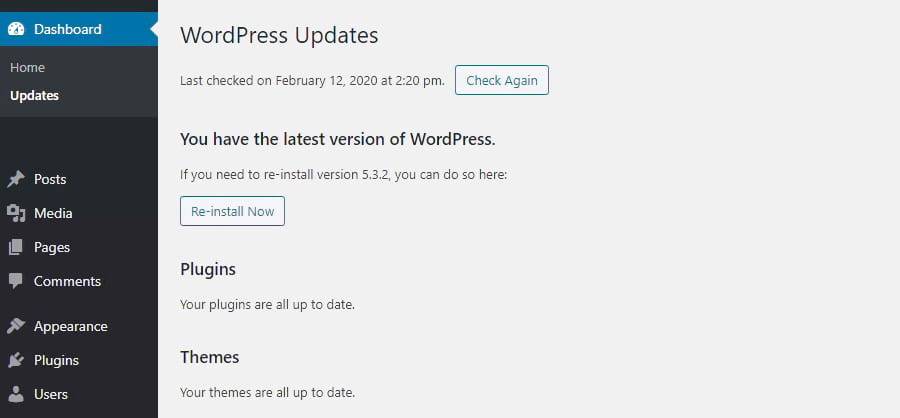
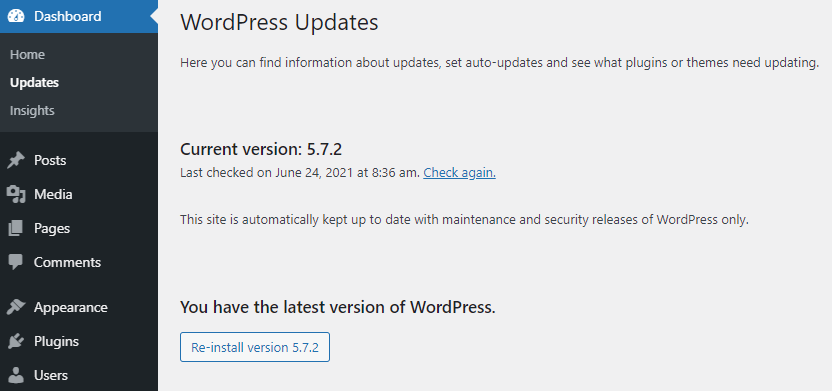
To check your WordPress version, log into your dashboard. Navigate to “Updates” under the “Dashboard” menu. You will see your current version displayed at the top. Alternatively, check the footer of your admin panel for version details.
Why Is Knowing My WordPress Version Important?
Knowing your WordPress version is crucial for security and functionality. Updates often include security patches and new features. Staying informed ensures your site remains secure and operates smoothly. It helps in compatibility checks with plugins and themes.
Can I Update My WordPress Version Manually?
Yes, you can update manually by downloading the latest version from WordPress. org. Upload files via FTP to your server, replacing old files. Always back up your site before performing manual updates to avoid data loss.
Are Plugins Affected By WordPress Version Updates?
Yes, plugins can be affected by updates. Some may become incompatible with newer versions. Always check plugin compatibility before updating WordPress. Updating plugins alongside WordPress ensures smooth functionality and minimizes errors.
Conclusion
Understanding your WordPress version is crucial. It helps you stay secure. You get access to new features. Updates improve performance. Always check your version regularly. It’s simple and quick. Just a few clicks. Don’t ignore updates. They protect your site.
They enhance functionality. Keep your website running smoothly. It’s a small task with big benefits. Stay informed. Keep your site efficient and safe. Regular updates ensure a better user experience. Your website thrives with the right version. Make sure you’re always up to date.
It’s easy and worthwhile.



