
Are you setting up a WordPress site and feeling a bit lost about which email to use for your admin account? You’re not alone.
Many WordPress users find this decision a bit tricky. But don’t worry; choosing the right email is crucial for managing your website effectively. The admin email is more than just a point of contact. It’s the key to your site’s security, communication, and management.
We’ll guide you through the process of selecting the best email for your WordPress admin account. By the end, you’ll have a clear understanding of why this choice is important and how it can affect your site’s success. Keep reading to ensure your site starts on the right foot!
Importance Of Choosing The Right Email
The admin email in WordPress is very important. This email gets alerts and notifications. It helps keep your site safe. If you use a wrong email, you might miss important messages. Always choose a professional email. This builds trust with users. Avoid using personal emails. They may get lost or hacked. Choose an email with your domain name. This looks more professional.
A good email helps in managing your site. You can reset passwords easily. You will get security alerts. You can also get updates about new features. This keeps your site working well. So, pick the right email from the start. It makes a big difference.
Credit: cinchws.com
Factors To Consider
Choose an email with strong security features
Your email should look professional. Use a domain-specific email. Avoid using personal emails like Gmail. A professional email builds trust. It shows you are serious. Clients prefer dealing with professionals.
High deliverability is crucial. Use a reputable email provider. Avoid spam filters. Ensure emails reach the inbox. Test the email deliverability regularly. Check for bounce rates. Deliverability affects communication with users.
Email Options For WordPress Admin
A custom domain email looks professional. It also promotes trust. For example, use yourname@yourwebsite.com. This type of email is good for branding. It shows you are serious about your website. Setting it up can be easy. Some hosting services provide it.
Free email providers are easy to use. Examples are Gmail and Yahoo. They are popular and reliable. But, they may look less professional. Free emails can be a good start. They are cost-effective. You can switch to a custom email later.
Business email services are a great choice. They offer extra features. These include security and support. Examples are Google Workspace and Microsoft 365. These services are not free. But, they are worth the investment. They provide a professional image and peace of mind.
Credit: www.greengeeks.com
Configuring Admin Email In WordPress
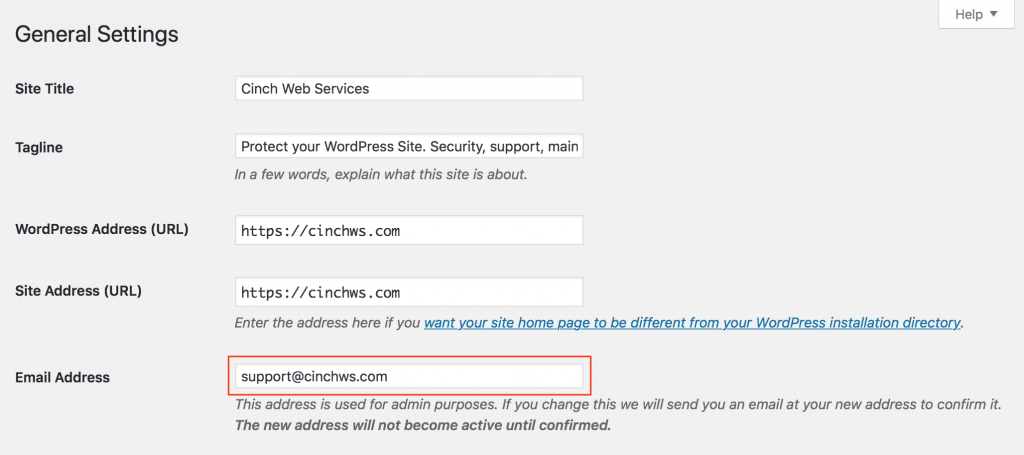
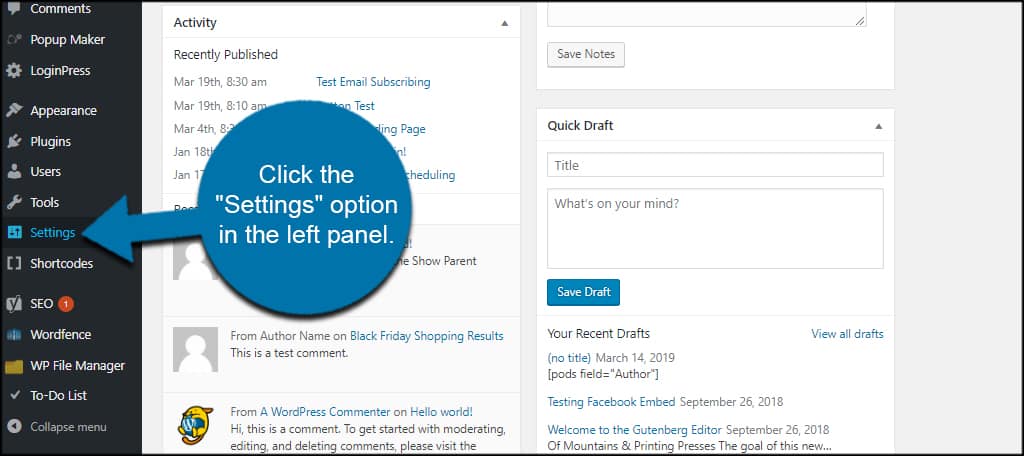
Start by logging into your WordPress dashboard. Find the Settings option on the left. Click on General to open the settings page. Here, you can see the admin email field. This is where you update your email.
Enter your new email address in the admin email box. Double-check for typos. Click Save Changes to update. The system will send a confirmation email.
Open your email inbox. Look for the WordPress confirmation email. Click the confirmation link in the email. Your new admin email is now verified. The update is complete.
Common Mistakes To Avoid
Using personal email accounts for WordPress admin is risky. Personal emails can mix work and private messages. This mix can lead to confusion. Important emails might get lost. Using a dedicated email keeps things clear. It also looks more professional.
Ignoring email security is dangerous. Many hackers target emails. Strong passwords are crucial. Regularly change passwords. Use two-factor authentication. Make security a top priority.
Overlooking backup options can be costly. Emails can get deleted by accident. Backups save important messages. Regular backups protect data. Use cloud services for easy backup. This helps in quick recovery.
Maintaining Your Admin Email
Keep your admin email updated for safety. Change it if you switch email providers. A current email ensures you get all updates. Missing updates can cause issues. Use an email that you check often.
Watch your email for strange activities. Hackers might target your account. Use strong passwords and change them regularly. Enable two-factor authentication for extra safety. This keeps your admin email safe.
Choose an email with good service. It should handle many messages. Some emails go to spam. Make sure yours does not. Test your email to see how it performs. This helps in getting important messages.
Credit: rankmath.com
Frequently Asked Questions
What Is The Best Email For WordPress Admin?
The best email for WordPress admin is a dedicated professional email. It should be separate from personal accounts. Using a domain-based email enhances credibility and security. Ensure it’s regularly monitored for updates and alerts.
Can I Use A Free Email Service?
Using a free email service for WordPress admin is possible but not recommended. Free emails can look unprofessional. They may lack advanced security features. A domain-based email offers better integration with WordPress functions.
How Do I Change My WordPress Admin Email?
To change your WordPress admin email, go to Settings in your dashboard. Click on General Settings. Update the email address and save changes. Verify the new email through the confirmation link sent.
Why Is Admin Email Important For WordPress?
Admin email is crucial for receiving site notifications and alerts. It’s used for password recovery and user management. It ensures seamless communication and security updates. A reliable admin email helps maintain site integrity.
Conclusion
Choosing the right email for your WordPress admin is crucial. It ensures smooth communication. Stick with a reliable and secure provider. Avoid personal emails for admin tasks. This keeps your site professional and organized. A dedicated email boosts credibility. It reduces clutter and confusion.
Make sure it’s easy to access. Use a strong password for security. Regularly update your email settings. This keeps your website running efficiently. Enjoy a hassle-free WordPress experience. Focus on building your website. Let the right email handle admin tasks.
Your WordPress journey will be smoother and more productive.



