
Ever stumbled upon the term “whitelist” while navigating through WordPress settings or forums and wondered what it truly means? You’re not alone.
Understanding the concept of a whitelist in WordPress can be a game-changer for how you manage and secure your website. Picture this: a tool that allows only the right people and content to access your digital space, keeping unwanted elements at bay.
Sounds intriguing, right? This article will unravel the mystery behind the WordPress whitelist, shedding light on how it can enhance your site’s performance and security. Stick around to discover how you can harness the power of whitelisting to safeguard your online presence and give yourself peace of mind.
Whitelist Concept In WordPress
A whitelist in WordPress is a list of approved items. It allows certain actions or access. Websites use whitelists to control who can log in. Only trusted users are allowed. This keeps the site safe from bad users. Whitelists make sure only good people enter.
Whitelists are used in comment sections. Only approved people can comment. They are also used for plugins and themes. Only safe plugins are allowed. Whitelists help protect the site. They keep out harmful things. Many websites use whitelists for security. It’s a simple way to keep control.
Benefits Of Whitelisting
Whitelist in WordPress helps secure your site by allowing only trusted users and content. This reduces spam and unwanted access, ensuring a smoother and safer experience for visitors. It streamlines management by automatically filtering out harmful elements, enhancing overall site performance and reliability.
Enhanced Security
Whitelisting improves security by allowing only trusted sources. This method blocks unknown and harmful sites. Hackers and malicious software find it hard to access. Your website stays safe from attacks. Regular updates keep the whitelist effective. It gives peace of mind. Your data remains protected. Enhanced security helps in maintaining credibility.
Improved User Experience
Users enjoy faster loading times. Whitelisting reduces unwanted pop-ups and ads. It creates a cleaner browsing experience. Visitors find what they need quickly. It ensures smoother navigation. Fewer distractions mean more focus on content. Better user experience encourages return visits. Happy users share positive feedback. This leads to increased traffic.
How To Implement Whitelisting
Plugins can help with whitelisting in WordPress. They are easy to use. You just need to install them. Many plugins offer this feature. Look for those with good reviews. Always check for updates. This keeps your site secure. Popular plugins include features for whitelisting IPs. They help in controlling access. You choose who can view your site. This makes your site safer. Anyone not on the list gets blocked. It’s a simple way to protect your site.
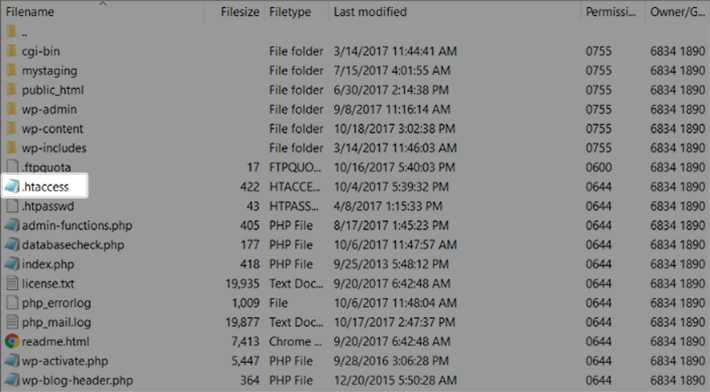
Custom code lets you whitelist directly in WordPress. It requires some coding skills. You add the code to your theme’s functions.php file. This file controls many features. Be careful when editing. A small mistake can cause problems. Always back up your site first. You can use PHP functions for this task. These functions check IP addresses. If the address matches, access is allowed. If not, it’s denied. Custom code gives you more control. It’s a flexible solution for advanced users.
Credit: managewp.com
Whitelisting Best Practices
Regular Updates keep your whitelist effective. Check for new threats often. Add only trusted sources to your list. Always be aware of changes in security risks. Updating keeps your site safe. Use tools that alert you to changes. This saves time and effort. Review your list every month. Remove items that are no longer needed. This helps keep the list clean and efficient.
Monitoring and Maintenance are key to a secure whitelist. Watch for unusual activity on your site. Use software to track changes. This helps catch problems early. Regular checks prevent issues from growing. Fix problems quickly to maintain safety. Your site needs constant care. This ensures it stays secure and reliable.
Challenges With Whitelisting
Understanding whitelisting in WordPress can be tricky. It involves allowing specific users or content while blocking others. This process helps manage access but can be complicated, leading to potential errors if not done correctly.
Potential Limitations
Whitelisting can have limitations. It might block useful plugins. Some features might not work well. Users may find fewer customization options. This can reduce flexibility. Compatibility issues can occur. Updates might be needed often. Small errors can cause big problems. Users need to understand plugin compatibility. Reading instructions is important. Misunderstandings can lead to issues.
Troubleshooting Common Issues
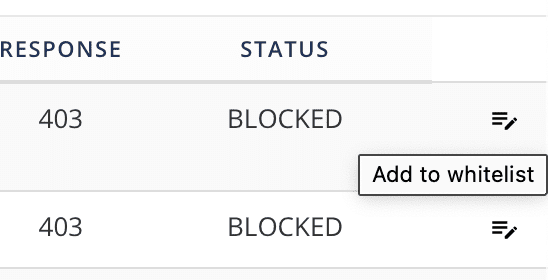
Errors can arise with whitelisting. Plugins may not function correctly. Websites can become slow. Users might see error messages. Fixing these requires careful steps. Check plugin settings first. Look for software updates. Ensure compatibility with WordPress versions. Disable conflicting plugins. Test changes thoroughly. Seek help from forums if needed. Follow guides for troubleshooting. Always back up the website.
Credit: www.malcare.com
Future Of Whitelisting In WordPress
Whitelisting in WordPress is getting smarter. Many new plugins now use this. They help keep bad things away. Users can feel safer with these tools. Developers are making these tools better every day. They listen to what people want. They work hard to make things easy. It’s like having a digital guard for your website. This helps keep things clean and safe.
Technology is growing fast. WordPress uses AI to improve whitelisting. AI learns and helps make smart choices. This means fewer bad things on your site. Users enjoy a safer experience. Updates come often. They bring new features to help website owners. These tools are getting easier for everyone. Even beginners can use them. It’s a good time to learn about these changes.

Credit: secure.wphackedhelp.com
Frequently Asked Questions
What Does Whitelist Mean In WordPress?
In WordPress, whitelisting refers to allowing specific users or actions. It enhances security by permitting only approved IPs, plugins, or features. This prevents unauthorized access and helps maintain site integrity. Whitelisting is often used in security plugins for controlling access and managing site operations efficiently.
How Do I Whitelist An Ip In WordPress?
To whitelist an IP, access your WordPress dashboard. Use a security plugin like Wordfence or manually edit the. htaccess file. Add the specific IP addresses you want to allow. This ensures only trusted IPs can access your site, enhancing security and preventing unauthorized access.
Why Is Whitelisting Important For WordPress Security?
Whitelisting is crucial for WordPress security as it restricts access to trusted users. By allowing only pre-approved IPs, plugins, or actions, it minimizes the risk of unauthorized access. This approach safeguards your site from malicious activities, ensuring a more secure and stable online environment.
Can Plugins Help With WordPress Whitelisting?
Yes, plugins can assist in WordPress whitelisting. Security plugins like Wordfence or Sucuri offer features to manage whitelisting. They allow you to specify IPs and actions to permit, enhancing site security. Using plugins simplifies the process, making it accessible even for non-technical users.
Conclusion
Understanding the whitelist in WordPress improves security. It allows only trusted elements. This means fewer risks for your site. Users feel safer and more confident. Whitelisting helps control access effectively. It’s a vital tool for site management. Easy to set up, crucial for protection.
Regular updates keep your list fresh. Always check who is on your list. Avoid unwanted access by staying alert. It’s about keeping your site secure and reliable. Use whitelisting wisely for better site safety. Your WordPress site deserves the best care.
Keep it secure with smart practices.



