
Ever wondered what happens when you set a WordPress page to private? You’re about to unlock a secret that can transform how you manage your content.
Imagine having a space on your website where only you or selected individuals can peek behind the curtain. This feature is not just about hiding content; it’s about creating exclusivity, control, and a personalized experience for your audience. By understanding the private setting on a WordPress page, you gain the power to curate and share your content on your own terms.
Dive into this article to discover how this little-known tool can revolutionize the way you use WordPress. You won’t want to miss the insights and advantages this setting has to offer. Are you ready to take your content management to the next level? Let’s explore!
Private Setting Overview
The private setting in WordPress is useful for keeping content hidden. Only logged-in users with the right permissions can see it. This keeps certain pages away from public view. Visitors without permission cannot access private pages. It helps protect sensitive information. You can choose this setting when publishing a page. It’s great for personal or internal use. You can change the setting anytime in the page editor. Only admins and editors can make a page private. This ensures that important data stays safe from unwanted eyes. If you have a private blog, this setting is very useful. Use it to keep parts of your site hidden. It’s simple and effective for privacy.
How To Set A Page To Private
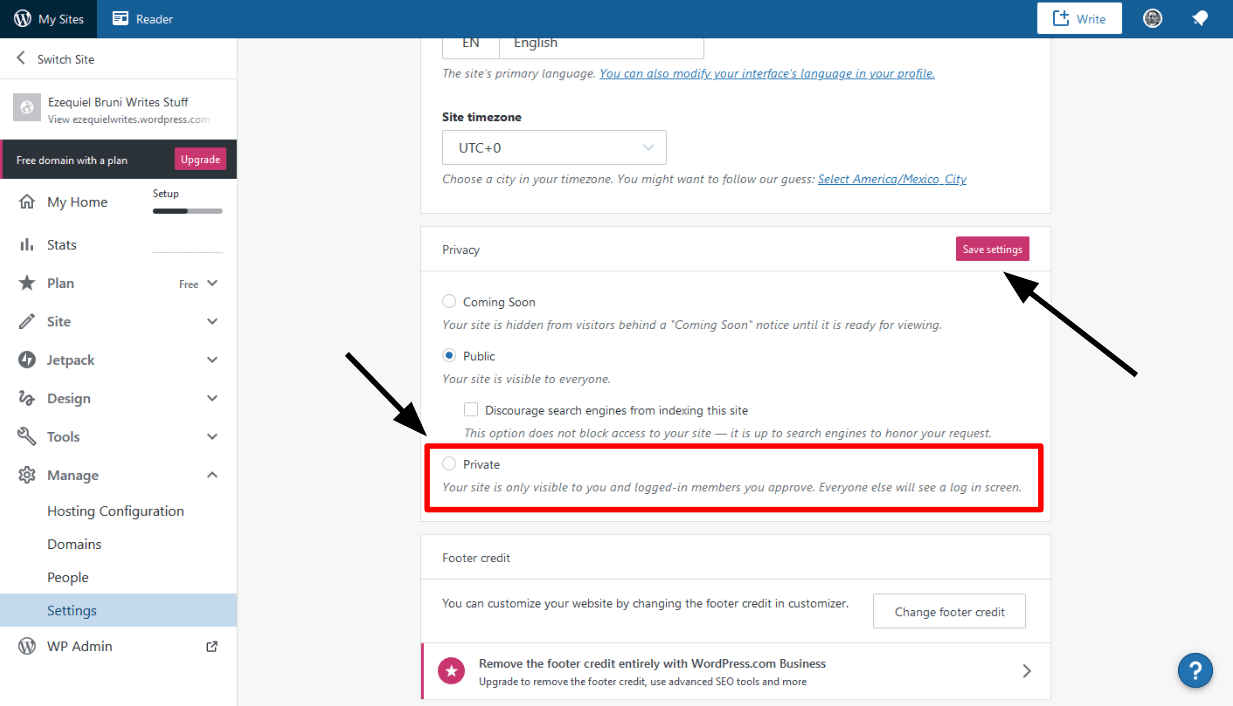
Make your page private in WordPress. Keep your content safe. Only you and chosen people can see it. First, find the page you want to hide. Open it for editing. Look for the visibility option. It’s usually on the right side.
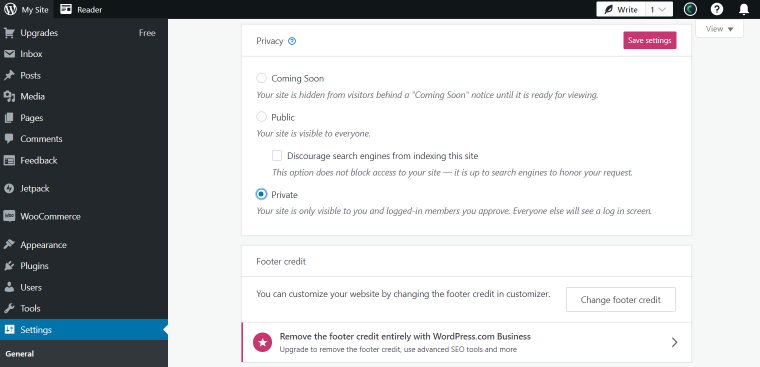
Click to change it. Choose private from the list. This setting hides the page from everyone else. No one can see it unless you allow them. When you’re done, save the changes. Now your page is private.
Only people with permission can view it. This feature is useful for personal content. Also good for sensitive information. Easy to use. Keeps your data secure.
Implications For Visitors
Setting a WordPress page to private keeps it hidden from visitors. Only users with the right permissions can see it. This means regular visitors cannot find it. They won’t see it in search results. It won’t appear on your website’s menu either. Privacy is key here. Only those invited can view the page. This setting helps keep important information secure. It is useful for sharing private content with select people. Remember, search engines cannot index private pages. So, they remain out of public reach. Visitors won’t stumble upon these pages by accident.
Credit: www.websiteplanet.com
Benefits Of Using Private Pages
Private pages on WordPress are useful for many reasons. They keep content hidden from public view. This is great for sensitive information. Only users with permission can see these pages. This keeps your content secure and safe. Private pages are perfect for sharing drafts with team members. They allow collaboration without showing unfinished work to everyone. You can manage who sees what. This is useful for sites with members or exclusive content. Private pages make it easy to organize your site. They keep things neat and tidy. Only the right people see the right content. This makes your site more professional.
Security Considerations
Private setting keeps your page hidden from visitors. Only you and chosen users can see it. Others cannot access or find it. This is like a locked door. Your secrets stay safe inside. It helps in protecting important information.
Search engines cannot see private pages. They do not show up in search results. This means your content is safe from public eyes. This is useful for personal or sensitive data. You can control who sees your content. Privacy is important for many users.

Credit: www.youtube.com
Alternatives To Private Settings
Using a password is a simple option. Only people with the password can see the page. This keeps your content safe. Make sure the password is easy to remember but hard for others to guess. Change it often if needed.
Save your work as a draft. Only you can see it. This helps when you are still writing. Take your time to make it perfect. Publish it only when ready.
Use membership plugins to control who sees your pages. Create groups for different people. Some plugins are free. Others need payment. Choose what fits your needs best.
Common Use Cases
A private setting on a WordPress page is very useful. It keeps the page hidden from visitors. Only logged-in users can see it. This is great for draft pages or personal notes. Some people use it for family updates. Others use it for internal team notes.
Educators can use private pages for lesson plans. Students cannot see these plans. Authors might use it for book drafts. This way, only they can see their ideas. A private page is also good for special offers. Only special users can see these offers.
Credit: crocoblock.com
Frequently Asked Questions
What Is A Private Page On WordPress?
A private page on WordPress is accessible only to logged-in users with specific permissions. It allows you to restrict content visibility to a select audience. This feature is ideal for sharing exclusive content with team members or collaborators without exposing it to the public.
How To Make A WordPress Page Private?
To make a WordPress page private, edit the page in the WordPress editor. Locate the “Visibility” section in the “Publish” box. Select “Private” and update the page. Only users with administrative privileges or specific roles can view the page.
Who Can See Private WordPress Pages?
Private WordPress pages are visible only to users with administrative privileges or assigned roles. These pages are hidden from search engines and the public. This ensures that sensitive content remains confidential and accessible only to authorized users within your WordPress site.
Can Search Engines Index Private Pages?
Search engines cannot index private WordPress pages. These pages are hidden from public view and search engine crawlers. This ensures that private content remains confidential and exclusive to authorized users. It’s an effective way to protect sensitive information from being publicly accessible.
Conclusion
Understanding the private setting on WordPress is crucial. It keeps your page hidden from public view. This feature is perfect for drafts or confidential content. It offers peace of mind and control. Your audience sees only what you choose to share.
Simplicity at its best, right? No complex steps involved. Just a few clicks and your page is private. Protect your work easily. Maintain privacy with confidence. WordPress makes it simple to manage your content visibility. Use this setting wisely. Keep your content secure until ready for the world.



