
Have you ever wished for a magic button that duplicates your perfect WordPress site effortlessly? Imagine the time and effort you could save by simply cloning your site to create a new one.
Whether you’re a seasoned developer or a WordPress newbie, understanding the concept of cloning in WordPress can be a game-changer. It’s not just about saving time; it’s about ensuring consistency, minimizing errors, and streamlining your workflow. By the end of this article, you’ll discover how cloning can revolutionize the way you manage your WordPress sites, making your life easier and your projects more successful.
Ready to unlock the secrets of cloning in WordPress? Let’s dive in and explore how this powerful tool can benefit you.
Cloning Basics
Cloning in WordPress means copying a site or page. It helps create duplicates without starting from scratch. This saves time and effort. Many use cloning for testing or redesigning sites. It allows you to try new ideas safely. No harm comes to the original site.
Plugins make cloning easy and fast. Some popular plugins offer cloning features. These plugins are often free. They are user-friendly and require no coding skills. Many beginners find cloning useful and handy. It simplifies complex tasks.
Backup is crucial before cloning. Always keep data safe and secure. Backup ensures you can restore if problems occur. It is a smart practice in web development. Cloning is part of a larger process in site management. It is a valuable tool for many users.

Credit: blogvault.net
Reasons To Clone A Site
A cloned site helps in testing new features safely. Developers can experiment without risking the live site. It ensures errors do not affect real users. Testing becomes more efficient. Bugs are easier to spot and fix. Development can proceed smoothly.
Cloning acts as a backup plan. It preserves your site’s content and settings. If something goes wrong, you have a safe copy. Data loss is minimized. Restoration is quick and easy. Peace of mind is ensured.
Migrating involves moving a site to a new server. Cloning makes this process simple. It ensures the site stays the same. Redesigning becomes easier with a clone. You can plan and execute changes safely. Visuals and layout can be tested.
Methods Of Cloning
Cloning in WordPress means creating an exact copy of a site. This includes themes, plugins, and settings. It’s useful for backups or setting up a testing environment.
Manual Cloning
Manual cloning needs patience and care. It starts with copying all website files. Use FTP or file manager for this. Next, export the database. This saves all site data. After, set up a new environment. Import the files and database here. Attention is key in every step. A mistake can break the site. Manual cloning suits tech-savvy users.
Using Plugins
Plugins make cloning easy. They do most of the work. Popular choices include Duplicator and WP Clone. Plugins copy files and database with a click. Some plugins are free, others cost money. Always choose a trusted plugin. Read reviews before installing. Plugins save time and reduce errors.
Utilizing Hosting Services
Many hosting services offer cloning tools. These tools simplify the process. They clone sites in a few steps. Services like SiteGround and Bluehost are popular. Contact your host for details. Some hosts may charge extra fees. Hosting services are convenient and reliable. Ideal for non-tech users.

Credit: jetpack.com
Popular Cloning Plugins
Duplicator is a plugin that helps copy your website. It packs your site into a zip file. You can move this file to a new place. This plugin is useful for backups and testing. It also helps when changing hosts. Installing it is easy. Many people trust this tool.
All-in-One WP Migration is a simple tool. It moves your site without coding. You can drag and drop files. It supports large sites too. This plugin keeps your data safe. It works on different servers. Many users like its ease of use. It’s popular among beginners.
WP Staging creates a copy of your site. This copy is for testing changes. It helps keep the main site safe. You can try new things without risk. The plugin is easy to use. It has a simple interface. It’s helpful for developers too.
Steps For Cloning
Backing up your site is very important. This keeps your data safe. Use a plugin like UpdraftPlus. Save all files, themes, and settings. Store them in a secure location. A backup helps if anything goes wrong.
Several methods exist for cloning. Plugins like Duplicator or WP Clone are popular. They are easy to use. Manual methods need more skills. Choose a method based on your comfort level. Plugins are usually quicker.
Start by installing your chosen plugin. Follow the instructions provided. Duplicate all site elements. Then, upload them to the new location. Check if everything works. Make sure links and media are intact.
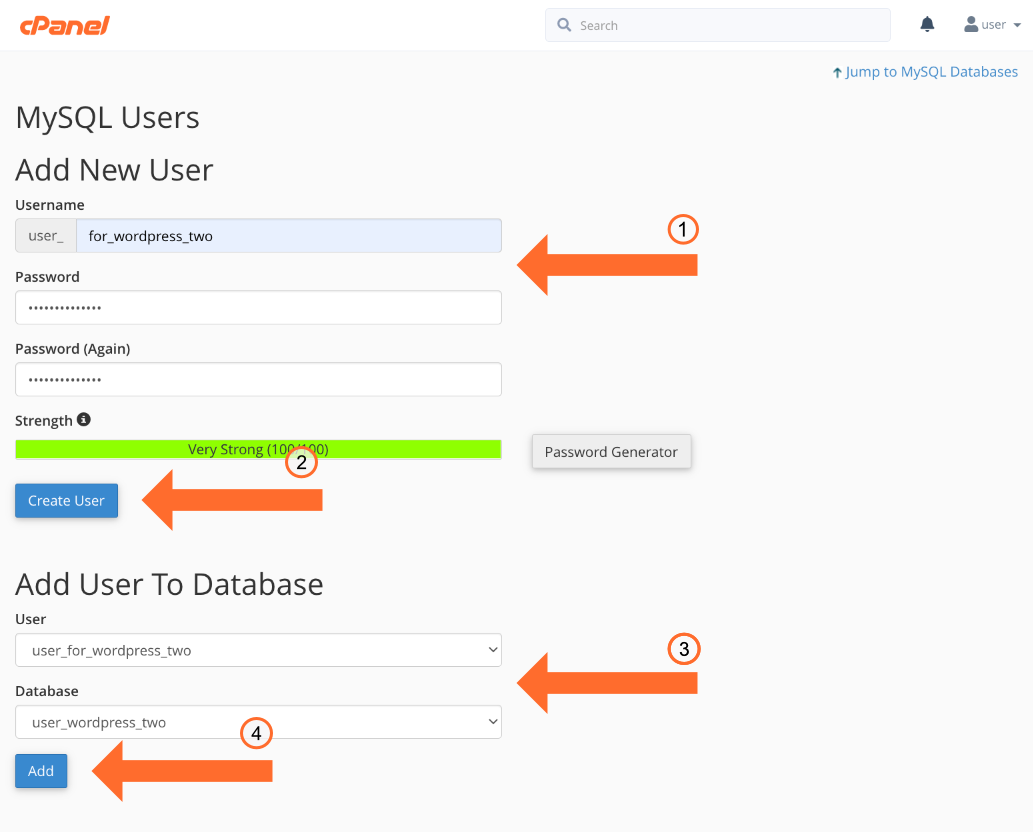
Credit: www.cpanel.net
Common Challenges
Cloning can sometimes lead to unexpected data loss. Important files or settings might disappear. Always keep a backup of your data. This helps in restoring lost information. Check twice before cloning. Ensure all data is safe.
Some plugins may not work well together. Cloning might cause plugin conflicts. This can break your website. Always test plugins on a test site first. Make sure they work together. This avoids problems on the main site.
Cloning can bring security risks. Hackers might find weak spots. Always use strong passwords. Keep your site software updated. Use security plugins to protect your website. Be careful with sensitive information.
Best Practices
Cloning in WordPress creates an exact copy of your site. It helps with testing changes safely, without affecting your live site. This practice ensures you can make updates confidently.
Regular Backups
Always make backups of your WordPress site. It keeps your data safe. Use a plugin for easy backup. Schedule backups regularly. Store these backups in multiple locations. This way, files are always recoverable.
Secure Connections
Use HTTPS to secure your site. It keeps information private. Choose strong passwords for admin accounts. Change them often. Use two-factor authentication for extra security. This protects against hackers.
Testing Environment
Test changes in a staging site first. This is a copy of your live site. It helps avoid mistakes. Use it to try new plugins or themes. If it breaks, your live site stays safe.
Future Of Cloning
Cloning in WordPress refers to creating exact copies of websites or pages. This process saves time and ensures consistency across multiple sites. Perfect for developers and site owners aiming to replicate successful designs effortlessly.
Advancements In Technology
The world of cloning in WordPress is growing fast. With new tools, tasks are easier. Developers find it simple to make copies of sites. This means less work and more fun. Plugins now offer smooth experiences. Each day, it gets better and smarter.
Integration With Ai
AI is changing how cloning works. It’s smart and quick. AI tools help fix issues fast. They can spot errors before they happen. Your site stays safe and sound. This is a big help for those who love tech. AI brings magic to WordPress.
Improved Security Measures
Keeping sites safe is key. New ways to protect sites are here. Security tools now guard against threats. Cloning is safe and secure. Updates come often and protect sites. Site owners sleep easy knowing they’re safe.
Frequently Asked Questions
What Is Cloning In WordPress?
Cloning in WordPress means creating an exact copy of your website. This includes all content, themes, plugins, and settings. It helps in testing changes without affecting the live site. Cloning is useful for backups and migrations too. It ensures a safe environment to experiment with new ideas.
How Do You Clone A WordPress Site?
To clone a WordPress site, use a plugin like Duplicator or All-in-One WP Migration. These plugins simplify the cloning process. They allow you to create a full site backup easily. You can then restore or migrate this backup to another server or domain.
Follow plugin instructions for best results.
Why Clone A WordPress Website?
Cloning a WordPress website is beneficial for various reasons. It provides a risk-free testing environment for updates and changes. You can experiment without affecting the live site. Cloning also facilitates site migrations and backups. It ensures your website data remains safe and accessible when needed.
Is Cloning A WordPress Site Safe?
Yes, cloning a WordPress site is safe when done correctly. Use reputable plugins like Duplicator or UpdraftPlus. These ensure your site’s data is handled securely. Always follow best practices and backup your site beforehand. This minimizes risks and ensures your site remains protected during the cloning process.
Conclusion
Cloning in WordPress simplifies website management. It helps create exact copies. You can test changes without risk. This boosts your site’s performance and security. Beginners find cloning user-friendly. It saves time and effort. No need to start from scratch. Many plugins make cloning easy.
Choose a reliable one for best results. Cloning also aids in backup and disaster recovery. Your website remains safe and efficient. Understanding cloning enhances your WordPress skills. Now, you can manage your site confidently. Enjoy a smoother, more efficient website experience.



