
Have you ever stumbled upon the term “link relationship” while navigating through your WordPress settings and wondered what it truly means for your website? Understanding link relationships in WordPress can feel like decoding a secret language, but it’s a crucial element for enhancing your site’s performance and user experience.
Grasping this concept not only helps in organizing your content better but also boosts your site’s SEO, making your website more appealing to search engines and users alike. Imagine having the ability to guide your visitors seamlessly through your content, increasing engagement and keeping them coming back for more.
Curious to unlock the potential of your WordPress site and make your content shine? Let’s dive into the world of link relationships and see how it can transform your online presence.

Credit: wordpress.stackexchange.com
Link Relationship Basics
Links connect different parts of a website. They help users find more information. Link relationship in WordPress is about how these links work. It tells Google and other search engines about the link’s purpose. Why is this important? Search engines use this info to rank pages. For example, a nofollow link tells search engines not to follow the link. This affects SEO.
What types are there? Links can be internal or external. Internal links connect pages within the same site. External links go to other websites. Understanding these helps manage website content. It improves user navigation and site structure.
Types Of Link Relationships
Links help websites connect. Two types are NoFollow and DoFollow. A NoFollow link tells search engines not to follow it. This means it does not pass on link juice. It’s useful for some links. DoFollow links are different. They allow search engines to follow. They also pass on link juice. This helps with rankings. Both types are important in their own way.
Sponsored links are paid. They often have a special tag. This tag tells search engines about the payment. UGC stands for User Generated Content. These links come from users, like in comments. It’s good to label them correctly. This helps search engines understand your content. Using these tags wisely can help your site.
Importance Of Link Relationships
Link relationships play a big role in SEO. They help search engines understand your site’s structure. This understanding can improve your site’s rank. Internal links connect pages within your site. External links connect to other sites. Both are important. Internal links help users stay on your site longer. External links can boost your site’s authority.
Good link relationships enhance user experience. Visitors find it easier to navigate your site. They can find what they need quickly. Clear links guide users through a logical path. This keeps them engaged. A well-linked site means happy users. Happy users often return. They may also share your site with others.
Credit: www.fixrunner.com
Setting Link Relationships In WordPress
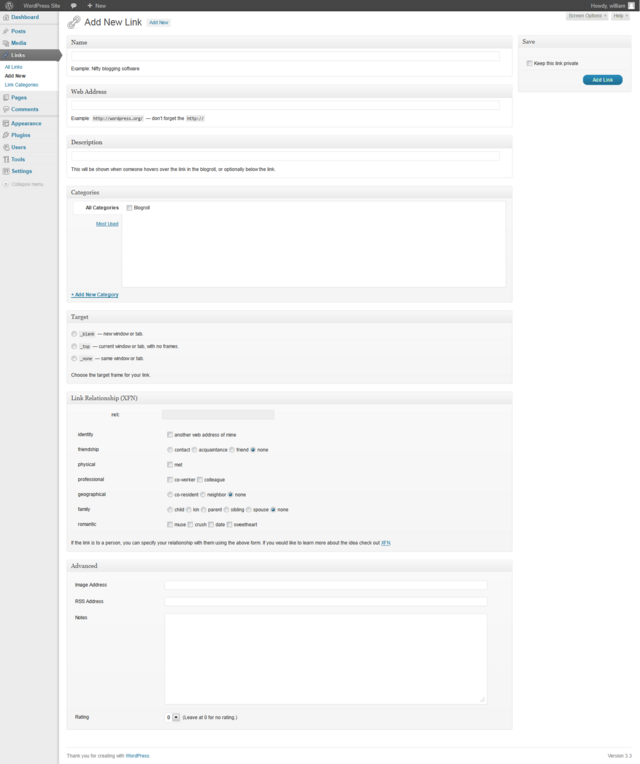
WordPress makes it easy to set link relationships. First, open the WordPress editor. Find the text you want to link. Click the link button. A box pops up. Enter the URL in the box. Below the URL, you see “Link Relationship (XFN).” Add your relationship here. Common choices are friend, colleague, or co-worker.
This helps search engines understand connections. It makes your site more organized. It’s a simple step but very useful.
Plugins can help set link relationships. Some plugins offer more features. They make it easy to manage links. First, install a plugin like “Yoast SEO” or “All in One SEO.” These plugins have link options. You can set relationships easily. Many plugins have helpful guides. They show step-by-step instructions.
Using plugins saves time and effort. They ensure your links work well. This helps improve your site’s performance. It makes your site user-friendly and neat.
Best Practices
Links are important in WordPress. They help your site grow. Internal links connect pages on your site. External links point to other sites. Both types are useful. Internal links keep visitors on your site. External links show authority and trust. They improve your site’s rank. Balance is key. Too many links can confuse users. Make sure links are clear. They should be easy to understand.
Follow guidelines for links. Google’s rules are important. They help you stay safe. Avoid link spam. Only use links that matter. Quality over quantity. Choose links that add value. Relevant links help users. They help search engines too. Clear and honest links are best. Keep your site’s reputation strong.
Common Mistakes
Many people use NoFollow tags the wrong way. These tags stop search engines from following links. Using them on all links is a mistake. It can hurt your site’s SEO performance. Only use NoFollow for links you don’t trust. Or for links that are paid or user-generated. Always think before adding a NoFollow tag. It helps in making good decisions.
External links connect your site to others. Some ignore them. This is not good for SEO. External links can boost your site’s trust. They show you know your topic well. Always check the sites you link to. Make sure they are trusted. Bad links can harm your site’s reputation. Choose wisely.
Tools For Managing Links
WordPress plugins make managing links easy. They help you handle links without much effort. A few popular ones include Yoast SEO and All in One SEO Pack. These plugins offer features to improve your site’s link structure. They make sure your links are clear and effective. Plugins like Pretty Links help shorten URLs. This makes them easier to share. They are helpful for keeping your links tidy. With plugins, managing links becomes less of a hassle.
Third-party tools are useful for link management. They offer different features than plugins. Tools like Ahrefs and SEMrush provide detailed link insights. They can track link performance and health. These tools help find broken links easily. Fixing broken links is important for SEO. They also analyze link sources. Understanding where links come from is crucial. Third-party tools ensure your link strategy stays strong.
Credit: codex.wordpress.org
Frequently Asked Questions
What Is Link Relationship In WordPress?
Link relationship in WordPress refers to the connection between different web pages. It helps search engines understand the context and relevance of linked content. Proper link relationships improve site navigation, user experience, and SEO ranking by clearly defining connections and content hierarchy.
How Do Link Relationships Affect Seo?
Link relationships play a crucial role in SEO. They help search engines determine the relevance and authority of your site. Well-structured link relationships can improve your site’s visibility in search results, increase organic traffic, and boost user engagement by guiding visitors through related content.
Why Are Link Relationships Important For User Experience?
Link relationships enhance user experience by providing a logical navigation structure. They help users easily find related content and explore your site more effectively. Clear link relationships reduce bounce rates and increase time spent on your site, contributing to better engagement and satisfaction.
How Can I Optimize Link Relationships In WordPress?
Optimizing link relationships in WordPress involves using internal linking strategically. Ensure links are relevant and guide users through related content. Use descriptive anchor text for clarity and maintain a logical hierarchy. Regularly review and update links to ensure they remain useful and functional.
Conclusion
Understanding link relationships in WordPress is crucial for your site. They help structure your content and guide visitors. Properly managed links improve your site’s navigation. They also enhance SEO performance. Make sure to define relationships for each link. This ensures clear connections within your site.
As a result, users find what they need easily. Search engines also understand your content better. Boost your site’s effectiveness by managing these link relationships. Keep experimenting and learning. Your WordPress site will benefit greatly.



