
Are you new to WordPress and feeling a bit overwhelmed by all the jargon? Don’t worry; you’re not alone.
One term you might have come across is “categories,” and it might seem like just another piece of the WordPress puzzle. But understanding what categories mean in WordPress can be the key to unlocking a more organized and reader-friendly website.
Imagine visiting a site where everything is neatly sorted, making it easy for you to find exactly what you’re looking for. That’s the power of categories. They not only help structure your content but also enhance your readers’ experience. Let’s dive deeper to see how you can use categories to your advantage and make your WordPress site shine.
Credit: www.hostpapa.com
Categories Basics
Categories are a way to organize content. They help users find posts easily. They are like folders. Each folder has a name. The name tells what is inside. Categories do the same for posts.
They keep your site tidy. Users can navigate faster. Categories make searching fun. They help with site structure. Every post fits into a category. This is very helpful.
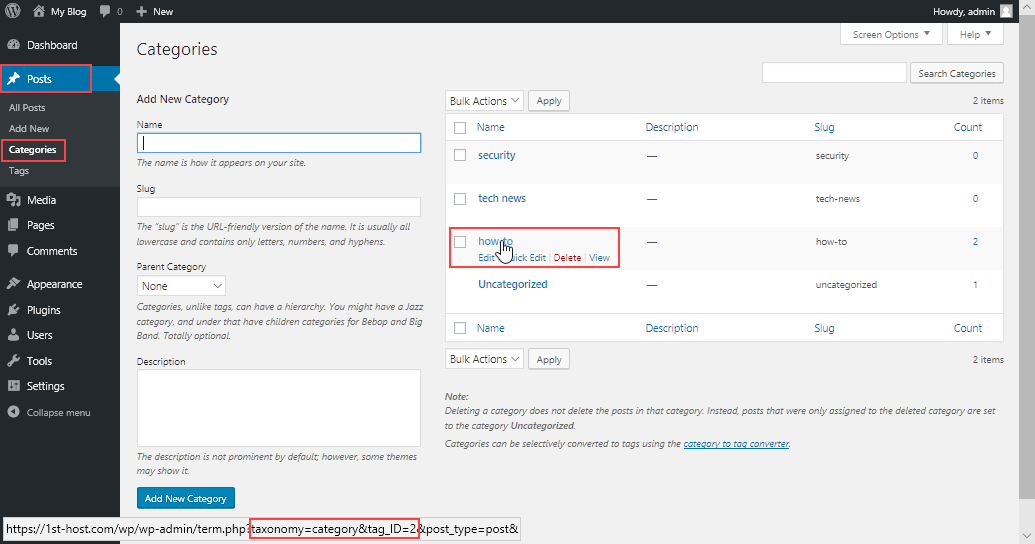
Go to the WordPress dashboard. Find “Posts”. Click “Categories”. Add a new category. Give it a name. You can also add a description. Save it. Now you have a new category!

Credit: wordpress.org
Role Of Categories In Content Organization
Categories help in sorting content on a website. They make it easier for readers to find what they are looking for. Imagine a library with no sections. It would be hard to find any book. With categories, all similar topics are grouped together. This makes browsing smooth.
Categories are like big boxes. Each box has related content. This way, your site looks clean and neat. Readers appreciate this order. It saves their time. It also helps in improving SEO. Search engines find it easier to index organized content. So, categories play a vital role in content structure.
Creating Categories In WordPress
Categories help organize your blog posts. They act like folders for your content. By using categories, readers find related posts easily. Adding categories is simple. Go to your WordPress dashboard. Click on “Posts” and then “Categories”. Here, you can add a new category. Give it a name. Add a description if you want.
You can also assign posts to these categories. This makes your blog neat and tidy. Readers enjoy better navigation. Categories also help search engines understand your site. This boosts visibility online. Remember to choose meaningful category names. This helps everyone find what they need quickly.
Managing Categories
To change a category, go to your WordPress dashboard. Find the Categories section. Click on the category you want to change. You can edit the name or description. Make sure to save your changes. This helps keep your site neat. It also helps people find what they need.
Go to the Categories section in the dashboard. Look for categories you do not use. Click on the delete option next to them. Be careful, as this action cannot be undone. Deleting unused categories helps keep your site organized. It also makes it easier to manage.
Best Practices For Using Categories
Categories in WordPress help organize content by grouping related posts together. They make it easier for users to find information and improve site navigation. Thoughtful use of categories enhances user experience, boosts SEO, and ensures content is easily accessible.
Keeping Categories Simple
Simple categories help users find content easily. Create categories that are clear and direct. Use names that describe the content well. Limit the number of categories. Too many can confuse users. Each category should have a clear purpose. This helps in organizing content better. Consistency in naming is key. It helps maintain clarity throughout your site.
Avoiding Category Overlap
Category overlap can confuse users. Each category should be unique. Similar names can lead to confusion. Avoid using synonyms for different categories. This ensures each category serves a distinct purpose. Review categories regularly. It helps keep them organized and clear. Adjust as needed to prevent overlap. Clear categories improve user navigation.
Impact On Seo
Categories help users find content easily. They make site navigation simple. This improves user experience. Easy navigation keeps users on your site longer. Search engines notice this. They rank sites higher when users stay longer. A well-organized site is key.
Improving Site Navigation
Categories group related posts. This helps users find topics they like. Users can explore your site better. They can move from one category to another. This creates a smooth journey. Smooth journeys make users happy.
Enhancing Search Engine Visibility
Categories make your content easy to find. Search engines love this. They crawl your site better. This boosts your visibility. More visibility means more traffic. More traffic means higher rankings.
Common Mistakes To Avoid
Many make mistakes with WordPress categories. Using too many categories can confuse. It’s better to keep categories simple. One or two categories often work best. Too few categories can also be a problem. Users might find it hard to search. Categories should be clear and easy to understand.
Some forget to update categories. As content grows, categories need updates. This helps users find new posts. Ignoring this makes sites less helpful. Always check and update categories. It keeps everything neat.
Another mistake is not using descriptions. Each category can have a description. This helps with SEO. Descriptions tell users what to expect. They also help search engines. Adding descriptions is easy and useful.
Tools And Plugins For Category Management
WordPress offers many tools for managing categories. Category Management Tools help organize content. Plugins like Yoast SEO improve search visibility. They enhance category optimization. Category Order is another useful plugin. It allows you to reorder categories. This makes finding content easier. WP Custom Category Pages lets you customize category pages. It adds a personal touch. Enhanced Category Pages improves category page layout. It provides better user experience.
Using these tools saves time. They make managing categories simple. Improved user experience keeps visitors happy. Happy visitors stay longer. They explore more content. This can increase website traffic. Better organization helps both users and site owners. Organizing content is key. It makes information easy to find. Choose the right plugin for your needs. Each tool has its unique features.

Credit: wordpress.com
Frequently Asked Questions
What Are WordPress Categories?
WordPress categories organize related posts into groups, enhancing site navigation. They help readers find content easily and improve SEO. You can create, edit, and delete categories via the WordPress dashboard. Assigning posts to categories ensures logical content structure.
How To Add Categories In WordPress?
To add categories, go to Posts > Categories in the dashboard. Enter the category name, slug, and description. Click “Add New Category” to create it. Organize posts by selecting relevant categories during editing.
Why Use Categories In WordPress?
Categories improve content navigation and user experience. They help organize posts logically, making it easier for readers to find related topics. Search engines also recognize categories, enhancing site SEO.
Can Categories Be Edited In WordPress?
Yes, categories can be edited anytime. Navigate to Posts > Categories, hover over the category, and select “Edit. ” You can change the name, slug, or description. Editing categories helps maintain content organization.
Conclusion
Categories in WordPress organize your content for easy navigation. They help visitors find related posts quickly, enhancing user experience. Using categories wisely can boost your site’s SEO, making it more visible. Keep categories relevant and concise. Overusing them may confuse readers.
Regular updates ensure categories reflect your current content strategy. This simple organization tool can significantly improve your website’s structure. Remember, a well-categorized site is a user-friendly site. So, take the time to set up your categories correctly. Your readers will appreciate the clarity and ease of finding information.



