
Imagine diving into the world of WordPress, eager to build your website but feeling a bit overwhelmed by the different user roles. You might wonder, “What does each role really do?”
Understanding these roles is crucial. It helps you manage your site effectively, ensuring security and functionality. By exploring the different roles in WordPress users, you gain the power to tailor your website’s management to suit your needs. Whether you’re a beginner or looking to refine your skills, knowing who can do what on your site is key to running a smooth operation.
You won’t want to miss out on this essential knowledge, as it will transform the way you handle your WordPress site. Stick around, and let’s unravel the mystery behind these roles, empowering you to make informed decisions that will boost your website’s performance and security.
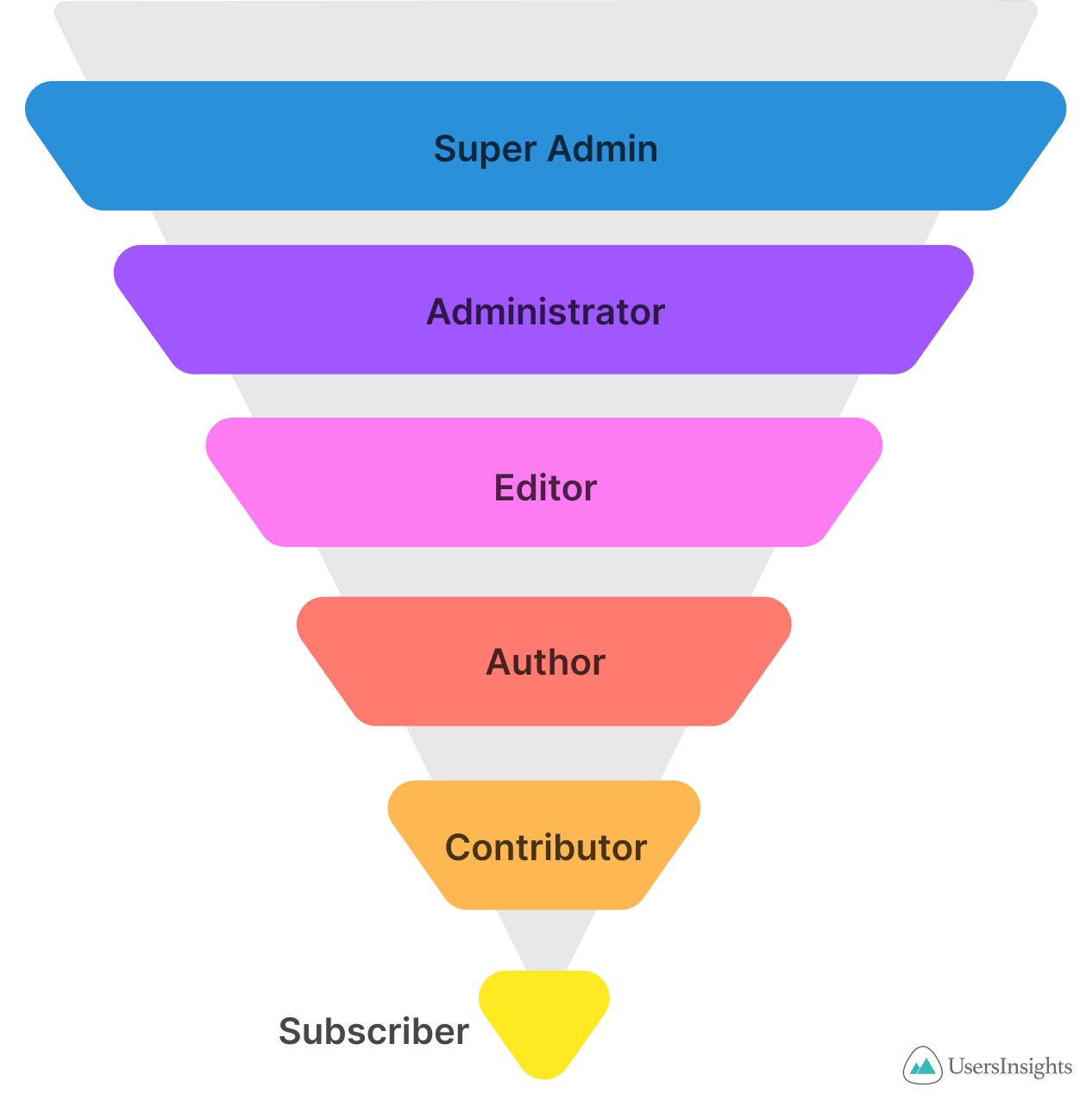
Credit: usersinsights.com
Administrator Role
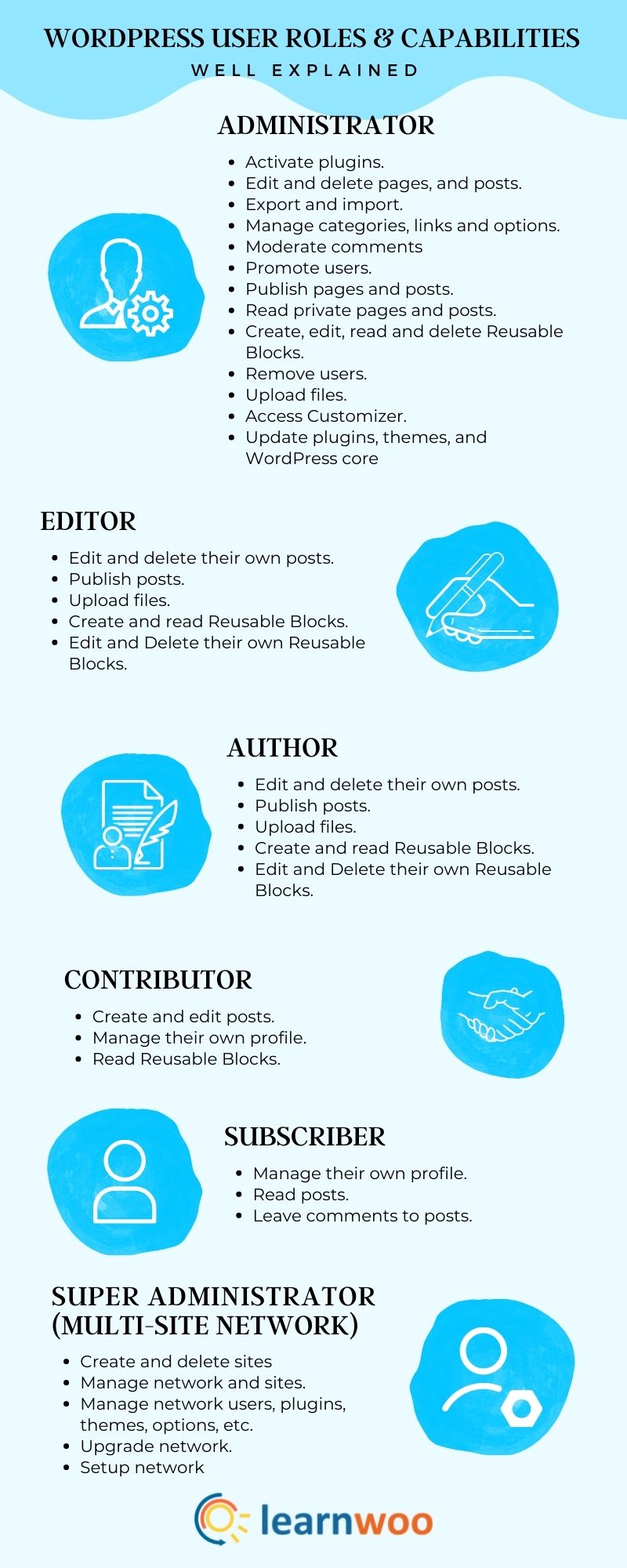
The Administrator role is powerful. It controls the entire site. Administrators can create, edit, and delete content. They manage plugins and themes. Site settings are under their control. They handle security tasks too. Administrators have access to all areas. They can change other users’ roles. They manage site updates. This role requires careful attention.
Administrators manage user accounts. They can add new users. They edit user profiles. They remove users if needed. User permissions can be changed by them. Administrators handle site settings. They adjust site options. They can change themes and plugins. They manage security settings. Regular checks are important. Administrator tasks keep the site running smoothly.
Editor Role
Editors have a special job. They manage the content on a website. This means they can add, edit, or delete posts. Also, they can organize the content in a nice way. Their role is important for keeping the site fresh and up to date.
Editors can also check for mistakes. This makes the content better. They work with writers to make sure everything is correct. They help make the website look professional.
Editors have the power to publish posts. They decide what goes live on the site. This is a big responsibility. They ensure the content is right for the audience. They make sure everything is ready before it is published.
Editors also manage comments. They approve or remove them. They keep the conversation clean and friendly. This keeps the website safe and welcoming.
Author Role
Authors in WordPress have a special job. They write and publish posts. Writing is their main task. They can make new posts and edit them. Authors use the WordPress editor to add text and pictures. Their creativity shows in their writing. They focus on making content interesting and clear. Authors want readers to enjoy what they read.
Authors can manage their own posts. They can update their articles anytime. If a mistake is found, they fix it. They can also delete posts they no longer need. This helps keep their work neat and organized. Authors cannot edit other users’ posts. Their focus stays on their own writing. This role gives authors control over their work.
Contributor Role
Contributors can create new postsdraft. Drafts are not published yet. They wait for someone to check them.
Contributors submit drafts for review. They click the submit button. Editors or admins will check the drafts. They look for errors or changes. Contributors cannot publish posts themselves. They need someone to approve them first.
Subscriber Role
The Subscriber role in WordPress is simple. Users with this role can manage their profiles. They can change their name, email, and password. It’s easy to do. They cannot change other users’ profiles. This keeps things safe.
Subscribers have limited access to content. They can read and comment on posts. They cannot write or publish posts. They see what others share. It’s like being part of a club. They enjoy the content but don’t change it. This role is great for people who love to read.

Credit: wpengine.com
Custom Roles
Custom roles allow you to tailor user permissions. This is helpful for unique needs. You can create specific roles for different tasks. For example, you might need a role with editing rights but no publishing rights. Creating custom roles requires a plugin or coding skills. Always test new roles to ensure they work as intended. Mistakes can lead to security issues. Custom roles keep your website organized.
Assigning capabilities means giving specific permissions to a role. You decide what users can do on your site. Basic capabilities include editing posts or changing settings. More advanced capabilities might involve theme changes. Be careful when assigning capabilities. Too many permissions can lead to problems. Not enough can limit functionality. Finding a balance is key. Review roles and capabilities regularly. Make adjustments as needed.
Role Management Best Practices
Security is very important for any website. Each user should have the correct role. Admin roles have more power. They can change many things. Editors can change posts. Authors can write their own posts. Subscribers can read and comment.
Managing users well is important. Give each user the right role. This keeps things organized. Don’t give too many people admin access. Use strong passwords for all users. This helps keep the site safe. It also prevents mistakes. Use plugins to help manage roles. They can make the job easier.
Credit: learnwoo.com
Frequently Asked Questions
What Are The Different User Roles In WordPress?
WordPress offers several user roles, including Administrator, Editor, Author, Contributor, and Subscriber. Each role has specific permissions and capabilities. Administrators have full control, while Subscribers have limited access. Understanding these roles helps manage your site effectively and ensures security by assigning appropriate permissions to each user.
How Does The Administrator Role Work In WordPress?
The Administrator role in WordPress grants full access to all site features. This includes managing settings, themes, plugins, and user accounts. Administrators can also publish, edit, and delete content. This role should be assigned cautiously, as it holds significant power over the website’s functionality and security.
What Permissions Does An Editor Have In WordPress?
Editors in WordPress can manage and publish posts, including those by other users. They can edit pages, moderate comments, and upload media files. However, they cannot manage site settings, plugins, or themes. This role is ideal for users who need control over content without full administrative access.
Can Authors Create And Publish Their Own Posts?
Yes, Authors in WordPress can create, edit, and publish their own posts. They can also upload media files to enhance their content. However, they cannot edit others’ posts or change site settings. This role is suitable for writers who need autonomy over their own published work.
Conclusion
Understanding WordPress user roles helps manage your site effectively. Each role has distinct capabilities. Administrators control everything. Editors manage content. Authors create their own posts. Contributors write but cannot publish. Subscribers view and comment. Assign roles wisely to ensure smooth operations.
Secure your site by restricting access. Regularly review user permissions. Keep your WordPress site organized and safe. Users make your website function well. Proper role assignment boosts productivity. Enhance your site’s security and efficiency. Manage roles carefully for a successful WordPress experience.
Ensure a seamless workflow with clear user roles.



