
Are you struggling to get the perfect look for your WordPress image gallery? You’re not alone.
Picking the right dimensions can be tricky, but it’s crucial for making your website visually appealing and engaging for your visitors. When images are too big or too small, they can disrupt the flow of your site and frustrate your audience.
You want every visitor to be impressed, captivated, and ready to explore more. In this guide, we’ll break down the ideal dimensions for your WordPress image gallery, helping you create a seamless and attractive visual experience that keeps your audience coming back for more. Let’s dive in and unlock the secrets to a flawless image display.
Importance Of Image Dimensions
Image dimensions matter in WordPress galleries. Bigger images may slow down websites. Small images might lose quality. Balance is key. Right size makes pages load faster. Clear images attract visitors. They improve user experience.
Correct dimensions help with SEO. Search engines prefer optimized images. This can increase website traffic. Small file size is important. It saves storage space. Proper dimensions also help with mobile viewing. Mobile users need clear images.
Responsive images adjust to screen size. This keeps them sharp. Good dimensions make galleries look neat. They fit well on pages. High-quality images are essential. They show details clearly. Choose dimensions wisely for the best gallery experience.
Common Image Sizes For WordPress
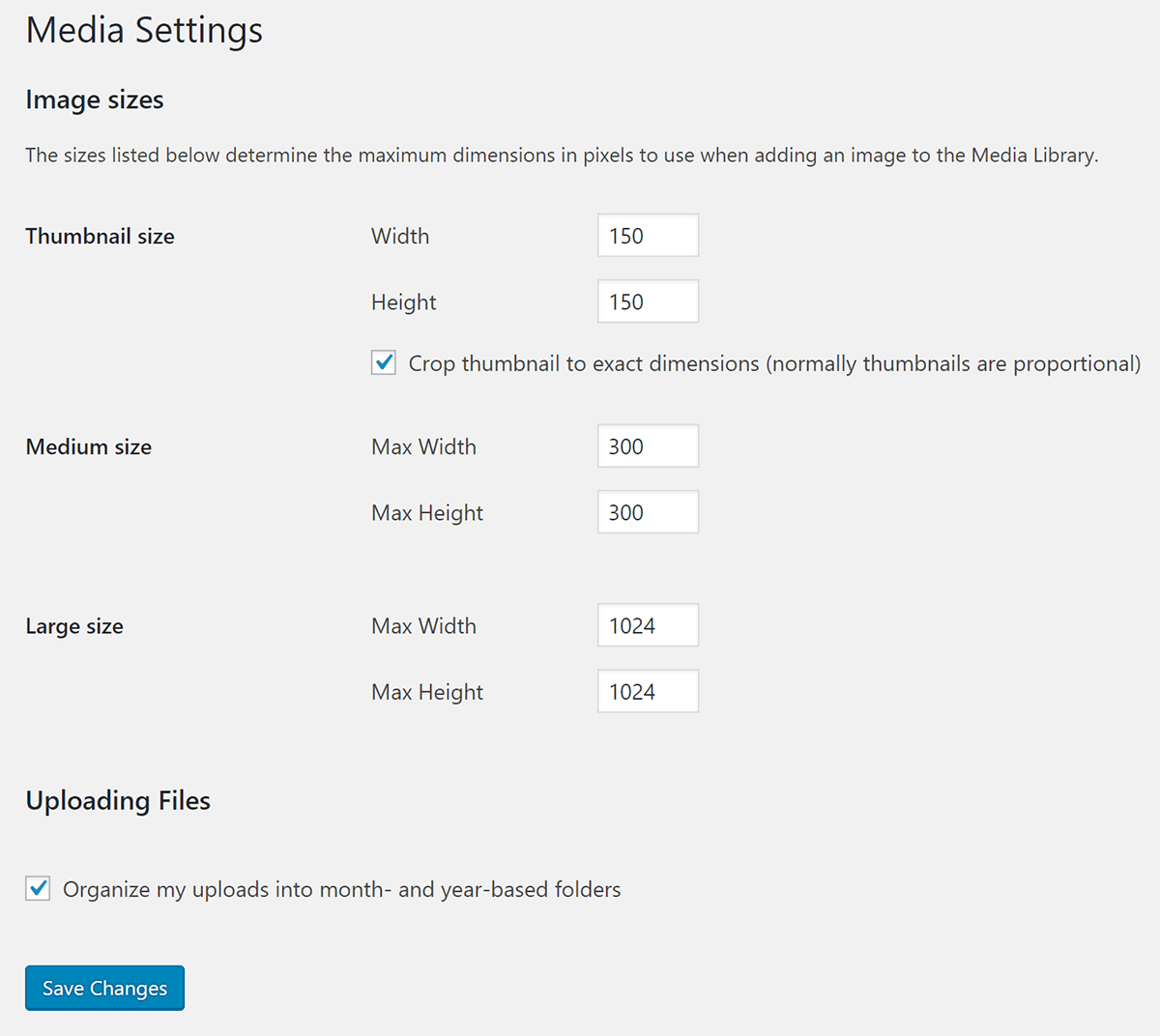
Thumbnails are small images. These are usually 150×150 pixels. They help in quick viewing. Thumbnails load fast. Best for previewing content. These images save space. They also make your site look tidy.
Medium images are often 300×300 pixels. These images show more details. Large images can be 1024×1024 pixels. Perfect for showcasing products. They can be used in blogs too. These images keep a balance. They fit well on most screens.
Full-size images show every detail. They use the original size. Often used for high-quality visuals. Best for galleries. Full-size images load slower. They need more space. Keep this in mind when using them.
Optimizing Images For Web Performance
Good image compression makes pages load faster. Use tools to make images smaller. TinyPNG and JPEGmini are popular choices. These tools keep images clear and sharp. Smaller images help websites perform better. Faster loading means happy visitors. It also means better search rankings. Always aim for the smallest size without losing quality.
Picking the right file format is key. JPEG is best for photos. It has good quality and small size. PNG is good for images with text. It supports transparency. GIF is for animations. Use it for simple moving images. Choose the right format for each image type. This helps with speed and looks.
Credit: wpmudev.com
Responsive Image Techniques
Images need to look good on all screens. This is why we use the srcset attribute. It allows the browser to choose the best image size. Different devices have different screen sizes. The sizes attribute tells the browser how big the image should be.
On a phone, the image should be smaller. On a tablet or computer, the image can be bigger. This makes images adapt to the device. This helps with loading times too. Fast loading is important for users. It keeps them happy.
Always use these attributes. They make websites look better. They also make websites run faster. Happy users will stay longer.
Impact On Website Loading Speed
Image size is crucial. Large images can slow websites. This affects user experience. Balancing image quality with speed is important. Use smaller dimensions to help speed. Yet, keep clarity. A good balance is key. Users want fast sites. They also want clear images.
Use tools to check speed. Google PageSpeed Insights is popular. It shows how fast your site is. GTmetrix is another tool. It gives details on loading times. Tools help find slow images. Fix these to improve speed. Speed is vital for success.
Plugins For Managing Image Galleries
WordPress offers many plugins for image galleries. Some plugins are very popular. Envira Gallery is one choice. It is easy to use. Another choice is NextGEN Gallery. This plugin has been around for a long time. FooGallery is also liked by many. It works well with beginners.
Good plugins should be easy to use. They should be fast. Look for plugins with many templates. They should help create beautiful galleries. Plugins should also be responsive. Images should look good on phones and computers. Look for plugins that allow easy customization. This helps in matching galleries with website styles.
Best Practices For Image Galleries
Use same size for all images. It looks tidy and neat. It makes the gallery easy to view. People find it easy to look at. It stops the need to scroll too much.
Different image sizes can confuse. Some photos look big. Others look small. This makes the gallery look messy. So, keep them the same.
Fast loading is important. People do not like to wait. They might leave the site. Make images smaller in size. This helps them load fast. It makes users happy. They can see pictures quickly.
Use clear and bright images. This makes the gallery look good. Users enjoy looking at clear photos. It keeps them interested. They might stay longer on the site. Happy users may come back.
Credit: enginescout.com.au
Credit: enginescout.com.au
Frequently Asked Questions
What Is The Best Size For Gallery Images?
The ideal size for WordPress gallery images is 1200×800 pixels. This dimension ensures optimal display across various devices. It provides a balance between quality and loading speed. Keeping image file sizes under 500KB helps maintain fast website performance. Using JPEG format is recommended for better compression and quality.
How To Optimize Images For WordPress Galleries?
Optimizing images involves resizing, compressing, and choosing the correct format. Use tools like Photoshop or online editors for resizing. Compress images without losing quality using plugins like Smush. JPEG format is ideal for maintaining a balance between quality and file size.
Proper optimization enhances site speed and user experience.
Can I Use High-resolution Images In Galleries?
Using high-resolution images in galleries can slow down your website. They often exceed recommended file sizes and dimensions. Instead, resize and compress images to improve loading speed. Aim for 1200×800 pixels and under 500KB for best results. Properly optimized images maintain visual appeal without compromising performance.
Why Is Image Dimension Important For Seo?
Image dimensions affect site speed, which impacts SEO rankings. Faster loading times improve user experience and search engine results. Properly sized images help maintain site performance. They also ensure visual consistency across devices. Using alt tags with relevant keywords further enhances SEO by improving image search visibility.
Conclusion
Choosing the right image dimensions enhances your WordPress gallery. Proper sizing aids faster load times. It also improves user experience. Images should be clear, not pixelated. High-quality photos engage visitors effectively. Balance between resolution and file size is crucial. Keep images optimized for mobile and desktop.
This ensures accessibility for all users. Experiment with different dimensions for best results. Tailor images to fit your site’s design. Regular updates keep your gallery fresh. Remember, visuals speak louder than words. Invest time in perfecting your WordPress image gallery.
Your website will benefit greatly from this effort.



