
Have you ever wondered what makes your WordPress website tick behind the scenes? The secret lies in its database.
Understanding this crucial component can unlock endless possibilities for your site management. Imagine having the ability to optimize performance, enhance security, and ensure seamless functionality. This is why grasping how your WordPress database is created is essential. By exploring its structure and how it interacts with your site, you gain the power to refine and perfect your online presence.
Ready to dive in and discover the backbone of your WordPress site? Let’s unveil the mysteries of your website’s database together.
WordPress Core Files
WordPress has files that build the website’s base. These files are known as WordPress core files. They contain the main code for WordPress. They help in creating the website’s database. The database stores all your website’s data. This includes posts, pages, and user data.
Core files and the database work together. They keep the website running smoothly. Each time you add a new post, the database gets updated. The core files guide this process. They ensure the data is stored correctly. The database is like a big storage box. The core files are the instructions to use this box.

Credit: formidableforms.com
Role Of Mysql
MySQL is the heart of a WordPress website. It stores all the data. This includes posts, pages, and user information. MySQL is a relational database system. It organizes data in tables. Each table has rows and columns. These tables are like spreadsheets. They help keep everything neat and tidy. MySQL uses Structured Query Language (SQL). SQL helps to add, update, and delete data. It also retrieves data when needed. This makes the website dynamic and interactive. WordPress relies heavily on MySQL for smooth functioning. MySQL is very reliable and fast. It can handle large amounts of data easily. This is crucial for big websites. MySQL is open-source. This means it’s free to use. Developers from around the world improve it. This ensures it stays secure and efficient.
Understanding Wp-config.php
The wp-config.php file is a crucial part of a WordPress site. It holds important settings for your website. This file connects your site to its database. Without it, your site cannot store data. The file contains information like the database name and username. It also includes the password needed to access the database.
Every WordPress site needs this file. It helps WordPress know where to find the data. Without it, your site won’t work correctly. Remember, this file is sensitive. Protect it from changes. Changes can lead to site errors. Keep it safe from unwanted access.
Database Structure
WordPress uses a database to store all its data. This database is made up of tables. Each table has a specific role. They keep your site’s content organized.
Default WordPress Tables
WordPress comes with 12 default tables. These include tables like wp_posts and wp_users. The wp_posts table stores all your posts and pages. The wp_users table keeps user information. These tables are crucial for your site to work well.
Custom Tables
Some plugins add custom tables to the database. These tables store extra data needed by plugins. Custom tables can help improve site performance. Developers often use them for complex tasks.
Installation Process
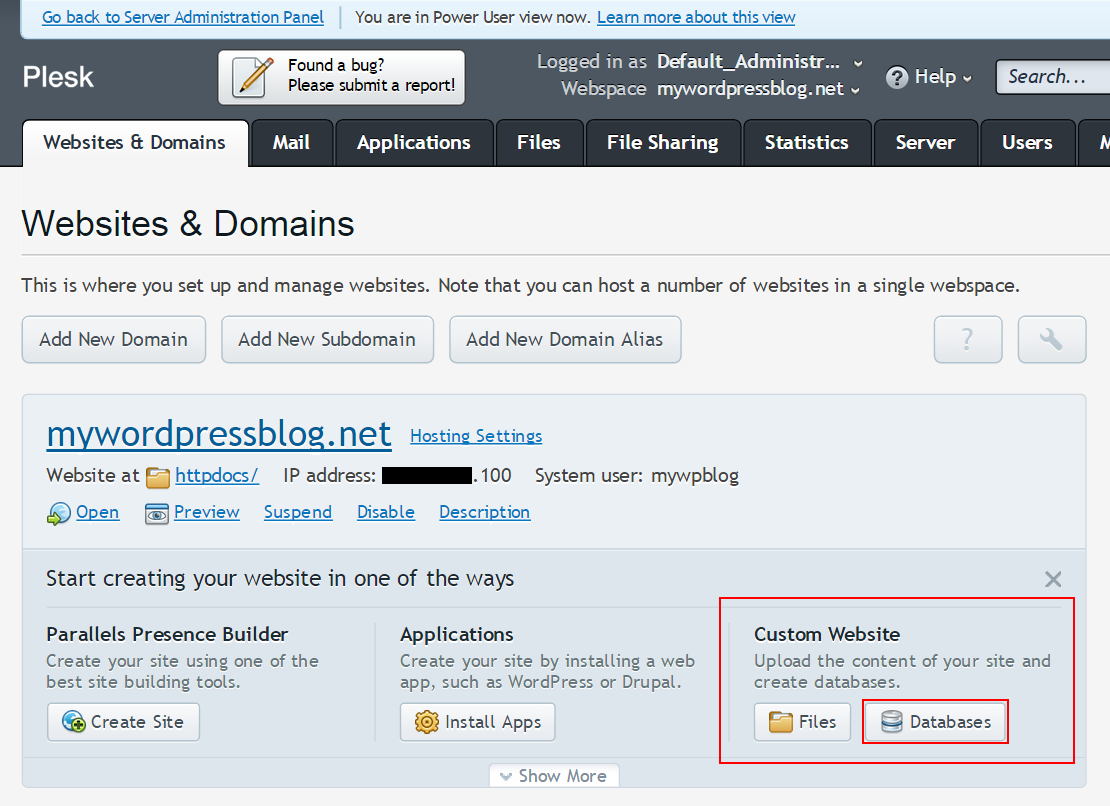
First, we need a database for WordPress. Use tools like phpMyAdmin. Click on “Databases”. Then, create a new database. Name it something easy. For example, mywebsite_db. Remember this name. We will use it later.
Next, we must link WordPress to the database. Open the wp-config.php file. Look for the line that says DB_NAME. Replace ‘database_name_here’ with your database name. Then, find DB_USER. Enter your username. Next, change the DB_PASSWORD to your password. Save the file. WordPress can now talk to your database.
Database Management Tools
phpMyAdmin helps manage databases. It’s a user-friendly tool for WordPress websites. You can easily create, delete, and edit database tables. Many people use phpMyAdmin because it’s free. It shows data in a clear way. You don’t need to be a tech expert. With phpMyAdmin, you can backup and restore data. This tool is great for beginners. It makes database tasks simple. Users feel comfortable with its interface.
Plugins help with database tasks. They add features to WordPress. Some plugins optimize database speed. Others help clean up old data. Popular plugins are WP-DBManager and Advanced Database Cleaner. These plugins improve website performance. Users can set automatic tasks. This saves time and effort. Plugins are easy to install. They make managing databases simple and efficient.
Security Considerations
Regular backups keep your data safe. It’s smart to save copies often. If a problem happens, you can restore everything. Use tools or plugins to make backups easy. Store copies in different places, not just one. Cloud storage is a good choice. Protect your backups with strong passwords. This keeps them safe from bad people.
SQL injections are a big threat. Hackers use them to steal data. Validate user inputs to stop this. Never trust data from users. Use code to check it first. Prepared statements help keep your database safe. They stop bad code from running. Always update your software. This fixes security holes.
Optimization Techniques
WordPress databases can get messy. Old data stays and takes space. Unused plugins and themes leave behind data. This slows down your website. Regular cleaning can help. Remove old revisions of posts. Delete spam comments. These tasks make your site faster. Use plugins for help. They do the hard work. Optimize tables to reclaim space. Keep your database lean and tidy.
A clean database runs better. Faster loading times make users happy. Optimize images for speed. Compress them without losing quality. Limit post revisions to save space. Use a caching plugin. This reduces server load. Monitor your database regularly. Look for slow queries. Fix them to improve speed. A well-maintained database boosts your site’s performance.
Common Issues And Solutions
Creating a database in a WordPress website often leads to issues like slow loading times or connection errors. Installing plugins can sometimes disrupt database operations. Ensuring proper configuration and regular updates can minimize these problems, maintaining optimal website performance.
Connection Errors
Many users face connection errorsdatabase login details. They should be correct. Verify the database hostname. It is usually ‘localhost’. Another solution is to check your database permissions. Your user must have access to the database.
Missing Tables
Missing tables can cause many problems. Your site might not work well. Check your database backup. You can restore the tables from there. Look for any recent changes in your database. Sometimes, plugins can cause missing tables. Disable any new plugins and see if it helps. You can also use the repair feature in your hosting panel to fix tables.

Credit: developer.wordpress.org
Credit: codex.wordpress.org
Frequently Asked Questions
How Is A WordPress Database Created?
A WordPress database is automatically created during installation. It stores essential site data, including posts, pages, and user information. The installation process involves connecting to a MySQL database server, where WordPress sets up necessary tables for data management.
What Role Does Mysql Play In WordPress?
MySQL is the database management system used by WordPress. It organizes and retrieves data stored in the database. MySQL handles operations such as querying, updating, and managing site content and user data efficiently. This ensures smooth functioning and data accessibility for WordPress websites.
Can I Customize My WordPress Database?
Yes, you can customize your WordPress database. Advanced users can modify database tables and settings using plugins or PHPMyAdmin. Customization can enhance site performance and add unique features. However, it’s crucial to back up the database before making changes to prevent data loss.
What Happens If The Database Connection Fails?
If the database connection fails, your WordPress site can’t access stored data, causing errors. Common reasons include incorrect credentials or server issues. Troubleshooting involves verifying database login details and server status. Resolving connection problems restores site functionality quickly.
Conclusion
Understanding what creates the database in a WordPress website is essential. It forms the backbone of your site. Every post, comment, and page relies on it. A well-structured database ensures smooth performance. It also aids in secure data management. By grasping its components, you can maintain your site better.
Knowledge of databases enhances troubleshooting skills. It also prepares you for future expansions. With this, your WordPress site remains efficient. Constant learning about databases is beneficial. It keeps your website running optimally. Always prioritize database health for a seamless online presence.



