
Are you wondering what you can do with WordPress? Whether you want to start a blog, build an online store, or create a portfolio, WordPress gives you the power to bring your ideas to life.
It’s easy to use, flexible, and packed with tools that make your website look professional and work smoothly. You’ll discover all the exciting possibilities WordPress offers and how you can make the most of them. Ready to unlock your website’s potential?
Let’s dive in!
Create Any Website
WordPress lets you build nearly any type of website. It works well for beginners and experts alike. You do not need to know coding. Choose themes and plugins to shape your site. Make it simple or complex as you wish. WordPress fits many purposes and ideas.
Blogs And Personal Sites
Start a blog or personal site easily. Share stories, thoughts, and updates with readers. Use categories and tags to organize posts. Customize your site with themes that suit your style. Add photos and videos to make posts lively.
Business Websites
Showcase your company online with WordPress. Create pages for services, about, and contact info. Use forms to get customer messages. Add testimonials to build trust. Keep your site fresh with news or blogs.
Online Stores
Sell products or services through an online store. WordPress supports many e-commerce plugins. Manage products, prices, and inventory easily. Offer payment options and shipping methods. Track orders and provide customer support.
Portfolios And Galleries
Display your work with portfolios or galleries. Perfect for artists, photographers, and designers. Arrange images and projects in clean layouts. Add descriptions to explain your work. Help visitors explore your skills clearly.
Customize With Themes
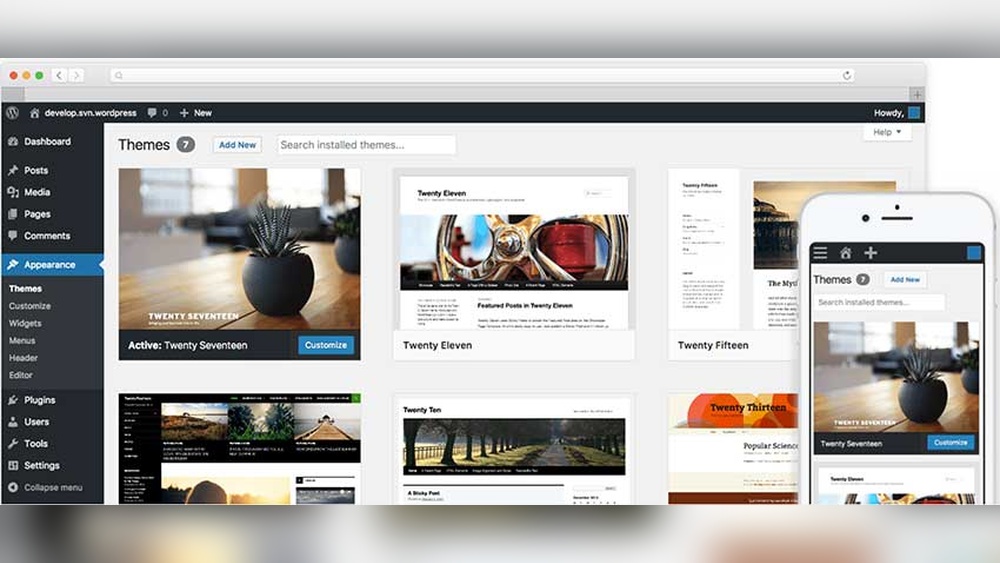
WordPress lets you change the look of your website easily. Themes control how your site appears to visitors. You can choose from many themes to match your style and needs. Themes help you make your site unique without coding skills. They also affect your site’s speed and user experience.
Free Vs Premium Themes
Free themes come with no cost and basic features. They work well for simple websites and beginners. Premium themes cost money but offer more designs and tools. These themes often include support and updates. Choose based on your budget and site goals.
Responsive Design
Responsive themes adapt to all screen sizes. Your site looks good on phones, tablets, and desktops. This improves visitor experience and keeps people on your site longer. Google also favors responsive sites in search results.
Theme Customization Options
Many themes let you change colors, fonts, and layouts. You can add your logo and adjust header styles. Some themes include drag-and-drop builders for easy design changes. Custom options help your site stand out without coding.
Extend Functionality With Plugins
WordPress plugins help you add new features to your website. They expand what your site can do without needing coding skills. Plugins allow you to customize your site for different needs. From simple tools to complex systems, plugins make WordPress flexible and powerful.
Essential Plugins For Beginners
Start with plugins that improve site speed and design. Cache plugins help your pages load faster. Contact form plugins let visitors send messages easily. Image optimization plugins reduce file size for quicker loading. These plugins make your site user-friendly and professional.
E-commerce Plugins
Turn your WordPress site into an online store. E-commerce plugins handle product listings and payments. They support various payment methods like PayPal and credit cards. These plugins also manage shipping options and taxes. Selling products or services becomes simple with these tools.
Seo And Marketing Tools
SEO plugins help your site rank higher in search results. They guide you to use keywords and improve content. Marketing plugins connect your site with email services. They let you create newsletters and track visitors. These tools boost your site’s visibility and engagement.
Security Enhancements
Protect your site from hackers and malware with security plugins. They monitor suspicious activity and block threats. Backup plugins save your site data regularly. Security plugins also manage user access and login attempts. Keeping your site safe is easy with these tools.

Credit: www.youtube.com
Optimize Content Management
Managing content well is key to a successful website. WordPress makes content management easy and efficient. It helps organize your work and save time. This section explores three ways WordPress helps optimize content management.
User Roles And Permissions
WordPress lets you set different user roles. Each role has specific permissions. You control who can write, edit, or publish content. This keeps your site safe and organized. Team members work smoothly without confusion.
Media Management
Uploading images, videos, and files is simple. WordPress stores all media in one place. You can search, edit, and reuse files easily. It also optimizes images for faster loading. Your site stays fast and visually appealing.
Content Scheduling
Plan your posts ahead of time. WordPress allows you to set future publish dates. Content goes live automatically on schedule. This keeps your site fresh without daily effort. Perfect for maintaining regular updates and campaigns.
Enhance User Experience
Enhancing user experience is key to keeping visitors on your WordPress site. A smooth, fast, and easy-to-use website makes people stay longer. It also encourages them to return. WordPress offers many tools to improve how users interact with your site. These improvements create a positive impression and build trust.
Mobile Optimization
More people use phones to browse websites. WordPress themes often include mobile-friendly designs. These designs adjust automatically to fit any screen size. Mobile optimization ensures your site looks good and works well on phones and tablets. Visitors can easily read content and navigate menus without zooming or scrolling sideways.
Site Speed Improvements
Fast-loading pages keep users happy. WordPress has many plugins to speed up your site. Caching plugins store copies of pages for quick delivery. Image optimization reduces file size without losing quality. A fast site lowers bounce rates and helps with search engine rankings. Users get information quickly and enjoy a smooth experience.
Accessibility Features
Making your site accessible means everyone can use it. WordPress supports accessibility with themes and plugins designed for this. Features include keyboard navigation, screen reader compatibility, and clear fonts. Accessibility helps people with disabilities visit your site easily. It shows care and respect for all users.

Credit: wordpress.org
Integrate With Third-party Services
WordPress works well with many third-party services. This helps you build a better website without much effort. You can add new features by connecting with other tools. These connections make your site more useful and interactive.
Social Media Integration
Social media helps you reach more people. WordPress allows you to link your site with platforms like Facebook and Twitter. Visitors can share your posts easily. You can also show your social feeds on your website. This keeps your content fresh and engaging.
Email Marketing Tools
Email marketing helps keep your audience informed. WordPress connects with popular email tools like Mailchimp and Constant Contact. You can collect emails with signup forms on your site. Send newsletters or updates to your subscribers. This builds a loyal community around your site.
Payment Gateways
Accepting payments online is simple with WordPress. It works with payment services like PayPal and Stripe. You can sell products or services directly from your site. These gateways keep transactions safe and smooth. This makes your website a powerful online store.
Scale And Maintain Your Site
Scaling and maintaining a WordPress site is essential for lasting success. A well-kept site runs smoothly and grows without issues. This section explains key steps to keep your site healthy and fast. Follow these tips to protect your content and improve performance.
Backup And Restore
Backups save your site’s data and files regularly. They protect against data loss from hacks or errors. Use plugins or hosting tools to create automatic backups. Store backups off-site, like in cloud storage. Restoring from a backup brings your site back quickly after problems.
Performance Monitoring
Track how fast your site loads and runs. Slow sites lose visitors and search rankings. Use tools to check speed and uptime. Find and fix issues like slow plugins or large images. Regular monitoring helps keep your site fast and reliable.
Regular Updates
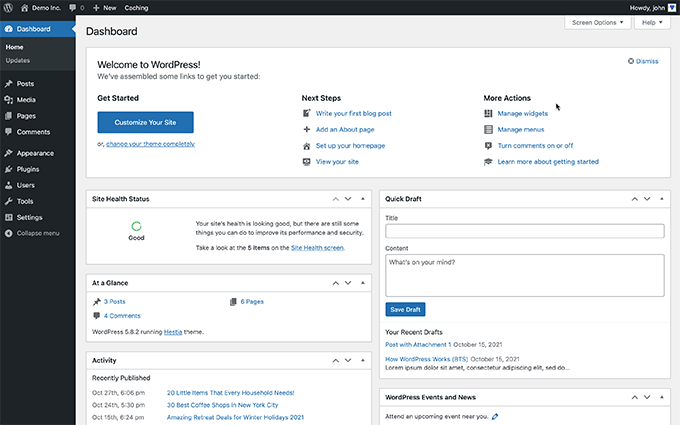
WordPress, themes, and plugins need frequent updates. Updates fix bugs and security holes. Running old versions risks hacking and crashes. Schedule updates during low traffic times. Always back up before updating to avoid data loss.
Credit: www.wpbeginner.com
Frequently Asked Questions
What Types Of Websites Can You Build With WordPress?
WordPress lets you create blogs, business sites, portfolios, e-commerce stores, and forums. It offers flexibility for nearly any website type.
How Easy Is It To Customize A WordPress Site?
WordPress provides thousands of themes and plugins to customize design and functionality. No coding skills are needed for basic changes.
Can WordPress Support Online Stores Effectively?
Yes, WordPress integrates with WooCommerce, a powerful plugin for building and managing online shops of any size.
Is WordPress Suitable For Seo Optimization?
WordPress is SEO-friendly with built-in features and SEO plugins that help improve your website’s search engine rankings.
Conclusion
WordPress offers many ways to build websites easily. You can create blogs, online stores, or portfolios. It suits beginners and experts alike. The tools and themes help you design your site quickly. You stay in control of your content and style.
With WordPress, your website can grow as you learn. Try different features to find what works best. It’s a smart choice for anyone wanting a simple, flexible website. Explore WordPress and see what you can create today.



