
Imagine having complete control over who can access and modify your WordPress site. With the WordPress User Editor, this power is at your fingertips.
Are you tired of fumbling through complex settings just to manage user permissions? It’s time to streamline your process and take the reins. Picture a tool that not only simplifies user management but also enhances your site’s security and efficiency.
You’ll uncover the secrets of the WordPress User Editor and how it can transform your approach to site administration. Get ready to unlock a world where managing users is no longer a hassle, but a breeze. Curious? Let’s dive in and explore how this tool can redefine your WordPress experience.

Credit: publishpress.com
Role Of A WordPress User Editor
The WordPress User Editor helps manage users. It allows adding new users. Also, it can change user roles. This means giving new abilities to users. Editors can also remove users when needed. This keeps the site safe and organized.
Editors have power over content. They can write new posts. Editing old posts is easy for them. They check for mistakes. They keep the site looking good. They can also decide which posts to publish.
It’s important to have a user editor. They keep everything running smoothly. They make sure the right people see the right content. This is key for any website.
User Management Features
WordPress lets you create new users easily. You only need an email and username. After that, a password is created. You can send it to the user by email. This allows new users to log in and start using the site right away.
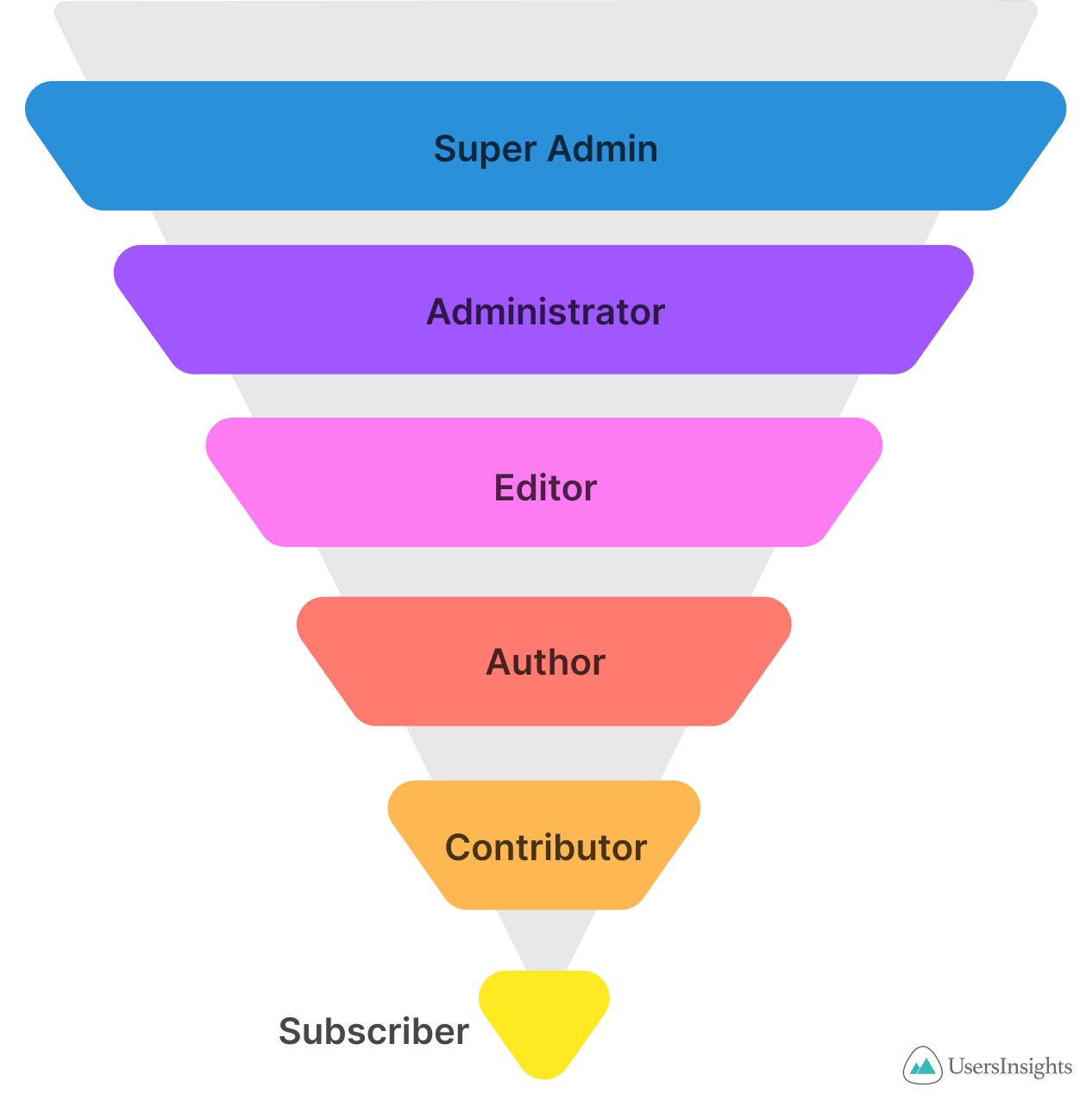
Each user can have a specific role. Roles decide what users can or cannot do. For example, an admin can do everything. An editor can change posts. You can also make custom roles if needed. It’s a simple way to keep your site safe.
Users have profiles with important details. You can change these details anytime. Profiles include names, emails, and more. Users can also add a profile picture. A complete profile helps users interact better on the site.
Customizing User Roles
WordPress lets you change user roles. This can help make tasks easy. Admins can change roles like Editor or Contributor. These changes can give users more or less power. This keeps your site safe. It also helps in managing content better. Editors can publish posts. Contributors can write but not publish. This helps in team work.
New roles can be made for special needs. You can create a role for a Shop Manager. They can manage orders and stock. This can be great for online stores. Custom roles give you control. Users do not get extra powers. This keeps your site secure. It’s easy and useful.
Access control lets you decide who sees what. You can lock parts of your site. Only special users can see it. This is important for private content. Users with certain roles can access more data. This makes sure that only trusted people see your work. It is a smart way to manage your website.
Content Management Capabilities
The WordPress User Editor helps in editing posts and pages. Users can add text, images, and links. It is easy to make changes. You can save your work anytime. Users can also preview before publishing. This helps in catching mistakes. The editor is user-friendly. It is good for beginners.
User Editor allows managing comments with ease. You can approve or delete comments. This keeps your site neat. It helps in stopping spam comments. You can also reply to comments. Users can moderate discussions. This makes your site interactive.
Media files include images, videos, and audio. User Editor helps manage these files. You can upload and organize them. It is easy to add them to posts. Users can also edit media details. This makes your content more engaging.
Security And Privacy Settings
WordPress User Editor allows users to manage roles and permissions. It helps control who can access or change site content. Adjust settings to ensure security and maintain privacy.
Password Management
WordPress user editor helps with password management. You can easily change passwords. Choose strong passwords for safety. Mix letters, numbers, and symbols. Regularly update passwords to keep accounts safe.
User Activity Monitoring
Monitoring user activity is important for security. WordPress user editor allows you to track actions. You can see login times and changes made. This helps in spotting unusual behavior. Protect your site from unwanted access.
Privacy Settings Configuration
Privacy settings are key for site safety. Control who sees your content. Adjust settings for data protection. Keep user information private. Ensure only trusted users can view sensitive content.
Extending Functionality With Plugins
WordPress user editor can do more with plugins. These plugins help in managing users. They make tasks easier and faster. Some plugins offer advanced user roles. Others provide custom permissions. You can find plugins for every need. They improve site security too. Plugins ensure smooth user management. They are vital for any WordPress site.
Popular User Management Plugins
Many plugins are popular. They help with user management. One such plugin is Members. It gives control over roles. Another is User Role Editor. It lets you customize roles easily. WPFront User Role is also useful. It offers great features. These plugins are easy to install. They enhance user management significantly.
Enhancing User Experience
Plugins can make user experience better. They provide user-friendly interfaces. They help with easy navigation. Users find it easier to explore sites. Plugins enhance site performance. They offer features like profile management. Users can update their profiles easily. These tools make sites interactive. They improve overall user satisfaction.
Integrating Third-party Tools
Some plugins integrate third-party tools. This expands site functionality. Tools like CRM systems can be added. Email marketing tools can also integrate. They help manage user data better. Integration is seamless and smooth. Users can benefit from extra features. These integrations enhance user engagement. They make sites more versatile.
Best Practices For User Editors
Protecting user data is very important. Use strong passwords for all accounts. Avoid sharing passwords with others. Always update your security settings. This helps keep the data safe. Make sure your site has an SSL certificate. It keeps information private and secure. Regular backups are also a good idea. They help you recover lost data.
Keep users interested with fresh content. Update your site often. Reply to comments quickly. It shows you care about their thoughts. Use simple designs that are easy to use. This makes navigation smooth. Encourage feedback from users. It helps improve your site.
Always install the latest WordPress updates. These updates fix bugs and improve security. Check for plugin updates too. They help the site run better. Set reminders for updates. This keeps the system healthy and secure.
Credit: usersinsights.com

Credit: wpusermanager.com
Frequently Asked Questions
What Is WordPress User Editor?
The WordPress User Editor is a tool for managing user roles and permissions. It allows administrators to assign specific capabilities to different user roles. This helps in controlling what users can access or modify within the WordPress site. It ensures that users have appropriate access levels based on their roles.
How Do I Change User Roles In WordPress?
To change user roles, go to the WordPress dashboard and click on “Users. ” Find the user you want to edit and click “Edit. ” In the “Role” dropdown menu, select the new role you wish to assign. Finally, click “Update User” to save the changes.
Can WordPress User Editor Restrict Access?
Yes, the WordPress User Editor can restrict access by assigning specific roles. Each role has predefined capabilities that limit what users can do. By setting the appropriate role, you can control access to certain features and content. This ensures that users only access what they need.
Is WordPress User Editor Plugin Needed?
A WordPress User Editor plugin isn’t always necessary. The default WordPress installation provides basic user role management. However, plugins offer advanced capabilities and customization options. If you need more control over user roles and permissions, consider using a plugin for enhanced functionality.
Conclusion
WordPress User Editor offers simple tools to manage user roles. Customize permissions with ease. Protect sensitive content by controlling access. Enhance collaboration by assigning roles. Streamline your workflow. Create a secure, organized environment. User Editor boosts efficiency and security. Perfect for teams.
Ideal for individual bloggers too. Gain control over who sees what. Reduce the risk of unauthorized access. Clear, user-friendly interface makes it accessible. Great for beginners and seasoned users alike. Explore its features for better site management. A powerful tool in WordPress arsenal.
Make your site safer and more efficient.



