
Imagine being able to manage multiple websites effortlessly from a single dashboard. Sounds like a dream, right?
Well, with WordPress Multisite installations, this dream becomes a reality. If you’re juggling multiple WordPress sites, you know the challenges of updating, maintaining, and managing them individually. But what if there was a way to streamline this process? By tapping into the power of WordPress Multisite, you can simplify your workflow, save time, and reduce stress.
This guide will reveal the secrets of WordPress Multisite installations, showing you how to unlock a more efficient and organized way to handle your web presence. Curious to learn how you can make your life easier with just a few clicks? Read on to discover the benefits and functionalities that could transform how you manage your sites.
WordPress Multisite Basics
WordPress Multisite lets you create many sites with one WordPress setup. Each site can have its own look and feel. Users manage all sites from one dashboard. This is useful for schools or businesses with different departments. It saves time and resources. Site owners can share plugins and themes across all sites. Multisite helps manage multiple sites easily.
Single WordPress setup runs one site. Multisite runs many sites. Single site is simpler to manage. Multisite needs more settings. Multisite is good for large projects. Schools, businesses, and networks use Multisite. Single setup is good for small projects. Multisite saves time for big networks.

Credit: getdevdone.com
Setting Up A Multisite Network
Before starting, check your WordPress installation version. It should be WordPress 3.0 or later. Ensure your hosting supports multisite. Use a subdomain or subdirectory for sites. Plan your site structure carefully. Consider themes and plugins compatibility. Backup your data before changes.
Log in to your WordPress admin. Go to the Dashboard. Find the Tools menu. Select Network Setup. Choose subdomains or subdirectories. Click Install to activate. Follow on-screen prompts carefully. Check for errors during setup.
Access the Network Admin dashboard. Set network title and admin email. Configure registration options. Control site and user permissions. Adjust upload settings as needed. Review themes and plugins for multisite support. Save settings after each step.
Managing Sites In A Network
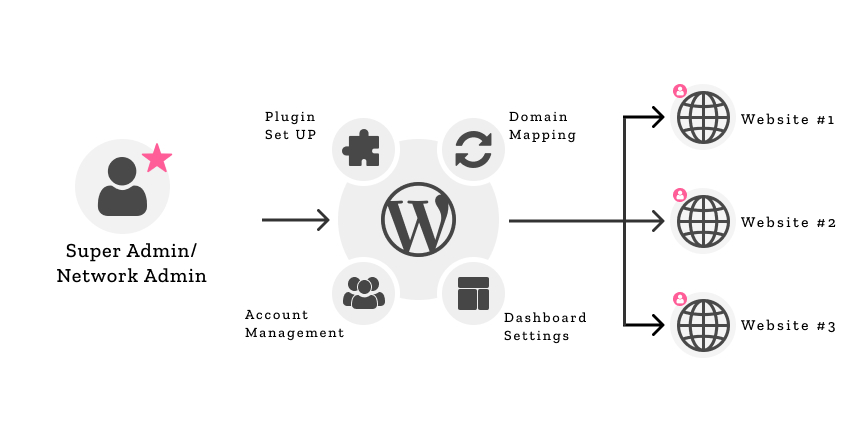
WordPress Multisite Installations allow users to manage multiple sites from a single dashboard. This feature simplifies site management, making it easy to update, maintain, and control various websites. Perfect for businesses or individuals with several sites, enhancing efficiency and organization.
Adding New Sites
Creating a new site is easy. Click on the “Add New” button. Enter the site name and address. Choose the site’s language and admin email. Hit “Create”. That’s it! Your site is ready.
User Roles And Permissions
WordPress offers different roles. Each role has specific permissions. Administrator has full access. Editor can edit posts. Author can write posts. Contributor can write but not publish. Subscriber can read content. Assign roles carefully.
Theme And Plugin Management
Network Admin manages themes and plugins. Activate themes for the whole network. Or, activate for specific sites. Same with plugins. Choose wisely. Not all themes suit every site. Plugins can slow down your network. Keep only what you need.
Benefits Of Using Multisite
Centralized Management is a key benefit. One can manage many sites from one dashboard. This saves time and effort. Updates happen faster. Changes apply to all sites at once. This makes the process smoother.
Resource Sharing helps in reducing costs. All sites share the same theme and plugins. This means less storage is needed. It also makes maintenance easier. Everything stays organized and tidy.
Multisite offers Enhanced Security Features. Security settings apply to all sites. This keeps data safe. Hackers find it harder to cause harm. Regular updates improve protection. Peace of mind is a bonus.
Challenges And Limitations
WordPress Multisite can grow with many websites. But, it faces scalability issues. With many sites, server load gets heavy. This can slow things down. A slow site means unhappy users. Also, updating many sites at once is hard. Each site may need different settings. Keeping everything in sync is a big task.
Some plugins might not work with Multisite. They can cause problems. Each site may need different plugins. But, not all plugins work well together. This can break a site. Testing is important. It’s best to check plugins first.
Backing up a Multisite is not easy. It involves many parts. A mistake can lose data. Restoring everything is tricky too. Each site needs careful handling. One error affects the whole network. Regular backups are a must. Always double-check them.
Credit: wcanvas.com
Best Practices For Multisite
Keep your sites fresh with regular updates. Check your plugins and themes often. Update them to the latest versions. This helps fix bugs and add new features. Clean up unused plugins to save space. Make backups frequently. These backups protect your data. If something goes wrong, you can restore it easily.
A fast site keeps visitors happy. Use caching plugins to speed up your site. Compress images to load faster. Too many plugins can slow you down. Choose only the necessary ones. Test your site’s speed with online tools. Fix any issues they find.
Protect your site from hackers. Use strong passwords. Change them often. Install security plugins for added protection. Regularly check for malware. Keep your WordPress version updated. Updates fix security holes. Monitor login attempts to spot suspicious activity.
Common Use Cases
WordPress Multisite installations serve various needs. They efficiently manage multiple websites from one dashboard. Ideal for universities or businesses, they ensure consistent branding across different sites. Bloggers use them to handle diverse content without juggling separate logins.
Educational Institutions
Schools and colleges use WordPress Multisite for different departments. Each department gets a separate site. This makes it easy to manage content. Teachers can post lessons and notes. Students can access them quickly.
Corporate Networks
Companies create various sites for different teams. Each team manages its own site. This keeps information organized and easy to find. WordPress Multisite helps in sharing resources. It saves time and effort.
Blogging Networks
Many bloggers use WordPress Multisite. They share one platform for multiple blogs. Each blog has its own theme and plugins. It allows easy management and reduces hosting costs. Bloggers focus more on creating content.

Credit: www.wpbeaverbuilder.com
Frequently Asked Questions
What Is A WordPress Multisite Installation?
A WordPress Multisite installation allows you to create multiple websites under one WordPress instance. It’s ideal for managing several sites from a single dashboard. This setup is perfect for businesses, schools, or anyone needing to run multiple sites efficiently.
How To Enable WordPress Multisite?
To enable WordPress Multisite, you need to edit your wp-config. php file. Add the necessary code and follow WordPress’s setup instructions. This process includes activating the network and configuring settings to manage multiple sites seamlessly.
Can I Use Plugins With Multisite?
Yes, you can use plugins with WordPress Multisite. However, some plugins may not be compatible with Multisite. Always check plugin compatibility and settings to ensure they work across your network of sites effectively.
Is Multisite Suitable For Large Networks?
WordPress Multisite is suitable for large networks. It allows easy management of numerous sites under one installation. This makes it efficient for organizations needing to maintain and update several sites simultaneously.
Conclusion
WordPress Multisite offers a flexible way to manage multiple sites. It’s perfect for networks, schools, or businesses. With one installation, you save time and effort. Site management becomes streamlined and efficient. Users can easily handle updates and plugins. This setup allows for consistent branding across all sites.
Multisite installations cater to growth, making expansion smooth. It’s a practical solution for managing several websites. Consider it for your next web project. It might simplify your online presence. Dive into WordPress Multisite and enjoy organized site management.



