
Ever wonder who’s stopping by your WordPress site? Knowing your viewers can be a game-changer for your online presence.
Imagine having the power to understand your audience’s habits, preferences, and needs. This knowledge can help you tailor your content and strategies to keep them coming back for more. Whether you’re a seasoned blogger or just starting out, grasping the concept of viewers on WordPress is crucial.
It’s not just about numbers; it’s about building relationships and growing your influence. Stick around to discover how you can harness this information to elevate your WordPress game and create a more engaging experience for your readers.
Understanding Viewers
Viewers are people who visit your website. They look at your content. They might read, watch, or listen to what you share. Each viewer is unique. Some stay for a long time. Others leave quickly. Knowing your viewers helps you create better content. This is important for your website.
Viewers help you understand your website’s success. They show you what content is popular. Analytics tools count these viewers. They help you see patterns and trends. With this information, you can improve your site. It’s like getting feedback from your audience. This data is very useful for growth.
Importance Of Viewers Data
Viewers data helps you understand your audience. It shows who visits your site. You can learn what pages they like. This data tells you how long they stay. Knowing this helps make your site better. You can attract more visitors.
Engagement means keeping visitors interested. Viewers data shows what catches their eye. You can make your content more exciting. Use images and videos they like. Add topics they enjoy. This makes them stay longer. Happy visitors come back.
Data helps plan better content. It shows what works and what doesn’t. You can focus on popular topics. Remove what users ignore. Create posts based on viewers’ needs. This makes your site more useful. Good content brings more traffic.
Tracking Viewers On WordPress
WordPress has some built-in tools to track viewers. One popular tool is Jetpack. It shows data like how many people visit your site. It also tells which pages are most popular. This is helpful to know what your viewers like. You can see this data on your WordPress dashboard. It’s easy to find and use.
There are many plugins to track viewers on WordPress. Google Analytics is a famous plugin. It gives detailed reports about your site traffic. You can learn about your visitors’ behavior. Another plugin is MonsterInsights. It connects with Google Analytics. This plugin is simple to set up. Many people use it for its clear reports.
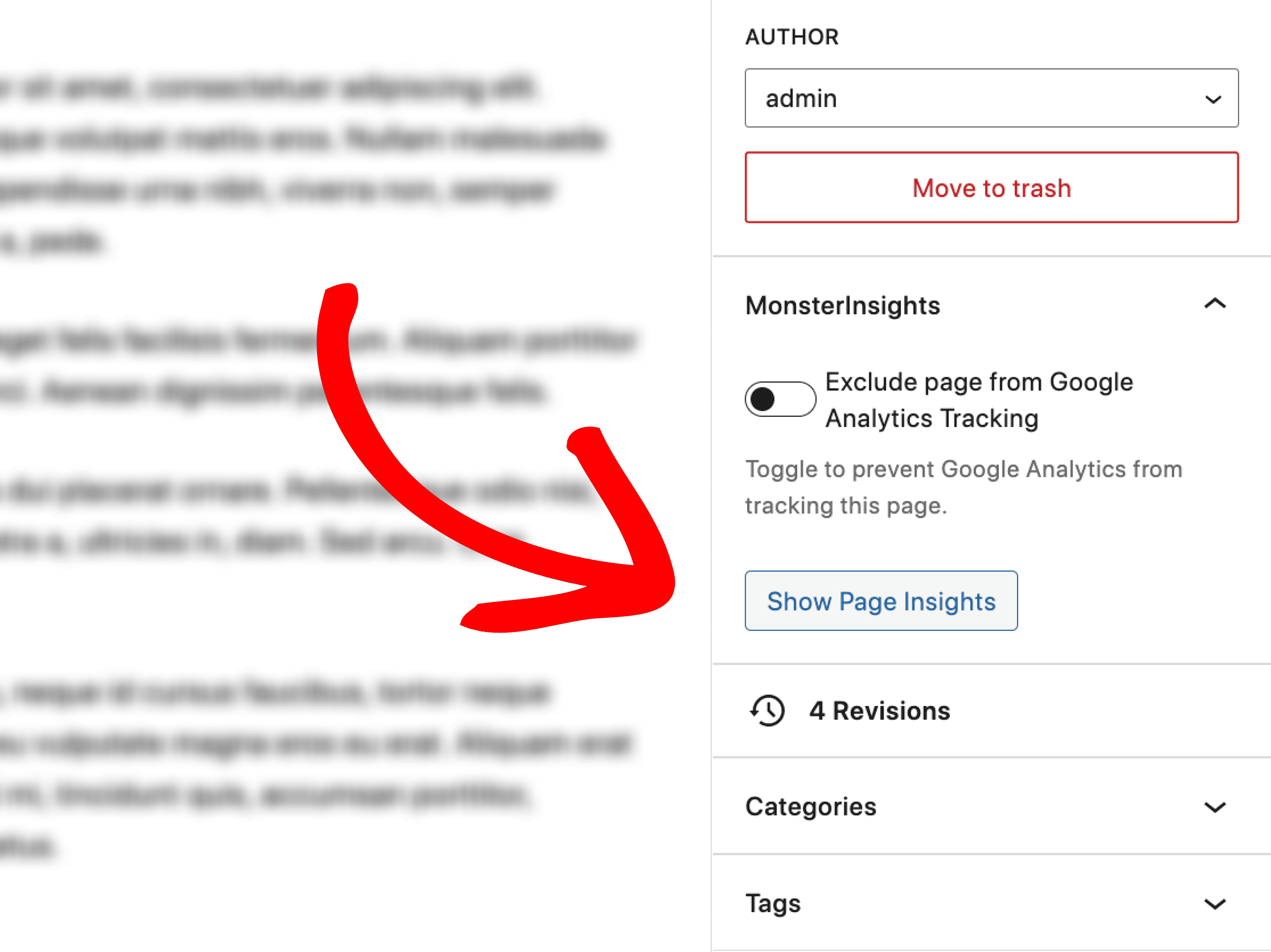
Credit: www.monsterinsights.com
Analyzing Viewer Metrics
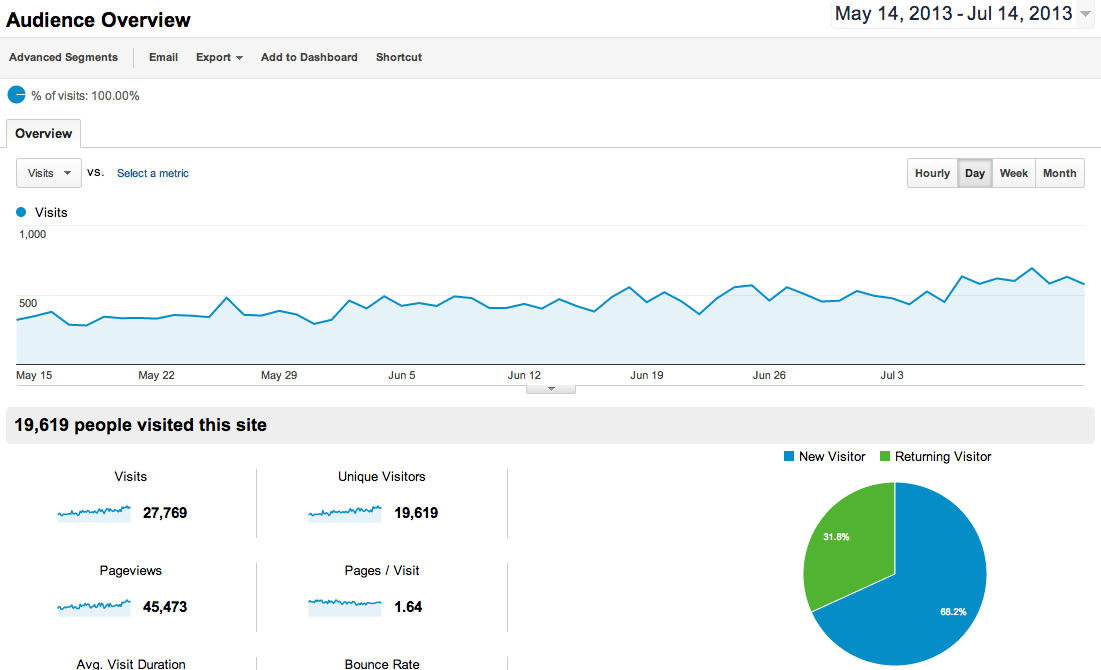
Understanding viewer metrics is important. These metrics help you know your audience. They show how many people visit your site. You can see which pages are popular. This helps improve your content. Metrics also tell you how long people stay. If they leave fast, you need changes. Knowing this helps keep viewers interested.
- Page Views: Number of times a page is seen.
- Unique Visitors: Count of different people visiting.
- Bounce Rate: Percentage of people leaving quickly.
- Average Time: How long people stay on a page.
- Traffic Sources: Where visitors come from.
Increasing Viewer Numbers
Optimize your content. Use keywordscatchy. Keep your words simple. Write short sentences. Your audience will understand better. Use images to explain. Visuals are easy to grasp. Write for your readers. Think like them. What do they want?
SEO is important. Use meta tags well. Describe your content. Search engines need them. Links are useful. Link to trusted sites. This builds authority. Keep your site fast. People dislike slow sites. Use analytics. Track your progress. See what works. Improve where needed.
Credit: wordpress.org
Privacy Considerations
Data protection is very important. Viewers’ information must be kept safe. Personal data should never be shared without permission. Websites must use strong security measures. This keeps data secure from hackers.
Users must agree before data is collected. This is called user consent. Websites should ask in a clear way. Users need to understand what they agree to. It is important to make this process simple. This builds trust with users.
Credit: www.nosegraze.com
Frequently Asked Questions
What Are Viewers On WordPress?
Viewers on WordPress refer to individuals visiting your site. They interact with your content, and their activity can be tracked. WordPress analytics tools can help you understand viewer behavior, preferences, and engagement levels. This data is crucial for optimizing your site and improving user experience.
How Can I Track Viewers On WordPress?
Tracking viewers on WordPress is easy with plugins like Google Analytics. These tools provide insights into visitor demographics, behavior, and engagement. You can analyze traffic sources and popular content. This information helps tailor your content strategy and improve site performance.
Why Are Viewers Important For My WordPress Site?
Viewers are vital as they drive engagement and conversions. Understanding viewer behavior helps enhance content, design, and functionality. Increased viewer interaction boosts SEO rankings. A strong viewer base can lead to more subscriptions, sales, and growth for your WordPress site.
How Do Viewers Affect WordPress Analytics?
Viewers impact WordPress analytics by providing data on site performance. Their activity reveals popular pages, bounce rates, and visit duration. This information helps optimize content and improve user experience. Effective analytics can guide your strategy, ensuring your site meets viewer expectations.
Conclusion
Understanding viewers on WordPress boosts your site’s performance. They offer insights into what content engages users. Use this data to refine your blog strategy. Focus on popular topics to attract more readers. Keep track of viewer trends for better content planning.
Remember, consistent analysis leads to growth. Engage with your audience and build a loyal community. Stay updated with viewer feedback and adapt to their needs. This ensures your WordPress site remains relevant and user-friendly. Happy blogging!



