
Imagine logging into your WordPress site and feeling confident about every setting. Sounds great, right?
If you’ve ever felt overwhelmed by the numerous options in WordPress, you’re not alone. Many users find themselves lost amidst the various settings. But here’s the good news: understanding these settings can be surprisingly straightforward. We’ll walk you through the main types of settings in WordPress, breaking them down into easy-to-digest segments.
You’ll learn how each setting impacts your site and how you can use them to your advantage. Whether you’re a seasoned blogger or a newbie, mastering these settings can transform your WordPress experience. Ready to boost your site’s performance and security? Let’s dive in!
General Settings
The Site Title shows at the top of your page. It tells users your site’s name. The Tagline is a short description. It tells what your site is about. Both are important. They help visitors know your site better. Simple and clear titles work best.
This is the link to your WordPress files. It usually looks like www.yoursite.com/wordpress. Users type it to visit your site. Keep it correct and updated. Mistakes can cause problems.
This link is where people find your site online. It may be the same as your WordPress URL. Or it can be different. Make sure it’s right. It helps users find your site easily.
Your Email Address is for admin notices. WordPress sends updates and alerts here. Use a checked email. This keeps you informed and ready.
You decide if anyone can join your site. Allow or restrict membership. New users get a default role. It can be subscriber, contributor, or more. Choose wisely. This affects site control and security.
Set your local Timezone. It affects post times and schedules. Choose a Date Format you like. It makes your site look neat and clear. Visitors know when posts were made.
Credit: firstsiteguide.com
Writing Settings
The default post category is where new posts go. If you don’t pick a category, it goes here. It’s like a home for uncategorized posts. Set it to your most-used category. This makes organizing easier.
The default post format decides how posts look. Choose from options like standard, video, or gallery. Pick one that matches your content style. This helps keep your blog consistent.
Mail server settings help send emails from your blog. You need the right server and port numbers. This makes sure your messages go through. Check with your host for details.
Update services tell search engines about new posts. They help your content get noticed. List these services in your settings. This boosts your blog’s visibility online.
Reading Settings
The front page display setting decides what visitors see first. You can choose between a list of your latest posts or a static page. A static page shows the same content every time. Choose what’s best for your site. Do you want to show new updates or keep it fixed?
The blog pages show at most setting limits posts per page. More posts on one page can slow down loading. Fewer posts make pages load faster. Choose a number that fits your needs. Balance is key.
Syndication feeds show your latest posts to subscribers. You decide how many recent posts they see. Choose a number that keeps them updated. They can see 5, 10, or more posts at a time.
The search engine visibility setting affects site discovery. You can allow or block search engines. Allowing them means more people might find your site. Blocking means less visibility. Choose based on your goals.
Credit: crocoblock.com
Discussion Settings
Default Article Settings help manage comments on new posts. Authors decide if readers can comment. Settings allow pingbacks and trackbacks too. These settings give authors control over interactions.
Other Comment Settings let users customize comment features. Visitors can fill out forms before commenting. Settings can limit the number of links allowed in comments. This helps prevent spam.
Email Me Whenever keeps authors informed. They get alerts for new comments. Emails are sent when a comment needs approval. This ensures authors stay updated on interactions.
Before a Comment Appears, authors can set approval rules. Comments might need manual approval. Authors can allow comments if the user has a previous approved comment.
Comment Moderation is useful for controlling comments. Authors can filter comments with certain words. They can block comments with many links. This helps keep discussions clean.
Avatar Display shows user images beside comments. Users can choose their avatar. Authors decide whether avatars show up. This adds personality to comments.
Media Settings
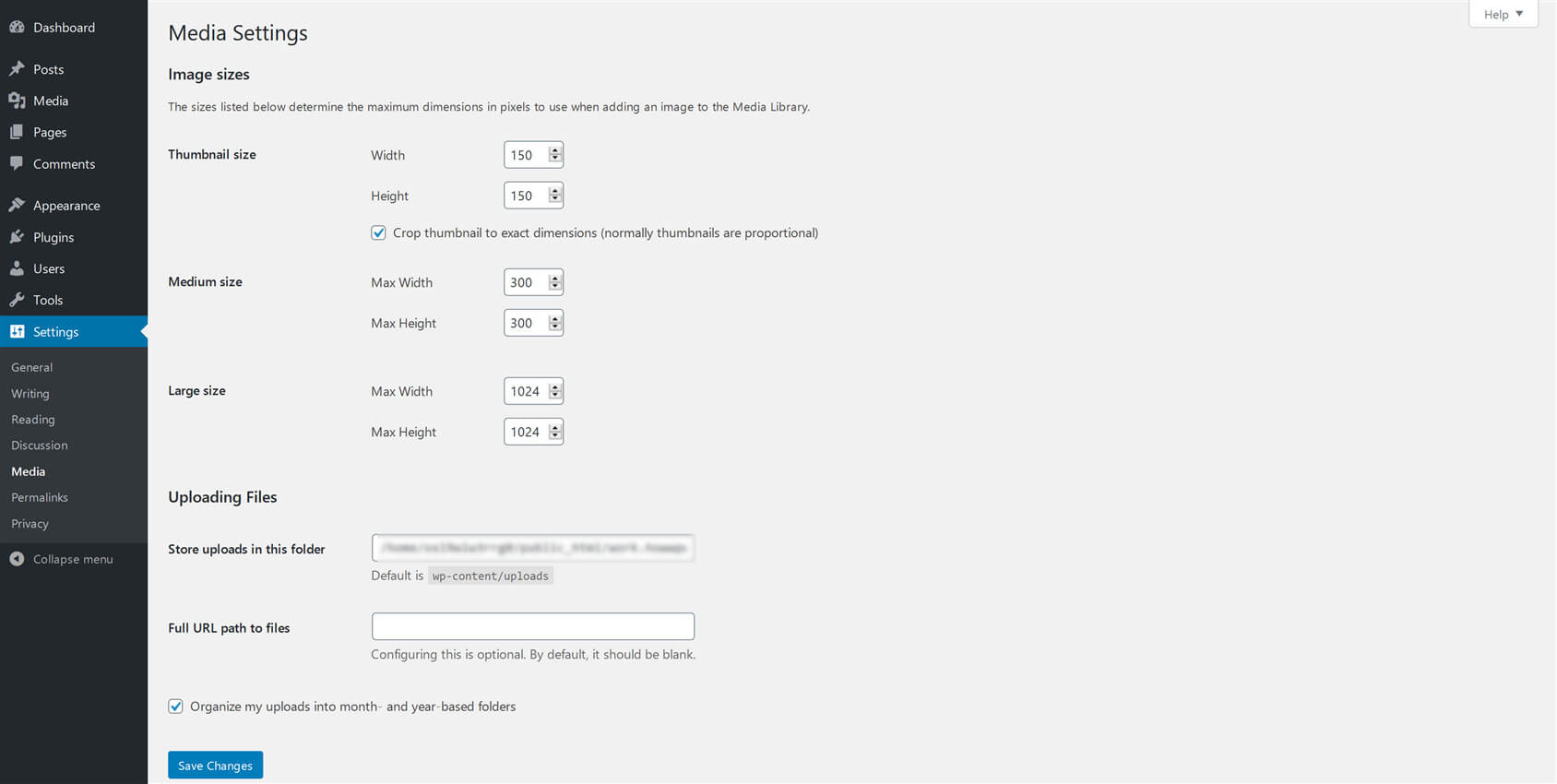
WordPress can resize images. It helps keep your site fast. You find three main image sizes here. These are Thumbnail, Medium, and Large.
Thumbnails are small. They are good for previews. Medium size is useful for blog posts. It shows more detail. The large size is for full-screen images. Use it for high-quality visuals.
You can change these sizes. Go to settings. Choose the size that fits your needs. This helps in keeping your site neat and organized.
Credit: www.s-sols.com
Permalink Settings
Permalinks are links to your blog posts. There are different formats you can choose. One option is the Plain format. It is simple but not pretty. Another option is Day and Name. This shows the post’s date and name. It is good for news sites. The Month and Name format is similar. It shows the month instead of the day. This is useful for less frequent posts.
Optional settings can change how permalinks look. You can add a category to the link. It helps organize your posts. Another option is to use tags in your links. It is good for detailed search. You can also shorten links. This makes them easier to read. Short links are better for social media. They save space and look clean.
Privacy Settings
WordPress lets you create a Privacy Policy Page easily. This page tells users how you handle their data. It’s important to have one. It builds trust with your visitors. You can edit the default content WordPress provides. Make sure to include how you collect, use, and store data. Keep the language simple and clear. This helps everyone understand your policy better.
The Privacy Guide in WordPress helps you. It shows steps to improve site privacy. Follow these steps to keep data safe. This guide is very useful for beginners. It gives clear tips and instructions. You learn how to protect user data better. Always check for updates. Privacy rules can change often. Keeping up is important for security.
Frequently Asked Questions
What Are General Settings In WordPress?
General settings in WordPress control site title, tagline, URL, and email address. They also manage time zone, date format, and language preferences. These settings are crucial for defining the basic identity and functionality of your WordPress site.
How Can I Configure Writing Settings?
Writing settings allow configuration of default post category, format, and email posting. They help streamline the content creation process. Adjusting these settings ensures your writing workflow aligns with your website’s goals.
What Role Do Reading Settings Play?
Reading settings determine how content is displayed on your site. They control the homepage display and the number of posts shown. These settings are essential for optimizing user experience and improving site navigation.
How Do Discussion Settings Affect Comments?
Discussion settings manage comments, pingbacks, and trackbacks on posts. They allow control over comment moderation and notification preferences. Proper configuration ensures a healthy and engaging community interaction.
Conclusion
Exploring WordPress settings can enhance your website’s performance. Understanding these settings is vital. It helps tailor your site to meet your needs. General settings influence your site’s basic features. Writing settings control post formats and styles. Reading settings affect how users view your content.
Discussion settings manage comments and interactions. Media settings organize images and videos. Permalink settings improve URL structure. Each setting plays a role in website functionality. Take time to explore them. Make your site efficient and user-friendly. Keep learning and adjusting.
Optimize your WordPress experience for better results.


