
Imagine this: you’ve crafted a perfect blog post, full of valuable insights and information. But somehow, it’s not reaching the audience you envisioned.
You start wondering what might be missing. The answer could be as simple as using the right tags in WordPress. Tags are like the secret sauce that can enhance your content’s visibility, making it easier for readers to discover your work.
They help organize your content, improve its searchability, and connect related topics seamlessly. By understanding how to use tags effectively, you can unlock new levels of engagement and reach with your blog. Ready to dive into the world of WordPress tags and see how they can transform your blogging experience? Let’s explore how you can harness their power for better visibility and engagement.
Credit: kinsta.com
Tags In WordPress
Tags are words you add to your blog posts. They help readers find related content easily. Tags are like labels. They group similar posts together. This makes browsing your site easier.
Tags are different from categories. Categories are broad. Tags are specific. A post can have many tags. Tags should be relevant. They should describe the post clearly.
Think of tags as keywords. They tell readers what your post is about. They also help with search engines. Good tags improve your site’s visibility. Always choose tags wisely.
Tags are simple to use. You can add them while writing. WordPress lets you add many tags. But don’t overuse them. Too many tags can confuse readers.
Purpose Of Tags
Tags help organize blog posts on WordPress. They make searching easy. Readers find related topics through tags. Tags improve navigation on the website. They act like labels. Each post can have several tags. Tags connect similar posts together. This creates a better reading experience. Users spend more time exploring the site. Tags improve SEO for the website. Search engines understand content better. This helps in ranking posts higher. Tags are simple but useful tools. They are easy to add during writing. Many bloggers use tags every day. Tags make websites more user-friendly.
Creating Tags
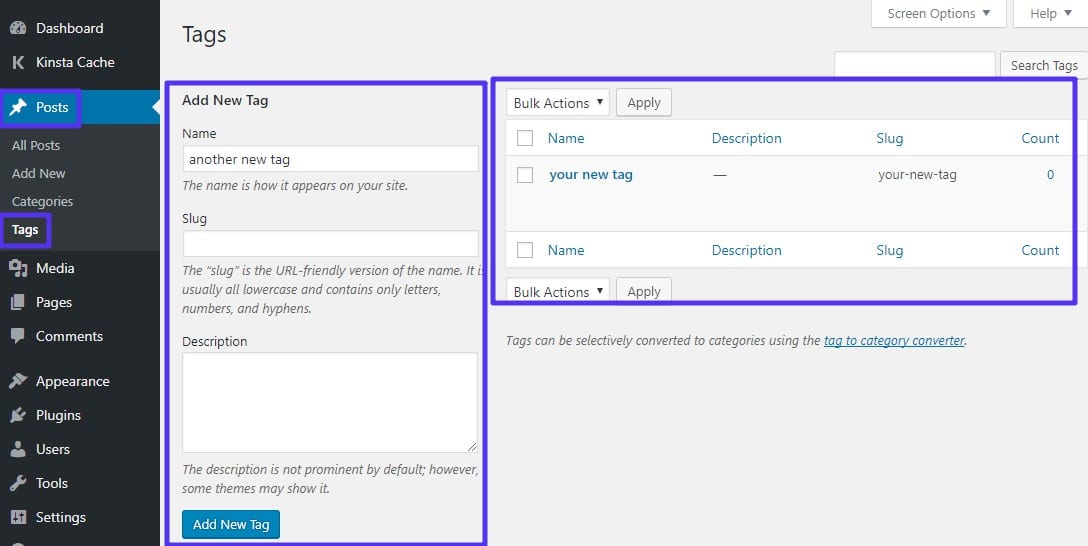
Tags help organize posts. They make content easy to find. Tags are like labels. They describe the post’s topic. To create tags, go to the WordPress dashboard. Click on “Posts” then “Tags.” Type the name of the tag. Press “Add New Tag.” Now, the tag is ready to use.
Adding Tags To Posts
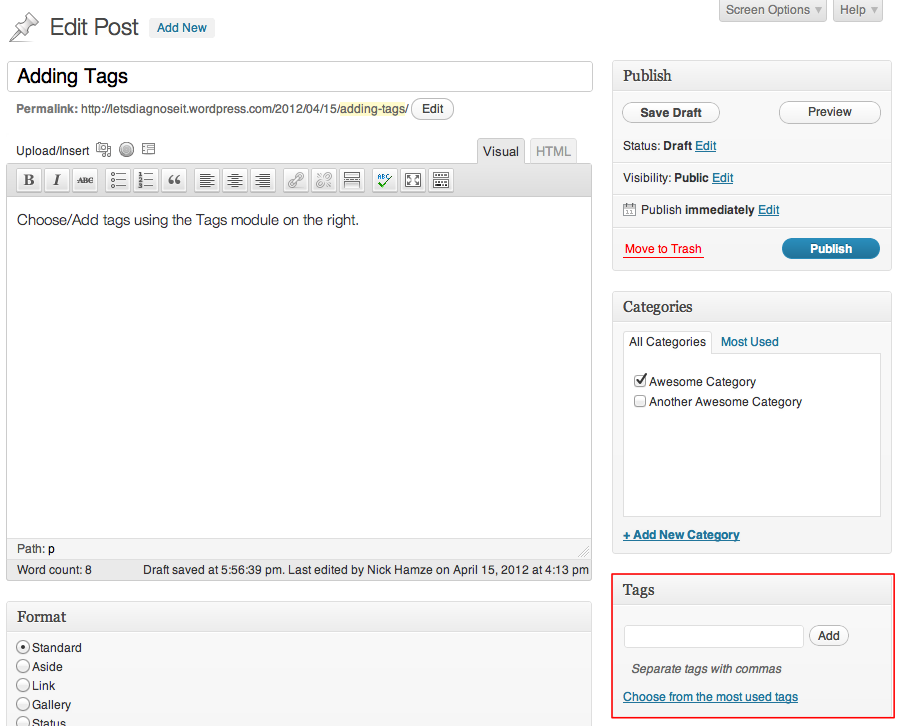
Tags can be added to posts easily. First, open the post editor. On the right side, find the “Tags” box. Click inside the box. Start typing your tag. As you type, suggestions appear. Choose a suggested tag or create a new one. Separate multiple tags with commas. Save or update the post. Tags help readers find related content.
Managing Tags In WordPress Dashboard
The dashboard helps manage tags. Go to “Posts” then “Tags.” See a list of all tags here. You can edit or delete tags. Click “Edit” to change a tag’s name. Choose “Delete” to remove a tag. Managing tags keeps content organized. It’s simple and quick.
Credit: make.wordpress.org
Tags Vs Categories
Tags and categories help organize your content. Categories are like big groups. They cover broad topics. Tags are more specific. They describe details. Categories are like chapters in a book. Tags are like the index. Categories must be chosen, but tags are optional. You can have many tags for one post. Categories help users find main topics. Tags help find specific details. Both improve site navigation.
Use tags when you want to show details. They help find related posts. Tags are like labels. They make searching easy. Use tags when you have many posts. They connect similar ideas. Tags are helpful for readers. They guide them to more content. Avoid too many tags. This can confuse users. Use tags wisely for best results.
Seo Benefits Of Tags
Tags help users find content fast. They group similar topics together. This makes browsing easy. A well-tagged site feels organized. Visitors stay longer when they find what they need.
Tags act like road signs. They guide users to related posts. Better navigation leads to happy readers. Happy readers often return. This boosts your site’s popularity.
Tags can boost your site’s search rank. They add keywords to your content. Search engines notice these keywords. This helps them index your site better.
More tags mean more chances to show up in searches. Use relevant tags for your posts. Relevant tags match what people search for. This can lead to more visitors. More visitors can mean more success for your site.

Credit: blog.hubspot.com
Best Practices For Using Tags
Tags in WordPress help organize content by grouping similar posts together. They enhance user experience by making it easier to find related topics. Use specific and relevant tags to improve searchability and maintain a clean, efficient website structure.
Choosing Relevant Tags
Tags help organize your content. Select tags that match your post’s theme. Use keywords your readers search. Relevant tags improve your site’s searchability. Limit tags to three or five per post. This keeps content clean and easy to find. Avoid using vague or generic tags.
Avoiding Tag Overuse
Too many tags can confuse users. It can make your site look messy. Keep tags simple and clear. Choose tags that truly represent your post. This helps readers find what they need. Overusing tags can hurt your site’s SEO. Be mindful and choose wisely.
Common Mistakes With Tags
Using tags that do not relate to your content confuses readers. They might click expecting one thing and find another. This can lead to disappointment. People leave your site quickly. This increases your bounce rate. Always choose tags that match your content. Think about your main topics. Make sure tags are clear and specific. This helps readers find what they are looking for.
Adding too many tags can be overwhelming. It makes your site look messy. It is hard for readers to know what is important. Stick to a few key tags. This keeps your site organized. It helps search engines understand your content. Avoid using too many similar tags. This can confuse search engines. It is better to use a few relevant tags.
Frequently Asked Questions
What Are Tags In WordPress?
Tags in WordPress are keywords that help categorize content. They assist in organizing posts around specific topics. Tags make it easier for readers to find related articles. Unlike categories, tags are more specific and flexible. They enhance user navigation and improve SEO by linking related content.
How Do Tags Affect WordPress Seo?
Tags improve WordPress SEO by organizing content into related topics. They help search engines understand your site’s structure. Properly used tags can increase visibility and traffic. They connect similar posts, enhancing user experience and engagement. Avoid using too many tags, as this can dilute SEO benefits.
How To Add Tags In WordPress?
To add tags in WordPress, go to the post editor. On the right side, find the “Tags” box. Enter your desired tags separated by commas. Click “Add” to include them. Alternatively, you can manage tags under the “Tags” section in the WordPress dashboard.
What’s The Difference Between Tags And Categories?
Tags and categories both organize WordPress content. Categories are broad, covering general topics. Tags are specific, describing post details. You can assign multiple tags to a post, but usually only one category. Categories are hierarchical, while tags are not. Both improve site navigation and SEO.
Conclusion
Tags in WordPress help organize content efficiently. They improve searchability and user experience. Using relevant tags makes your blog easier to navigate. Readers find related posts faster. Tags enhance SEO by linking similar topics. They guide search engines to your content.
Choose meaningful tags for better visibility. Keep them concise and specific. Avoid overusing or repeating tags. They should reflect the post’s main themes. Tags are simple tools but powerful. They boost engagement and help readers. Properly managed tags make your blog more accessible.
So, use tags wisely to enhance your WordPress site.



