
Are you looking to enhance your WordPress site without diving deep into complex coding? Imagine having the power to add dynamic content with just a few simple commands.
Welcome to the world of shortcodes in WordPress. These nifty little tools can transform the way you manage your website, making tasks easier, faster, and more efficient. Whether you’re aiming to add a contact form, embed a video, or showcase a photo gallery, shortcodes are here to simplify your life.
Curious to discover how they can empower your website? Let’s unravel the secrets of shortcodes and unlock their potential for your digital presence. Keep reading to learn how you can make your WordPress site more dynamic and user-friendly with minimal effort.
Introduction To Shortcodes
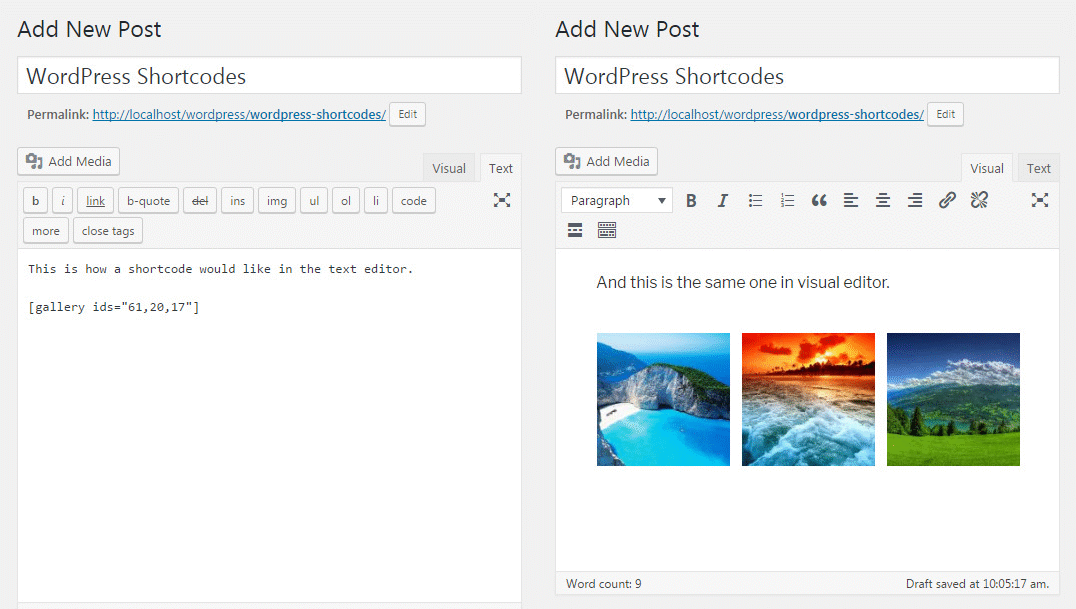
Shortcodes are small code snippets in WordPress. They help add dynamic content easily. Users add them to pages and posts. These snippets are inside square brackets. For example, shows an image gallery. Shortcodes save time. They are easy to use. No coding skill is needed. They make your site more interactive. Developers can create custom shortcodes. They offer flexibility. Many plugins use shortcodes. They enhance WordPress functions. These codes are like shortcuts. They bring features without hassle. Shortcodes are handy for everyone. They make web design simple. They are part of WordPress magic.
Credit: www.smashingmagazine.com
Origins And Purpose
Short codes began as a way to make WordPress easy. Users wanted simple tools. Developers needed flexibility. Short codes help both groups. They are small pieces of code. This code can be added to posts or pages. It creates features without writing lots of code. Think of it as a shortcut. Want to add a gallery? Use a short code. Need a video? Again, a short code helps. They make tasks quicker. They also reduce errors. No need to worry about coding mistakes. Just add the short code and see the magic. Easy, right?
How Shortcodes Work
Shortcodes are small code snippets in WordPress. They make adding features easy. You can use them without knowing programming. These codes are surrounded by square brackets. For example, [shortcode]. They turn into complex code behind the scenes. This helps create buttons, galleries, or videos.
WordPress has many built-in shortcodes. Users can create custom ones too. Shortcodes save time and effort. They make your site look professional. You only need to copy and paste them. This is simple for beginners and experts alike. Shortcodes are flexible and powerful.
Adding a shortcode in WordPress is easy. Paste it into a page or post. It works instantly. Shortcodes are a great tool for users. They enhance functionality without hassle.
Credit: firstsiteguide.com
Common Uses
Short codes make adding media easy. Embed YouTube videos with a simple code. No need for complex HTML. Just copy the code and paste it in your post. It’s that simple. Images and audio can also be added this way.
Layouts improve the look of your site. Short codes help create columns and buttons. They make pages look neat. Design your site with ease. No coding skills needed. Just use the right codes.
Short codes add features to your site. Want a contact form? Use a short code. Need a gallery? There’s a code for that too. They make your site more useful. Enhance user experience with these handy tools.
Built-in Shortcodes
WordPress offers many built-in shortcodes for users. These shortcodes help in adding special features without coding. One popular shortcode is the gallery. It lets you add image galleries easily. Another one is the video shortcode. It allows you to embed videos quickly. The audio shortcode is also handy. Use it for adding audio files to your page.
Shortcodes save time and effort. They make tasks simpler. You don’t need to be a tech expert. Just use the shortcode and see the magic. WordPress has many more shortcodes. Explore and find the ones you need. Enjoy creating beautiful pages with these tools.
Custom Shortcodes
Creating a custom shortcode in WordPress is simple. It lets you add special features to your site. Use PHP to create them. First, open your theme’s functions.php file. Add your code there. Define your function using add_shortcode. Choose a unique name for your shortcode. This makes it easy to use.
Best practices help keep your site running well. Choose names that are clear. This helps others understand your code. Test your shortcode before using it. This ensures it works correctly. Keep your code clean and organized. This makes future changes easier. Always backup your site before adding new code.
Shortcodes Vs. Blocks
Shortcodes are tiny bits of code. They help add features to posts or pages. They are simple and easy to use. Even beginners can use them. Shortcodes are placed in brackets. This makes them easy to find.
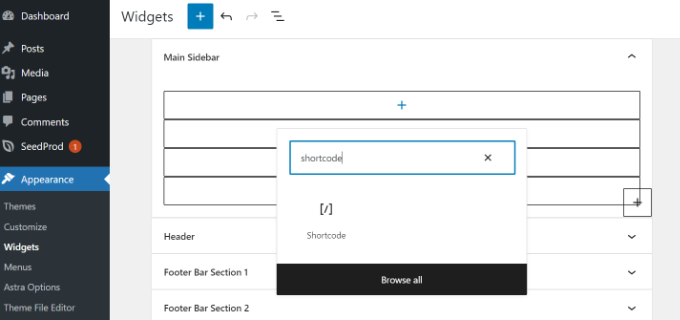
Blocks are new in WordPress. They help build pages visually. Blocks have more design options. They allow for greater creativity. Blocks are like building blocks. You can move them around easily.
Some users prefer shortcodes. They find them faster to use. Others like blocks more. They enjoy the visual design. Each has its own benefits. It’s about choosing what works best.
Troubleshooting Issues
Short codes in WordPress simplify content creation by allowing users to insert complex elements using simple tags. They enhance the functionality of posts and pages without needing advanced coding skills. Understanding their application can resolve many common issues and streamline website management.
Common Errors
Short codes in WordPress can sometimes cause errors. A common issue is the short code not showing up. This can happen if the plugin is disabled. Another error might be a broken layout. This occurs if the short code is placed incorrectly. Sometimes, short codes might conflict with other plugins. This can lead to unexpected behavior.
Debugging Techniques
Begin by checking if the plugin is activated. Ensure the short code is typed correctly. Use the preview feature to test changes. Deactivate other plugins one by one. This helps find conflicts. Use a default theme to see if the theme is the problem. If errors persist, seek help from WordPress forums. These steps usually fix most issues with short codes.
Security Considerations
Short codes help make WordPress websites look better. They are small pieces of code. Security is very important with short codes. Hackers can use them to harm your site. Always keep your WordPress updated. This helps keep your website safe. Use only trusted short codes from good sources.
Check the code before using it. Test the short code in a safe place first. Never share your website login details. Use strong passwords to keep your site safe. Backup your website often. This way, you can restore it if something goes wrong.
Credit: www.wpbeginner.com
Future Of Shortcodes
Shortcodes have been a useful tool in WordPress. They make tasks easier. Users can add special features with simple codes. These codes are small. They fit anywhere. But changes are coming. WordPress now uses Gutenberg blocks. Blocks give more flexibility. They are more visual. Some people think blocks will replace shortcodes. But shortcodes are still important. Many plugins use them. They help with different tasks.
In the future, both tools may work together. Developers might find new ways to use shortcodes. They will adapt to new needs. As WordPress grows, shortcodes will change too. They will remain a part of WordPress. For now, they are still a great tool. Easy and quick to use.
Frequently Asked Questions
What Are Short Codes In WordPress?
Short codes in WordPress are snippets of code that simplify complex functions. They allow users to add features without coding. By placing a short code in a post or page, you can easily embed elements like galleries, videos, or forms.
Short codes enhance content creation efficiency.
How Do I Use Short Codes In WordPress?
To use short codes, simply insert them into the post editor. They are enclosed in square brackets, like [example]. WordPress recognizes these codes and replaces them with the intended content or function. This allows you to add dynamic content quickly without technical expertise.
Can Short Codes Improve My Website’s Functionality?
Yes, short codes can significantly enhance your website’s functionality. They provide a streamlined way to add complex features like sliders, contact forms, and more. By using short codes, you can enrich user experience and make your site more interactive without extensive coding.
Are Short Codes Easy For Beginners To Use?
Absolutely, short codes are user-friendly and ideal for beginners. They require no coding knowledge and can be used effortlessly. Most short codes come with documentation, guiding you on how to implement them. This makes it easy for anyone to expand their site’s capabilities.
Conclusion
Short codes in WordPress simplify complex tasks. They save time and effort. You can easily add features without coding knowledge. Just copy, paste, and you’re done. Customize your website with minimal hassle. Short codes enhance functionality with simplicity. They are essential tools for every WordPress user.
Start exploring different short codes today. Discover new ways to improve your site. Short codes are powerful allies. They make website management easier. Remember, simplicity leads to efficiency. Get creative with short codes. Your WordPress site will benefit greatly.



