
Are you struggling to organize your content on WordPress? Do you want to make your products easier for your audience to find?
If so, understanding product tags in WordPress could be your game-changer. Product tags can significantly enhance your site’s navigation, making it a breeze for your visitors to find exactly what they’re looking for. By mastering this simple yet powerful tool, you can improve your site’s user experience and boost your SEO performance.
Dive into this guide to uncover how product tags can transform your WordPress site and keep your audience coming back for more.
Credit: woocommerce-manager.com
Basics Of Product Tags
Product tags help organize items in WordPress. They are labels added to products. These labels help users find items quickly. Tags are like keywords. They describe the product. Tags can be colors, sizes, or types. They improve search results on your site. Tags make browsing easier for visitors. With the right tags, users find products faster. Tags also help in sorting items. Each product can have many tags. Tags give more details about a product. They are different from categories. Categories group products broadly. Tags give specific info.
Role Of Product Tags
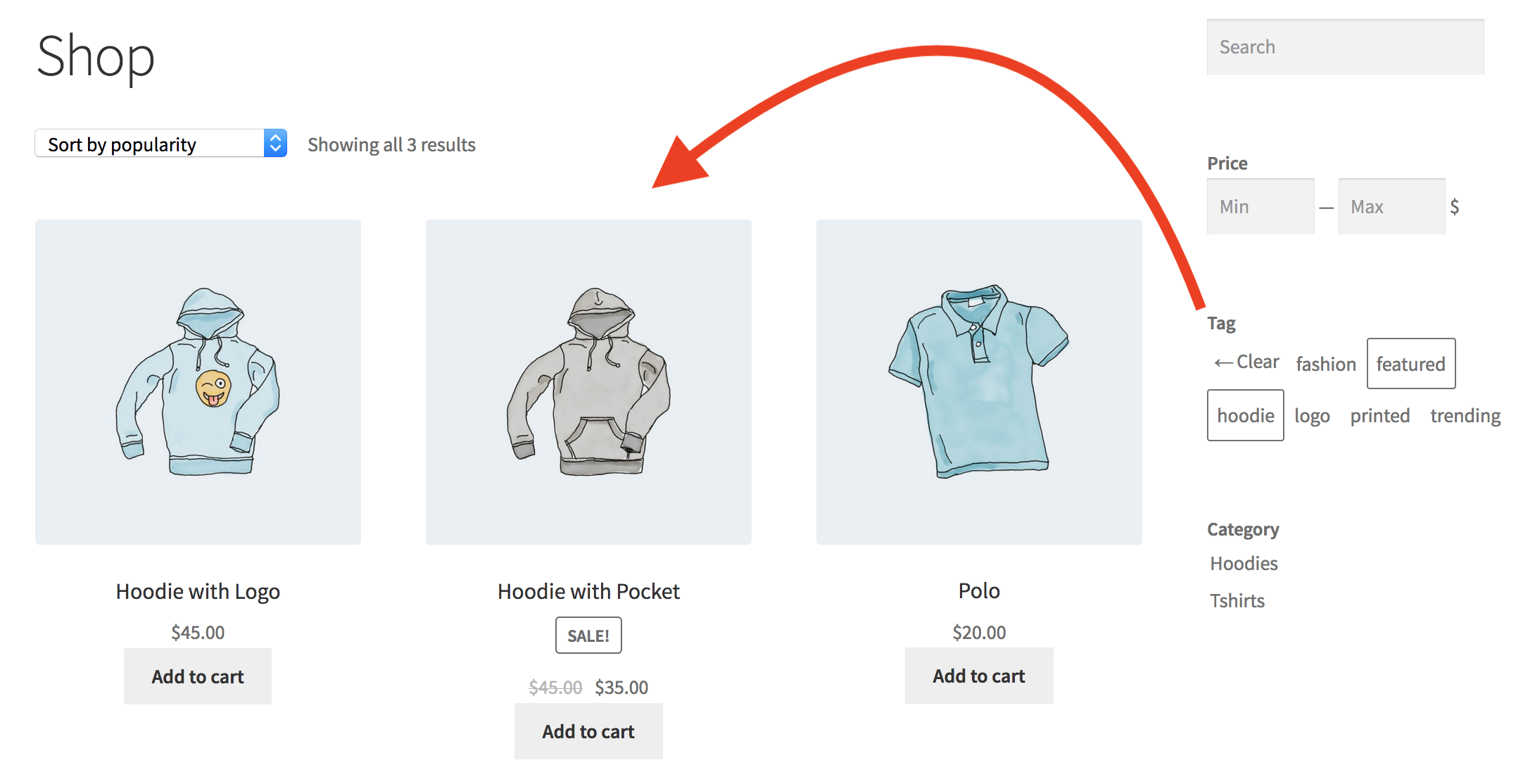
Product tags help organize products in WordPress. They act like labels for items. You can find products faster with tags. Search for a tag, and all related items appear. This makes shopping easier for everyone. Tags also help in sorting products by category. For example, a red dress can have tags like “red” or “dress”. Customers find it quickly by using these tags. This improves the shopping experience.
SEO also benefits from product tags. They make the website more visible. Search engines find tags and boost the site’s rank. This brings more visitors to the website. Tags are simple yet very useful. They make websites better organized. Use them well, and your site will shine.
Creating Product Tags
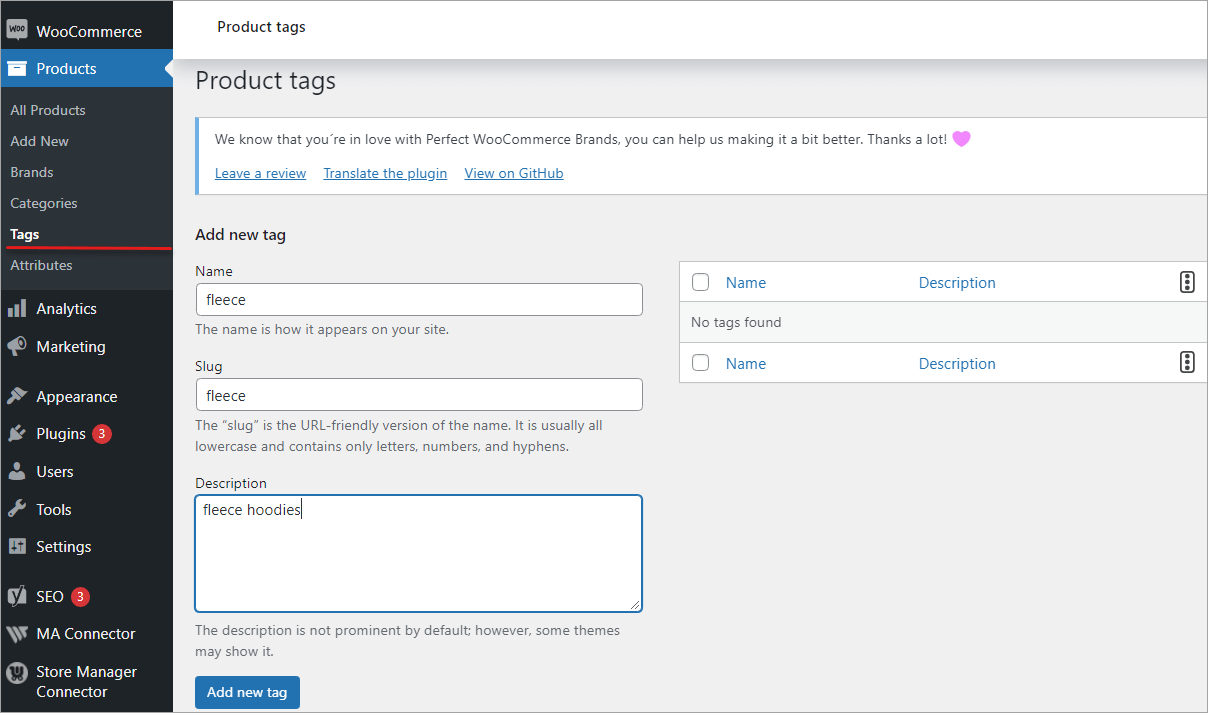
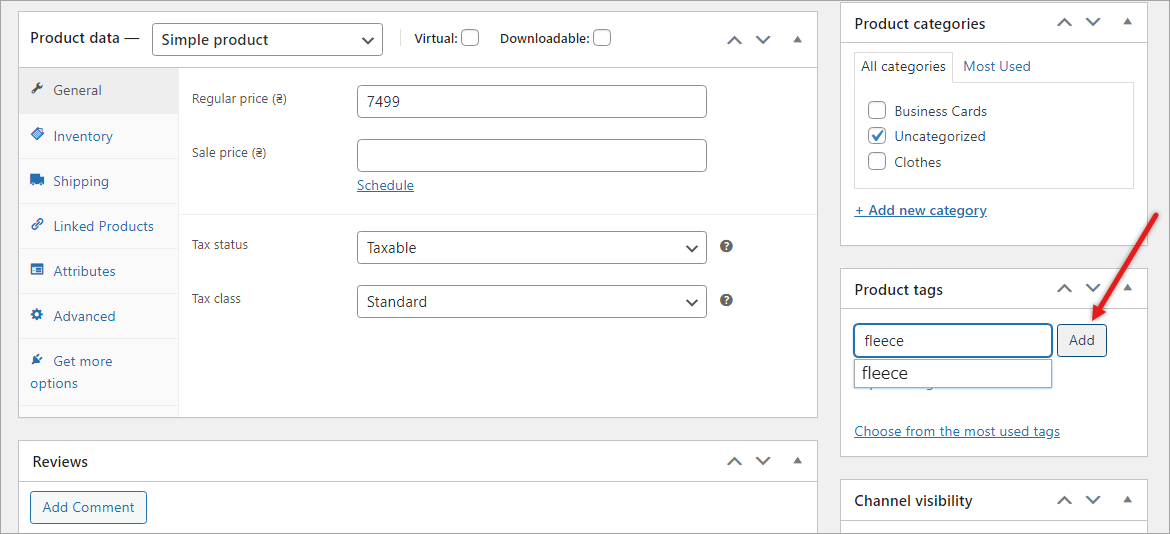
Product tags help to organize your store. They make it easy to find items. First, go to your WordPress dashboard. Click on “Products”. Then, choose “Tags”. After that, fill in the name of your tag. Write a description if you like. Finally, hit the “Add New Tag” button. Your tag is ready now!
Use short and clear names for tags. They should reflect the product. Avoid using special characters. Keep tags specific. This helps users find what they need. Use common words customers search for. Make sure each tag is unique. This keeps your store organized.
Organizing Products With Tags
Product tags help users find items quickly. They make browsing easy and fun. Tags group similar products together. Shoppers see related items fast. This saves time. It boosts satisfaction. Happy users return for more shopping.
Tags improve search results. Users type specific words. They find products with those tags. Search becomes simple and direct. No need to scroll endlessly. Tags narrow down choices. Users find what they need fast. This makes shopping easy.
Tags Vs Categories
Product tags in WordPress help organize and identify products more specifically. They act as keywords or phrases linked to items, making searches easier. Unlike categories, which group products broadly, tags offer detailed labeling for better navigation and discovery.
Key Differences
Categories are broad. They group posts by main topics. Tags are specific. They focus on details. Categories help readers find general topics. Tags assist in finding precise subjects. Categories are required. Tags are optional. Categories appear in menus. Tags do not. Categories can have subcategories. Tags cannot. Categories form a tree-like structure. Tags are flat.
When To Use Each
Use categories for organizing main ideas. They help structure your site. Choose tags for detailed searches. Tags highlight specific words. Use them to pinpoint topics. Categories are for navigation. Tags are for searching. Use categories for broad themes. Use tags for niche subjects. Categories guide users. Tags offer extra search options. Use both for better organization.
Seo Benefits Of Product Tags
Product tags can help your products be seen more. They make it easier for customers to find what they want. Tags group products by type or feature. This helps in showing similar items together. Customers can see more items they may like. This can make them buy more. Better visibility means more chances for sales.
Search engines like Google use tags too. Tags tell the search engine about your product. They act like keywords. This means your product can show up in searches. Good tags can improve your product’s ranking. A higher rank means more people see your product. More views can lead to more sales. Use tags wisely for best results.
Common Mistakes With Product Tags
Over-tagging can confuse people. Too many tags make finding products hard. Each tag should be clear and direct. Use only tags that help users. Fewer tags mean better navigation. Customers find products faster.
Over-tagging Issues
Adding too many tags does not help. It can slow down your site. This makes users leave. Use only the most important tags. This keeps your site fast and user-friendly. Too many tags can mix up your product pages. Products may not show correctly. Organize tags for better results.
Irrelevant Tags
Tags must match the product. Wrong tags confuse users. They may not find what they need. Tags must be accurate. This helps users find the right product. Wrong tags can lead to unhappy customers. Use relevant tags for better search results.
Credit: woocommerce.com
Advanced Tagging Strategies
Tags help in boosting sales. You can use tags like “Sale” or “Discount”. These attract customers to special offers. It makes your products easy to find. People love deals. They search for discounts often. So, using these tags is smart. It catches eyes quickly. Customers get excited seeing tags. It helps them make quick decisions. They add items to the cart faster. This way, tags can increase sales.
Seasonal tags are very useful. Use tags like “Winter Collection” or “Summer Sale”. These tags guide shoppers to seasonal items. People look for products by season. They want to buy what suits the weather. Seasonal tags make searching easy. Customers find what they need in seconds. It saves time for them. It makes shopping fun and easy. Using these tags helps sell seasonal items faster.
Credit: woocommerce-manager.com
Frequently Asked Questions
What Are Product Tags In WordPress?
Product tags in WordPress are labels used to classify and organize products. They help users find related items quickly. Tags improve search functionality and enhance user navigation on e-commerce sites. They are different from categories, offering more flexibility in labeling products.
How Do Product Tags Help Seo?
Product tags boost SEO by improving site navigation and enhancing keyword visibility. They make it easier for search engines to index content. Using relevant tags can increase your site’s discoverability. This leads to better search rankings and increased traffic.
Can I Use Multiple Tags On One Product?
Yes, you can use multiple tags on a single product in WordPress. This allows for versatile categorization. Tags help in cross-referencing and improving searchability. They enhance user experience by making products more accessible and easier to find.
Are Product Tags And Categories The Same?
No, product tags and categories are not the same. Categories are broader, organizing products into large groups. Tags are more specific, providing detailed classification. They work together to improve site structure and navigation. Tags offer flexibility in labeling products.
Conclusion
Product tags in WordPress simplify content organization. They enhance search results and improve user experience. With tags, finding specific products becomes easy. Users feel more engaged. Tags boost SEO by making content more discoverable. Simple and effective. Tags help structure and categorize your products efficiently.
They offer a straightforward way to manage your online store. By using tags wisely, you enhance navigation and increase visibility. Keep tags relevant and concise. This ensures your site stays organized. Embrace tags to streamline your WordPress product management. A small step with big benefits.



