
Are you trying to unravel the mysteries of WordPress? Ever found yourself wondering what exactly pages are within this popular platform?
You’re not alone. Many users dive into WordPress with enthusiasm but quickly get puzzled by the difference between posts and pages. Understanding pages is crucial for building a well-structured website that caters to your audience’s needs. Imagine a clean, organized space where visitors easily find information, increasing your site’s credibility and user engagement.
We’ll break down the concept of WordPress pages into simple terms. You’ll discover how to leverage them to enhance your website’s functionality and user experience. Keep reading to unlock the potential of WordPress pages and transform your site into a digital masterpiece.

Credit: wordpress.org
WordPress Pages Explained
WordPress pages hold important content. They are different from posts. Posts are for news or updates. Pages are for static content. Static content does not change often. Examples are About Us or Contact pages. Pages do not have dates. They are not time-sensitive. Pages are perfect for timeless information. They help in organizing a website.
Pages can have a hierarchy. Parents and children pages. Parent pages hold child pages. This structure helps in navigation. WordPress pages are easy to create. They offer many templates. Templates change the look of a page. Choose a template that fits your content. Pages are important for website structure.
Difference Between Pages And Posts
Pages and posts are both part of WordPress. They have different uses. Pages are for static content. They include “About Us” or “Contact” pages. Posts are for blog entries. They show up in reverse order. The latest post appears first.
Pages do not have dates. They do not show in the blog feed. Posts are time-stamped. They are part of a blog’s timeline. Pages are for timeless content. Posts are for timely updates. Pages are often used for important information. Posts are for news and stories.
Pages can have a parent-child structure. This means one page can be under another. Posts are grouped by categories and tags. Both can have comments. But, comments are more common on posts.
Creating A New Page
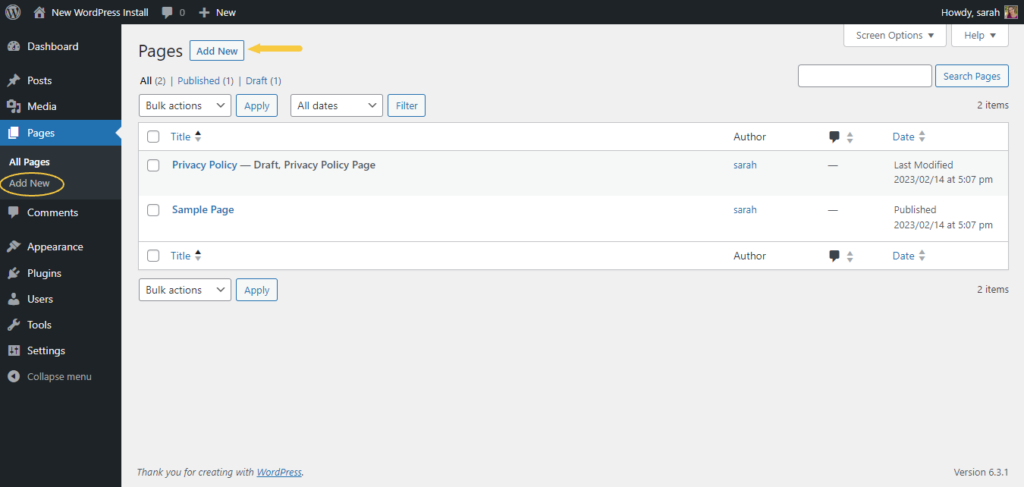
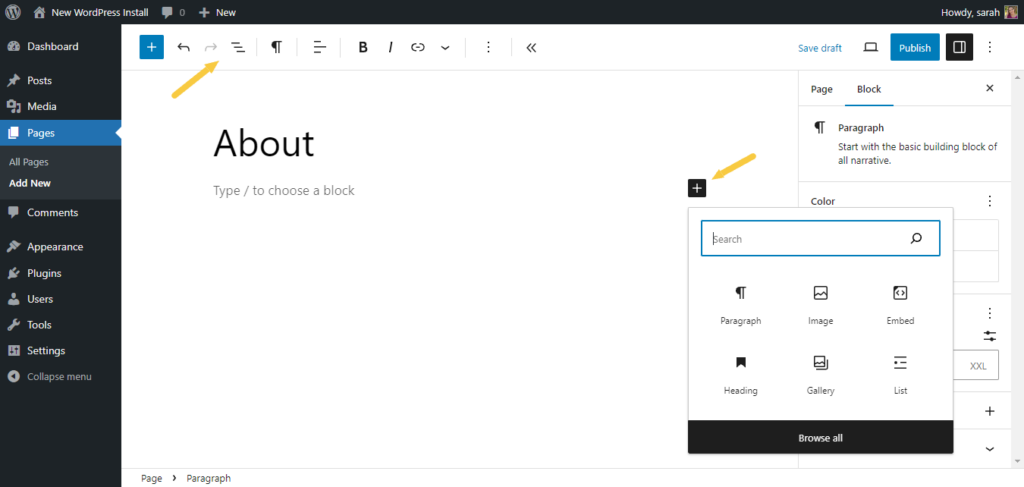
Start by logging into your WordPress dashboard. Find the Pages section on the sidebar. Click Add New to begin. A new screen will appear. You can give your page a title here. It’s like naming a book. Write your content in the large text box. You can use the toolbar to style your text. You can make it bold or italic. Add images by clicking the Add Media button. This makes your page look nice.
Look to the right side of your screen. You will see the Publish box. Click Save Draft to keep your work safe. You can come back to it later. Ready to show your page to the world? Click Publish. Your page is now live on your site. You can view it by clicking View Page.
WordPress lets you organize pages. Find the Page Attributes box. This is on the right side. You can set a Parent Page here. This helps group pages together. It’s like putting chapters in a book. Select a parent from the drop-down menu. This keeps your site neat and tidy.
Credit: solidwp.com
Customizing Page Layout
Page templates help in changing the look of a page. They allow you to have a unique design. Different pages can have different layouts. This makes your website more interesting. You can choose a template from the theme. Or, you can create your own. Page templates save time. They also make design work easier. No need for coding skills. Just pick and use. Make your site look how you want.
Widgets are small tools for your site. They add extra features. Widgets can display a calendar. Or show recent posts. You can place them in sidebars or footers. Widgets make your site more useful. They help visitors find information fast. You can drag and drop them easily. Customize their settings to fit your needs. Experiment with different widgets. Find what works best for your site. Enhance user experience with these handy tools.
Seo For WordPress Pages
WordPress pages need good SEO to be found on Google. Use simple words in your content. Short sentences work best. Always include a keyword in the title. This helps search engines find you. Use keywords in the first 100 words of your page. This makes your page more visible.
Structure is key. Use headings and subheadings. This makes reading easy. People stay longer on your page. Longer visits are good for SEO. Add images with alt text. They explain what the image is about. This helps search engines understand your page better.
Link to other pages on your site. This improves navigation. It also keeps people on your site longer. Check your page speed. Slow pages can lose visitors. Use plugins to help with SEO. They guide you in making better pages.
Managing Page Hierarchies
Parent pages hold the main content. Child pages are like their helpers. They give more info about the main topic. You can have many child pages under one parent. This makes things easy to find. It’s like a big book with chapters. Each chapter is a child page. The main book is the parent page.
Menus help people find stuff on your site. It’s important to have good menus. You can put parent and child pages in your menu. This helps people see how pages link together. A clear menu makes your site friendly. People stay longer when they can find things easily. Keep menus simple and neat. This makes everyone happy.
Utilizing Plugins For Pages
WordPress Pages serve as static content holders for your website. Plugins enhance these Pages by adding features like contact forms, galleries, and SEO tools. Using plugins effectively can elevate the functionality and user experience of your site.
Popular Plugins
Plugins make your WordPress pages better. They add new features. Yoast SEO helps your page rank higher on Google. Elementor lets you design pages easily. Use WPForms to create forms for your site. These plugins are easy to use.
Enhancing Functionality
Plugins also make pages work better. Jetpack offers security and backups. WooCommerce adds a store to your site. Akismet protects from spam comments. Each plugin has a special job. Choose the right ones for your needs.
Common Mistakes To Avoid
Many beginners make mistakes with WordPress pages. One mistake is not setting a proper page hierarchy. This helps in organizing content. Another mistake is using too many plugins. They can slow down the site. Always check if a plugin is needed. Some users also forget to make pages search engine friendly. This means using keywords well.
Some forget to update pages regularly. This can make the site look old. A good practice is to keep content fresh. Always check links on pages. Broken links can frustrate visitors. Finally, using too many large images can slow down loading time. Compress images for better speed.
Credit: solidwp.com
Frequently Asked Questions
What Are WordPress Pages Used For?
WordPress Pages are used for static content like “About Us” or “Contact” pages. They are ideal for timeless information that doesn’t change often. Unlike posts, pages are hierarchical and can have subpages. They’re not listed by date and do not support categories or tags, making them perfect for evergreen content.
How Do Pages Differ From Posts In WordPress?
Pages in WordPress are static and timeless, while posts are dynamic and time-sensitive. Pages are used for fixed content like “About Us,” whereas posts are for blog entries. Pages don’t have categories or tags, unlike posts. This distinction helps organize content effectively, catering to different audience needs.
Can WordPress Pages Be Organized Hierarchically?
Yes, WordPress Pages can be organized hierarchically. You can create parent and child pages, allowing for structured navigation. This feature is beneficial for organizing complex information, like company details or services. Hierarchical organization improves user experience by making content easily navigable and logically structured.
Are WordPress Pages Seo Friendly?
Yes, WordPress Pages can be SEO friendly. They support custom URLs, meta descriptions, and SEO plugins for optimization. Pages help improve site structure, making it easier for search engines to crawl. By using relevant keywords and best practices, you can enhance the visibility and ranking of your pages.
Conclusion
Understanding WordPress pages is essential for website management. Pages help organize content efficiently. They provide structure to your site. Unlike posts, pages remain static. This means they don’t change often. Pages are ideal for timeless content. Think about contact or about pages.
Easy to manage. Easy to navigate. They enhance user experience. With WordPress, creating pages is simple. No coding skills needed. Just click, add, and publish. Pages improve site clarity. Visitors find information easily. Better user experience leads to better engagement.
Enhance your WordPress skills. Start using pages effectively today. Your website will thank you!



