
Imagine having a superpower that lets you see exactly what your visitors are doing on your WordPress site. Sounds intriguing, right?
Understanding user behavior is like unlocking a secret map to improving your website. Whether you’re managing an e-commerce store, a blog, or a service-based site, knowing what your users are up to can transform your online presence. You can discover what keeps them engaged, what makes them leave, and what drives them to click that magical “purchase” button.
This insight is not just about numbers; it’s about creating an experience that resonates with your audience. By tracking user actions, you can tailor your content, refine your strategies, and ultimately boost your site’s performance. Stay with us as we dive into practical ways to track what users do in WordPress, turning guesswork into actionable insights.
Credit: www.isitwp.com
Importance Of User Tracking
Knowing what users do on your WordPress site is key. It helps you understand their behavior. You can see which pages they visit. You can learn which posts they like. You can find out what makes them leave. This information is valuable. It helps improve your site. Better user experience means happy visitors. Happy visitors return often. They might become loyal customers. This can grow your business.
User tracking also helps with security. You can spot unusual activities. You can see if someone tries to access restricted areas. This keeps your site safe. Protecting your data is very important. User tracking tools help you do this easily.
Essential Tools For Tracking
WordPress offers basic tools for tracking. You can see post views and comments. This helps to know what users like. Use the dashboard to check site activity. You will find the Activity tab helpful. It shows recent changes and updates. Also, you can track user roles and permissions. This ensures security and control over your site.
Plugins can add more tracking features. Google Analytics is a popular choice. It shows detailed reports on user behavior. Another option is Jetpack. It provides basic stats and insights. Use plugins for tracking user actions. They help in understanding user needs better. Make sure to choose plugins with good reviews. This ensures reliability and support.
Setting Up User Tracking
Start by finding a good tracking plugin for WordPress. Popular options include MonsterInsights, WP Statistics, and Jetpack. These plugins help you see what users do on your site. First, go to your WordPress dashboard. Click on “Plugins” and then “Add New.” Type the plugin name in the search box. Click “Install” and then “Activate.”
After installation, visit the plugin settings page. This page is usually under the “Settings” menu. Here, you can adjust what you want to track. Choose the features that are important for your site. Some plugins let you see user locations. Others show which pages are most visited. Make sure to save changes after setting up.
Credit: www.monsterinsights.com
Key Metrics To Monitor
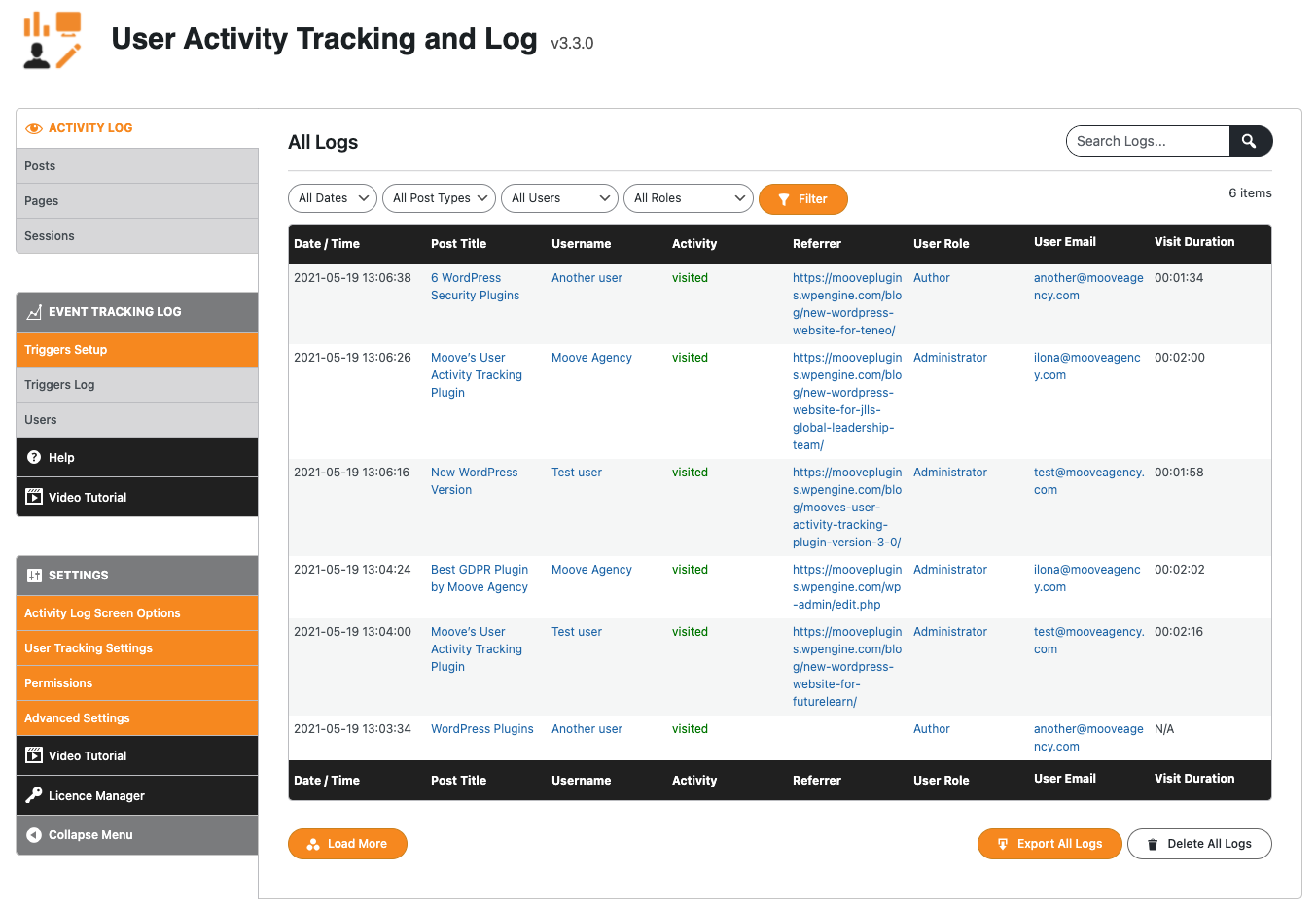
User activity logs are important. They show what users do on your site. They help you find popular pages. You can see which pages get more visits. This helps you know what content users like. Check user activity often. This helps improve your site. You can adjust content based on user actions. This makes your site better.
Page views tell how many times a page is seen. Visit duration shows how long users stay. Both metrics are important. More views mean more interest. Longer visits mean users like the content. These metrics help measure user engagement. You can see what pages need improvement. You can also find what pages are successful. Use this info to create better content.
Enhancing User Experience
Understanding how users interact with your website is crucial. It helps in creating better experiences. Use tools like Google Analytics. They show what users click. They tell how long users stay. This data is very important. It gives insights into user preferences. You can see popular pages. You can track user paths. All this helps in making informed decisions. For instance, if a page gets many visits, it might be interesting.
Good content keeps users engaged. It encourages them to return. You need to know what users like. Use the data from user behavior analysis. It helps in crafting content. Make sure the content is relevant. It should be easy to read. Keep it simple. Users should find it helpful. Regular updates keep the site fresh. This improves user satisfaction. Over time, it enhances the site’s performance.
Privacy And Compliance
GDPR and CCPA laws protect user privacy. They set rules for data use. Websites must tell users what data they collect. They must also say how the data is used. This builds trust with users. It also keeps websites safe from fines.
Websites need to have clear privacy policies. These policies should be easy to find. Users should understand them without trouble. Keeping user data safe is very important. This shows respect for user privacy.
User consent is key to data collection. Websites must ask users before collecting data. This is called opt-in. Users need to know why their data is collected. They should know how it will be used. Giving users control builds trust. It is also a legal need.
Websites can use pop-ups to ask for consent. These should be easy to read. Users should find it easy to agree or disagree. This keeps the process fair and clear.
Troubleshooting Common Issues
Track user actions in WordPress easily. Identify common issues by checking user logs. Improve your website’s performance with insights.
Plugin Conflicts
Plugins can sometimes cause problems. They may not work well together. This is called a conflict. If a site breaks, check the plugins first. Turn off all plugins. Turn them on one by one. This finds the problem plugin. Some plugins need an update. Check for updates often.
Data Accuracy Problems
Data might not always be right. This can happen if settings are wrong. Check settings often to ensure they are correct. Look at data sources. Make sure all sources are working well. Bad data can lead to wrong choices. Correct any mistakes quickly.
Credit: fr.wordpress.org
Frequently Asked Questions
How To Track User Activity In WordPress?
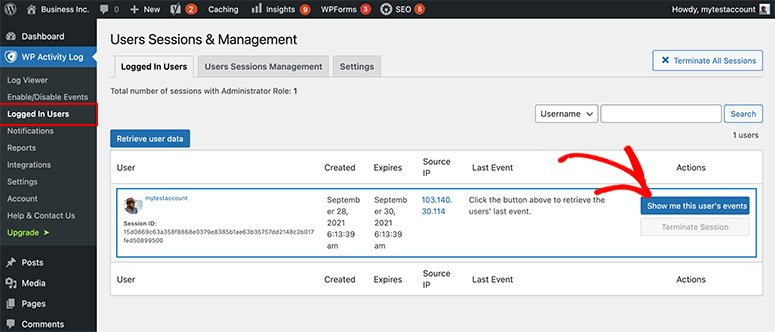
Tracking user activity in WordPress can be done using plugins. Popular options include WP Activity Log and Simple History. These plugins help monitor user interactions and changes on your site. They provide detailed logs and reports, enabling you to analyze user behavior for improved site management and security.
Why Track User Actions On WordPress?
Tracking user actions helps improve website security and performance. It allows you to identify suspicious activities and understand user behavior. With this data, you can enhance user experience, optimize content, and ensure compliance with data regulations. It’s a valuable tool for maintaining an efficient WordPress site.
What Plugins Track WordPress User Behavior?
Several plugins track WordPress user behavior effectively. WP Activity Log and Simple History are popular choices. They offer comprehensive monitoring and detailed logs. These plugins help you understand user interactions, enabling better content optimization and security measures. Choose a plugin that suits your site’s specific needs for optimal results.
Can Tracking Improve WordPress Site Performance?
Yes, tracking can enhance WordPress site performance. By monitoring user actions, you can identify issues and optimize content. It helps in understanding user preferences and improving user experience. With this data, you can make informed decisions, leading to better site performance and increased user engagement.
Conclusion
Tracking user activity in WordPress enhances your website’s success. It provides insights into visitor behavior, helping improve user experience. You can identify popular content and areas needing attention. This knowledge guides your strategy for growth. With the right tools, monitoring becomes straightforward.
Remember to respect user privacy while gathering data. Use analytics responsibly and ethically. By understanding your audience, you build a stronger connection. This boosts engagement and drives results. Start tracking today to stay ahead. Your WordPress site will benefit greatly from informed decisions.
Keep it simple, yet effective.



