
Are you confused about whether to use Google Domains name servers or your hosting provider’s name servers? This choice might seem small, but it can have a big impact on your website’s speed, security, and control.
Making the right decision can save you headaches and help your site run smoothly. You’ll discover the key differences, benefits, and potential drawbacks of each option—so you can confidently pick what works best for your needs. Keep reading to find out which name server setup will give your website the edge it deserves.
Google Domains Name Servers
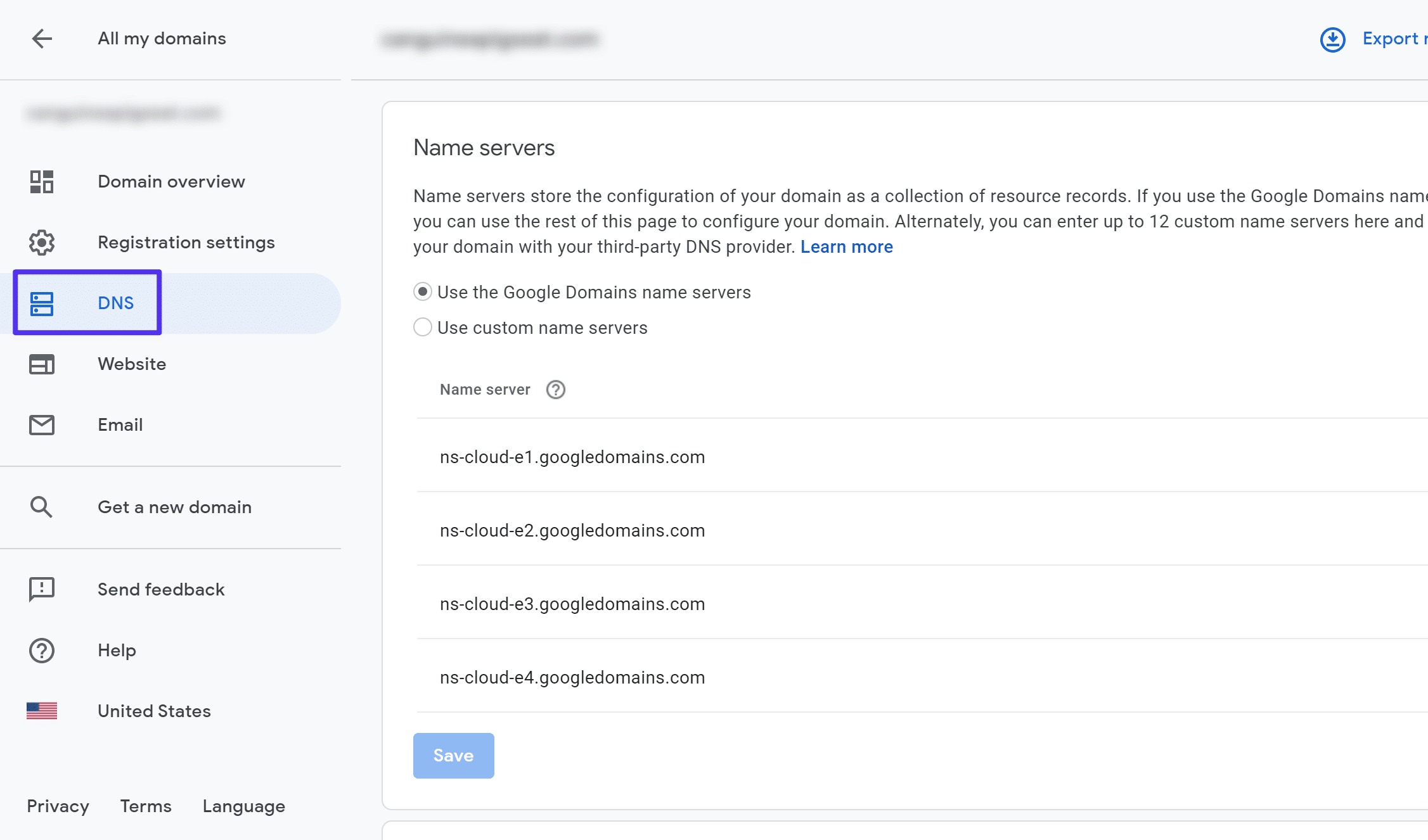
Google Domains Name Servers offer a simple way to manage your website’s domain settings. They handle the domain’s DNS, linking your web address to the right server. Using Google’s name servers can make your domain easier to control and update.
Features And Benefits
Google Domains Name Servers provide fast and stable DNS service. They update domain records quickly, reducing downtime. The interface is user-friendly, with clear options for managing DNS settings. Integration with other Google services makes website management smoother. These name servers support common DNS records needed for websites and email.
Setup Process
Setting up Google Domains Name Servers is straightforward. After purchasing a domain through Google, you can use their default name servers. Changing DNS records happens within the Google Domains dashboard. No technical skills are required. The process usually takes minutes, and changes propagate fast across the internet.
Performance And Reliability
Google uses a global network of servers to deliver fast DNS responses. This means your website loads quicker for visitors worldwide. Their infrastructure is built for high uptime and low latency. Google’s name servers rarely experience outages. This reliability ensures your domain stays accessible without interruptions.
Security Advantages
Google Domains Name Servers include built-in security features. They support DNSSEC, which helps prevent domain hijacking. Google also protects against DNS spoofing attacks. Regular updates and monitoring keep the system secure. Using Google’s servers can improve your domain’s overall safety.
Host Provider Name Servers
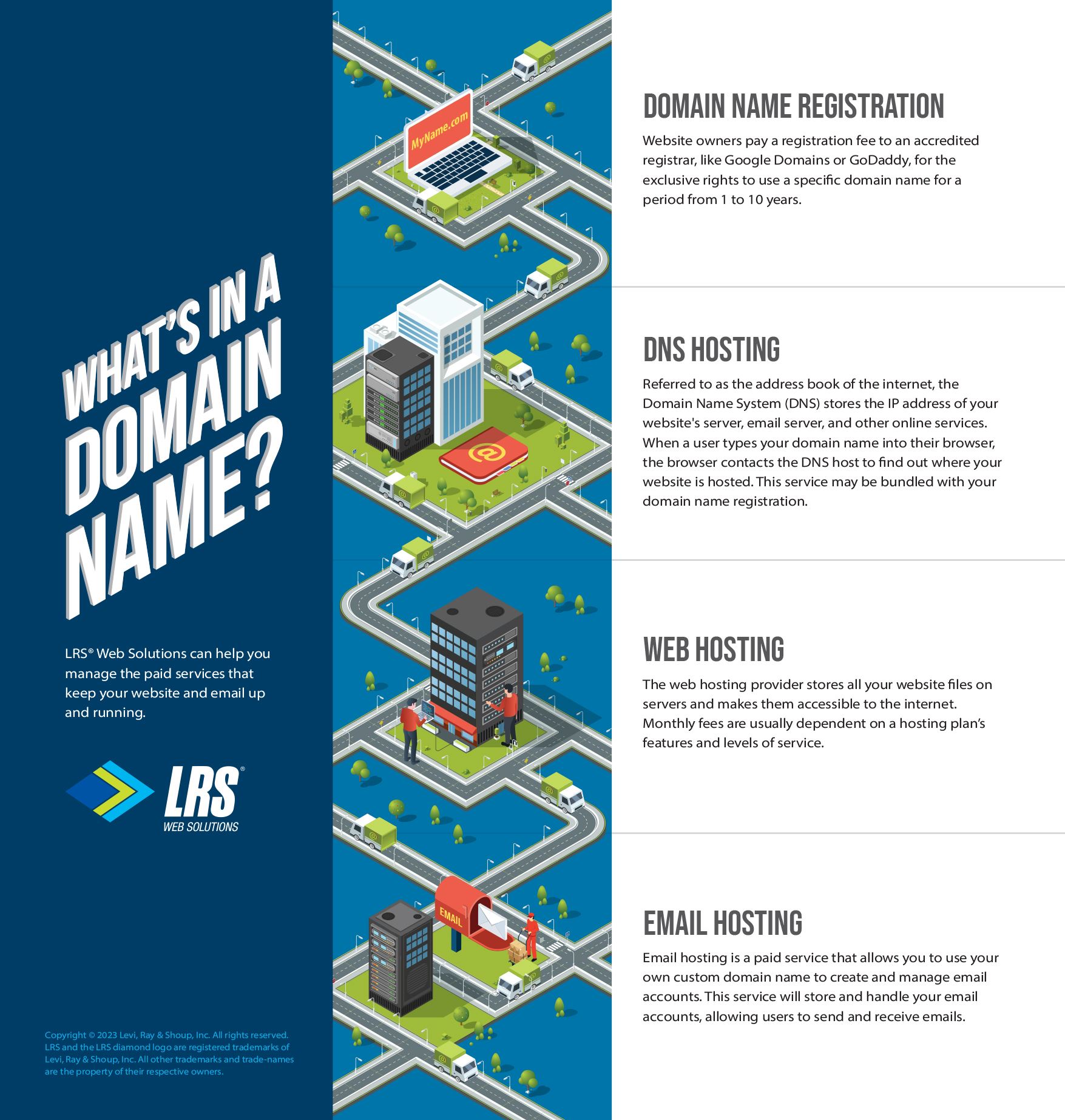
Host provider name servers manage your domain’s DNS records through your web hosting company. These servers control how your domain connects to your website and email services. Using your host’s name servers can simplify your website management. It keeps everything in one place, making updates easier for many users.
Common Features
Host provider name servers usually offer basic DNS management tools. You can add or edit records like A, CNAME, MX, and TXT. Most hosts provide a control panel to handle these settings. Some offer extra features like DNSSEC for security and automatic backups of DNS records.
Configuration Steps
To use host provider name servers, update your domain’s DNS at your registrar. Replace the current name servers with those given by your host. Wait for DNS propagation, which can take a few hours to a day. After that, your domain will point to your hosting provider’s services.
Speed And Uptime
Host provider name servers depend on the host’s infrastructure. Some hosting companies maintain fast and reliable DNS servers. Others might have slower response times or occasional downtime. Check your host’s reputation for uptime before choosing their name servers. Fast DNS helps your website load quicker for visitors.
Security Considerations
Using host name servers means trusting their security measures. Good hosts protect DNS from attacks like DNS spoofing and DDoS. Look for hosts offering DNSSEC and other protections. Weak DNS security can risk your website’s availability and data safety. Always ensure your hosting provider prioritizes DNS security.
Comparing Dns Management
Comparing DNS management between Google Domains and your web host helps you pick the best option. DNS controls how your domain name points to your website and email. Managing DNS well is key for site speed and reliability.
Both services offer ways to handle DNS records. Yet, they differ in ease, customization, and support. Understanding these differences helps you manage your domain better.
Ease Of Use
Google Domains has a simple, clean interface. It shows all DNS settings clearly. Beginners find it easy to add or change records.
Your host’s DNS tools vary. Some hosts offer user-friendly panels. Others may have complex, cluttered systems. This can confuse new users.
Google Domains focuses on basic DNS tasks. Hosts might mix DNS with other site settings. This could slow down changes.
Customization Options
Google Domains supports common DNS records like A, CNAME, MX, and TXT. It covers most small to medium website needs.
Hosts often provide advanced DNS features. These include custom TTLs, SRV records, or DNSSEC. This suits larger or more complex sites.
Google Domains may limit some advanced options. Hosts give more control but can be harder to manage.
Support And Documentation
Google Domains offers clear guides and a help center. Answers focus on domain and DNS basics.
Your host usually has support for both hosting and DNS. This can be helpful if issues involve both areas.
Host support may include live chat or phone help. Google Domains support is mainly online and less direct.
Credit: kinsta.com
Impact On Website Performance
The choice between Google Domains name servers and your host’s name servers affects your website’s performance. Fast and reliable name servers can improve your site’s speed and availability. Slow or unreliable servers can make visitors wait or cause downtime. Understanding the impact on website performance helps you decide the best option for your site.
Dns Resolution Speed
DNS resolution speed means how fast the browser finds your website’s address. Google Domains uses large, well-maintained servers. They usually respond quickly to DNS requests. Your host’s servers may be slower if they have limited resources. Faster DNS resolution reduces the time visitors wait before your site loads. This small speed boost can improve user experience.
Global Cdn Integration
Content Delivery Networks (CDNs) store your website content worldwide. Google Domains easily integrates with many global CDNs. This helps deliver your website content faster to visitors everywhere. Some hosts may offer CDN services but might have fewer locations. Using name servers that work well with CDNs improves site speed globally. It also reduces load times for international visitors.
Downtime Risks
Downtime means your website is unavailable to visitors. Google Domains has strong infrastructure with low downtime risk. Some hosts may have less reliable name servers, causing occasional outages. If your host’s DNS goes down, your site becomes unreachable. Google’s name servers have built-in redundancy to keep your site online. Choosing reliable name servers lowers the risk of losing visitors due to downtime.
Security And Privacy Factors
Security and privacy matter a lot when choosing name servers. Your domain name system (DNS) controls how visitors reach your website. It also affects the safety of your site and user data. Picking the right name server can reduce risks from hackers and keep your information private.
Dnssec Support
DNSSEC helps protect your domain from fake DNS data. It ensures users reach the real website, not a fake one. Google Domains offers DNSSEC by default. Some hosts may not support it or require extra steps. Using DNSSEC adds a strong layer of security.
Data Privacy Policies
Data privacy rules show how providers handle your information. Google has clear policies that protect your data from misuse. Some hosting companies may collect more data or share it. Check privacy policies before choosing a name server. Privacy matters for you and your visitors.
Protection Against Attacks
Name servers face many attacks like DDoS or cache poisoning. Google Domains has strong systems to block these threats. Hosting providers vary in their security measures. Using a name server with good protection keeps your site online and safe. This prevents downtime and protects user trust.
Cost Implications
Choosing between Google Domains name servers and your hosting provider’s name servers can affect your costs. Understanding the cost implications helps you decide which option fits your budget better. Let’s explore the key points about costs.
Free Vs Paid Services
Google Domains offers free name servers with domain registration. No extra fees apply for using their DNS services. Many hosting providers include name servers as part of their hosting plans. In some cases, hosts may charge for advanced DNS features. Free services suit basic needs. Paid services might offer faster response or better security.
Hidden Charges
Watch out for hidden fees with hosting name servers. Some hosts charge for extra DNS zones or records. These costs can add up over time. Google Domains keeps pricing simple with no surprise fees. Check your host’s terms carefully. Hidden charges increase total expenses unexpectedly.
Value For Money
Assess what you get for the price. Free Google name servers offer reliable performance and easy management. Paid hosting DNS may provide extras like DDoS protection or custom routing. Consider your website’s needs. Spending more is worth it only if you get real benefits. Otherwise, free services often deliver good value.
When To Choose Google Domains Name Servers
Choosing the right name server can affect your website’s speed and security. Google Domains name servers offer a reliable choice for many users. They provide easy setup and good performance. Knowing when to select Google’s name servers helps make the best decision for your site.
Ideal Scenarios
Google Domains name servers work well for simple websites. They suit small businesses and personal blogs. If your host’s name servers are slow or unreliable, Google’s can improve speed. Google also offers strong security features, which protect your domain from attacks. Use Google’s name servers if you want a trusted, stable service with minimal fuss.
User Experience Level
Google Domains name servers are easy to use. Beginners find the setup straightforward. The Google interface is clear and simple. Advanced users who want full control might prefer their host’s name servers. For those new to domains, Google’s system reduces errors and confusion. It guides users through DNS management step-by-step.
When To Use Host Provider Name Servers
Choosing the right name server is crucial for your website’s performance and management. Host provider name servers offer specific advantages that suit certain situations better than others. Understanding when to use these name servers helps in making the best choice for your website needs.
Suitable Use Cases
Host provider name servers work best if you want simple setup and control all in one place. They are ideal when your website and email services stay on the same host. Using host name servers can reduce delays in DNS updates, helping your site stay live without interruptions. These servers also fit well if your host provides extra features like SSL certificates or automatic backups.
Technical Requirements
Host name servers need your domain to point directly to your hosting provider. You must have access to the hosting control panel for DNS management. Some hosts need specific DNS records to connect your website and email properly. Knowing the host’s DNS setup rules ensures smooth site operation and fewer errors.
Migrating Between Name Servers
Migrating between name servers is a key step when managing a website’s domain. It means changing where your domain points for DNS services. This move can improve site speed, security, or management ease. Careful steps ensure the site stays online during this change. Understanding the process helps avoid common problems and downtime.
Step-by-step Guide
First, log into your current name server account. Note down all DNS records like A, MX, and CNAME. Next, access the new name server, such as Google Domains or your host’s panel. Enter the exact DNS records you copied. Double-check for typos or missing entries. Then, update your domain registrar to point to the new name servers. Finally, wait for DNS propagation, which can take up to 48 hours.
Common Pitfalls
Failing to copy all DNS records causes email or website failures. Typos in IP addresses lead to lost traffic. Forgetting to lower TTL values before switching can slow down changes. Also, changing name servers without backup risks losing domain control. Ignoring propagation time can cause confusion about whether the switch worked.
Downtime Prevention
Lower the TTL setting a day before migration to speed up updates. Keep the old name server active until you confirm the new one works. Test your website and email after the change. Plan the switch during low traffic hours to reduce impact. Have a backup plan ready in case issues arise.
Credit: www.lrswebsolutions.com

Credit: webmasters.stackexchange.com
Frequently Asked Questions
What Are The Advantages Of Using Google Domains Name Servers?
Google Domains name servers offer easy setup, reliable uptime, and seamless integration with Google services. They provide automatic DNS security and updates, making domain management simple for beginners and advanced users alike.
When Should I Choose My Host’s Name Servers?
Choose your host’s name servers if you want tighter integration with hosting features. This often improves performance and allows direct control over DNS settings via your hosting provider’s dashboard.
Can Using Google Domains Dns Affect Website Speed?
Using Google Domains DNS can improve speed due to their global network and fast response times. However, actual website speed depends on hosting server quality and site optimization.
Is It Safe To Switch Between Google And Host Name Servers?
Yes, it is safe to switch, but expect brief downtime during DNS propagation. Always backup current DNS settings before making changes to avoid service disruption.
Conclusion
Choosing between Google Domains name servers and your host’s depends on your needs. Google’s servers offer easy setup and strong reliability. Your host’s servers may provide better integration with your website. Think about what matters most: simplicity or control. Either choice can work well if managed right.
Keep your site running smoothly by updating settings carefully. Make a choice that fits your skill level and goals. Trust your decision and keep learning as you go.


