
Imagine your website standing out with a sleek, captivating design that pulls visitors into an immersive experience. You know that a fullscreen WordPress theme could be your ticket to achieving this.
It’s not just about aesthetics; it’s about making a statement, enhancing user engagement, and showcasing your content in a way that feels personal and impactful. But how do you get there? You’re not alone in wanting to transform your site into a visual masterpiece.
This guide will walk you through the straightforward steps to make your WordPress theme fullscreen. Whether you’re a beginner or have some experience, you’ll find actionable tips to turn your vision into reality. Get ready to captivate every visitor with a website that truly stands out.
Understanding Fullscreen Themes
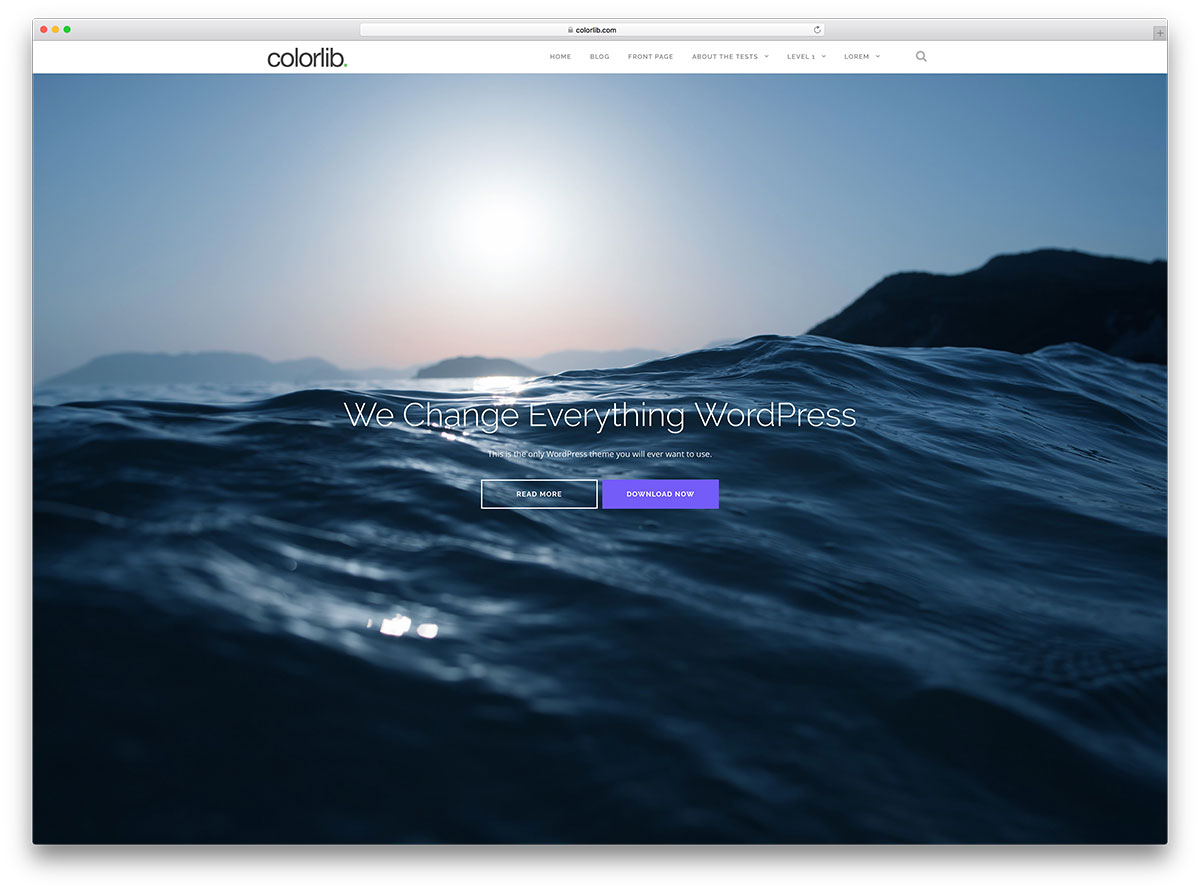
Fullscreen designs grab attention quickly. They provide a clean and simple look. Users focus on the main content. This design makes images and videos stand out. Navigation becomes easier with less clutter. Viewers enjoy a more immersive experience. Mobile users find it easy to scroll through. Fullscreen themes often improve loading speed. Faster loading keeps users happy. This design helps with better storytelling. Businesses can highlight their key messages. Content looks more appealing and is easy to read.
- Large, bold images
- Simple navigation menus
- Responsive design for mobile devices
- Minimal text for clarity
- Focus on visual content
- Fast loading speed
- Easy scrolling experience
Selecting The Right Theme
Many themes offer a fullscreen design
Choose themes that are responsive. They should look good on all devices. Also, themes must be easy to customize. You should change colors and fonts. This makes your site unique. Themes should load quickly. Fast themes keep visitors happy. They should also support plugins. Plugins add extra features to your site.
Installing Your WordPress Theme
First, download the theme files from a trusted source. Keep them safe on your computer. Now, go to your WordPress dashboard. Find the Appearance section and click on Themes. Click Add New at the top. Then, click on Upload Theme. Choose the file you downloaded. Click Install Now. Your theme will start uploading. Wait for the upload to complete.
After installation, find the Activate button. Click it to turn on your new theme. Your site will now use this theme. Check your site to see the changes. Sometimes, you may need to tweak settings. This ensures your site looks good. Enjoy your new fullscreen theme!
Customizing Your Theme
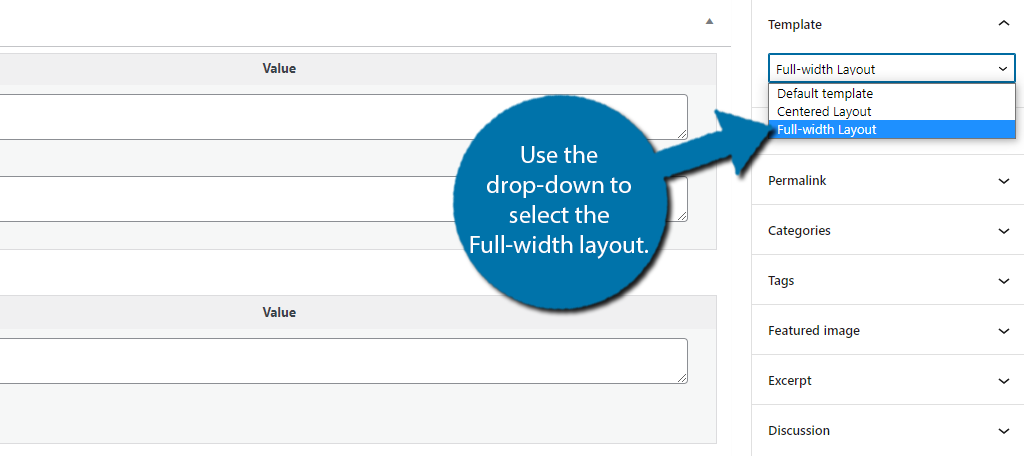
The WordPress Customizer helps change your theme easily. Open it by clicking “Customize” under “Appearance”. You see many options. Look for “Layout” or “Design”. These help set your theme to fullscreen mode. Adjust settings to fit your needs. Save your changes often. This keeps your work safe.
Try different options for a better look. Fullscreen themes show more content. They make your site look big. Explore fonts and colors too. They add style. Play with settings. See what works best. Keep testing until it looks right.
Go to Theme Options in WordPress. This is under “Appearance”. Change settings to fullscreen. Look for “Width” or “Height”. Adjust these. They help make your site fullscreen. Save changes when done. This updates your theme.
Explore different features in Theme Options. Try changing layouts. Some themes need special settings. Check your theme’s guide. It helps a lot. Custom themes need more work. Keep trying new settings. This makes your site unique.
Ensuring Responsiveness
Your site should look good on all screens. Use different devices for testing. Check how your theme works on phones, tablets, and computers. Adjust the layout if needed. Responsiveness is important for user experience. A site that looks bad can lose visitors.
Mobile users need special settings. Go to your theme options. Look for mobile settings. Adjust font sizes and images. Make buttons easy to tap. Ensure text is clear and easy to read. A good mobile view keeps users happy.
Credit: www.greengeeks.com
Enhancing With Plugins
Plugins help make your site look better. They add new features. Fullscreen plugins are great for photos and videos. Some popular choices are Elementor and Fullscreen BG. These plugins are easy to use. They have good support. Many people like them for their functions. Try these plugins for a better site.
Adding plugins to your site is simple. First, go to your WordPress dashboard. Click on “Plugins” and then “Add New”. Type the plugin name in the search box. After finding it, click “Install Now”. Don’t forget to activate it. Check your site to see changes. Make sure everything looks good. Always keep plugins updated. This helps keep your site safe.
Troubleshooting Common Issues
Making a WordPress theme fullscreen can enhance user experience. Adjust the CSS settings in the theme’s stylesheet. Ensure all elements adapt to the new layout by checking responsiveness.
Resolving Display Problems
Many themes face display problems. Some parts may not show fully. Adjusting theme settings can help. Check your screen resolution. It must match the theme’s needs. Use a tool to check your settings. Browser issues can also cause trouble. Try using another browser. Update your browser for better results. Sometimes, clearing cache solves problems. Always keep your theme updated. An outdated theme can cause issues.
Fixing Plugin Conflicts
Plugins can conflict with themes. This can cause trouble. Check which plugins are active. Disable one plugin at a time. See if the issue is fixed. Some plugins may not work well together. Compatibility is important. Use plugins that suit your theme. Update plugins regularly. An outdated plugin can cause errors. Always keep plugins and themes updated. This reduces conflicts.
Optimizing Performance
Fast websites make users happy. Slow sites lose visitors. Use fewer plugins to speed up WordPress. Plugins can slow down loading times. Choose lightweight themes. Heavy themes make pages slow. Use a caching plugin. Caching saves time by loading pages faster.
Minify CSS and JavaScript files. Smaller files load quicker. Reduce server response times. This helps pages load fast. Use a Content Delivery Network (CDN). CDNs serve files from nearby servers. This speeds up access for users around the world.
Large images slow down websites. Compress images to reduce size. Use tools like TinyPNG or JPEGmini. These tools make images smaller. Smaller images load faster. Choose the right image format. JPEGs are best for photos. PNGs work well for graphics.
Resize images before uploading. Big images take longer to load. Use lazy loading for images. Lazy loading shows images only when needed. This saves bandwidth and boosts speed. Optimize images for better site performance.
Best Practices For Fullscreen Design
Keep the design simple. Use fewer elements on the screen. This helps the user focus. Choose a clean background. Avoid too many colors. Use just a few fonts. This makes the text easy to read. Keep the layout neat and tidy. Avoid clutter. Simple design is easy on the eyes.
Make buttons big and clear. Users find them easily. Use simple icons to guide users. Keep navigation simple. Use a clear menu. Make sure it is easy to find. Ensure the website loads fast. Fast loading keeps users happy. Ensure images are clear and sharp. Blurry images are hard to see.
Credit: themeforest.net
Credit: colorlib.com
Frequently Asked Questions
How To Make A Theme Fullscreen In WordPress?
To make a WordPress theme fullscreen, customize CSS settings or use a fullscreen plugin. Access the WordPress dashboard, navigate to Appearance, then Customize. Adjust the layout settings or add custom CSS to enhance the theme’s fullscreen appearance, providing an immersive experience for visitors.
What Plugins Make WordPress Themes Fullscreen?
Several plugins can transform WordPress themes into fullscreen layouts. Consider using plugins like Fullscreen Page/Window Slider, WP Full Screen Background, or Elementor. These plugins offer features to adjust background images, sliders, and content areas, enhancing the overall fullscreen aesthetic of your WordPress site.
Why Use A Fullscreen WordPress Theme?
Fullscreen WordPress themes offer a modern, immersive user experience. They highlight visual content effectively, making it ideal for portfolios, photography, or creative projects. Fullscreen layouts minimize distractions, directing visitor focus on essential elements. This design approach enhances engagement and leaves a lasting impression.
Can I Make Existing Themes Fullscreen?
Yes, existing WordPress themes can be made fullscreen. Customize the theme using CSS adjustments or employ a dedicated plugin. Many themes offer built-in customization options. Explore the theme’s settings or utilize page builders like Elementor to achieve a fullscreen design seamlessly.
Conclusion
Making your WordPress theme fullscreen is simple and effective. First, explore your theme settings. Many themes offer built-in fullscreen options. If not, consider using a plugin. Plugins can enhance functionality without coding. For more control, dive into CSS. Adjust margins and padding to fit your screen.
Testing is crucial. Ensure your site looks great on all devices. Mobile, tablet, and desktop. A fullscreen design offers a clean and modern look. Visitors enjoy a seamless browsing experience. Your site becomes visually appealing. Implement these tips for a polished website.
Enjoy the fresh, fullscreen layout!



