
Are you struggling to get your WordPress site looking just right? Maybe you’ve noticed that your images aren’t fitting as perfectly as you’d like.
Understanding the dimensions of your WordPress theme images is crucial for creating a visually appealing website. When your images align perfectly, your site looks more professional and engaging. In this guide, you’ll discover simple steps to identify the exact image sizes your WordPress theme requires.
You’ll learn how to make your site not only look good but also perform better by avoiding common pitfalls. Ready to transform your website into a polished masterpiece? Let’s dive in and unlock the secrets of perfect image dimensions!
Credit: www.elegantthemes.com
Inspecting Image Sizes
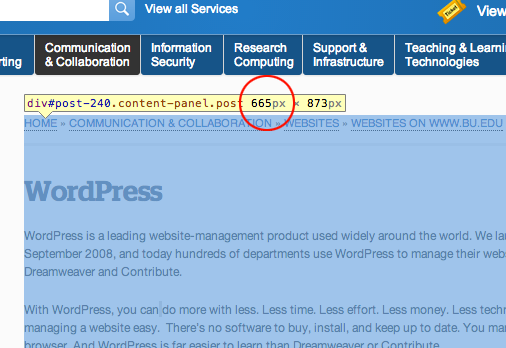
Open your browser and right-click on the image. Choose “Inspect” from the menu. A panel will appear. Look at the highlighted code. It shows the image URL and its dimensions. The dimensions are in pixels.
Sometimes, the image dimensions are set in CSS. Check the right side of the panel. You might see width and height values there. This helps you know the displayed size.
Click the image in the developer panel. Look for the Styles tab. Check for CSS rules that affect the image. Sometimes, images have max-width or height settings.
These settings can change how big the image looks. You might also see other CSS properties. These can include padding or margins. They can make the image look different in size.
Theme Documentation
Theme guides can help with image sizes. They show the right dimensions. Check the documentation that comes with your theme. It often has the details you need. Look for sections about images or media. Sometimes, themes have a specific guide for this.
Image requirements are important. They help keep your site looking good. Themes often need images to be a certain size. This helps them fit well on the page. Always check the theme’s image size recommendations. This ensures your site looks nice and clean.
Using Plugins
Plugins can help find image sizes easily. They show exact dimensions of theme images. Some plugins do this with just a few clicks. Images are important for website design. Knowing their size helps in better layout planning. Correct image size improves site speed. Faster websites are good for visitors. It also helps with SEO. Search engines like fast sites. Plugins are useful tools for website owners.
Many plugins manage images well. They offer features like resizing and optimization. Smush is a popular choice. It compresses images without losing quality. Imagify offers similar functions. It makes images load faster. EWWW Image Optimizer is another option. It optimizes images automatically. These plugins keep images sharp and clear. Good image management makes websites look great. It also boosts user experience.
Credit: enginescout.com.au
Contacting Theme Support
Understanding the dimensions of WordPress theme images is essential for maintaining a polished website look. Direct contact with theme support can provide the exact image sizes needed. Clear guidance ensures your site’s visuals align perfectly, enhancing user experience and aesthetic appeal.
Reaching Out To Developers
Asking developers about your theme can be helpful. They know the exact dimensions of images. Developers can provide precise image size details. This helps in maintaining the theme’s look. Make sure to ask them directly. Keep your questions simple and clear.
Common Queries For Image Dimensions
- What is the recommended image size?
- Which image format works best?
- How can I optimize my images?
- Is there a maximum image size?
These questions can help improve your site’s appearance. Knowing the right dimensions is crucial. It ensures images fit well in your theme. Clear communication with developers is key.
Customizing Image Sizes
Theme settings help change image sizes. Go to your WordPress dashboard. Select “Appearance.” Choose “Customize.” Look for “Images” or “Media.” Set desired dimensions. Save changes. Your images will resize. Check your site to see the difference. It is easy and quick.
CSS changes can adjust image sizes. Open your theme’s style.css file. Find the image class or id. Add width and height properties. Use pixels or percentage values. Save the file. Refresh your website. Images will appear in new sizes. CSS offers flexibility in design.
Testing Image Display
Use the WordPress Customizer to see image changes. This tool helps you view changes before they go live. It’s important to check image sizes here. Large images may slow down your site. Small images might look blurry. Find the right balance for a clear display.
Images not displaying correctly? First, check if the file size is too big. Large files can cause loading issues. Try compressing the image. Also, look at the file format. JPG and PNG work best for the web. If problems continue, consider a different theme or plugin. This can sometimes fix display issues.
Credit: www.bu.edu
Frequently Asked Questions
How To Find Image Dimensions In WordPress?
To find image dimensions, go to your WordPress dashboard. Navigate to “Media” and select the image. The dimensions are displayed in the image details. Alternatively, right-click the image on your website and select “Inspect” to view dimensions in the browser’s developer tools.
Can WordPress Themes Affect Image Size?
Yes, WordPress themes can define image dimensions through CSS and theme settings. Some themes have predefined image sizes for different sections. It’s important to check theme documentation or settings to adjust sizes according to your needs.
Why Are Image Dimensions Important In WordPress?
Image dimensions are crucial for website performance and design consistency. Correct dimensions ensure images fit well, load faster, and enhance user experience. They help maintain site aesthetics and improve page load times, contributing to better SEO.
How Do I Adjust Image Sizes In WordPress?
To adjust image sizes, go to “Settings” > “Media” in your WordPress dashboard. You can set custom sizes for thumbnails, medium, and large images. You can also use image optimization plugins to resize images without losing quality.
Conclusion
Finding image dimensions in WordPress themes is simple. Start by checking theme documentation. Developers often list recommended image sizes there. Use browser tools to inspect elements. They reveal image dimensions directly. Explore WordPress settings for custom size options. This helps maintain visual consistency.
Adjust image sizes in your media library. Crop or resize as needed. Always save backup copies. Consistent image dimensions enhance your site’s appearance. Visitors appreciate a well-organized layout. Regular updates keep your theme fresh. Stay informed about design trends. Image dimensions play a crucial role in site aesthetics.
Keep experimenting and learning.


