
Are you ready to take your web app to the next level? Hosting on Google Cloud Platform (GCP) might just be the perfect solution for you.
Imagine your app running smoothly, backed by the same infrastructure that powers Google’s own products. Sounds impressive, right? But getting started can feel overwhelming, especially with all the technical jargon and complex setups involved. Don’t worry, though—this guide is designed with you in mind.
Think of this as your friendly roadmap to navigating GCP with ease. We’ll break down the process into simple steps, making it feel like a breeze. By the end, you’ll know exactly how to host your web app on GCP, ensuring it’s fast, reliable, and ready to impress your users. So, let’s dive in and unlock the full potential of your web app!
Setting Up A Google Cloud Account
Visit the Google Cloud website. Click on the “Get Started” button. Fill in your personal details. Use a valid email address. Choose a strong password. Agree to the terms. Click “Create Account”. Your account is now ready.
Log in to your Google Cloud account. Go to the billing section. Add a payment method. A credit card is required. Enter your card details. Check your billing information. Click “Submit”. Billing is now enabled. You can now use Google Cloud services.
Configuring Your Project
First, open the GCP console. Click on the “Select a project” button. Then click “New Project” at the top-right corner. Enter a name for your project. Choose the billing account you want to use. Click “Create” to finish. Your new project is ready now.
Go to the IAM & Admin section in GCP. Click on “IAM” to view permissions. Press “Add” to invite new users. Enter the email of the user. Choose the role needed for the project. Click “Save” to apply changes. Your permissions are now set.
Preparing Your Web App
Start by planning your web app. Decide on features and layout. Choose a simple design. Coding is the next step. Use HTML, CSS, and JavaScript. These are basic web tools. Test your app after coding. Check if all features work. Fix any bugs you find.
Make sure your app is fast. Compress images and files. This helps it load quicker. Use a tool like Google PageSpeed. It checks your app speed. Security is also important. Add HTTPS to your app. This keeps user data safe. Finally, check your app on different devices. It should work on phones and computers.

Credit: cloud.google.com
Choosing The Right Hosting Service
Google App Engine is a great choice for beginners. It handles many things for you. No need to worry about servers. Just upload your code. It can scale up if needed. It supports many languages like Python, Java, and Node.js. Simple setup and easy to use.
Google Compute Engine gives you more control. You manage virtual machines yourself. Customizable and flexible. You can choose the size and type of machine. Good for advanced users. It can handle heavy loads. Ideal for complex applications.
Google Kubernetes Engine is for containerized apps. It helps manage Docker containers. Highly scalable and efficient. You can deploy many containers easily. It works well with other Google services. Best for experienced developers. It requires some knowledge of Kubernetes.
Deploying On Google App Engine
Google App Engine lets you host web apps. It is easy to start. First, create a Google Cloud account. Then, open the console. Go to the App Engine section. You need to pick a region. This is where your data will be. Set up a new project. Follow the steps to enable App Engine. It is important to make sure your code is ready. Use the app.yaml file to define settings.
Deploying is simple with App Engine. Use Google Cloud SDK. Install it on your computer. This tool helps you manage your app. Open the terminal. Use the gcloud app deploy command. This uploads your code to the cloud. Wait for the process to finish. Check your app online. Make sure it works fine. You can update your app anytime. Just change the code and deploy again. It is that simple!
Deploying On Google Compute Engine
Start by visiting the Google Cloud Platform console. Find the Compute Engine section. Click on “Create Instance”. Choose a machine type. Make sure it fits your app’s needs. Select a region close to your users. This ensures fast performance. Pick an operating system. Linux is popular for web apps.
Go to the VPC network section. Set up a firewall rule. Allow traffic on port 80 and 443. These ports are for web traffic. Make your app accessible to users. Assign a static IP address. This keeps your app’s address the same. It’s important for users to find it easily.
Deploying On Google Kubernetes Engine
First, create your Google Cloud account. Open Google Cloud Console. Choose Kubernetes Engine from the menu. Click on “Create Cluster”. Follow the steps. Set the cluster name and zone. Choose the machine type. Finish by clicking on “Create”. Your cluster is now ready.
Prepare your container image. Use Docker to create it. Push your image to Google Container Registry. Open Kubernetes Engine. Click on “Workloads”. Choose “Deploy”. Enter the container image. Set the replicas. Choose the resource limits. Click “Deploy” to finish. Your containers are now running.

Credit: cloud.google.com
Configuring Domain And Ssl
First, pick a name for your website. Ensure it is unique. Use a domain registrar to check availability. Popular registrars include GoDaddy and Namecheap. Once you find an available name, register it. This gives you the right to use it. You might pay a yearly fee. Keep your domain details private if you wish. Most registrars offer this service.
An SSL certificate keeps your site safe. It encrypts the data. To get one, visit a trusted Certificate Authority like Let’s Encrypt. Follow their steps to get your certificate. Install it on your server. This makes your website secure. Visitors see a padlock icon in their browser. It shows your site is safe. Many users trust sites with SSL.
Monitoring And Scaling
Google Cloud Monitoring helps you keep an eye on your app. It shows how your app is doing. You can see real-time data and alerts. This helps fix problems fast. You can set up dashboards too. Dashboards show you important information. They help you understand how your app works.
Auto-scaling makes sure your app runs smoothly. It adds more power when needed. And reduces it when not needed. This saves costs and resources. It is smart and fast. Google Cloud does the work for you. Your app stays reliable and efficient. With auto-scaling, users get a good experience.
Cost Management
GCP offers different pricing models. Pay-as-you-go is a common choice. It means you pay for what you use. Committed use can save money. You agree to use resources for a set time. Sustained use discounts apply when you use resources for a long period. Free tier is available for small projects. Always check the pricing calculator to estimate costs. Choose wisely based on your needs.
Budget alerts help you keep track of spending. Set alerts to know when costs get high. Use GCP console to set alerts easily. Alerts can be sent to your email. They keep you updated on your budget. Notifications can prevent surprises in billing. Make sure alerts are set for all projects. Staying informed helps manage your budget better.
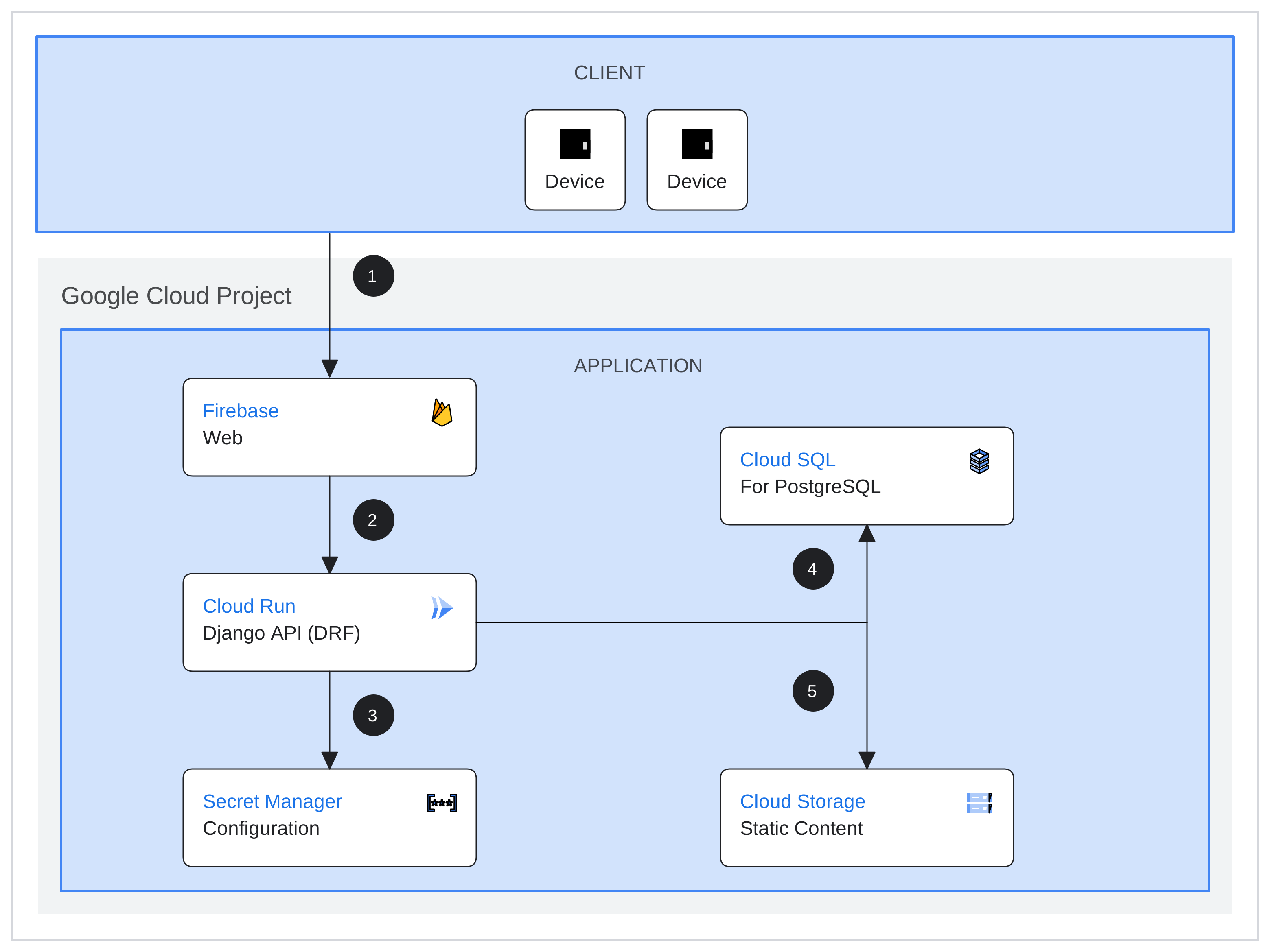
Credit: cloud.google.com
Frequently Asked Questions
Can I Host An App On Google Cloud?
Yes, you can host an app on Google Cloud. It offers scalable solutions like Google App Engine and Google Compute Engine. These platforms provide robust infrastructure and tools for app deployment and management. Benefit from Google’s global network, ensuring reliability and speed for your app users.
How Do I Host A Web Based App?
Host a web app by choosing a reliable hosting provider. Deploy your app using their platform tools. Ensure your app’s compatibility with the hosting environment. Configure server settings and security measures. Monitor performance and make necessary updates for optimal functionality.
Can I Use Google Drive To Host My Website?
Google Drive can’t directly host websites. Use it to store files and link them elsewhere. Consider web hosting services for full functionality.
How To Deploy A Web Application In The Cloud?
Deploy a web application in the cloud by choosing a provider like AWS, Azure, or Google Cloud. Set up your server, upload your code, and configure necessary services. Use tools like Docker for containerization and automate deployment with CI/CD pipelines for efficiency.
Conclusion
Hosting your web app on GCP is simple and effective. You benefit from Google’s reliable infrastructure. Plus, tools are intuitive for seamless app management. This guide helped you set up your app with ease. Now, your app can reach users globally.
Explore the vast resources GCP offers. Your web app is ready to grow and thrive online. Keep learning and optimizing your app. Remember, technology evolves fast. Stay updated to ensure your app’s success. Enjoy the journey with GCP.


