
Are you on a quest to find the perfect WordPress theme for your website? The right theme can make all the difference, transforming your site from ordinary to extraordinary.
But with so many options available, navigating the vast world of WordPress themes can feel overwhelming. You’re not alone in this digital jungle, and that’s why you’re here. In this guide, we’ll unravel the secrets of the WordPress themes directory, showing you exactly how to find the gems that will make your website shine.
You’ll discover easy steps and insider tips to ensure you choose a theme that not only looks great but also functions flawlessly. Stick with us, and by the end, you’ll feel confident in selecting a theme that truly reflects your brand and captivates your audience. Let’s dive in and unlock the potential of your WordPress site together!
Choosing The Right Theme
Understand what your website needs. Is it for a blog, a store, or a portfolio? Each type needs a different theme. Make a list of what you want. Do you need a photo gallery or a contact form? Knowing this helps you pick the best theme.
Themes come with many features. Some have custom colors, others have built-in SEO tools. Check if the theme is responsive. This means it works on phones and computers. Make sure it supports plugins you need. Choose themes with good reviews. This shows others like it too.
Design is how your site looks. Layout is where things go. Pick a clean design that is easy to read. Avoid themes with too many colors or fancy fonts. These can confuse visitors. Look for a layout that fits your content. A simple layout is often the best choice.
Accessing The WordPress Theme Directory
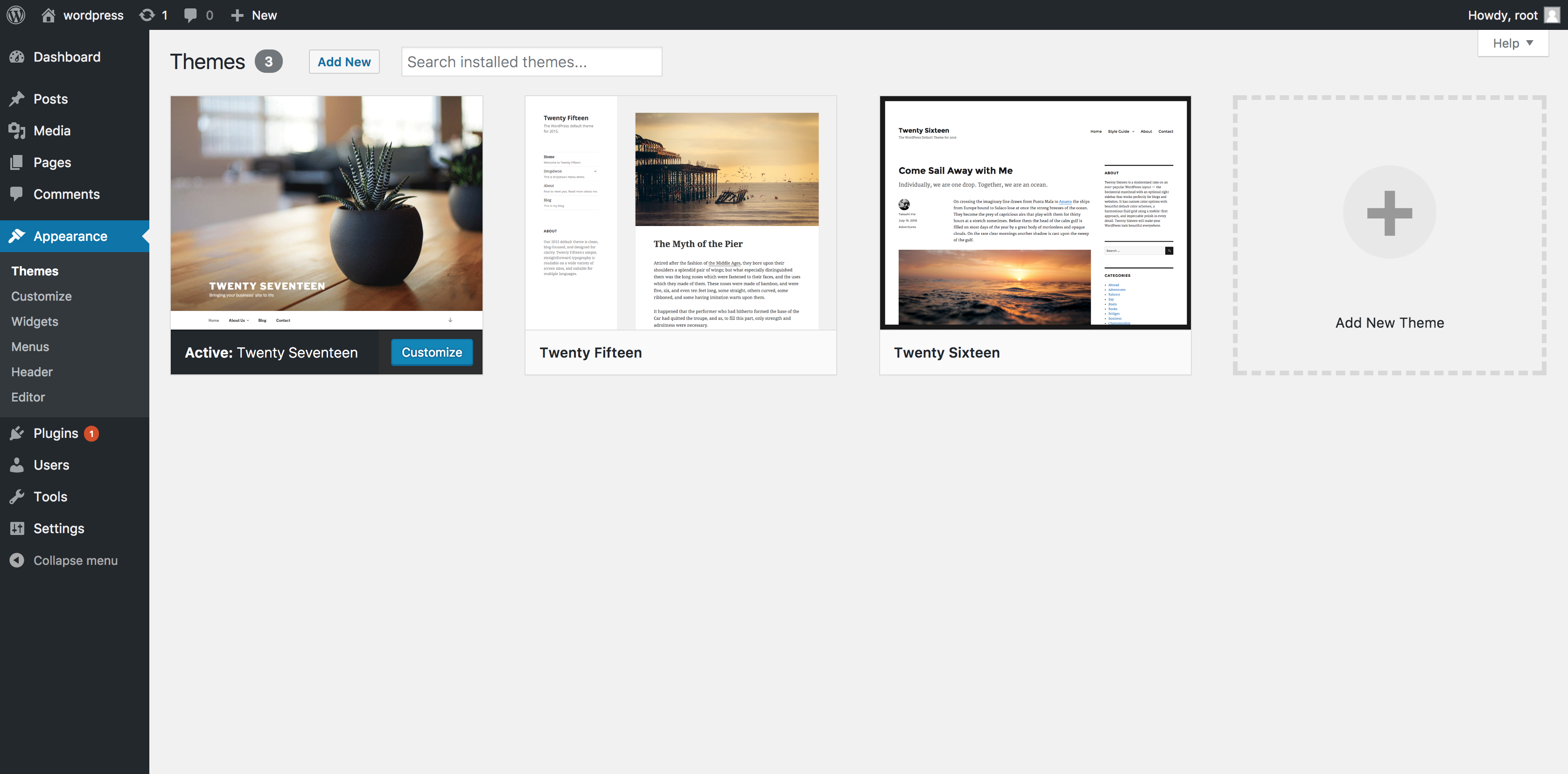
First, log in to your WordPress Dashboard. You will see a menu on the left. Find the option labeled “Appearance”. Click on it. A list will drop down. Choose “Themes” from this list. This opens the Themes page. Here, you can see all your installed themes.
Look for a button named “Add New”. Click on it. Now, you enter the Theme Installer. Here, you can search for new themes. Use the search bar to find a theme you like. You can also filter themes by features. Click on any theme to preview it. If you like it, click “Install”. Then click “Activate” to use it on your site.
Exploring Popular Themes
Many WordPress themes are free. Astra is a favorite. It’s light and fast. Neve works well with many plugins. OceanWP is good for e-commerce sites. Hestia offers a modern look. Twenty Twenty-One is simple and clean. Each theme has unique features. Choose based on your needs.
Many users prefer premium themes. They offer more features. Divi is popular for its builder. Avada is known for its flexibility. Enfold provides clean design options. BeTheme includes many pre-built sites. X Theme is versatile and user-friendly. Premium themes often come with support. They are updated regularly.

Credit: themeforest.net
Using Filters To Narrow Choices
Use filters to find themes quickly. WordPress offers many features to choose from. You can select themes with special layouts. Or choose themes with custom colors. Some themes have built-in sliders. Others offer social media integration. Responsive design is important. Make sure to check this feature. Some themes are SEO friendly. This helps your site rank better. Choose wisely.
Categories help you find the right theme. Business themes are professional. Blog themes are simple and neat. E-commerce themes have shopping features. Portfolio themes show off your work. Magazine themes look like news sites. Each category is unique. Pick what suits your needs. Explore different options. Find themes that match your style. Choose by category for easy selection.
Previewing Themes Before Installation
Many themes offer a live demo before you install them. This demo shows how the theme looks. You can see colors, fonts, and layout. It helps to decide if the theme is right. Look for the “Live Demo” button on theme sites. Click it to view the theme in action. This feature is very helpful. It saves time and prevents mistakes.
Responsiveness is important for a theme. It means the theme works on all devices. Check if the theme looks good on phones and tablets. Use the “Responsive” option in the live demo. Resize your browser to test it. A responsive theme adjusts itself. It keeps content clear and readable. Always choose a theme that is responsive. This ensures your site looks great everywhere.

Credit: www.radiustheme.com
Installing And Activating A Theme
First, go to your WordPress dashboard. Look for the Appearance tab on the left. Click on Themes. You will see a button that says Add New. Press it. Now, you can search for your favorite theme. Use the search bar to help you find it. Once you find a theme, click Install. The theme will start downloading.
After the theme is installed, you must activate it. Look for the Activate button. It’s next to the theme’s name. Click on it. Your website will now use the new theme. Check your site to see the changes. The new look should appear right away.
Customizing Your Theme
Explore the Customizer to change your theme’s look. Find it in the WordPress dashboard. You can change colors, fonts, and layouts. It helps make your site unique. Preview changes before saving. It’s easy and fun.
Add widgets to show extra info on your site. Use them in sidebars or footers. They can display recent posts, calendars, or social media links. Menus help visitors find pages. Organize them in the dashboard. Drag and drop to reorder. Simple steps to make your site better.
Credit: www.namecheap.com
Troubleshooting Common Issues
Finding the WordPress Themes Directory involves accessing your WordPress dashboard. Navigate to “Appearance” and select “Themes. ” This section provides various themes to enhance your website’s design.
Compatibility Problems
WordPress themes sometimes don’t work well with plugins. Check if your theme is up-to-date. Old themes might cause problems. Update your theme regularly. Make sure plugins are compatible too. Some themes need specific plugins. You can ask theme support for help. They can guide you. Look for known issues online. Other users might face the same problems. Forums are a good place to find answers. Always backup your site before updates. This protects your data from loss.
Fixing Broken Themes
Broken themes can make your site look bad. Check your theme files for errors. Sometimes files get corrupted. You can reinstall the theme. This may fix problems. Check for missing files. Themes need all files to work. If missing, download the theme again. Ask theme support for missing files. They might have copies. Check your site’s error log for clues. It tells you what went wrong. You can fix errors with this info.
Resources For Theme Support
Community forums are a great place for WordPress help. Many users share tips and tricks. You can ask questions and get answers. People share their experiences. It’s a space for everyone to learn. Make sure to search before asking. Your question might already have an answer.
Professional support can be very helpful. Experts solve problems quickly. They offer detailed guidance and solutions. It often costs money. But you get quality help. Some services offer a monthly plan. Others charge per issue. Choose what’s best for you and your budget.
Frequently Asked Questions
What Is The WordPress Themes Directory?
The WordPress themes directory is an official repository of themes. It offers thousands of free and premium themes. Users can search, preview, and download themes directly from their WordPress dashboard. This directory ensures themes meet WordPress standards, ensuring compatibility and security for your website.
How Do I Access The WordPress Themes Directory?
Access the WordPress themes directory from your WordPress dashboard. Navigate to “Appearance,” then “Themes,” and click “Add New. ” Here, you can search and browse available themes. Alternatively, visit the official WordPress website to explore themes directly from your browser.
Are WordPress Directory Themes Free?
Yes, many themes in the WordPress directory are free. The directory offers a wide range of free themes to suit different needs. However, some themes may have premium versions or features that require purchase. Always check the theme description for details on pricing and features.
How Can I Choose The Right Theme?
To choose the right theme, consider your website’s purpose and audience. Look for a theme with a clean design, responsive layout, and necessary features. Read user reviews and check ratings for insights. Test the theme’s customization options and ensure it aligns with your brand.
Conclusion
Finding the right WordPress theme can be simple. Start by exploring the WordPress themes directory. It’s filled with options for every need. You can browse themes by features or popularity. Check user reviews to ensure quality. Preview themes to see how they look on your site.
Downloading and installing is easy. Always choose a theme that matches your style and functionality needs. Remember, a good theme enhances your site’s appeal. Keep your audience in mind when making choices. A well-chosen theme boosts engagement and improves user experience.
Happy searching!



