
Are you looking to make your WordPress posts easier to find and organize? Adding tags is a simple yet powerful way to do just that.
When you use tags effectively, you help your readers navigate your content and improve your site’s visibility in search engines. You’ll learn exactly how to add tags to WordPress step-by-step. By the end, you’ll feel confident using tags to boost your site’s reach and keep your content neat and accessible.
Let’s dive in and make your WordPress site work smarter for you!
Benefits Of Using Tags
Tags in WordPress help connect related content on your site. They make it easier for visitors to find posts about similar topics. Using tags improves the overall experience of browsing your website. Tags also help search engines understand your content better.
Improved Site Navigation
Tags group posts with similar themes or subjects. Visitors can click on a tag to see all related articles. This simple tool guides users through your site smoothly. It reduces the time visitors spend searching for information. Clear navigation keeps readers engaged longer.
Enhanced Seo Performance
Search engines read tags to find content relevance. Proper tags increase the chance your posts rank higher. Tags provide extra keywords that boost your site’s visibility. They help search engines connect different pages on your site. This can lead to more organic traffic over time.
Better Content Organization
Tags create a neat structure for your posts. They separate topics clearly without cluttering categories. This makes managing content easier for site owners. Well-organized content improves user satisfaction. Readers can quickly find what interests them most.
Credit: make.wordpress.org
Creating Tags In WordPress
Creating tags in WordPress helps organize your content. Tags act as keywords that describe your posts. They make it easier for visitors to find related content. Using tags also improves your site’s SEO by grouping similar topics together.
WordPress allows you to create and manage tags in several simple ways. You can add tags directly while writing posts or manage them later from the dashboard. Bulk editing tags saves time when handling many posts.
Adding Tags While Writing Posts
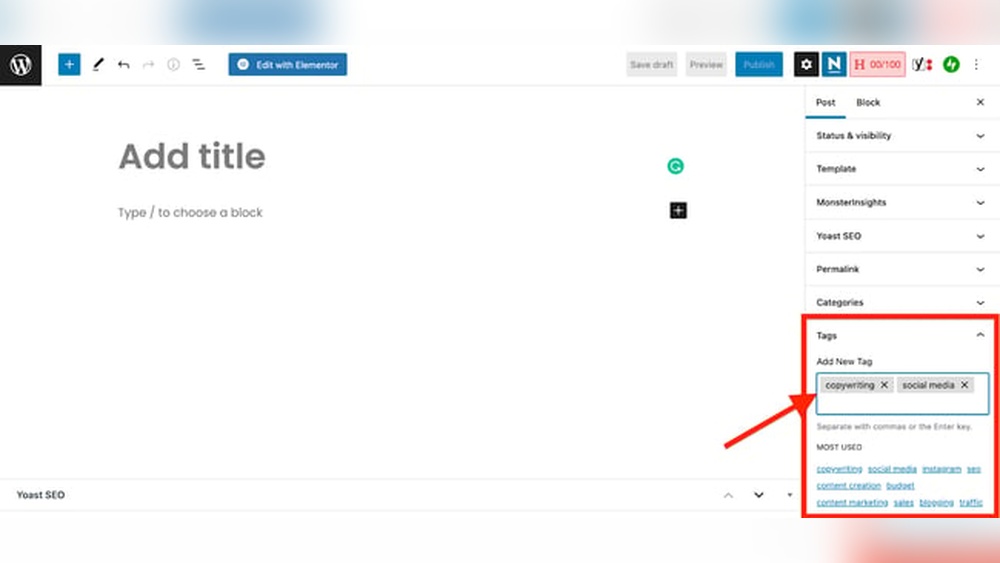
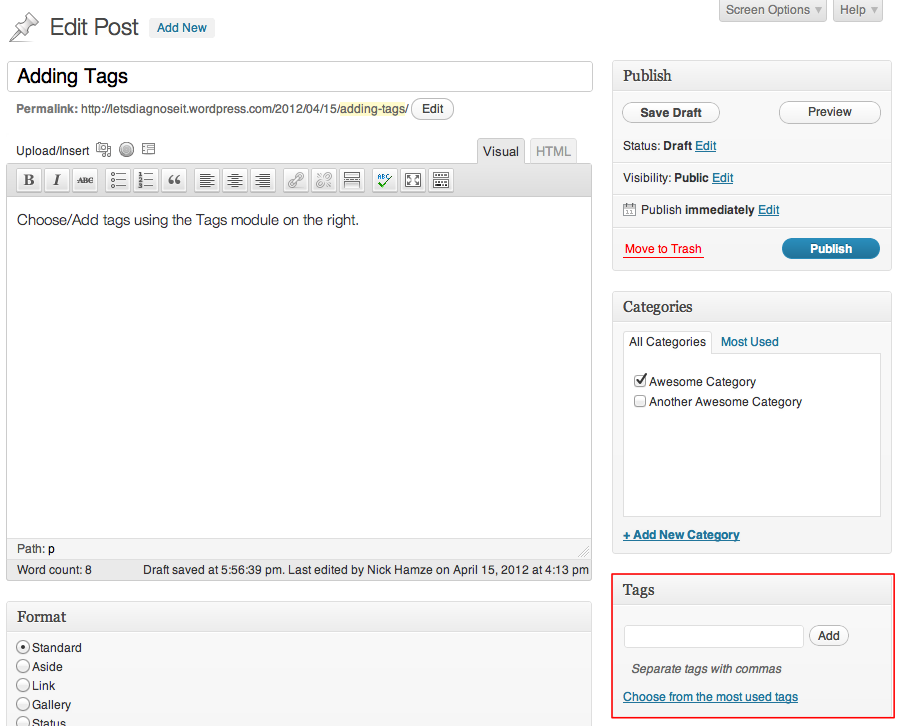
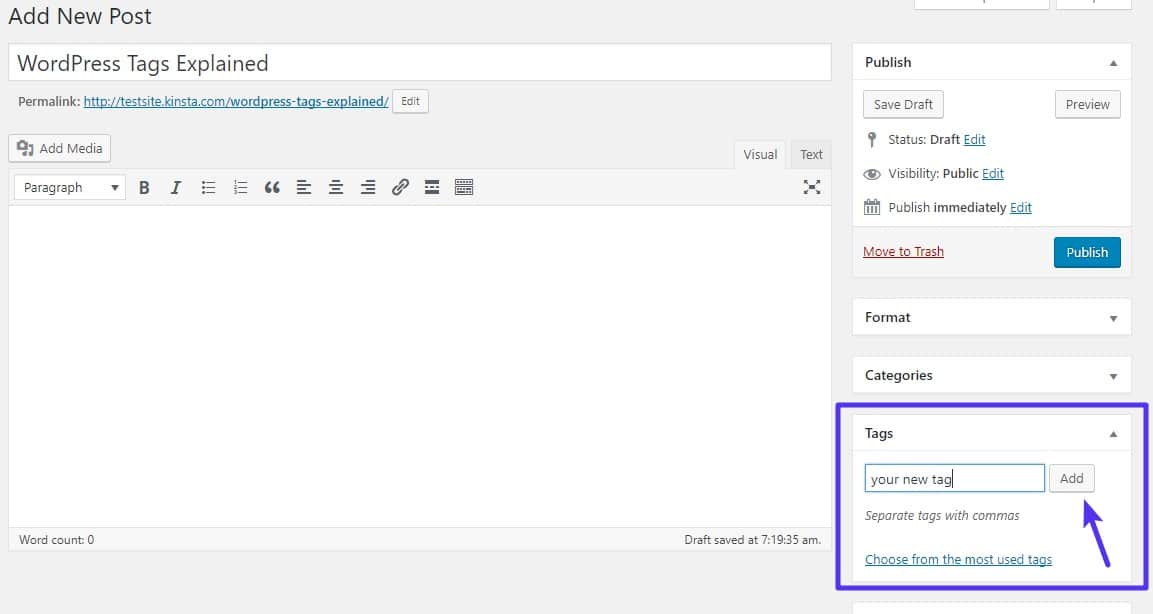
On the post editor screen, look for the Tags box. Type your desired tags separated by commas. Press Enter or click Add to create each tag. You can add new tags or select existing ones. This step organizes your post instantly.
Adding tags during post creation is fast. It helps you stay focused and keep posts relevant. Tags improve user experience by linking similar content.
Managing Tags From Dashboard
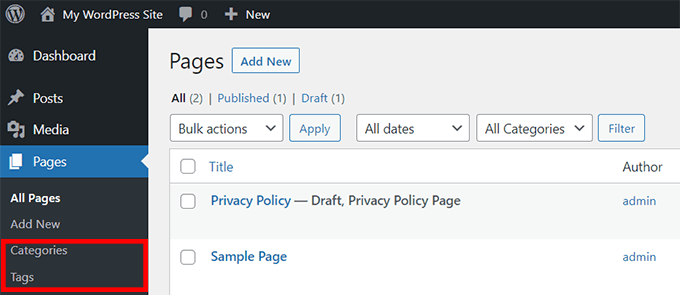
Go to the WordPress dashboard and click Posts > Tags. Here you see all created tags in a list. You can edit tag names, slugs, or descriptions. Deleting unused tags keeps your site clean.
The dashboard view gives control over all tags. It’s easy to update or remove tags as your content grows. Managing tags regularly helps maintain site structure.
Bulk Editing Tags
For many posts, bulk editing tags saves effort. In the Posts section, select multiple posts with checkboxes. Choose Edit from the Bulk Actions menu and click Apply. Add or remove tags for all selected posts at once.
Bulk editing speeds up tag management. It avoids editing posts one by one. Use this method to organize large websites efficiently.
Best Tagging Practices
Using tags correctly helps organize your WordPress site. It makes content easier to find. Good tagging improves user experience and SEO. Follow best practices for tagging to keep your site neat and effective.
Choosing Relevant Tags
Select tags that describe the main topics of your post. Use words your readers might search for. Avoid very broad or unrelated tags. Focus on specific themes that match your content.
Avoiding Tag Overuse
Limit the number of tags per post. Too many tags cause confusion for readers and search engines. Use only the most important tags. This keeps your site clean and easy to navigate.
Consistent Tag Naming
Keep tag names uniform across all posts. Use the same spelling and format for similar tags. Consistency helps group related content. It also prevents duplicate or confusing tags.
Credit: kinsta.com
Plugins To Enhance Tag Usage
Plugins help improve how you use tags in WordPress. They make managing tags easier and more efficient. Plugins also help organize content better for readers and search engines. Using the right plugins can save time and boost your site’s performance.
Tag Management Plugins
Tag management plugins let you handle tags more smoothly. They help merge duplicate tags or delete unused ones quickly. Some plugins offer bulk editing for tags, saving you effort. These tools keep your tags clean and organized. Clean tags improve site navigation and user experience.
Seo Plugins With Tag Features
SEO plugins often include tag-related tools. They help optimize tags to improve search rankings. These plugins suggest the best tags for your posts. They check if your tags follow SEO rules. Using SEO plugins ensures your tags attract more visitors.
Optimizing Tags For Seo
Optimizing tags in WordPress helps improve your site’s SEO. Tags organize your content, making it easier for search engines to find related topics. Using tags correctly can boost your site’s visibility and user experience.
Using Tags In Meta Descriptions
Include relevant tags in your meta descriptions. This helps search engines understand the page content better. A clear meta description with tags can increase click-through rates. Keep the description short and focused on key tags.
Linking Tags To Related Content
Link tags to pages or posts with similar topics. This creates a network of related content for users and search engines. It helps visitors find more information easily. Internal linking through tags improves site navigation and SEO value.
Monitoring Tag Performance
Track how tags perform using analytics tools. See which tags drive the most traffic and engagement. Remove or update tags that do not help your SEO. Regular monitoring keeps your tags effective and relevant.
Credit: www.wpbeginner.com
Common Mistakes To Avoid
Adding tags to WordPress helps organize your content and improve searchability. Many beginners make mistakes that reduce the effectiveness of tags. Avoiding these common errors keeps your blog clean and user-friendly.
Using Too Many Tags
Using many tags can confuse visitors and search engines. Limit the number of tags to a few relevant ones. Choose tags that clearly describe the topic. This keeps your posts focused and easier to find.
Duplicate Tags And Content
Creating duplicate tags splits your content into smaller groups. This lowers the value of each tag page. Use unique tags to group similar posts properly. Check for duplicates regularly and merge or delete them.
Ignoring Tag Cleanup
Old or unused tags clutter your site and harm SEO. Clean up tags regularly to keep your site organized. Remove tags with no posts or very few posts. This improves user experience and site performance.
Frequently Asked Questions
How Do I Add Tags To WordPress Posts?
To add tags, go to your WordPress dashboard. Open the post editor, find the “Tags” box, enter your tags, and click “Add. ” Tags help organize content and improve SEO by linking related posts.
Can Tags Improve My WordPress Site’s Seo?
Yes, tags improve SEO by grouping related content. They help search engines understand your site’s structure and boost internal linking, which enhances user experience and search rankings.
Where Do WordPress Tags Appear On My Site?
Tags usually appear below or beside your posts. They link to tag archive pages, allowing visitors to find all posts with the same tag easily, improving navigation and engagement.
How Many Tags Should I Add To A WordPress Post?
Use 3-10 relevant tags per post. Too many tags can confuse readers and search engines, while too few may limit content discovery and SEO benefits.
Conclusion
Adding tags to WordPress helps organize your posts clearly. Tags make it easier for readers to find related content. Use relevant words that match your post’s topic. Keep tags simple and avoid too many at once. Regularly updating tags improves your site’s navigation.
Start adding tags today to enhance your WordPress experience. Simple steps bring better content structure and user engagement. Try it now and see the difference.



