
If you want your WordPress website to get noticed by search engines, adding a sitemap is a crucial step you can’t afford to miss. A sitemap acts like a roadmap, guiding search engines through your site and helping your content get found faster.
But how do you add a sitemap to your WordPress site without getting lost in technical details? This article will walk you through simple, clear steps that anyone can follow. By the end, you’ll know exactly how to set up a sitemap that boosts your site’s visibility and drives more traffic your way.
Keep reading—you’re just a few clicks away from making your website easier to discover!
Credit: aioseo.com
Benefits Of Adding A Sitemap
Adding a sitemap to your WordPress website brings many important benefits. A sitemap helps search engines find and understand your pages faster. It also guides visitors through your site more easily. These advantages improve your site’s overall performance and reach.
Boosting Seo Rankings
Sitemaps help search engines find new content quickly. This speeds up the process of showing your pages in search results. More pages indexed means better chances to rank higher. Search engines also see your site as well-organized. This can improve your site’s authority and trust.
Improving Website Indexing
A sitemap lists all important pages on your site. It shows the structure clearly to search engines. This ensures no page is missed during indexing. You control which pages get indexed and how often. Fresh content gets noticed faster with a good sitemap.
Enhancing User Experience
Visitors can find content more easily with a sitemap. It acts like a map, showing where everything is. This reduces frustration and keeps users on your site longer. Clear navigation also encourages visitors to explore more pages. Better user experience leads to higher engagement and return visits.

Credit: www.joomunited.com
Types Of Sitemaps For WordPress
Sitemaps help search engines find and index your website content. WordPress supports different types of sitemaps. Each type serves a unique purpose for your site’s visibility. Understanding these sitemaps helps improve your site’s SEO.
Xml Sitemaps
XML sitemaps list all important pages on your site. Search engines read these files to discover your content quickly. WordPress plugins like Yoast SEO create XML sitemaps automatically. They update as you add or change content. These sitemaps focus on helping search engines understand your site structure.
Html Sitemaps
HTML sitemaps are designed for human visitors. They show a simple list of pages on your website. Visitors can use them to navigate your site easily. These sitemaps also help search engines by linking all important pages. You can create HTML sitemaps with plugins or manually.
Image And Video Sitemaps
Image and video sitemaps highlight multimedia content. These help search engines find your photos and videos. Adding them improves the chances of your media appearing in search results. WordPress plugins often support these sitemaps too. Use them if your site has lots of images or videos.
Creating A Sitemap In WordPress
Creating a sitemap in WordPress helps search engines find and index your pages. It improves your website’s visibility and makes sure all important pages are included. There are several ways to create a sitemap, each with its own benefits. Choose the method that fits your skills and needs.
Using Seo Plugins
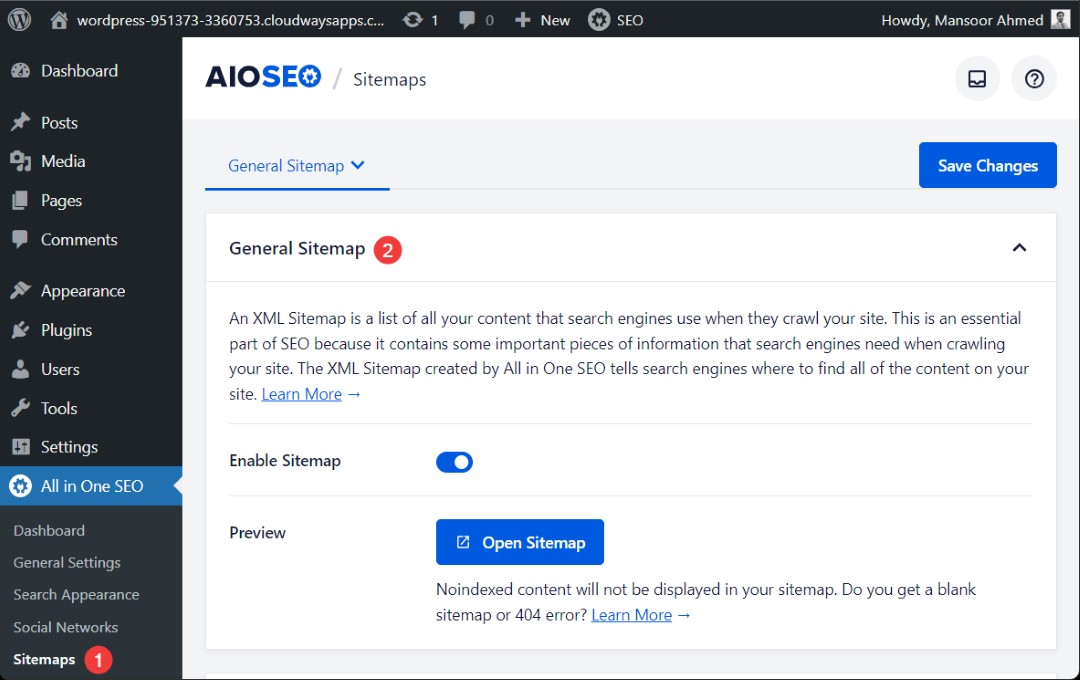
SEO plugins make sitemap creation easy and automatic. Plugins like Yoast SEO and All in One SEO generate sitemaps for you. They update the sitemap whenever you add or change content. Just install the plugin, activate sitemap features, and your sitemap is ready. This method saves time and works well for beginners.
Manual Sitemap Creation
Manual sitemap creation gives you full control over your sitemap. You create an XML file listing all important URLs on your site. Use a text editor to write the file or copy from a template. Upload the file to your website’s root folder using FTP. This method takes more effort but allows customization.
Online Sitemap Generators
Online sitemap generators create sitemaps without installing plugins or coding. Enter your website URL, and the tool scans your pages. It then creates an XML sitemap you can download. Upload the sitemap file to your website root folder. This option works well for small sites or one-time updates.
Submitting Sitemap To Search Engines
Submitting your sitemap to search engines helps them find and index your website pages. This step improves your site’s visibility in search results. It also ensures new content is discovered faster. Each search engine has its own tool to submit sitemaps. Follow the simple steps below to submit your sitemap correctly.
Google Search Console
Google Search Console is the main tool to submit sitemaps to Google. First, log into your Google Search Console account. Select your website from the list. Click on “Sitemaps” in the left menu. Enter the URL of your sitemap, usually “sitemap.xml.” Click “Submit.” Google will start crawling your sitemap soon. Check back later to see any errors or indexing status.
Bing Webmaster Tools
Bing Webmaster Tools helps submit sitemaps to Bing and Yahoo. Log into your Bing Webmaster account. Choose your website dashboard. Find the “Sitemaps” section. Type your sitemap URL and submit it. Bing will use this to index your pages. You can monitor sitemap status and fix issues here.
Other Search Engines
Some smaller search engines accept sitemaps too. Use their webmaster tools or submit forms if available. For example, Yandex and Baidu have their own sitemap submission tools. Check their guidelines for sitemap URLs. Submitting your sitemap increases chances of being indexed quickly everywhere.
Maintaining And Updating Your Sitemap
Maintaining and updating your sitemap is key to keeping your WordPress site visible to search engines. A sitemap guides search engines to new and changed content. Without regular updates, your sitemap can become outdated. This can slow down how fast search engines find your updates. Keeping your sitemap current helps improve your site’s SEO and user experience.
Automating Sitemap Updates
Automation saves time and ensures your sitemap stays fresh. Many WordPress SEO plugins update sitemaps automatically. These tools detect new posts, pages, and changes instantly. You do not need to edit the sitemap by hand. Automatic updates help search engines index your site faster. Check your plugin settings to enable this feature.
Checking For Errors
Errors in your sitemap can confuse search engines. Use tools like Google Search Console to spot problems. Look for broken links, missing pages, or incorrect URLs. Fix these errors quickly to keep your sitemap clean. Regular checks prevent indexing issues and improve site ranking. Clean sitemaps ensure better search engine crawling.
Best Practices For Sitemap Management
Keep your sitemap simple and well-structured. Only include important pages that you want indexed. Avoid adding duplicate or low-value content. Submit your sitemap to Google Search Console and Bing Webmaster Tools. Update your sitemap after major site changes or new content. Regular maintenance helps search engines find your best pages fast.
Troubleshooting Common Sitemap Issues
Adding a sitemap to your WordPress site helps search engines find your pages faster. Sometimes, issues with the sitemap can stop it from working well. Fixing these common problems ensures your site gets the attention it deserves. Below are simple ways to solve usual sitemap troubles.
Sitemap Not Found
Sometimes, the sitemap URL returns a 404 error or cannot be reached. Check if your sitemap plugin is active and updated. Clear your site cache and browser cache to remove old data. Make sure your sitemap URL is correct and typed without errors. Try visiting the sitemap URL directly in the browser to see if it loads.
Incorrect Urls
Your sitemap may list wrong URLs, like old pages or broken links. This confuses search engines and hurts SEO. Review the sitemap content to check for outdated links. Refresh your sitemap by regenerating it through the plugin settings. Remove any private or no-index pages from the sitemap list. Confirm that URLs use the right domain and HTTPS if needed.
Plugin Conflicts
Multiple plugins can clash and cause sitemap issues. Disable all sitemap-related plugins except one to test which causes trouble. Deactivate caching or security plugins temporarily to see if they block the sitemap. Update all plugins and WordPress to their latest versions. Use a trusted sitemap plugin known for compatibility with WordPress.
Credit: www.cloudways.com
Frequently Asked Questions
What Is A Sitemap In WordPress?
A sitemap is a file listing all important pages on your WordPress site. It helps search engines crawl and index your content effectively, improving SEO performance and website visibility.
How Do I Create A Sitemap In WordPress?
You can create a sitemap using plugins like Yoast SEO or Google XML Sitemaps. These tools automatically generate and update your sitemap for easy search engine access.
Why Add A Sitemap To My WordPress Site?
Adding a sitemap improves site indexing by search engines. It ensures all pages are discovered quickly, boosting your website’s search ranking and organic traffic.
How To Submit A WordPress Sitemap To Google?
Submit your sitemap via Google Search Console. Log in, select your site, go to Sitemaps, enter your sitemap URL, and click Submit for faster indexing.
Conclusion
Adding a sitemap to your WordPress site helps search engines find your pages. It improves your website’s visibility and ranking. Creating and submitting a sitemap is simple and takes little time. Regularly update your sitemap to include new content. This keeps your site fresh and easy to crawl.
Follow the steps carefully to avoid errors. A clear sitemap guides visitors and search bots alike. Keep your website organized and easy to navigate. This small step can make a big difference over time.



