

Are you struggling to make your WordPress site stand out in search engines? Adding SEO to your WordPress website can feel confusing, but it doesn’t have to be.
Imagine your site showing up right where your audience is searching—on the first page of Google. That’s exactly what good SEO can do for you. In this post, you’ll discover simple, practical steps to boost your site’s visibility and attract more visitors.
Ready to turn your WordPress site into a traffic magnet? Let’s dive in and make SEO work for you.
Why Seo Matters In WordPress
SEO plays a key role in WordPress websites. It helps your site get found on search engines like Google. Without SEO, your website may stay invisible to many users. This limits your chances of growing your audience and business. SEO improves how search engines understand your content. It also boosts your site’s performance and user experience.
Impact On Website Traffic
SEO increases your site’s visibility in search results. Higher visibility means more visitors to your website. More visitors can lead to more sales or contacts. SEO targets users actively searching for your content or products. This traffic is more likely to engage and convert. SEO helps your site appear on relevant searches, attracting the right audience.
Benefits For User Experience
Good SEO improves website speed and navigation. Fast loading pages keep visitors interested and reduce bounce rates. Clear site structure makes it easy for users to find information. SEO-friendly design works well on both computers and phones. A positive experience encourages visitors to stay longer. Happy visitors may return and recommend your site.

Credit: community.make.com
Choosing The Right Seo Plugin
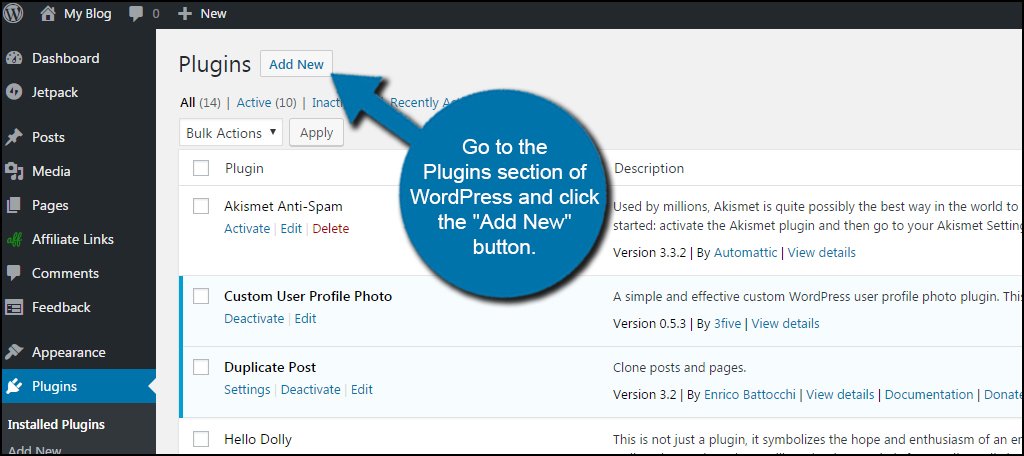
Choosing the right SEO plugin is important for your WordPress site. The plugin helps improve your site’s visibility on search engines. It guides you in optimizing content, meta tags, and keywords. Picking a plugin that fits your needs saves time and effort. It also ensures better results in search rankings.
Popular Seo Plugins
Several SEO plugins work well with WordPress. Yoast SEO is very popular. It offers easy tools to optimize pages and posts. All in One SEO Pack is another choice. It provides simple setup and useful features. Rank Math is newer but growing fast. It includes many options for advanced users. SEOPress is also worth considering. It offers good features with a clean interface.
Features To Look For
Choose a plugin with easy setup and clear instructions. It should support meta title and description editing. Automatic sitemap generation helps search engines find your content. Check for keyword optimization tools. These help improve your content’s focus. Look for support with social media sharing. This boosts your site’s reach. Good plugins offer regular updates and support. They keep your site secure and compatible.
Optimizing Your Content
Optimizing your content is key to improving your WordPress site’s search engine ranking. Good content attracts visitors and keeps them engaged. It also helps search engines understand what your page is about. Focus on clear, relevant, and well-structured content to boost SEO.
Follow simple steps to make your posts and pages easier to find. Use keywords naturally, organize your text, and enhance images. Each part plays a role in making your site visible and user-friendly.
Keyword Research Tips
Start by finding keywords people use to search for your topic. Use tools like Google Keyword Planner or Ubersuggest. Choose keywords with low competition but good search volume. Include these words in your content, but keep it natural. Avoid stuffing keywords, which can hurt your ranking.
Crafting Seo-friendly Titles
Write titles that clearly describe the page content. Include your main keyword near the beginning of the title. Keep titles under 60 characters to avoid being cut off in search results. Make titles interesting to encourage clicks. Use simple language that matches what users search for.
Using Headings And Subheadings
Break your content into sections with headings and subheadings. Use H2 and H3 tags to structure your text. Headings help readers scan the content quickly. They also tell search engines about the main topics. Include keywords in some headings for better SEO.
Optimizing Images
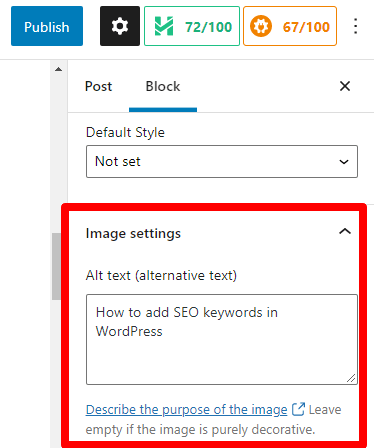
Use images to support your content and make it more engaging. Compress images to reduce file size and improve page load speed. Add descriptive alt text with relevant keywords for each image. This helps search engines understand the image content. Use clear file names related to the image topic.
Improving Website Structure
Improving your website structure is key for better SEO in WordPress. A clear structure helps search engines find and understand your content. It also makes navigation easier for visitors. Good structure boosts your site’s ranking and user experience.
Permalink Settings
Permalinks are the URLs of your posts and pages. Clean, simple URLs help search engines and users. Use the WordPress default setting “Post name” for permalinks. This keeps URLs short and descriptive. Avoid using numbers or symbols in URLs. Clear permalinks improve click rates and indexing.
Creating A Sitemap
A sitemap lists all your website pages. It guides search engines through your content. WordPress plugins like Yoast SEO create sitemaps automatically. Submit your sitemap to Google Search Console. This helps your pages get found faster. Keep your sitemap updated with new content.
Using Internal Links
Internal links connect pages within your site. They help spread SEO value across pages. Use relevant keywords in link text. Link to important pages and related content. This improves user engagement and page authority. Avoid excessive linking to keep the site clean.
Enhancing Site Speed
Site speed is a key part of SEO for WordPress sites. A faster site improves user experience and helps search engines rank your pages higher. Slow websites can cause visitors to leave quickly. Speed also affects how often search engines crawl your site. Focus on steps that make your site load faster.
Choosing A Fast Hosting Provider
Good hosting makes your site load quickly. Shared hosting can slow your site. Choose a hosting provider known for speed and reliability. Look for servers near your main audience. Quality hosting reduces delays and downtime. This is the foundation of a fast WordPress site.
Using Caching Plugins
Caching saves copies of your pages. This reduces the work your server must do for each visitor. Use popular caching plugins like W3 Total Cache or WP Super Cache. They create static pages to serve visitors faster. Caching cuts load times and lowers server load.
Optimizing Images For Speed
Large images slow down your website. Compress images without losing quality. Use formats like WebP for smaller file sizes. Resize images to fit your design. Lazy loading delays off-screen images from loading immediately. This cuts initial page load time and improves speed.
Credit: aioseo.com
Mobile Optimization
Mobile optimization is essential for WordPress SEO. Many users visit websites on their phones. A mobile-friendly site improves user experience and search rankings. Google favors websites that load well on mobile devices. Optimizing for mobile means your site looks good and works smoothly on small screens. This can lead to more visitors and longer site visits.
Responsive Themes
Choose a responsive theme for your WordPress site. Responsive themes adjust to different screen sizes automatically. This means your site will look great on phones, tablets, and desktops. Most modern WordPress themes are responsive. Make sure the theme you pick states it supports mobile devices. A responsive design saves you time and effort. It also ensures your content is easy to read on any device.
Testing Mobile Usability
Test your site’s mobile usability often. Use tools like Google’s Mobile-Friendly Test to check your pages. These tools show if your site works well on mobile phones. They also suggest fixes for any problems found. Testing helps you find issues like slow load times or hard-to-click buttons. Fixing these problems improves user experience and SEO. Regular testing keeps your site mobile-optimized as technology changes.
Tracking Seo Performance
Tracking SEO performance is key to improving your WordPress site’s search rankings. It helps you see what works and what needs change. Monitoring your SEO data lets you focus on the right strategies. This section covers two essential tools for tracking SEO: Google Analytics and Google Search Console. Both are free and easy to use.
Setting Up Google Analytics
Google Analytics shows how visitors find and use your site. It tracks traffic, user behavior, and conversions. Start by creating a Google Analytics account. Then, add your WordPress site to the account. Use a plugin like “Site Kit” or manually insert the tracking code into your site’s header. Check your reports regularly. Look for trends in visitor numbers, page views, and bounce rates. These insights help you improve your content and SEO efforts.
Using Google Search Console
Google Search Console helps you understand how Google views your site. It shows which keywords bring traffic and any indexing issues. Sign up with your Google account and verify your website ownership. Submit your sitemap to help Google crawl your pages faster. Use the Performance report to check clicks, impressions, and average position for keywords. Fix any errors found in the Coverage report to keep your site healthy. This tool helps you spot problems and improve your site’s visibility.
Credit: www.greengeeks.com
Frequently Asked Questions
What Is The Best Seo Plugin For WordPress?
The best SEO plugin for WordPress is Yoast SEO. It offers easy optimization, keyword management, and readability analysis. It helps improve your site’s visibility and ranks well on search engines.
How Do I Optimize WordPress Posts For Seo?
To optimize WordPress posts, use relevant keywords, write compelling titles, and add meta descriptions. Include internal links, optimize images with alt text, and ensure fast loading speed for better SEO results.
Can WordPress Seo Be Improved Without Plugins?
Yes, SEO can improve without plugins by using clean URLs, optimized images, and quality content. Also, use proper heading tags and ensure mobile responsiveness for better search engine ranking.
How To Add Meta Descriptions In WordPress?
You can add meta descriptions using SEO plugins like Yoast or All in One SEO. These plugins provide easy fields to enter meta descriptions for each post or page.
Conclusion
Adding SEO to WordPress helps your site get noticed by search engines. Use simple plugins and clear keywords to improve rankings. Keep your content fresh and easy to read for visitors. Check your site speed and mobile friendliness often. Small changes can bring steady traffic growth over time.
Stay patient and keep learning about SEO best practices. This will help your WordPress site reach more people.



