

Are you looking to boost your website’s credibility and attract more visitors? Adding reviews to your WordPress site is one of the easiest and most effective ways to do just that.
Reviews build trust, show real experiences, and encourage new customers to take action. You’ll discover simple, step-by-step methods to add reviews to your WordPress site—no tech skills needed. By the end, you’ll have powerful social proof right on your pages, helping your business grow faster than you imagined.
Ready to get started? Let’s dive in!

Credit: formidableforms.com
Benefits Of Adding Reviews
Adding reviews to your WordPress site brings many benefits. Reviews show real opinions from customers. They help visitors trust your products or services. Reviews also improve how search engines see your site. This can lead to more visitors. More visitors can turn into more customers. Let’s look at three key benefits of adding reviews.
Boosting Trust And Credibility
Reviews build trust with your visitors. People trust other people more than ads. Positive reviews show your product or service works well. This makes new visitors feel safer to buy. Honest reviews, even mixed ones, add credibility. They prove your site is real and transparent.
Enhancing Seo Performance
Search engines like Google notice user reviews. Reviews add fresh and unique content to your pages. This helps your site rank higher in search results. Keywords in reviews can match what people search for. More reviews mean more content and more chances to appear in searches.
Increasing Conversion Rates
Reviews help visitors decide to buy. Seeing good feedback reduces doubts and fears. Reviews answer common questions and concerns. This leads to more people completing purchases. The more reviews you have, the higher your sales chance.
Credit: www.greengeeks.com
Choosing The Right Review Plugin
Choosing the right review plugin for your WordPress site is important. The right plugin helps you collect and display reviews easily. It improves trust and boosts your site’s credibility. Not every plugin suits every website. Consider your needs and budget before deciding.
Free Vs Paid Options
Free review plugins offer basic features. They work well for small websites or simple reviews. Paid plugins provide advanced tools. They include better customization and support. Paid options often have more integrations and better design. Choose based on your site’s goals and budget.
Key Features To Look For
Look for easy setup and user-friendly design. Check if the plugin supports star ratings and text reviews. It should allow moderation to control spam. Mobile-friendly display is a must. Integration with Google or social media is helpful. Also, consider if the plugin supports rich snippets for SEO.
Popular Review Plugins For WordPress
WP Customer Reviews is a popular free option. It is simple and effective for basic needs. Site Reviews offers a good balance of free and paid features. It has strong moderation tools. WP Review Pro is a paid plugin with many customization options. It supports multiple rating systems and rich snippets. Choose one that fits your site’s style and review needs.
Installing And Activating Plugins
Adding reviews to your WordPress site starts with installing and activating the right plugin. Plugins extend your website’s features without coding. This step is simple but important. It helps your site handle reviews smoothly.
Using The WordPress Plugin Directory
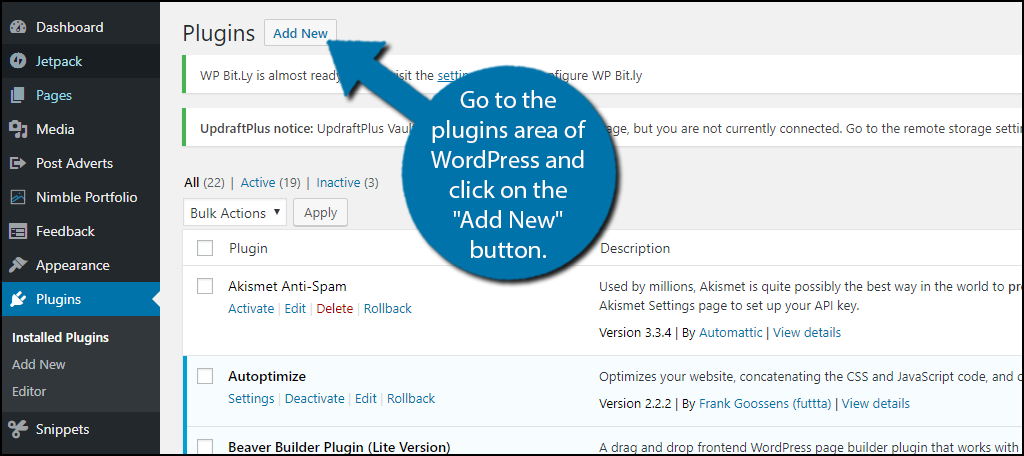
Access your WordPress dashboard. Find the “Plugins” menu and click “Add New.” Search for review plugins by typing keywords like “reviews” or “testimonials.”
Choose a plugin with good ratings and many active installations. Click “Install Now” and then “Activate.” Your plugin is ready to use.
Uploading Plugins Manually
Download the plugin file from a trusted website. It should be a .zip file. Go to your WordPress dashboard and select “Plugins” > “Add New.”
Click “Upload Plugin” at the top. Choose the .zip file and click “Install Now.” After installation, press “Activate Plugin.”
Basic Plugin Setup
After activation, find the plugin settings in your dashboard. Usually, it appears in the left menu or under “Settings.”
Follow the setup guide to customize how reviews show on your site. Save your changes. Your review system is now active and ready for visitors.
Adding Reviews Manually
Adding reviews manually to your WordPress site gives you full control over content. You can create custom reviews that match your website’s style. This method is great for small sites or when you want to highlight specific feedback.
Manual addition means typing or copying reviews directly into your posts or pages. You decide how each review looks and where it appears. This approach is simple and does not require extra plugins.
Creating A Review Section
Start by opening the WordPress editor on the page or post. Choose a spot where the review section fits well. Add a heading like “Customer Reviews” or “What People Say.” This helps readers find the reviews easily.
Use blocks or paragraphs to separate each review. This keeps your section organized and clean. You can also add images or star ratings to enhance the section.
Formatting Reviews For Readability
Make reviews easy to read with clear fonts and spacing. Use bullet points or short paragraphs for each review. Highlight important parts with bold or italics. This draws attention to key opinions or features.
Keep sentences short and simple. Avoid long blocks of text. White space around reviews helps readers focus on each one.
Using Shortcodes To Display Reviews
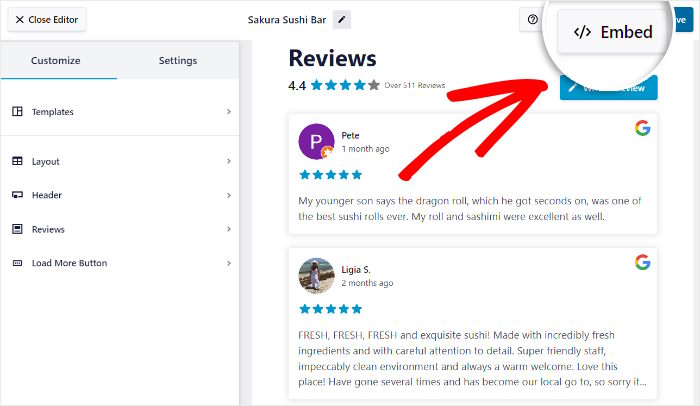
Shortcodes let you place reviews anywhere on your site quickly. You can create a shortcode for a review or a group of reviews. Then, insert it into posts, pages, or widgets.
To use shortcodes, write the review content inside a shortcode tag. Save it in your theme’s functions.php or a custom plugin. This method makes managing reviews easier and keeps your site tidy.
Enabling User-submitted Reviews
Enabling user-submitted reviews on your WordPress site helps build trust. Visitors see real opinions from other customers. It boosts your site’s credibility and encourages more sales. Setting up this feature is simple and effective. It invites your users to share their thoughts directly.
Setting Up Review Forms
Start by installing a plugin that supports review forms. Many free options let you customize fields easily. Create a form asking for a name, rating, and comment. Keep the form short to encourage more submissions. Place the form on product pages or blog posts.
Moderating User Reviews
Allowing user reviews requires careful moderation. Check every review before it goes live on your site. Filter out spam and inappropriate content quickly. Use WordPress’s comment moderation settings or a plugin feature. This keeps your site clean and trustworthy.
Encouraging Customers To Leave Feedback
Ask customers to share their experience after a purchase. Send a polite email reminder with a direct link to the review form. Offer simple incentives like discounts or freebies for reviews. Make the process quick and easy. Happy customers are more likely to respond.
Customizing Review Appearance
Customizing the look of your reviews helps create a strong impression. It ensures your reviews blend well with your website’s style. You can control colors, fonts, and layouts to match your brand. This makes your site look professional and trustworthy.
Small changes in design can improve how visitors read and trust reviews. A clear and attractive review section encourages users to engage more. Customization also helps highlight key points in reviews for better impact.
Styling Review Widgets
Review widgets display customer feedback on your site. Styling these widgets means changing their size, colors, and fonts. Choose colors that match your website’s theme for a smooth look. Use fonts that are easy to read on all devices. Add padding and margins to give space around text. This prevents the reviews from looking crowded or messy.
Using Star Ratings And Icons
Star ratings quickly show how good a product or service is. Use stars or other icons to make reviews clear and visual. Pick star colors that stand out but still fit your design. You can use half stars for more accurate ratings. Icons like thumbs up or checkmarks add extra meaning. These elements make reviews easier to scan and understand fast.
Responsive Design Considerations
Many visitors use phones or tablets to browse your site. Your review section must look good on all screen sizes. Use flexible layouts that adjust automatically to different devices. Make text and icons large enough to tap on small screens. Test your reviews on multiple devices before publishing. A responsive design keeps your reviews readable everywhere.
Managing And Updating Reviews
Managing and updating reviews keeps your WordPress site trustworthy and useful. Regular care helps visitors see fresh opinions. It also shows that you value customer feedback. Proper handling of reviews builds a positive online image.
Editing And Deleting Reviews
Edit reviews to fix errors or update details. Some plugins allow easy review editing right from the dashboard. Delete reviews only if they are spam or offensive. Always back up your site before removing any content. Clear and correct reviews improve your site’s credibility.
Handling Negative Feedback
Respond politely to negative reviews. Show you listen and care about customers. Offer solutions or ask for more details. Do not ignore bad feedback. It can help you improve your products or services. A calm reply can turn a complaint into trust.
Keeping Reviews Fresh And Relevant
Ask customers to leave new reviews regularly. Remove old reviews that no longer apply. Update review display to highlight recent feedback. Fresh reviews attract more visitors and improve SEO. Make reviewing easy with clear calls to action.
Leveraging Reviews For Marketing
Reviews are powerful tools for marketing your WordPress site. They show real opinions from real customers. This builds confidence in your products or services. Using reviews smartly helps attract new visitors and keeps old customers loyal.
Sharing reviews across different platforms spreads your message wider. It turns happy customers into brand promoters. These reviews act as social proof, making your brand look trustworthy and reliable.
Showcasing Reviews On Social Media
Post customer reviews on your social media profiles regularly. Use eye-catching images or simple text posts. Tag the customers if possible to increase credibility. Short and positive reviews work best. They grab attention and encourage others to try your product.
Social media shares can reach many potential buyers quickly. This increases your brand’s visibility and trust. Encourage followers to share their own reviews. This creates a lively community around your brand.
Using Reviews In Email Campaigns
Include customer reviews in your email newsletters and promotions. Highlight positive feedback near your product descriptions. This reassures recipients about the quality of your offerings. Use brief and clear quotes to keep emails readable.
Emails with reviews tend to get higher open and click rates. They create a connection between your brand and the reader. Personal stories or testimonials work well here. This method helps turn interested readers into buyers.
Building Customer Trust Over Time
Consistently showing reviews builds long-term trust with your audience. Fresh reviews prove your business is active and reliable. Respond to reviews to show you value customer opinions. This interaction improves your brand’s reputation.
Trust grows when customers see honest feedback from others. It reduces doubts and makes buying decisions easier. Over time, this trust results in repeat purchases and loyal followers. Focus on collecting and displaying reviews regularly.
Credit: smashballoon.com
Frequently Asked Questions
How Do I Add Reviews To WordPress Manually?
To add reviews manually, create a new post or page. Use the WordPress block editor to add text, star ratings, and images. Customize the layout using built-in tools or HTML. This method is simple but lacks automation and advanced features.
Which Plugins Are Best For WordPress Reviews?
Popular review plugins include WP Review, Site Reviews, and WP Customer Reviews. These plugins offer star ratings, user submissions, and customization. Choose one based on your needs for design, functionality, and ease of use. Most plugins also support SEO-friendly review schema.
Can I Display User-submitted Reviews On WordPress?
Yes, many review plugins allow user-submitted reviews. Enable front-end submission forms so visitors can leave feedback. Admins can moderate reviews before publishing. This boosts engagement and provides authentic social proof for your site.
How To Optimize WordPress Reviews For Seo?
Use plugins that add schema markup to reviews. Schema helps search engines understand your content and display rich snippets. Write unique, keyword-rich review content. Encourage genuine user reviews to improve trust and SEO rankings.
Conclusion
Adding reviews to your WordPress site builds trust with visitors. It shows real opinions about your products or services. Simple steps and plugins make this task easy. Regularly update and manage reviews to keep content fresh. Positive feedback can boost your site’s credibility and sales.
Start adding reviews today to enhance your website’s value. Your audience will appreciate honest and clear information. Keep it simple, and watch your site grow steadily.



