
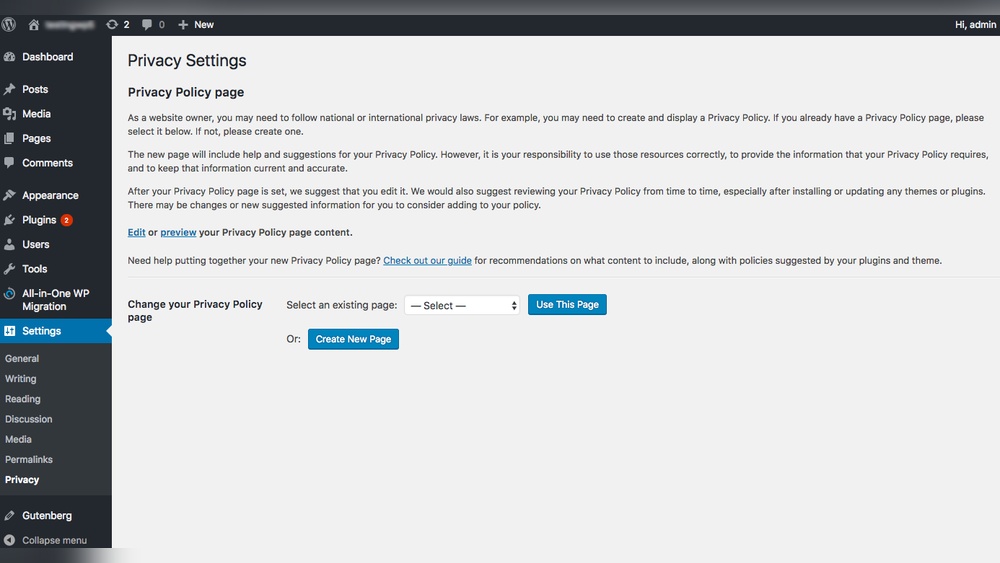
You want to keep your website trustworthy and safe, right? Adding a privacy policy to your WordPress footer is one of the easiest ways to do that.
It shows your visitors that you care about their information and follow the rules. But maybe you’re unsure how to add it without messing up your site’s look or functionality. Don’t worry—this guide will walk you through simple steps that anyone can follow.
By the end, your site will not only look professional but also build trust with every visitor. Ready to make your WordPress footer work smarter for you? Let’s dive in.
Why Add A Privacy Policy
Adding a privacy policy to your WordPress footer is important. It tells visitors how their data is collected and used. This builds trust and keeps your site safe from legal trouble.
Many countries require websites to have a privacy policy. It shows you respect user privacy and follow the law. Without one, your site might face penalties or bans.
Legal Compliance
Privacy policies help your site follow laws like GDPR and CCPA. These laws protect personal data and require transparency. A clear policy reduces the risk of fines and legal actions.
Builds User Trust
Visitors feel safer knowing their data is protected. A privacy policy shows honesty and care. Trust leads to more engagement and repeat visits.
Protects Your Website
Without a privacy policy, your site can face lawsuits. It also helps explain your data practices clearly. This lowers the chance of misunderstandings and disputes.
Improves Seo
Search engines favor websites with privacy policies. It shows your site is reliable and professional. Adding one can improve your search rankings.
Credit: www.wpbeginner.com
Prepare Your Privacy Policy Content
Preparing your privacy policy content is a key step before adding it to your WordPress footer. Clear and accurate content helps visitors understand how you handle their data. Take time to create text that fits your website’s needs.
Generate Privacy Policy Text
Start by creating a basic privacy policy text. Use online privacy policy generators for quick drafts. These tools provide standard templates based on common legal requirements. They save time and ensure you cover important points.
Make sure the generated text mentions data collection, usage, and protection. Include details about cookies and third-party services if you use them. This ensures transparency and builds trust with visitors.
Customize For Your Website
Edit the generated text to match your website’s specific practices. Remove any sections that don’t apply. Add details about your own data handling methods. This makes the policy clear and relevant to your audience.
Use simple language and short sentences for easy understanding. Avoid technical or legal jargon. A clear privacy policy helps visitors feel safe and respects their rights.
Access WordPress Footer Settings
Accessing the WordPress footer settings is the first step to add a privacy policy link. The footer area often holds essential links like privacy policies. Managing this section allows you to customize your site’s legal notices easily.
WordPress offers simple ways to access and edit footer content. Two common methods are using the Customizer and editing footer widgets. Both methods are beginner-friendly and do not require coding skills.
Using The Customizer
The WordPress Customizer lets you change the footer settings live. Go to your WordPress dashboard. Click on Appearance, then select Customize.
Inside the Customizer, find the Footer option. Here, you can add text, links, or legal information. Some themes allow direct editing of footer text. Add your privacy policy link here to make it visible on every page.
Editing Footer Widgets
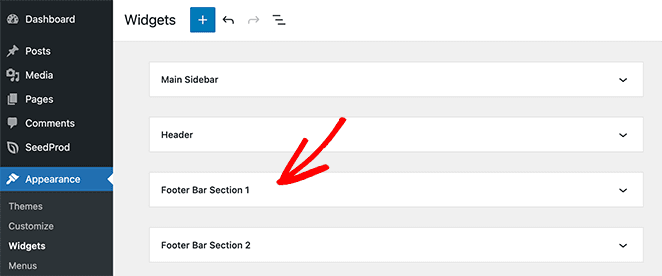
Footer widgets are blocks that appear in the footer area. Go to Appearance and select Widgets from the dashboard menu.
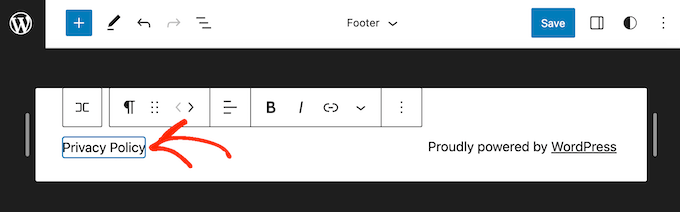
Find the Footer widget area. Add a Text widget or Custom HTML widget to this section. Enter your privacy policy text and link inside the widget content. Save the changes, and the link will appear in your footer.
Credit: www.wpbeginner.com
Insert Privacy Policy Link
Inserting a privacy policy link in your WordPress footer helps visitors find your site’s privacy details easily. It builds trust and keeps your site compliant with legal rules. This guide shows two simple ways to add the privacy policy link.
Add To Footer Menu
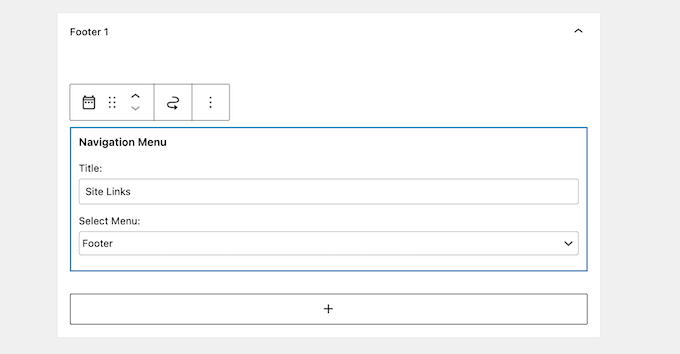
Go to your WordPress dashboard and open the Appearance menu. Click on Menus and select the footer menu to edit. Find the Privacy Policy page under Pages and add it to the menu. Drag the link to the position you want in the footer menu. Save the menu to apply the changes. Now, visitors see the privacy link in the footer area.
Use Text Or Html Widget
Open the Appearance section and select Widgets. Choose the Footer widget area to add a new widget. Pick the Text or Custom HTML widget for flexibility. Insert the privacy policy link using simple HTML code like Privacy Policy. Replace “URL” with your actual privacy policy page link. Save the widget to display the link in the footer. This method works well for custom footer designs.
Verify Privacy Policy Visibility
Verifying the privacy policy visibility is a key step after placing it in your WordPress footer. This step ensures visitors can easily find and access your privacy policy. Visibility affects user trust and compliance with legal standards. Take time to check how your privacy policy looks and works on your site.
Check On Different Devices
Open your website on various devices like phones, tablets, and computers. See if the privacy policy link shows clearly in the footer area. Make sure the text is readable and the footer layout stays neat. Different screen sizes can change how the footer appears. Confirm the link is not hidden or cut off.
Test Link Functionality
Click the privacy policy link to test if it directs to the right page. The page should load quickly and display the full privacy policy content. Broken or slow links can frustrate visitors and reduce trust. Ensure the link is active and works without errors. This simple test helps keep your site professional and user-friendly.
Tips For Maintaining Your Privacy Policy
Maintaining your privacy policy is essential for trust and legal safety. It shows visitors you care about their data and follow rules. Keeping your policy current avoids problems and confusion.
Regular Updates
Check your privacy policy often. Update it when you collect new data or change how you use it. Clear information builds trust and keeps users informed. Use simple words to explain any changes. Make sure updates appear on your site quickly.
Legal Compliance Checks
Privacy laws change a lot. Review your policy to meet new rules. This protects your site from fines and trouble. Use reliable sources or legal help to stay correct. Compliance keeps your site safe and trustworthy for visitors.
Credit: www.seedprod.com
Frequently Asked Questions
How Do I Add A Privacy Policy Link In WordPress Footer?
To add a privacy policy link, go to WordPress Dashboard > Appearance > Widgets. Drag the “Custom HTML” or “Text” widget to the footer area. Insert your privacy policy page URL with anchor text and save. The link will now appear in your footer.
Can I Customize The Footer Privacy Policy Text?
Yes, you can customize the footer text. Use a Custom HTML or Text widget in the footer area. Write any descriptive text or link label you want. Customize fonts and colors via your theme’s customizer for better design integration.
Is It Necessary To Have A Privacy Policy In My WordPress Footer?
Yes, having a privacy policy in the footer is essential. It builds trust, informs visitors about data use, and complies with legal regulations like GDPR. The footer is a visible, accessible spot for users to find this important information easily.
What If My WordPress Theme Doesn’t Support Footer Widgets?
If your theme lacks footer widget support, use a footer menu or custom code. Create a menu with a privacy policy link and assign it to the footer location. Alternatively, add the link manually via the theme’s footer. php file.
Conclusion
Adding a privacy policy to your WordPress footer helps build trust with visitors. It shows you respect their data and follow rules. The process is simple and takes only a few steps. A clear privacy policy can protect your site from legal issues.
Keep the policy updated as laws change. Now, your site looks professional and trustworthy. This small addition makes a big difference. Start today to keep your website safe and reliable.



