
Are you ready to make your WordPress website more powerful by adding a payment method? Imagine your visitors smoothly completing purchases without any hassle.
Adding a payment option not only boosts your sales but also builds trust with your customers. In this guide, you’ll discover simple steps to set up payment methods quickly and securely. Whether you’re selling products, services, or memberships, this article will help you take your website to the next level.
Keep reading to unlock the secrets of seamless online payments!
Choose A Payment Gateway
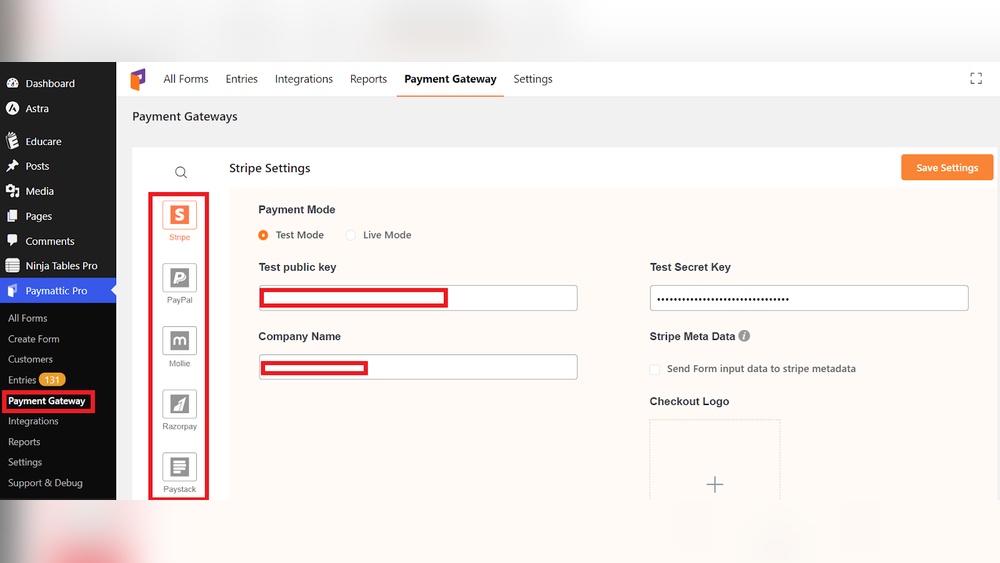
Choosing the right payment gateway is key to accepting payments on your WordPress website. It connects your site to payment networks, allowing customers to pay securely. The right gateway affects user experience, security, and the ease of managing transactions. Pick one that fits your business needs and budget.
Popular Payment Gateways For WordPress
Some payment gateways work very well with WordPress. PayPal is widely known and easy to set up. Stripe supports many payment types and has strong security. Square offers tools for both online and in-person sales. Authorize.Net is good for larger businesses with more features. Each option has plugins that make integration simple.
Factors To Consider When Selecting
Look at transaction fees and monthly costs first. Check if the gateway supports your country and currency. Security features like PCI compliance are important. Ease of use for you and your customers matters. Also, consider how well the gateway integrates with your WordPress theme and plugins.
Credit: wpdeveloper.com
Install Payment Plugin
Installing a payment plugin is the key step to accept payments on your WordPress site. It connects your website with payment gateways, making transactions smooth and secure. The right plugin ensures easy setup and reliable payment processing.
Choosing and installing a suitable plugin can be simple with the right guidance. Below are easy steps to find and install a payment plugin directly from your WordPress dashboard.
Finding The Right Plugin
Search for payment plugins in the WordPress plugin directory. Use keywords like “payment gateway” or “online payments.” Check plugin ratings and reviews to see what others say.
Look for plugins updated recently and compatible with your WordPress version. Popular options support major payment methods like PayPal, Stripe, or credit cards. Pick a plugin that fits your website needs and budget.
Installing From WordPress Dashboard
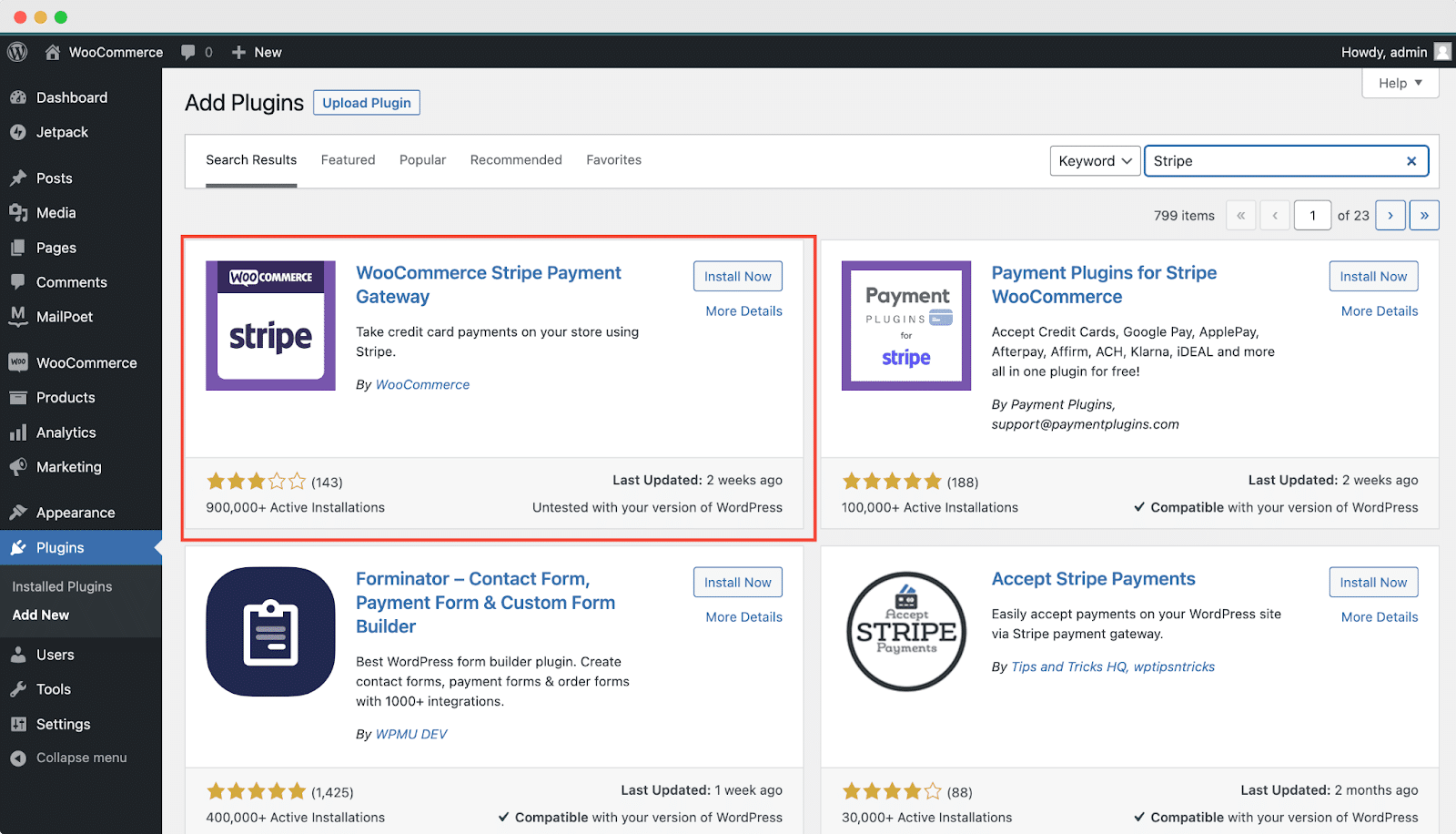
Log in to your WordPress admin panel. Go to the “Plugins” section and click “Add New.” Enter the plugin name or keywords in the search bar.
Find the plugin you want and click “Install Now.” Wait for the installation to complete, then click “Activate.” The plugin is now ready to use. Follow its setup instructions to connect your payment account.
Configure Plugin Settings
Configuring plugin settings is a key step in adding a payment method to your WordPress website. This process ensures your payment system works smoothly and securely. Proper configuration helps your customers pay without any trouble. Follow simple steps to set up your plugin correctly and avoid payment errors.
Connecting To Payment Gateway
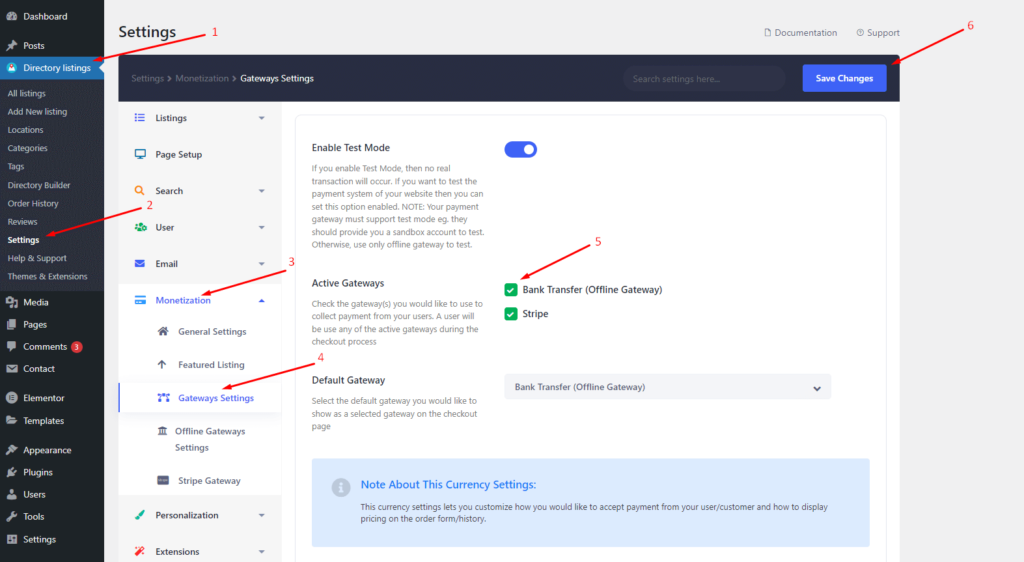
Start by linking your plugin to the payment gateway. This connection allows your website to process payments. Usually, you need API keys or credentials from the payment provider. Enter these details exactly as given to avoid connection issues. Test the connection to ensure it works before going live.
Setting Currency And Payment Options
Next, choose the currency your website will use for transactions. Select the currency that fits your target market. Set other payment options like payment methods and transaction types. You can enable credit cards, PayPal, or other popular methods. Adjust settings to make payments easy and clear for customers.
Credit: directorist.com
Add Payment Method To Checkout
Adding a payment method to the checkout page is essential for any WordPress store. It allows customers to pay easily and safely. This step helps you accept money directly on your website. You can choose from many payment options like credit cards, PayPal, or other gateways.
Setting up payment methods correctly improves the shopping experience. It also reduces cart abandonment and increases sales. Follow simple steps to edit the checkout page and test the payment system.
Editing Checkout Page
Start by opening your WordPress dashboard. Go to the plugin or theme that controls your checkout page. Many stores use WooCommerce for this task.
Find the checkout settings. Add or enable the payment methods you want to offer. You can also change the order of payment options here.
Make sure to save all changes before leaving the page. Check the checkout page on your website to see the new payment options.
Testing Payment Integration
Testing is crucial to avoid payment errors. Use the test mode provided by your payment gateway. This mode lets you try payments without using real money.
Complete a test purchase from start to finish. Confirm the payment goes through without any issues. Check your email for order confirmation messages.
Fix any problems found during testing. Repeat the process until all payments work smoothly. This step ensures a good experience for your customers.
Secure Your Payment Process
Securing your payment process is key to building trust on your WordPress website. It protects your customers’ data and prevents fraud. A safe payment system encourages buyers to complete their purchases with confidence.
Follow essential steps to make your payment method secure. These steps help keep information private and reduce risks.
Enable Ssl Certificate
SSL certificates encrypt data sent between your website and users. This encryption stops hackers from stealing sensitive information. Installing SSL shows a padlock in the browser, signaling safety to visitors. Most hosting providers offer free SSL certificates. Enable it through your hosting control panel or WordPress plugins. Always use HTTPS links for all payment pages.
Use Anti-fraud Measures
Anti-fraud tools detect suspicious activities during transactions. They check for unusual patterns like multiple failed attempts or strange locations. Use plugins or payment gateways that include fraud protection features. Set rules for transaction limits and verify customer details. Regularly update your security settings and monitor transactions. This reduces chargebacks and protects your business revenue.

Credit: www.youtube.com
Troubleshoot Common Issues
Troubleshooting common issues helps keep your payment system smooth. Problems can stop payments or break your site. Quick fixes save time and prevent lost sales. Below are frequent problems and simple ways to solve them.
Plugin Conflicts
Plugins might not work well together. They can cause errors or stop payments. Deactivate all plugins except your payment one. Check if the problem continues. Activate plugins one by one to find the conflict.
Keep plugins updated to avoid bugs. Use plugins from trusted sources only. Avoid too many plugins to reduce conflicts. Clear your site cache after changes.
Payment Failures
Payment failures can frustrate users and lose sales. Check your payment gateway settings first. Ensure API keys and credentials are correct. Test payments with sandbox mode before going live.
Look for error messages during payment attempts. Contact your payment provider for specific errors. Check your SSL certificate is active for security. Slow internet or server issues can also cause failures.
Frequently Asked Questions
How Do I Add A Payment Method To My WordPress Site?
To add a payment method, install a payment gateway plugin like WooCommerce or Easy Digital Downloads. Configure the plugin settings with your payment provider details. Then, test the payment method to ensure it works smoothly before going live.
Which Payment Gateways Work Best With WordPress?
Popular gateways for WordPress include PayPal, Stripe, and Square. They offer easy integration, security, and wide customer acceptance. Choose a gateway that suits your business needs and supports your country and currency.
Can I Add Multiple Payment Methods On WordPress?
Yes, WordPress supports multiple payment methods through plugins. You can enable options like credit cards, PayPal, and bank transfers. This flexibility improves customer experience and boosts sales by offering various payment choices.
Is It Safe To Add Payment Methods On WordPress?
Adding payment methods via trusted plugins ensures security. Always use SSL certificates, keep plugins updated, and follow PCI compliance. These steps protect your customers’ payment information and build trust in your website.
Conclusion
Adding a payment method to your WordPress site is simple and quick. It helps your visitors pay easily and safely. Choose the right plugin and follow the steps carefully. Test the payment process before going live. Keep your site updated to avoid any issues.
This small step can improve your website’s user experience. Start today and make payments easier for everyone.



