
Are you struggling to get more visitors to your WordPress blog? One simple trick can make a big difference: adding a meta description to your posts.
This small snippet helps search engines understand your content and can boost your click rates. In this guide, you’ll learn exactly how to add a meta description to your WordPress posts—step by step. By the end, you’ll know how to make your posts stand out in search results and attract more readers.
Keep reading to unlock this easy yet powerful SEO tip!
Why Meta Descriptions Matter
Meta descriptions are short summaries of your webpage content. They appear under the page title in search engine results. This small text can influence whether users click your link or not.
Search engines use meta descriptions to understand your page’s topic. A clear and relevant description helps your page rank better. It also attracts the right visitors to your site.
Well-written meta descriptions improve user experience. They give readers a quick idea of what to expect. This reduces bounce rates and keeps visitors engaged longer.
Improves Search Engine Rankings
Meta descriptions help search engines categorize your content. They show the main topic and keywords of your page. This can lead to higher rankings in search results.
Increases Click-through Rate
A good meta description grabs attention. It convinces users to visit your site over others. More clicks mean more traffic and potential customers.
Provides Clear Information To Users
Users read meta descriptions to decide if a page suits their needs. Clear, simple descriptions reduce confusion. They guide users to the right content quickly.
Enhances User Experience
Meta descriptions set user expectations. Visitors know what your page offers before clicking. This leads to better satisfaction and lower bounce rates.
Credit: www.greengeeks.com
Choosing The Right Meta Description
Choosing the right meta description helps your WordPress post stand out in search results. It gives readers a quick summary of your content. A good meta description can increase clicks and improve your post’s visibility.
Focus on clarity and relevance to attract the right audience. Write meta descriptions that match the content and keywords of your post. This makes your post more appealing to search engines and users alike.
Keep It Concise
Meta descriptions should be short and clear. Aim for about 150 to 160 characters. This length fits well in search results without being cut off. Short descriptions make it easier for readers to understand your post quickly.
Include Target Keywords
Use important keywords related to your post. This helps search engines connect your meta description to user searches. Place keywords naturally to avoid sounding forced. Keywords should match what your audience is searching for.
Make It Engaging
Write meta descriptions that catch attention. Use active language and clear benefits. Ask a question or highlight a solution to draw readers in. An engaging description encourages users to click your post over others.
Using WordPress Seo Plugins
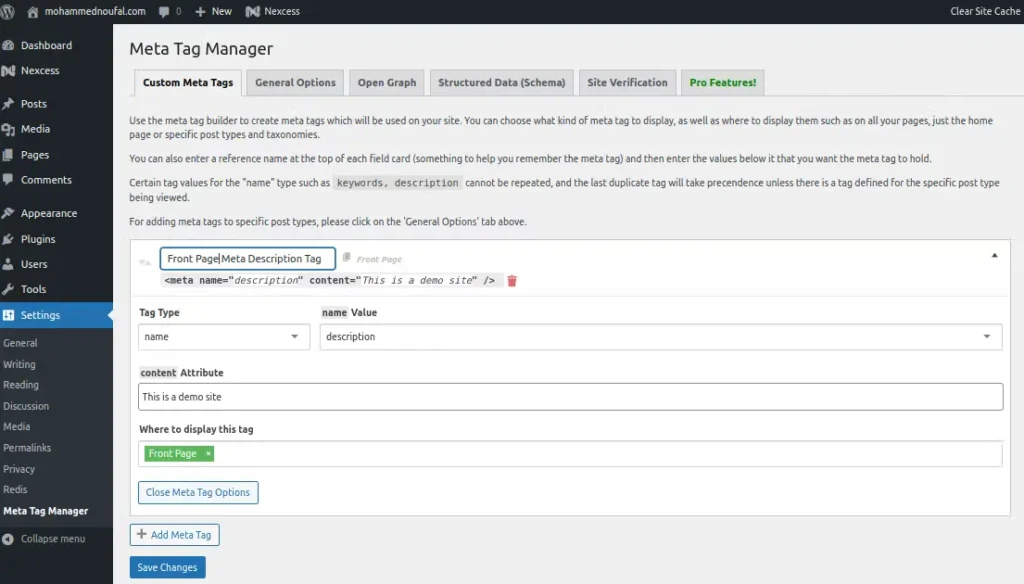
Using WordPress SEO plugins is a simple way to add meta descriptions to your posts. These plugins offer easy tools that help you write and manage meta descriptions without editing code. They improve how your posts appear in search engine results. This can lead to more visitors clicking on your content.
Installing A Plugin
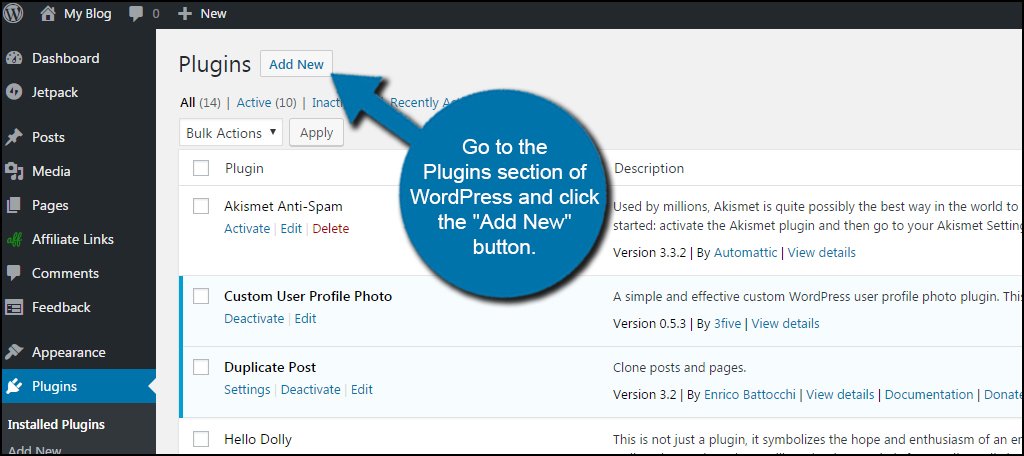
Start by logging into your WordPress dashboard. Go to the “Plugins” section and click “Add New.” Use the search bar to find an SEO plugin that supports meta descriptions. Click “Install Now” and then “Activate.” The plugin will add new options for SEO on your post editor screen. You can now write meta descriptions directly when you create or edit posts.
Popular Seo Plugins For Meta Descriptions
Several SEO plugins help with meta descriptions. Yoast SEO is very popular and user-friendly. It shows a snippet preview and scores your meta description. All in One SEO Pack also offers simple meta description fields. Rank Math provides an easy interface and many SEO tools for free. These plugins guide you to write better descriptions that attract clicks.
Credit: www.liquidweb.com
Adding Meta Description Via Yoast Seo
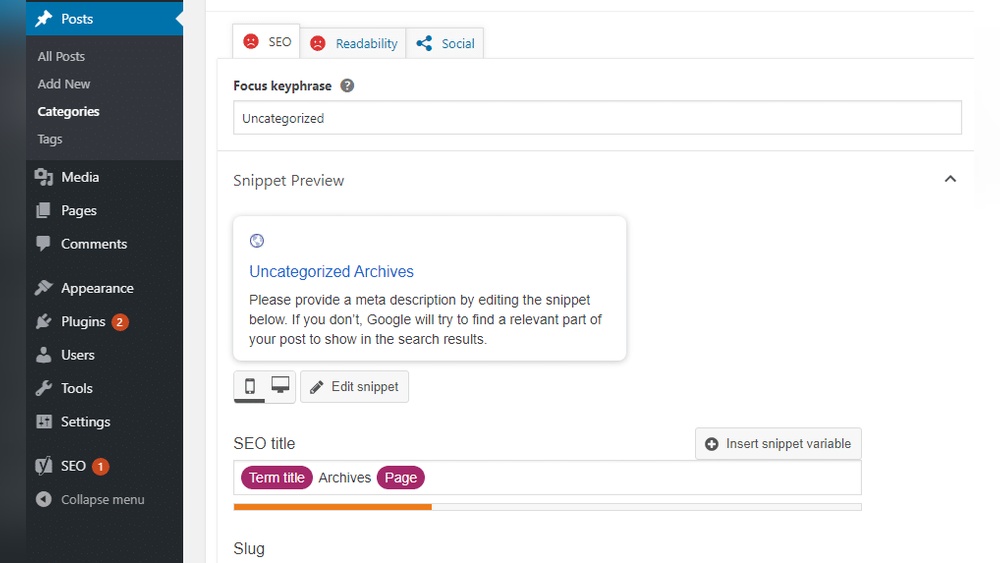
Adding a meta description to your WordPress post improves how search engines see your page. Yoast SEO makes this process simple. It provides a clear box for you to write a short summary of your post. This summary shows up in search results. It helps users decide if they want to click your link.
Using Yoast SEO, you can control the text that appears below your page title in search results. This control can increase your post’s visibility and click rate. The plugin guides you with tips to write the best meta description. Follow the steps below to add your meta description easily.
Locating The Meta Description Box
First, open the post editor in WordPress. Scroll down past the main content area. You will see the Yoast SEO section. Look for the box labeled “Meta Description.” It is under the snippet preview. This preview shows how your post will look in search results.
If you cannot find the Yoast SEO section, check if the plugin is active. Also, confirm the meta description box is enabled in the settings. Once located, you are ready to write your description.
Writing And Saving Your Description
Click inside the meta description box. Write a short sentence or two that explains what your post is about. Keep it clear and direct. Use words people would type to find your post. Avoid long sentences or complicated words.
Yoast SEO shows a color bar below the box. Green means your description length is good. Red means it is too short or too long. Adjust your text until the bar turns green. After writing, save or update your post. Your meta description is now live and ready for search engines.
Adding Meta Description With All In One Seo
Adding a meta description to your WordPress posts helps improve search engine visibility. The All in One SEO plugin makes this task simple and quick. It offers a special field to write your meta description directly on the post editor page.
This section explains how to find and use the meta description field in All in One SEO. It also shares tips for writing descriptions that attract clicks and accurately describe your content.
Accessing The Meta Description Field
Open your WordPress dashboard and go to the post editor. Scroll down below the content area to find the All in One SEO section. Here, locate the meta description box labeled “Meta Description.”
Click inside the box and type your description. The plugin shows a character count to help keep your description within the ideal length. Save or update your post to apply the changes.
Tips For Effective Descriptions
Write clear and simple sentences that explain your post’s topic. Use important keywords naturally to help search engines understand your content. Keep the description between 120 and 160 characters to fit search results.
Avoid copying the first lines of your post. Instead, create a unique summary that encourages users to click. Think about what makes your post useful or interesting. Focus on benefits or key points.
Manually Adding Meta Descriptions
Manually adding meta descriptions in WordPress gives you full control over your site’s SEO. It helps search engines understand your content better. You can customize descriptions for each post without using plugins.
This method requires some basic editing of WordPress theme files. It is ideal for users comfortable with code and file management. Always back up your site before making any changes.
Editing Theme Files
To add meta descriptions manually, you need to edit your theme’s header.php file. This file controls the content inside your site’s
section. Open the header.php file via Appearance > Theme Editor or using FTP.Inside
, add this PHP code:php if (is_single()) : ? php endif; ? This code checks if the page is a single post and adds a meta description using the post excerpt. You can customize the content inside the description tag to fit your needs.
Save the file and refresh your post page to see the meta description in the source code.
Using Functions.php
You can also add meta descriptions by editing the functions.php file. This keeps your header.php file cleaner and is easier to manage.
Add this code to functions.php:
function custom_meta_description() { if (is_single()) { $description = strip_tags(get_the_excerpt()); echo ''; } } add_action('wp_head', 'custom_meta_description'); This function runs on every page load and inserts a meta description for single posts. It pulls the excerpt and outputs it safely in the head section.
Make sure to save changes and test your posts to confirm the meta description appears correctly.
Checking Your Meta Description
Checking your meta description is important. It helps you see how your post appears in search results. A good meta description can attract more visitors to your site. It should be clear, short, and match the content of your post. Use tools to check if your meta description looks right and works well.
Using Google Search Console
Google Search Console shows how your pages appear in Google. It helps you check your meta description’s performance. You can see if Google uses your meta description or creates its own. This tool also reports any errors with your descriptions. Fixing these issues can improve your search rankings.
To check, log into Google Search Console. Select your website and go to the “Performance” section. Look for your page URLs and click on them. Review the snippets shown to verify the meta descriptions. This gives you real data from Google’s index.
Previewing In Search Results
Previewing your meta description shows how users see it. Some WordPress plugins offer a preview feature. This lets you view the snippet as it would appear on Google. You can adjust the text length and wording here. Make sure it is catchy and fits within the character limit.
Use the preview to avoid cut-off text in search results. A well-written description increases click rates. It summarizes the post clearly and invites users to read more. Preview often to maintain good SEO and user experience.
Common Mistakes To Avoid
Writing meta descriptions for WordPress posts can boost your site’s SEO. Still, many make simple mistakes that hurt your rankings and clicks. Avoid these errors to write better meta descriptions. This section highlights common mistakes to watch out for.
Using Meta Descriptions That Are Too Long
Google shows only about 155 characters in search results. Longer descriptions get cut off. Write concise descriptions that fit within this limit. Clear and short meta descriptions attract more clicks.
Ignoring Keywords In Meta Descriptions
Keywords help search engines understand your content. Leave them out, and your post may rank lower. Include relevant keywords naturally to improve visibility and relevance.
Writing Duplicate Meta Descriptions
Each post needs a unique meta description. Copying the same text across posts confuses search engines. Unique descriptions help each page stand out in search results.
Forgetting To Add A Meta Description Altogether
WordPress may use random text if no meta description is set. This can hurt your click rate. Always write a custom meta description for each post to control what appears.
Using Irrelevant Or Misleading Descriptions
The meta description should match the post content. Misleading descriptions frustrate users and increase bounce rates. Keep descriptions honest and relevant to the post.

Credit: www.crazyegg.com
Frequently Asked Questions
What Is A Meta Description In WordPress?
A meta description is a short summary of your post shown in search results. It improves click-through rates and SEO. Adding clear, relevant meta descriptions helps search engines understand your content better.
How Do I Add A Meta Description In WordPress Posts?
You can add meta descriptions using SEO plugins like Yoast SEO or Rank Math. Simply enter your description in the plugin’s meta description field before publishing your post.
Why Is Meta Description Important For Seo?
Meta descriptions influence search result snippets and user clicks. Well-written descriptions boost visibility, increase traffic, and improve your post’s ranking on search engines.
Can I Edit Meta Descriptions After Publishing A Post?
Yes, you can update meta descriptions anytime through your SEO plugin or WordPress editor. Changes usually reflect in search results after a few days.
Conclusion
Adding a meta description to your WordPress post helps improve search results. It gives readers a clear idea about your content. Keep it short, relevant, and interesting. This small step can increase clicks to your site. Use the right keywords naturally within the description.
Make sure each post has a unique meta description. Now, your posts are better set to attract visitors. Start adding meta descriptions today and see the difference.



