
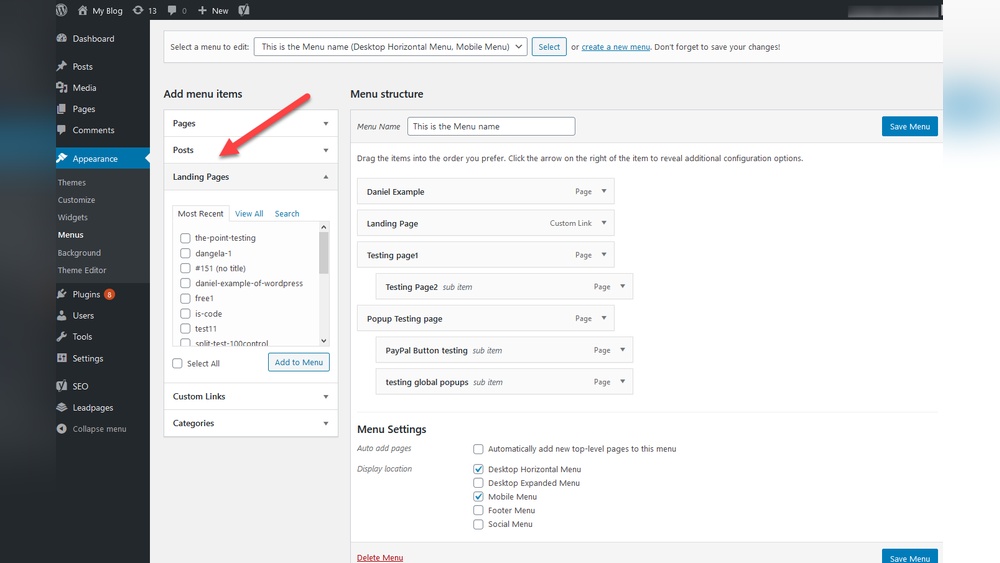
Are you looking to boost your website’s impact and turn visitors into customers? Adding a landing page in WordPress is one of the smartest moves you can make.
It’s simple, effective, and can dramatically improve your results. You’ll discover easy steps to create a landing page that grabs attention and drives action. By the end, you’ll have the confidence to set up your own landing page and watch your online presence grow.
Ready to get started? Let’s dive in!
Choose A Landing Page Plugin
Choosing the right landing page plugin is key for your WordPress site. A good plugin helps create pages that attract and keep visitors. It should be easy to use and fit your site’s needs. Plugins come with different features and designs. Pick one that matches your goals and skills.
Popular Plugins For Landing Pages
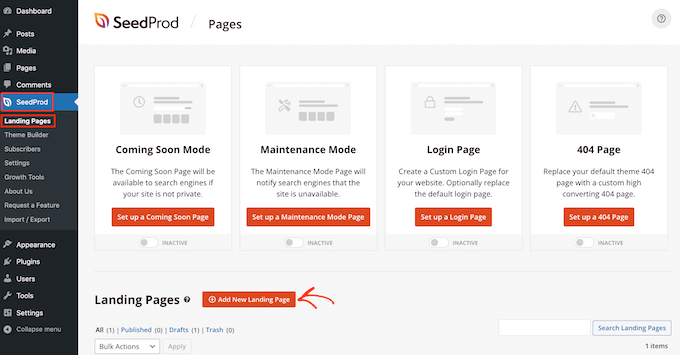
Several plugins are popular for building landing pages in WordPress. Elementor is known for its drag-and-drop builder and many templates. Beaver Builder offers a simple interface and responsive designs. Thrive Architect focuses on marketing features and fast page creation. SeedProd is great for coming soon and maintenance pages with easy setup. Each plugin has its strengths and suits different users.
Factors To Consider When Choosing
Check how easy the plugin is to use. You want something that saves time, not adds work. Look at the templates and customization options. Pick a plugin that lets you change colors, fonts, and layouts. Speed matters. A slow plugin can hurt your site’s performance and rankings. Also, consider support and updates. Regular updates keep the plugin secure and working well. Finally, check if the plugin fits your budget and goals.
Credit: elementor.com
Install And Activate The Plugin
Installing and activating a plugin is the first step to add a landing page in WordPress. Plugins extend your website’s features without coding. This process is simple and takes only a few minutes. Two common ways exist to install plugins: through the WordPress dashboard or manually. Each method suits different user needs and technical skills.
Using WordPress Dashboard
Start by logging into your WordPress admin area. Go to the “Plugins” menu on the left sidebar. Click “Add New” to open the plugin directory. Use the search bar to find the landing page plugin you want. Click “Install Now” next to the plugin name. Wait a few seconds for the installation to finish. Then, click “Activate” to enable the plugin on your site. The plugin is now ready for use.
Manual Installation Method
Download the plugin file in .zip format from a trusted source. Log in to your WordPress admin panel. Navigate to “Plugins” and click “Add New.” Select “Upload Plugin” at the top of the page. Choose the .zip file from your computer and click “Install Now.” Once installed, click “Activate Plugin” to start using it. This method works when the plugin is not in the WordPress directory.
Create A New Landing Page
Creating a new landing page in WordPress is simple and quick. A landing page helps you focus visitors on a single goal. This could be signing up, buying a product, or getting information. Start by setting up the basic details. Then, choose a template that fits your needs.
Setting Up Basic Page Details
Go to your WordPress dashboard. Click on “Pages” and then “Add New.” Enter a clear and catchy title for your landing page. This title will show in search engines and browser tabs. Write a short description or summary if your theme allows it.
Set the page URL to be simple and easy to remember. Avoid using long or complex words. Make sure the page is set to “Publish” when you are ready. You can also schedule the page to go live later.
Selecting A Template
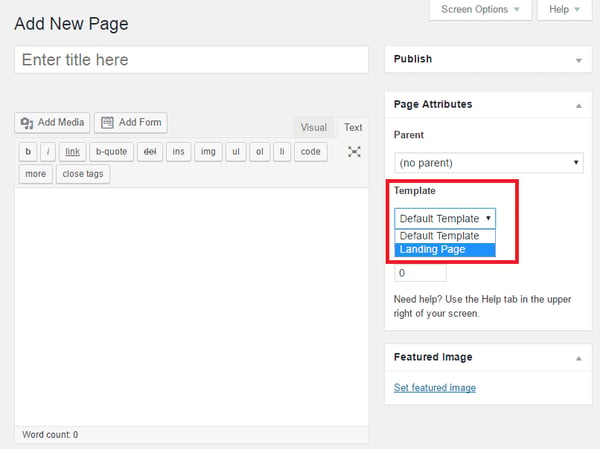
Choose a template designed for landing pages. Many themes have special templates that remove sidebars and menus. This keeps visitors focused on the main content.
Look for templates labeled “Landing Page” or “Full Width.” These templates give you more space and fewer distractions. If your theme does not have a landing page template, use a blank or full-width page. You can customize it with page builders like Elementor or Gutenberg blocks.
Customize Your Landing Page
Customizing your landing page helps create a unique and engaging experience. It lets you match your brand style and meet your goals. Simple changes can boost visitor interaction and conversions.
Focus on clear text, eye-catching images, and easy navigation. Each element should guide visitors toward your main message or offer. Small adjustments improve the overall look and feel.
Editing Text And Images
Start by changing the default text to your own words. Use short sentences and clear messages. Highlight the benefits or key points you want visitors to know.
Replace placeholder images with photos or graphics that fit your brand. Use high-quality images that load quickly. Avoid cluttering the page with too many pictures.
Adding Call-to-action Buttons
Call-to-action (CTA) buttons direct visitors to take specific steps. Use simple words like “Buy Now,” “Sign Up,” or “Learn More.” Make buttons stand out with bright colors and clear shapes.
Place CTAs in visible spots, such as near the top and after important content. Ensure each button links to the right page or form. Test buttons to confirm they work properly.
Adjusting Layout And Design
Change the layout to make the page easy to read and navigate. Use white space to separate sections and avoid crowding. Align text and images for a balanced look.
Choose fonts that are simple and large enough to read on all devices. Pick colors that match your brand and provide good contrast. Keep the design clean and focused on your message.
Configure Seo Settings
Configuring SEO settings is a key step in creating a landing page on WordPress. It helps your page rank better in search engines. A well-optimized page attracts more visitors and improves your site’s visibility. Focus on making your titles and descriptions clear and relevant. Use tools that make SEO easier to handle. This section guides you through simple steps to set up SEO correctly.
Optimizing Page Titles And Descriptions
Page titles tell search engines what your page is about. Keep titles short and include main keywords. Make sure titles match the page content closely. Descriptions appear below the title in search results. Write descriptions that summarize the page clearly. Use keywords naturally in descriptions without overstuffing. Both titles and descriptions should invite users to click. Check how your titles and descriptions look on search results.
Using Seo Plugins
SEO plugins simplify the optimization process on WordPress. They offer tools to edit titles, descriptions, and more. Popular plugins include Yoast SEO and All in One SEO Pack. These tools provide real-time feedback on your SEO efforts. Use plugins to create XML sitemaps automatically. They also help with social media sharing settings. Plugins reduce the chance of missing important SEO details. Keep your plugins updated for best performance.
Credit: blog.hubspot.com
Publish And Test Your Landing Page
Publishing and testing your landing page is a key step in your WordPress journey. It lets you see your hard work live. You can find errors and fix them before visitors arrive. Testing also ensures the page works well on all devices. This improves user experience and keeps visitors engaged. Follow these steps to make sure your landing page is ready.
Previewing The Page
Preview your landing page before publishing. Click the “Preview” button in the WordPress editor. This shows how the page looks to visitors. Check all text, images, and links for accuracy. Make sure the design matches your vision. Previewing helps catch mistakes early. Save time and avoid publishing errors.
Testing Responsiveness And Load Time
Test your page on different devices like phones, tablets, and desktops. The layout should adjust smoothly to each screen size. Responsive pages keep visitors happy and reduce bounce rates. Use online tools to check load speed. Fast-loading pages improve SEO and user satisfaction. Fix any slow elements before publishing. A quick, responsive page performs better overall.
Integrate With Marketing Tools
Integrating your landing page with marketing tools helps you track and grow your audience. It connects your page with services that manage email lists and measure visitor behavior. These connections make your marketing efforts stronger and more organized.
Connecting Email Marketing Services
Email marketing helps you reach people who visit your landing page. Connect your page to popular email services like Mailchimp, Constant Contact, or ConvertKit. Use plugins or built-in features in WordPress to link your form with these services. This way, visitor emails go directly to your list. It saves time and keeps your contacts organized.
Choose an email tool that fits your needs. Set up automated emails to welcome new subscribers. Keep your audience engaged with regular updates. This connection turns visitors into loyal followers.
Setting Up Analytics Tracking
Analytics tracking shows how visitors interact with your landing page. Google Analytics is a top choice for this task. Create a Google Analytics account and get your tracking code. Add this code to your WordPress site using a plugin or theme settings.
Tracking data reveals which parts of your page work well. It shows where visitors click and how long they stay. Use this information to improve your page design and content. Analytics helps you make smart decisions to boost conversions.
Credit: www.wpbeginner.com
Maintain And Update Landing Pages
Maintaining and updating your landing pages keeps them useful and attractive. Fresh content helps visitors trust your site. Regular updates also improve your search engine rankings. Stay active with your pages to keep them relevant.
Regular Content Updates
Change the text and images on your landing page often. Add new offers, news, or customer reviews. Keep the information clear and simple. Remove old details that no longer apply. This keeps visitors interested and encourages them to act.
Monitoring Performance Metrics
Track how many people visit your landing page. Check how long they stay and where they click. Use tools like Google Analytics to see this data. Look for patterns that show what works or what needs change. Use these insights to improve your page regularly.
Frequently Asked Questions
How Do I Create A Landing Page In WordPress?
To create a landing page, go to your WordPress dashboard. Click “Pages” > “Add New. ” Choose a landing page template or use a page builder plugin. Customize content, design, and layout, then publish your page for visitors.
Can I Use Plugins To Build Landing Pages?
Yes, plugins like Elementor, Beaver Builder, and Divi help create landing pages easily. They offer drag-and-drop features and pre-made templates, enabling you to design without coding. These plugins improve flexibility and speed up landing page creation.
How To Set A Landing Page As Homepage In WordPress?
Go to WordPress dashboard, then “Settings” > “Reading. ” Select “A static page” and choose your landing page from the dropdown. Save changes to display your landing page as the homepage for all visitors.
What Are The Best Themes For WordPress Landing Pages?
Themes like Astra, OceanWP, and GeneratePress are lightweight and customizable. They support landing page templates and work well with popular page builders, ensuring fast loading times and responsive designs for better user experience.
Conclusion
Adding a landing page to WordPress is simple and effective. Follow the steps carefully to create your page. Choose a clear design and focus on your goal. Keep content short and easy to read. Test your page on different devices for best results.
A good landing page helps visitors take action quickly. Start building your page today and see the difference.



