

Are you struggling to get your WordPress site noticed? Adding the right keywords can change everything.
When you use keywords correctly, your site becomes easier to find, bringing more visitors and potential customers straight to you. In this guide, you’ll discover simple, effective steps to add keywords to your WordPress site. By the end, you’ll know exactly how to boost your site’s visibility and attract the audience you want.
Ready to unlock your site’s full potential? Let’s dive in.
Why Keywords Matter
Keywords are the words and phrases people type into search engines. They help connect your website to what users want. Using the right keywords on your WordPress site makes it easier for search engines to find and show your pages. This boosts your chances of reaching more visitors. Understanding why keywords matter is key to improving your site’s visibility.
Role Of Keywords In Seo
Keywords tell search engines what your content is about. They guide the search engine to match your site with relevant searches. Good keywords align with your content and audience needs. They help organize your pages around specific topics. This clarity improves how search engines read your site.
Impact On Search Rankings
Search engines rank pages based on how well they match search queries. Using relevant keywords increases your chances of ranking higher. Higher rankings lead to more clicks and visitors. Without proper keywords, your site may stay hidden in search results. This makes keywords a crucial part of SEO success.
Credit: www.wpbeginner.com
Finding The Right Keywords
Finding the right keywords is a crucial step for your WordPress site’s success. Good keywords bring visitors who want your content. They help your site show up in search results. Choosing the best words takes time and care. Focus on words your audience uses. Think about what they type when searching.
Using Keyword Research Tools
Keyword research tools make the process easier. Tools like Google Keyword Planner and Ubersuggest suggest popular words. They show how many people search each keyword. These tools also provide ideas for related keywords. Use them to find words with good search volume. Avoid very competitive keywords. Aim for those easier to rank for.
Analyzing Competitors
Check what keywords your competitors use. Visit their websites and note the words in titles and content. Use tools like SEMrush or Ahrefs to see their top keywords. This gives clues about what works in your niche. Find gaps where you can rank better. Don’t copy exactly. Use this info to create your own keyword list.
Selecting Long-tail Keywords
Long-tail keywords are longer and more specific phrases. They have less competition and attract targeted visitors. For example, “best running shoes for flat feet” instead of “running shoes.” These keywords often have higher conversion rates. Use them in blog posts, titles, and product descriptions. They help your site rank faster and bring quality traffic.
Adding Keywords To WordPress Content
Adding keywords to your WordPress content helps search engines find your site. It improves your chances of showing up in search results. Keywords should fit naturally in your content. Avoid stuffing keywords too many times.
Focus on placing keywords in important spots. This includes titles, headings, body text, and meta descriptions. Proper use of keywords makes your content clear and relevant.
Optimizing Titles And Headings
Titles and headings catch readers’ attention first. Use your main keywords here to signal the topic. Keep titles clear and direct. Use headings to break content into sections. Add keywords in headings without forcing them.
Incorporating Keywords In Body Text
Body text is where you explain your topic. Use keywords naturally inside sentences. Spread them evenly throughout the content. Avoid repeating the same keyword too often. Write for readers, not just search engines. Use related words to support your main keywords.
Using Keywords In Meta Descriptions
Meta descriptions appear in search results below your title. Include main keywords to attract clicks. Keep descriptions short and clear. Summarize the page content using simple language. A good meta description improves your site’s visibility.
Utilizing Seo Plugins
Utilizing SEO plugins can make managing keywords on your WordPress site easier. These tools help you add, organize, and track keywords without technical hassle. Plugins guide you step-by-step to improve your site’s visibility on search engines.
Choosing The Best Seo Plugin
Select a plugin that is popular and frequently updated. Check user reviews and ratings before installing. Look for features like keyword management, content analysis, and sitemap creation. Plugins like Yoast SEO and Rank Math are reliable choices. Ensure the plugin fits your site’s size and needs.
Setting Up Keywords In Plugins
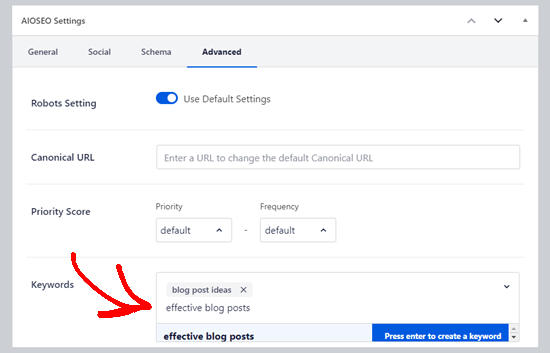
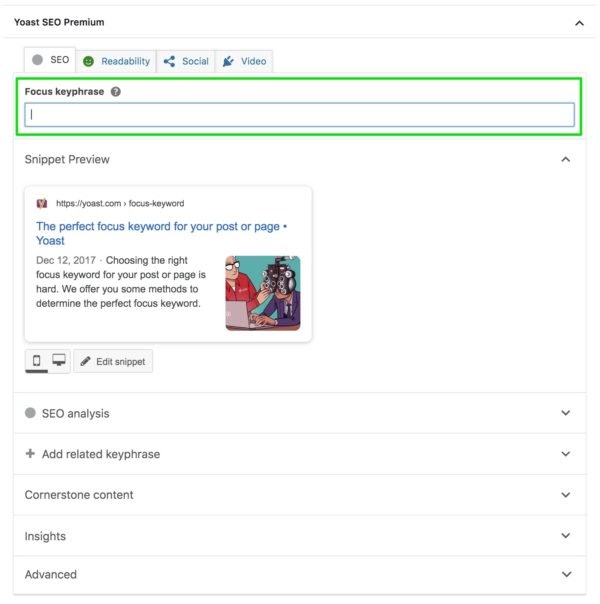
After installing, go to the plugin’s settings page. Enter your main keywords for each page or post. The plugin will suggest improvements to optimize keyword use. Use the plugin’s tools to add keywords to titles, descriptions, and content. Keep keywords natural and relevant to your topic.
Monitoring Keyword Performance
SEO plugins provide reports on how keywords perform. Check these reports regularly to see which keywords attract visitors. Adjust your content based on this data to improve rankings. Use the plugin’s tools to track changes over time. Consistent monitoring helps keep your site competitive.
Optimizing Images And Media
Images and media play a big role in your WordPress site’s SEO. Optimizing them helps search engines understand your content better. It also improves user experience by making pages load faster and more relevant.
Adding keywords to images and media is a smart SEO step. This makes your site easier to find in search results. Below are two key ways to optimize your images using keywords.
Using Keywords In Alt Text
Alt text describes images to search engines and users who cannot see them. Use clear, short phrases that include your main keywords. This helps search engines understand the image topic. It also improves accessibility for visitors with disabilities.
Write alt text that matches the image content. Avoid keyword stuffing. Keep it natural and helpful. For example, instead of “IMG1234,” use “red running shoes for men.”
Naming Image Files Strategically
Image file names should include keywords related to your content. Use hyphens to separate words, like “blue-winter-jacket.jpg.” Search engines read file names to understand the image.
Rename images before uploading them to WordPress. Avoid generic names like “photo1.jpg.” This small step boosts your SEO and keeps your site organized.
Credit: blog.hubspot.com
Improving Site Structure With Keywords
Improving your site structure with keywords helps search engines find and rank your pages better. A clear structure guides visitors to the right content quickly. Using keywords in key places strengthens your site’s relevance and boosts SEO.
Creating Keyword-rich Urls
URLs with keywords show search engines what the page is about. Keep URLs short and include the main keyword. For example, use yoursite.com/seo-tips instead of a long, unclear URL. This makes your links easier to read and remember.
Use hyphens to separate words in URLs. Avoid special characters and numbers that confuse users. Clean, keyword-rich URLs improve both user experience and SEO performance.
Building Internal Links
Internal links connect pages within your website. Use keywords as the link text to help search engines understand each page’s topic. For example, link the phrase “WordPress SEO guide” to your SEO page.
This practice spreads page authority and keeps visitors on your site longer. It also helps search engines find new content and rank it appropriately. Use internal linking wisely to create a strong site structure.
Avoiding Keyword Stuffing
Keyword stuffing means using too many keywords on a page. This can harm your site’s ranking and annoy readers. Search engines want content that reads naturally and provides value. Avoid cramming keywords into every sentence. Focus on clear and helpful writing instead.
Maintaining Natural Content Flow
Write for people, not just for search engines. Use keywords where they fit naturally. Read your text aloud to check the flow. If a sentence feels forced, change it. Keep sentences simple and easy to follow. This helps visitors stay longer on your site.
Balancing Keyword Density
Keyword density means how often a keyword appears in your content. Aim for about 1-2% density. Too many keywords can look like spam. Spread keywords evenly throughout the text. Use variations and related terms to avoid repetition. This keeps your content fresh and readable.

Credit: www.crazyegg.com
Frequently Asked Questions
How Do I Add Keywords To WordPress Posts?
To add keywords, include them naturally in titles, headings, and content. Use plugins like Yoast SEO for keyword optimization and meta descriptions.
Where Should Keywords Be Placed On A WordPress Site?
Place keywords in titles, meta descriptions, URLs, headers, and image alt texts. This helps search engines understand your content better.
Can I Use Keywords In WordPress Tags And Categories?
Yes, using relevant keywords in tags and categories improves site structure and boosts SEO by organizing related content effectively.
How Do Seo Plugins Help With Keyword Addition?
SEO plugins guide keyword placement, analyze content, and suggest improvements. They simplify optimization for better search engine rankings.
Conclusion
Adding keywords to your WordPress site helps attract the right visitors. Choose words that match your content and audience. Place keywords naturally in titles, headings, and text. Use SEO plugins to guide your efforts. Keep your content clear and helpful for readers.
Regularly update keywords to stay relevant. Small steps lead to better search results. Start applying these tips today and watch your site grow.



