

Are you worried about protecting your hard work on your WordPress site? Adding a copyright notice is a simple yet powerful way to claim ownership and keep your content safe.
But how exactly do you add copyright to WordPress without any hassle? You’ll discover easy steps to make your site legally secure and professional. Keep reading to learn how to add copyright quickly and effectively—your content deserves it!
Why Copyright Matters
Copyright is important for every WordPress site. It tells visitors who owns the content. It shows that your work is protected. This makes your site more professional and trustworthy.
Adding copyright helps keep your content safe. It stops others from copying your work without permission. This simple step can save you from many problems later.
Legal Benefits
Copyright gives you legal rights over your content. It allows you to take action if someone steals your work. Courts recognize copyrighted content as your property. This legal protection is important for online creators.
Protecting Original Content
Your ideas, photos, and writing belong to you. Copyright helps protect these original pieces. It prevents others from claiming your work as their own. This keeps your site unique and valuable.
Avoiding Infringement Issues
Using others’ content without permission can cause problems. Copyright helps you avoid these issues by making ownership clear. It reduces the risk of legal trouble and fines. Clear copyright notices warn others to respect your work.

Credit: qodeinteractive.com
Choosing The Right Copyright Notice
Choosing the right copyright notice for your WordPress site protects your content legally. A clear notice shows others you own the work. It also informs visitors about your content’s rights. The right notice helps avoid confusion and misuse. Understanding the basic elements of a copyright notice is key to choosing the best one for your site.
Standard Copyright Symbols
The © symbol is the most common copyright mark. It signals that content is protected by copyright law. Using this symbol is simple and widely recognized. The letter “C” in a circle means “copyright.” You can type it easily with keyboard shortcuts or copy-paste. Placing it in your footer or page bottom is best.
Customizing Your Notice
Customizing your copyright notice makes it unique. You can add your website name or company name. This shows exactly who owns the content. Some sites also add a short phrase like “All rights reserved.” This phrase tells others they cannot reuse your work freely. Keep your notice clear and simple for best results.
Including Dates And Ownership
Including the year or range of years is important. It shows when you first published the content. For example, “© 2022-2024 YourSiteName.” This helps protect your content over time. Also, clearly stating ownership avoids confusion. Use your real business or website name. This makes your copyright notice complete and professional.
Adding Copyright In WordPress Theme
Adding copyright to your WordPress theme protects your content. It shows who owns the website material. It also adds professionalism and trust for your visitors. Many themes do not include copyright by default. You can add it easily by editing theme files or using built-in tools. This guide explains how to add copyright in WordPress theme.
Editing Footer.php File
The footer.php file controls the bottom part of your website. You can insert your copyright text here. Open your WordPress dashboard and go to Appearance > Theme Editor. Find the footer.php file in the list on the right. Scroll to the bottom of this file. Add your copyright notice inside a
tag. Use the current year and your site name. Save the changes. Refresh your site to see the copyright in the footer.
Using Theme Customizer
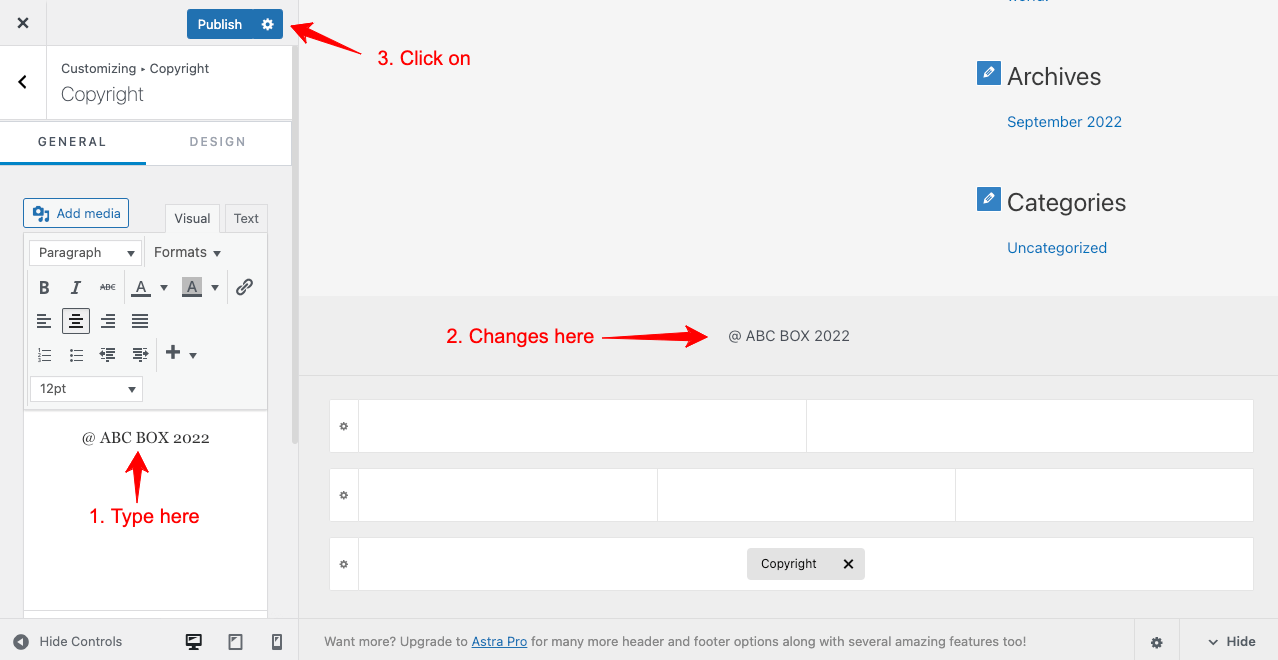
Many themes allow you to add copyright via the Customizer. Go to Appearance > Customize in your WordPress dashboard. Look for sections like “Footer” or “Site Identity.” Some themes have a field to enter copyright text directly. Type your message there. Preview the changes live. Click “Publish” to save. This method is safe and easy. It does not require coding knowledge.
Child Theme Considerations
Editing theme files directly can cause problems when the theme updates. Updates may erase your custom copyright text. A child theme solves this issue. Create a child theme and copy footer.php into it. Make your copyright edits in the child theme file. WordPress will use this file instead of the original. This keeps your changes safe after updates. Using a child theme is a best practice for custom code.
Using Plugins For Copyright
Adding copyright notices to your WordPress site helps protect your content. Using plugins for this task is a simple and effective method. Plugins automate the process and make it easy to manage copyright information across your site.
Many plugins offer customization options. You can set the text, year, and placement of your copyright notice. These tools help keep your site professional and secure.
Popular Copyright Plugins
Several plugins are popular for adding copyright to WordPress sites. “WP Copyright Protection” blocks content copying. “Simple Copyright” adds a customizable copyright message. “Footer Putter” includes copyright and other footer elements. Choose one based on your needs and ease of use.
Configuring Plugin Settings
After installing a plugin, go to its settings page. Enter your copyright text and select where it appears. Options include footer, posts, or pages. Some plugins allow automatic year updates. Save changes and check your site for the copyright notice.
Pros And Cons Of Plugins
Plugins save time and require no coding skills. They offer flexible design and placement options. Some plugins also block content theft. On the downside, plugins can slow down your site if poorly coded. Too many plugins may cause conflicts. Regular updates are necessary for security and compatibility.
Displaying Copyright On Different Pages
Displaying copyright on different pages of your WordPress site protects your content. It shows visitors that your work is legally owned. Each type of page may need a different copyright approach. This section explains how to add copyright notices on various pages.
Homepage And Blog Posts
The homepage is the first thing visitors see. Adding a copyright notice here sets the tone. Use a simple copyright line in the footer. For blog posts, place copyright at the end of each post. This reminds readers that your content is protected.
Static Pages
Static pages include About, Contact, and Services pages. These pages often stay the same over time. Add copyright in the footer or at the bottom of each page. This keeps your ownership clear across your entire site.
Media And Downloads
Media files and downloadable content need copyright protection too. Add a copyright notice near images, videos, or files. You can also include a copyright statement in file descriptions. This helps prevent unauthorized use of your media.
Credit: happyaddons.com
Updating Copyright Information Automatically
Updating copyright information on your WordPress site is important. It shows visitors your site is active and cared for. Doing this manually each year can be a hassle. Automating the update saves time and keeps your site looking professional. There are simple ways to make copyright dates update on their own.
Dynamic Year Scripts
Dynamic year scripts use code to show the current year automatically. This means your copyright date changes every January 1st without any action. A common method is using JavaScript or PHP in your theme’s footer. This small code snippet pulls the current year from the server or browser. It updates the copyright date every time someone visits your site. The code is easy to add and does not slow down your site.
Automated Plugin Features
Many WordPress plugins offer automatic copyright updates. These plugins add the current year to your footer or widget areas. Some plugins also let you customize the copyright text. They work without needing to touch any code. Plugins are good for beginners who want a quick and easy solution. They often include extra features like copyright symbols and links. Using a plugin means no worries about forgetting to update dates yearly.
Additional Legal Tips
Adding a copyright notice to your WordPress site is a good start. Legal protection goes beyond just showing a copyright symbol. Knowing extra legal steps can help protect your work better. These tips focus on key actions to secure your content and handle any problems.
Registering Your Copyright
Registering your copyright gives you stronger legal protection. It proves you own the content and shows the creation date. This helps if someone steals your work. You can register online through your country’s copyright office. The process is usually simple and not too costly. Registered copyrights offer legal benefits not available otherwise.
Terms Of Use And Disclaimers
Write clear terms of use to explain how visitors can use your content. Terms protect you from misuse and set rules for your site. Disclaimers help limit your responsibility for how users use your information. Both should be easy to find on your site. Use simple language so everyone understands your rules.
Monitoring For Infringement
Keep an eye on the internet to find if someone copies your content. Use tools that scan for duplicate content online. Check regularly to spot problems early. If you find infringement, act quickly. Send a notice to the offender or report it to hosting services. Protecting your content shows others you take ownership seriously.
Credit: wpcode.com
Frequently Asked Questions
How Do I Add Copyright Text In WordPress Footer?
To add copyright text in the footer, go to Appearance > Customize > Widgets or Footer. Use a text widget to insert your copyright notice. Save changes, and it will display on all pages, protecting your content.
Can I Customize Copyright Notice With The WordPress Theme?
Yes, most themes allow copyright customization via the Customizer or theme settings. Check your theme’s documentation for specific instructions. This lets you add your business name and year easily.
Is It Necessary To Update Copyright Year Regularly?
Yes, updating the copyright year annually shows your website is current. It also helps protect your content legally. You can automate this with a small PHP snippet in your theme’s footer file.
What Plugins Help Add Copyright To WordPress?
Plugins like “WP Copyright Protection” or “Simple Copyright” can add and protect your copyright text. They offer easy options to display and update copyright notices without coding knowledge.
Conclusion
Adding copyright to your WordPress site protects your content easily. It shows others your work belongs to you. You can add it in the footer, pages, or posts. Use simple steps and tools to do this fast. Keep your copyright updated with the current year.
This small action helps avoid content theft. Protect your site and give your work respect. Start adding copyright today to secure your WordPress content.



