
Are you looking to make money from your WordPress site? Adding advertisements is one of the easiest ways to start earning.
But how do you do it without messing up your site or annoying your visitors? This guide will walk you through simple steps to add ads that fit perfectly with your content. By the end, you’ll know exactly how to set up ads that attract clicks and boost your income.
Ready to turn your website into a profit machine? Let’s dive in!
Choosing The Right Ad Network
Choosing the right ad network is key to earning money from your WordPress site. Each network offers different features and benefits. Picking one that fits your needs helps increase your site’s revenue and keeps visitors happy.
Consider your website’s topic, audience size, and the type of ads you want to show. Some networks work better for small sites, while others suit large traffic. The right choice balances income with user experience.
Popular Ad Networks For WordPress
Google AdSense is the most common option. It offers many ad formats and easy setup. Media.net focuses on contextual ads and works well with content sites. Amazon Associates lets you promote products and earn commissions. AdThrive is good for sites with high traffic and pays well. Each network has its own rules and payment methods.
Factors To Consider When Selecting
Check the minimum traffic requirements. Some networks require thousands of visitors per month. Look at the ad formats supported. Choose those that fit your site design. Review the payment threshold and methods. Ensure they match your preferences. Consider the ad network’s reputation and support. Good support helps solve issues fast.
Preparing Your WordPress Site
Before adding advertisements to your WordPress site, it is essential to prepare your site properly. A well-prepared site ensures ads display correctly and attract more clicks. Preparation also improves user experience and keeps visitors engaged.
Focus on optimizing site speed and ensuring mobile compatibility. These steps help your site run smoothly and look good on all devices. Proper preparation sets the stage for successful ad placement.
Optimizing Site Speed
Site speed affects how fast your pages load. Slow loading pages can drive visitors away. Use a reliable hosting service to improve speed. Optimize images by compressing them without losing quality. Use caching plugins to reduce server load. Keep your WordPress themes and plugins updated for best performance. Remove unused plugins and themes to avoid slowing your site. Fast sites keep visitors longer and improve ad views.
Ensuring Mobile Compatibility
Many visitors use mobile devices. Your site must look good on phones and tablets. Choose a responsive WordPress theme that adjusts to screen sizes. Test your site on different devices to check display and functionality. Make sure ads fit well on small screens without blocking content. Mobile-friendly sites provide better user experience and higher ad engagement.
Using Plugins To Add Ads
Using plugins is one of the easiest ways to add advertisements to your WordPress site. Plugins handle the complex parts of ad placement, saving time and effort. They offer tools to manage where and how ads show up on your pages.
Many plugins also support multiple ad networks and formats. This flexibility helps you display ads that fit your site’s style and audience. Most plugins come with simple settings that anyone can use without coding knowledge.
Top Ad Management Plugins
Ad Inserter is popular for its easy interface and powerful features. It supports all ad types, including Google AdSense and Amazon ads. Advanced Ads is another good choice. It offers precise control over ad placement and scheduling. WP Quads is great for quick setup and reliable performance. It lets you insert ads in posts, widgets, or headers without hassle.
Step-by-step Plugin Setup
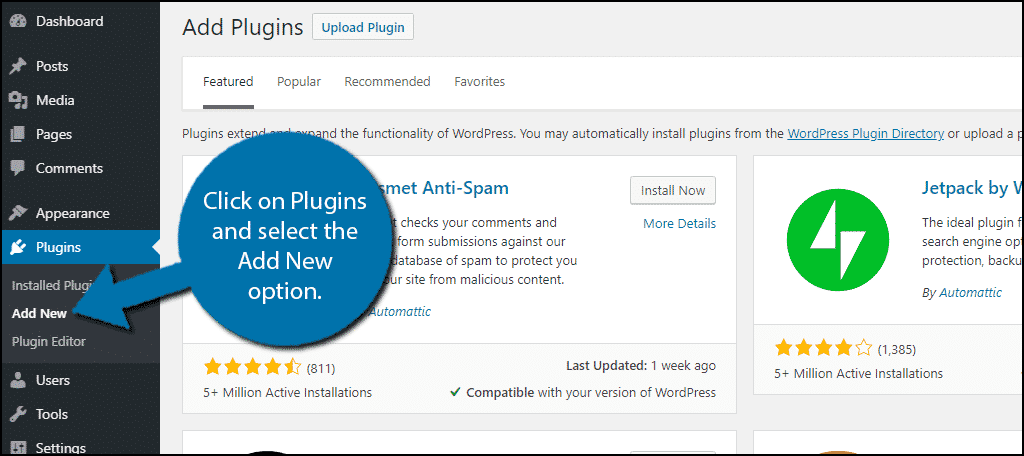
First, go to your WordPress dashboard and click “Plugins.” Choose “Add New” and search for your preferred ad plugin.
Click “Install Now” and then “Activate” to enable the plugin on your site.
Open the plugin settings from the dashboard menu. Follow the setup wizard or instructions to connect your ad accounts.
Choose where to place ads on your site, such as before posts, in the sidebar, or between paragraphs.
Save your settings and check your site to see the ads live. Adjust placements if needed for better results.
Credit: wpcode.com
Manual Ad Placement Techniques
Manual ad placement lets you control exactly where ads appear on your WordPress site. It needs some basic knowledge of WordPress and coding. You place ads directly into your theme files or use widgets. This method gives more control than automatic plugins. It helps you match ads with your site design easily.
Inserting Ads In Theme Files
Adding ads in theme files means editing PHP files of your theme. This method places ads in specific spots like header, footer, or sidebar. You need to access your site files via FTP or the WordPress theme editor.
Find the file where you want the ad. Open it and insert the ad code from your ad provider. Save the file and check your site to see if the ad shows correctly. Be careful not to change other code to avoid site errors.
Adding Ads Via Widgets
Widgets are a simple way to add ads without editing code. Go to Appearance > Widgets in your WordPress dashboard. Drag a Custom HTML widget to your sidebar or footer area.
Paste the ad code inside the widget content box. Save the widget and visit your site to confirm the ad appears. Widgets work well for placing ads in sidebars or footers. They are easy to change or remove anytime.
Ad Placement Strategies
Choosing the right spots for ads on your WordPress site helps catch visitor attention. Good placement increases clicks and earnings. Poor placement may annoy readers and reduce site visits.
Think about where visitors look first. Place ads in those areas to boost visibility. Consider balancing ad size and number to keep your site neat.
High-visibility Areas
Top of the page is prime space for ads. Visitors see this area immediately after loading the site. Sidebars also attract attention because they stay visible while scrolling.
In-content ads blend with your articles. They appear between paragraphs and get noticed naturally. Footer ads reach visitors who scroll to the bottom.
Balancing User Experience And Ads
Too many ads make your site look crowded. Visitors may leave quickly if ads block content. Use a few well-placed ads to keep readers happy.
Choose ad sizes that fit your layout. Avoid large pop-ups that interrupt reading. Make sure ads load fast to prevent slow pages.
Tracking And Optimizing Ad Performance
Tracking and optimizing ad performance is key to earning more from your WordPress site. Knowing how ads perform helps you make smart choices. You see what works and what doesn’t. This way, you spend money and time wisely.
Tracking tools show how many people see and click ads. Optimizing means changing ad spots or styles to get better results. Small changes can bring big improvements in earnings and user experience.
Using Analytics Tools
Analytics tools track ad views, clicks, and user behavior. Google Analytics is a popular choice. It gives detailed reports on ad performance. You can see which pages bring the most clicks.
These tools help spot trends over time. For example, you learn which ads attract the most attention. You can also track visitor sources and devices. This info guides your ad strategy.
A/b Testing Ad Positions
A/B testing means trying two ad positions to see which is better. Place ads in different spots on your site. Compare the results after a few days or weeks.
This testing shows where ads get the most clicks and views. Maybe ads near the content perform better than sidebars. Use this data to place ads smartly. Keep testing to improve constantly.
Maximizing Revenue With Affiliate Ads
Maximizing revenue with affiliate ads can boost your WordPress site’s earnings. Affiliate ads pay you when visitors buy products or services through your links. This method fits well with blogs and content sites. It does not require selling your own products. Focus on choosing the right programs and placing links smartly. This approach improves user experience and increases clicks.
Choosing Affiliate Programs
Select programs related to your site’s topic. Relevant products attract your audience’s interest. Check the program’s reputation and payment terms. Choose those with clear, fair commission rates. Look for programs with good support and tracking tools. Avoid too many programs at once. Focus on quality over quantity to keep trust.
Integrating Affiliate Links Effectively
Place links naturally within your content. Use product reviews, tutorials, or comparisons. Highlight benefits to encourage clicks. Avoid link stuffing, which can annoy readers. Use text links, buttons, or images wisely. Make links open in new tabs to keep visitors. Test links regularly to ensure they work. Keep your site clean and user-friendly.
Credit: help.one.com
Credit: www.greengeeks.com
Frequently Asked Questions
How Do I Add Ads To WordPress Manually?
You can add ads manually by inserting ad code into WordPress widgets or theme files. Use the Text widget in Appearance > Widgets or edit header/footer. php for placement. Always back up your site before editing theme files to avoid errors.
What Are The Best WordPress Ad Plugins?
Top ad plugins include Ad Inserter, Advanced Ads, and WP Quads. These plugins simplify ad placement, support multiple ad networks, and offer customization options. They help manage ads without coding knowledge, improving ad performance on your site.
Can I Display Google Ads On WordPress?
Yes, you can display Google Ads by integrating Google AdSense with WordPress. Add your AdSense code via widgets or plugins like Advanced Ads. Ensure your site complies with Google AdSense policies for approval and optimal revenue.
Where Should I Place Ads For Best WordPress Revenue?
Place ads in high-visibility areas like above the fold, sidebar, or within content. Experiment with ad placement to maximize clicks without disrupting user experience. Use heatmaps and analytics to find the best spots on your site.
Conclusion
Adding ads to your WordPress site can boost your income. Choose the right ad type for your audience. Place ads where visitors will easily see them. Keep your website fast and user-friendly. Test different ad positions to find what works best.
Regularly update your ads to keep content fresh. Track your ad performance to improve results. Simple steps lead to steady growth. Start adding ads today and watch your site grow.



