
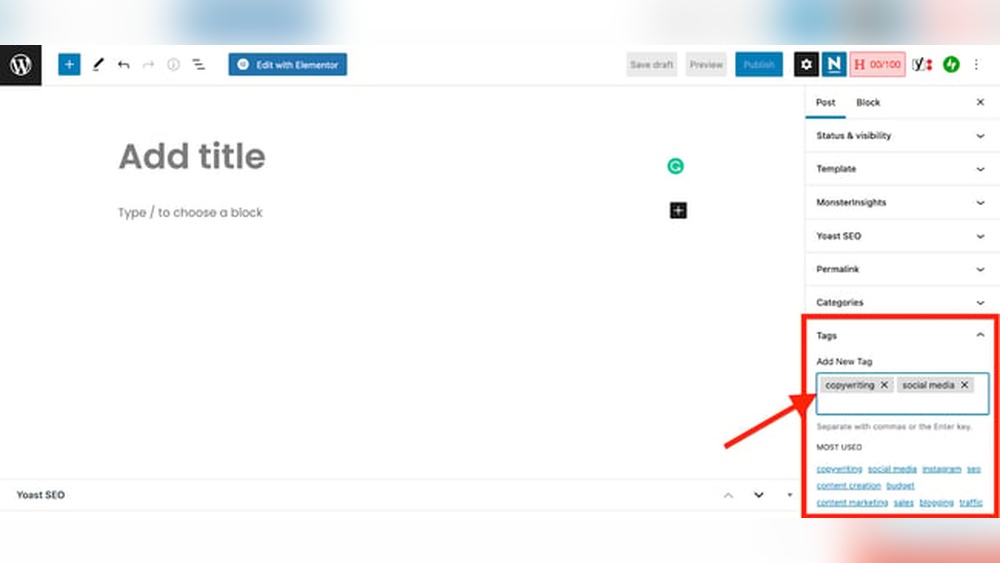
Are you looking to organize your WordPress posts better and make it easier for your visitors to find related content? Adding tags to your WordPress posts is a simple yet powerful way to do just that.
In this guide, you’ll learn exactly how to add a tag in WordPress step-by-step. By the end, you’ll have a clear understanding of how tags work and how they can boost your site’s navigation and SEO. Ready to make your WordPress site more user-friendly and organized?
Let’s dive in!
Benefits Of Using Tags
Tags in WordPress help organize your content clearly. They group similar posts, making your site tidy and simple. Tags also help visitors find related topics fast. Using tags wisely improves your site’s structure and overall appeal.
Improving Content Organization
Tags sort your posts into small, focused groups. This makes it easy to manage large websites. Readers can jump to specific topics without scrolling through unrelated content. Clear organization keeps your site neat and professional.
Boosting Seo Performance
Tags create extra pages with related content. Search engines use these pages to understand your site better. This can increase your chances of ranking higher in search results. Proper tags target specific keywords and topics effectively.
Enhancing User Experience
Tags guide visitors to more posts they like. They help users explore your site naturally. Easy navigation keeps readers longer and lowers bounce rates. A good user experience encourages return visits and sharing.
Credit: www.wpbeginner.com
Tag Vs Category
Tags and categories both organize content in WordPress. They help visitors find posts easily. Yet, they serve different purposes. Understanding these differences improves your site’s navigation and SEO.
Key Differences
Categories group posts into broad topics. They create a main structure for your content. Tags describe specific details within those posts. Categories are like chapters in a book. Tags are like keywords inside each chapter.
When To Use Tags
Use tags for specific topics or ideas in a post. They connect related posts with similar details. Tags do not have a hierarchy. Add many tags to cover all important points. They help readers find posts by narrow subjects.
When To Use Categories
Use categories to organize posts into main topics. Each post should fit into one or two categories only. Categories help create a clear, simple site structure. They appear in menus and archives. Use categories to guide visitors through your content.
Adding Tags In WordPress Dashboard
Adding tags in the WordPress dashboard helps organize your content. Tags group related posts for easier navigation. They improve user experience and boost SEO. Managing tags from the dashboard is simple and fast.
Accessing The Tags Section
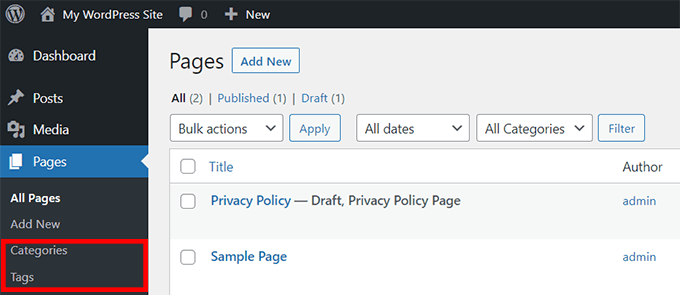
Log into your WordPress admin panel. On the left menu, find the “Posts” option. Hover over it, then click “Tags.” This opens the Tags page. Here, you see all existing tags and options to manage them.
Creating New Tags
On the Tags page, find the “Add New Tag” form on the left side. Enter the tag name in the first field. Optionally, add a slug, the URL-friendly version of the tag. Write a short description to explain the tag. Click the “Add New Tag” button to save it. The new tag appears on the right list immediately.
Editing And Deleting Tags
To edit a tag, find it in the right list. Hover over the tag name and click “Edit.” Change the name, slug, or description as needed. Press “Update” to save changes. For deleting, hover over the tag and click “Delete.” Confirm the action if prompted. Deleted tags are removed from all posts automatically.
Credit: make.wordpress.org
Adding Tags While Creating Posts
Adding tags while creating posts helps organize content on your WordPress site. Tags group similar topics and improve user navigation. They also help search engines understand your content better. This section explains how to add tags during post creation.
Using The Post Editor
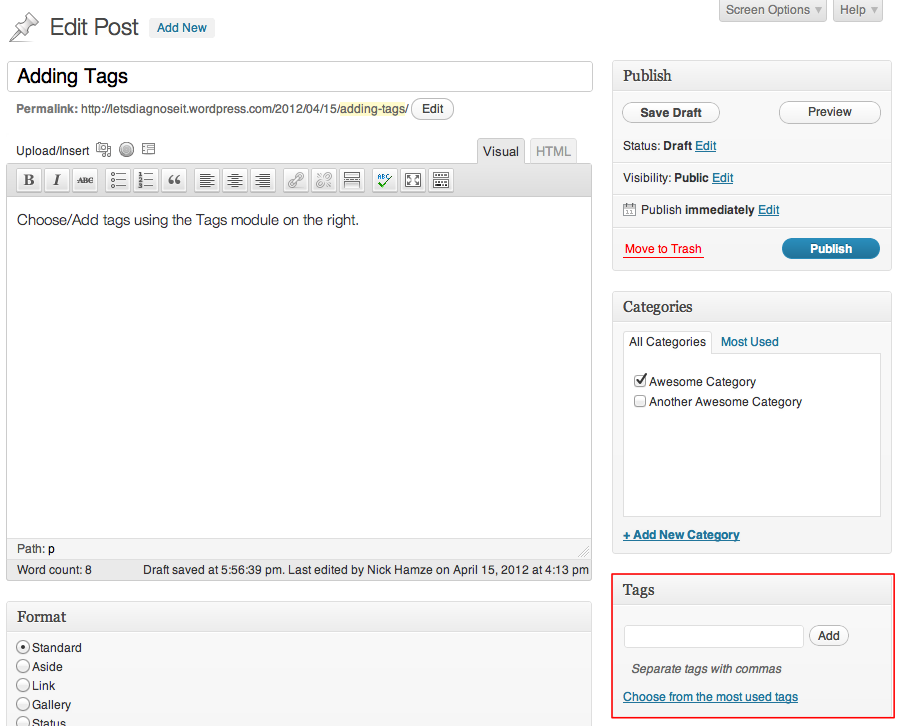
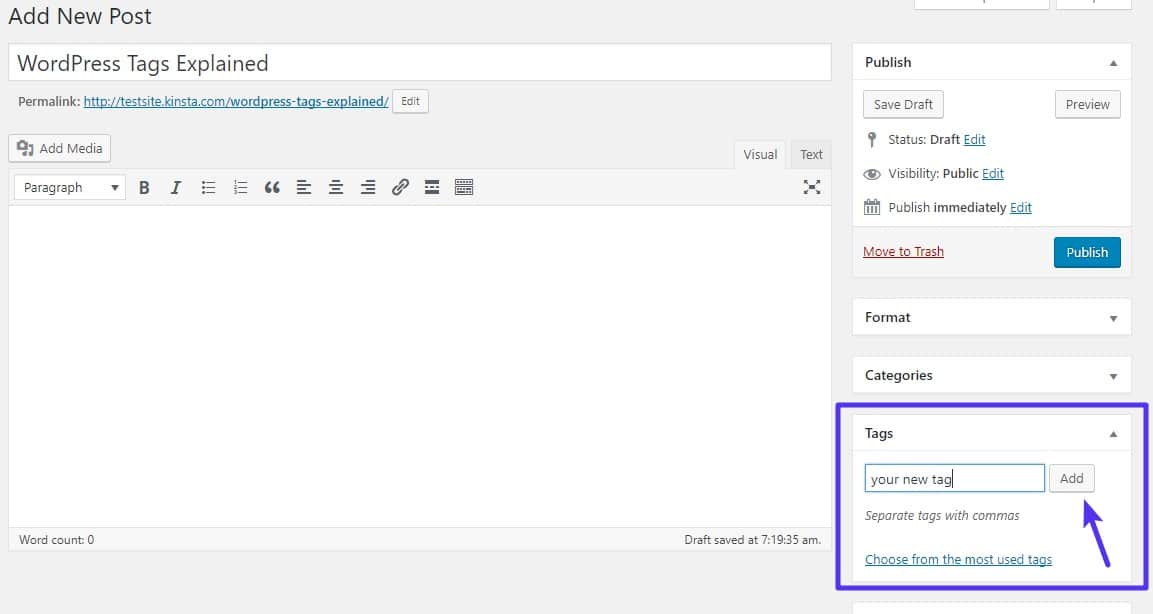
Open the WordPress post editor to start writing a new post. On the right side, find the “Tags” box. Type your tag name and press “Enter” or click “Add”. Add multiple tags by repeating this step. You can also select existing tags from the list. Save or publish your post to apply the tags.
Tips For Choosing Effective Tags
Choose tags that clearly describe your post’s topic. Use simple words your readers will search for. Avoid using too many tags; limit to 5-10 per post. Pick tags that relate to your content and main keywords. This improves your post’s visibility and user experience.
Optimizing Tags For Seo
Tags help organize your WordPress content. They also improve SEO by making your site easier to navigate. Optimizing tags means choosing the right words and using them well. This boosts your site’s visibility on search engines. Keep tags relevant, consistent, and simple to help both users and search engines.
Selecting Relevant Keywords
Choose tags that match your content closely. Use simple words people search for. Avoid broad or vague terms that do not describe your post well. Think about what your readers might type to find your content. This helps search engines show your posts to the right audience.
Avoiding Tag Overuse
Do not use too many tags on one post. Too many tags can confuse search engines. It may look like spam and lower your site’s ranking. Stick to a few key tags that truly match the post. Quality matters more than quantity for SEO.
Maintaining Tag Consistency
Use the same tags consistently across similar posts. This builds clear groups of content on your site. Consistent tags make navigation easier for visitors. It also helps search engines understand your site structure better. Check your tags regularly and fix duplicates or misspellings.
Credit: kinsta.com
Managing Tags With Plugins
Managing tags in WordPress can be simple with the right tools. Plugins help organize, edit, and optimize tags efficiently. They save time and improve your site’s navigation. Using plugins makes tag management less of a hassle, especially for bigger websites.
Popular Tag Management Plugins
Several plugins offer strong tag management features. “Simple Tags” is a popular choice for auto-tagging and tag suggestions. “Tag Manager” helps merge, delete, and organize tags quickly. “TaxoPress” supports creating and managing tags with ease. These tools improve control over your tags without complex steps.
Features To Look For
Choose plugins with easy tag editing and bulk actions. Auto-suggestion features help add relevant tags fast. Check for tag merging and cleanup options to avoid duplicates. Good plugins also offer tag cloud and display controls. Make sure the plugin updates regularly and works well with your theme.
Common Tagging Mistakes To Avoid
Tags help organize content and improve site navigation. Using tags properly boosts SEO and user experience. Avoiding common mistakes keeps your site clean and easy to use. Here are some tagging errors to watch out for.
Using Too Many Tags
Adding many tags can confuse readers and search engines. It dilutes the focus of your content. Stick to a few relevant tags per post. This helps users find related posts quickly.
Creating Duplicate Tags
Duplicate tags harm site structure and SEO. Similar tags with slight differences split your content. Check your tag list often to merge or delete duplicates. Keep tags consistent and clear.
Ignoring Tag Maintenance
Tags need regular updates to stay useful. Old or unused tags clutter your site. Review and clean up your tags regularly. This keeps your site organized and improves search rankings.
Frequently Asked Questions
How Do I Add A Tag To A WordPress Post?
To add a tag, open your WordPress post editor. Find the “Tags” box on the right. Type your tag name and click “Add. ” Tags help organize content and improve SEO by grouping related posts.
Can I Add Multiple Tags To One WordPress Post?
Yes, you can add multiple tags to a post. Separate each tag with a comma in the “Tags” box. Using multiple tags increases your content’s visibility and helps readers find related topics easily.
Where Do WordPress Tags Appear On My Site?
Tags usually appear below the post content or in a tag cloud widget. They link to pages showing all posts with the same tag, enhancing user navigation and SEO structure.
Are WordPress Tags Different From Categories?
Yes, tags are more specific keywords, while categories are broad topics. Tags describe details of your post, and categories group posts into general subjects, both improving site organization and SEO.
Conclusion
Adding tags in WordPress helps organize your posts clearly. It makes your content easier to find. Tags connect related topics for your readers. This simple step improves your site’s navigation. Keep your tags relevant and specific. Avoid adding too many tags to one post.
Regularly update tags to keep content fresh. Use tags to help search engines understand your site. Start adding tags today to enhance your WordPress blog. It’s a small task with big benefits.



