
Want to organize your website better and make it easier for visitors to find what they need? Adding a sub page in WordPress is a simple way to create a clear structure for your content.
Whether you’re building a blog, business site, or portfolio, knowing how to add sub pages can help you present your information in a neat, professional way. You’ll learn exactly how to do it step-by-step, even if you’re new to WordPress.
Keep reading, and you’ll have your sub pages set up in no time—making your site more user-friendly and boosting your online presence.
Why Use Sub Pages
Using sub pages in WordPress helps organize your website clearly. Sub pages create a structure under main pages. This makes your site easier to navigate. Visitors find information faster. Search engines also like well-organized sites. This can improve your website ranking. Sub pages keep related content grouped together. This helps visitors understand your website better.
Benefits Of Sub Pages
Sub pages improve website navigation for users. They group similar topics under one main page. This reduces clutter on your main menu. Visitors can explore topics in detail without confusion. Sub pages also help with SEO by creating clear site hierarchy. Search engines read this structure to rank pages better. It helps spread page authority across related content. Sub pages make your site look professional and organized.
When To Add Sub Pages
Add sub pages when you have related topics to share. Use them if your main page covers broad subjects. Sub pages work well for detailed explanations or guides. They suit categories like services, products, or blog topics. Adding sub pages helps avoid long, crowded main pages. It keeps content manageable and easy to update. Use sub pages to guide visitors through your site step-by-step.
Preparing Your WordPress Site
Preparing your WordPress site is important before adding a sub page. It helps keep your site organized and easy to manage. Taking a few simple steps now can save time later. This guide shows how to get ready in a clear way.
Accessing The Dashboard
Start by logging into your WordPress dashboard. This is the control center for your site. Use your username and password to sign in. Once inside, you see many options for editing and managing pages.
The dashboard lets you create new pages, edit existing ones, and organize your content. It is the first step in adding any page, including sub pages.
Checking Page Structure
Look at your current page setup before adding a sub page. Check which pages already exist and how they link together. This helps you decide where the new sub page should go.
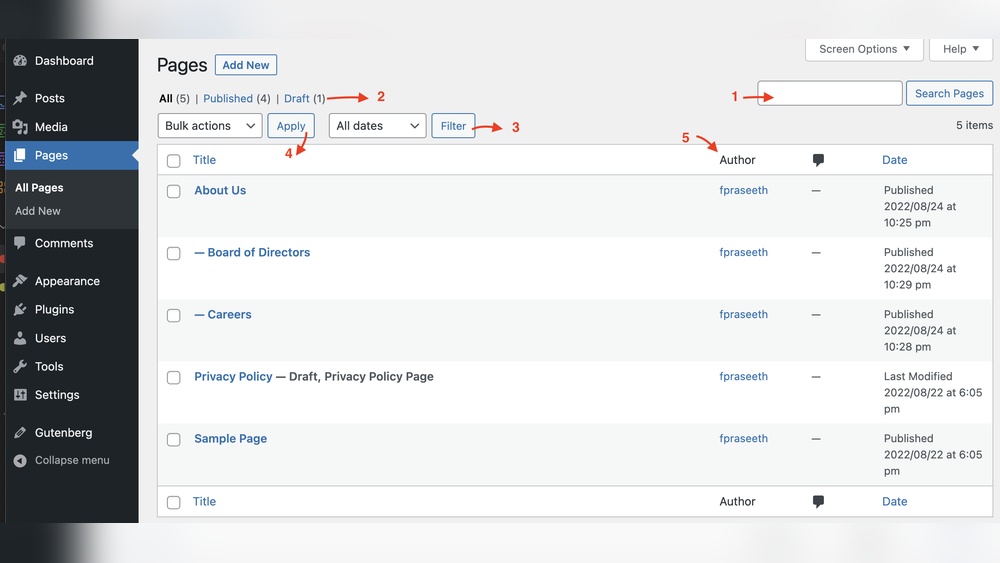
Having a clear structure makes your website easier to navigate for visitors. It also improves search engine ranking. Use the Pages menu in the dashboard to see a list of all pages.
Creating A New Sub Page
Creating a new sub page in WordPress helps organize your website content. It places your new page under a main page. This structure improves navigation and user experience. Follow these simple steps to create a sub page quickly.
Adding A New Page
First, log in to your WordPress dashboard. Go to the “Pages” menu on the left. Click on “Add New” to create a new page. Enter a clear and short title for your page. Add the content you want to show on this page. Use headings, images, and text to make it informative. After adding content, don’t publish yet.
Selecting A Parent Page
Look at the “Page Attributes” box on the right side. Find the “Parent” dropdown menu inside this box. Click it to see a list of existing pages. Choose the main page you want your new page to be under. This step creates the sub page relationship. It ensures your page appears as a child of the parent.
Setting Page Attributes
In the same “Page Attributes” box, check other settings. You can set the order of the page if needed. This controls where the page shows in menus. Choose a template if your theme offers options. Templates change the layout of the page. After setting these, click “Publish” to make the sub page live.
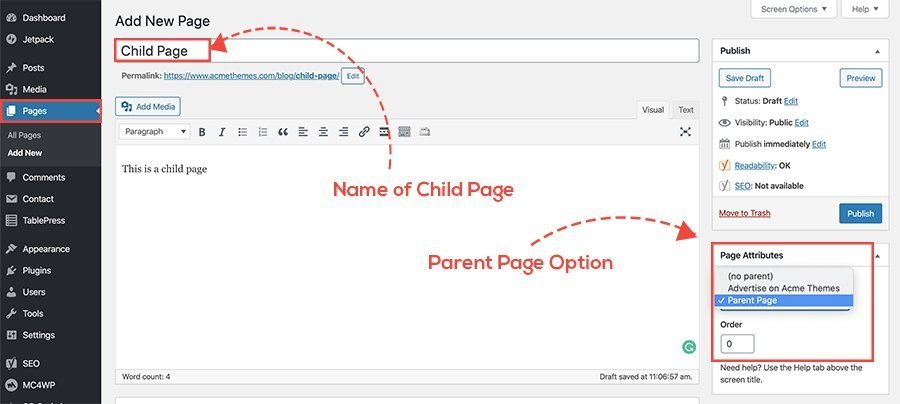
Credit: www.acmethemes.com
Customizing Your Sub Page
Customizing your sub page in WordPress helps you create a unique space. This space can match your main site style or stand out. You control how it looks and what it says. Let’s explore how to make your sub page fit your needs perfectly.
Adding Content And Media
Start by adding text that explains your topic clearly. Use short paragraphs for easy reading. Insert images to support your message. Use videos to show more details or tutorials. Upload files like PDFs if needed. Make sure your media is relevant and not too large. This keeps your page fast and user-friendly.
Using Page Builders
Page builders let you design without coding. Drag and drop elements like text boxes, images, and buttons. Choose from ready-made templates to speed up work. Adjust colors, fonts, and layouts easily. Page builders like Elementor or Beaver Builder fit many users. They help create a professional look fast.
Adjusting Seo Settings
SEO settings improve your page’s visibility on search engines. Add a clear title that includes important keywords. Write a short meta description that invites clicks. Use headers to organize content and add keywords. Set a friendly URL with simple words. Optimize images by adding alt text. These steps help your sub page reach more people.
Publishing And Managing Sub Pages
Publishing and managing sub pages in WordPress is simple and clear. After creating a sub page, you need to check how it looks. Then, you can decide when to publish it. Later, you may want to edit or remove the sub page. These steps help keep your website organized and up to date.
Previewing Your Sub Page
Always preview your sub page before publishing. This shows how the page looks to visitors. Check the layout, images, and text. Make sure everything fits well on different devices. Previewing helps find errors or design issues early. Fix problems before the page goes live.
Publishing Options
WordPress offers several ways to publish your sub page. You can publish it immediately or schedule it for later. Use the “Publish” button to make the page live. Schedule the page if you want it to appear on a future date. You can also save the page as a draft to work on it later.
Editing Or Deleting Sub Pages
You can edit sub pages anytime to update content or design. Just open the page in the editor and make changes. After editing, save or update the page to apply changes. To delete a sub page, find it in the pages list. Select “Trash” to remove it from your site. Deleting helps keep your website clean and relevant.

Credit: wpwax.com
Troubleshooting Common Issues
Troubleshooting common issues helps keep your WordPress site running smoothly. Sub pages might not appear or work as expected. Problems can stem from menu settings, URLs, or your theme. Fixing these issues improves user experience and site navigation.
Sub Page Not Showing In Menu
Your sub page may not show if it is not added to the menu. Go to Appearance > Menus in your dashboard. Check if the sub page is selected and saved. Some themes require manual menu updates. Also, clear your site cache to see changes.
Permalink Problems
Permalink issues can stop sub pages from loading correctly. Visit Settings > Permalinks and click Save Changes to reset. Avoid using special characters or spaces in page URLs. Use simple words and dashes for better links. This helps with SEO and site access.
Theme Compatibility
Some themes do not support sub pages well. Test your site by switching to a default theme like Twenty Twenty-Three. If sub pages work, your theme may need an update. Contact the theme developer or check the theme settings. Choose themes that support clear navigation and sub page display.
Enhancing Navigation With Sub Pages
Sub pages help organize your website content clearly. They create a hierarchy under main pages. This structure makes navigation easier for visitors. Visitors find what they need faster. It also improves user experience and site flow.
Proper use of sub pages can make menus cleaner. Visitors see related topics grouped together. This keeps your site tidy and professional. Search engines also like well-structured websites. It can help with your SEO efforts.
Creating Drop-down Menus
Drop-down menus show sub pages under main menu items. They save space by hiding links until hovered or clicked. WordPress lets you create these menus quickly. Go to Appearance > Menus in your dashboard.
Add your main pages and sub pages to the menu. Drag sub pages slightly to the right under a main page. This makes them child items, appearing in the drop-down. Save the menu and check your site’s navigation bar.
Using Widgets For Sub Pages
Widgets can also display sub pages in sidebars or footers. The “Pages” widget lists all pages or selected ones. Choose a parent page to show only its sub pages.
Go to Appearance > Widgets to add the Pages widget. Select the widget area like sidebar or footer. Customize the settings to display the sub pages you want. This helps users find related content on any page.

Credit: wordpress.org
Frequently Asked Questions
How Do I Create A Sub Page In WordPress?
To create a sub page, go to Pages > Add New. Write your content, then under “Page Attributes,” select the parent page. Publish the page, and it will appear as a sub page under the chosen parent.
Can I Change A Page To A Sub Page Later?
Yes, you can change any page to a sub page. Edit the page, and in “Page Attributes,” choose a parent page. Update the page, and it will be nested under the selected parent.
Why Use Sub Pages In WordPress?
Sub pages help organize your website content logically. They improve navigation and user experience. This also benefits SEO by creating a clear website hierarchy.
Will Sub Pages Affect My Website Url Structure?
Yes, sub pages create URLs reflecting the hierarchy. For example, example. com/parent-page/sub-page. This structure improves clarity and SEO by showing relationships between pages.
Conclusion
Adding a subpage in WordPress helps organize your website better. It makes your site easier to navigate for visitors. The process is simple and quick to follow. Just create a new page and set its parent page. This way, you keep content clear and structured.
Regular updates keep your site fresh and useful. Try adding subpages to improve your WordPress site today. Your visitors will appreciate the easy layout and clear information.



