
If you want your website to get noticed by search engines like Google, adding a sitemap is one of the smartest moves you can make. A sitemap acts like a roadmap, showing search engines exactly where to find your pages.
But how do you add a sitemap in WordPress without getting lost in complicated steps? This guide will walk you through simple, clear instructions to get your sitemap up and running fast. By the end, you’ll have a powerful tool helping your site rank better and attract more visitors.
Ready to make your site easier to find? Let’s dive in.
Credit: www.wpbeginner.com
Benefits Of A Sitemap
A sitemap is a file that lists all pages of your website. It helps search engines find and understand your site. Using a sitemap brings clear benefits for your WordPress site. It improves indexing, navigation, and SEO.
Improved Search Engine Indexing
A sitemap guides search engines to all your web pages. It ensures no page is missed during crawling. This speeds up the indexing process for new and updated content. Your website appears more quickly in search results.
Better Website Navigation
Sitemaps help users find pages easily. They offer a clear structure of your website. Visitors can browse through content without confusion. This improves user experience and keeps visitors longer.
Enhanced Seo Performance
Sitemaps boost your website’s SEO by making it easier to crawl. Search engines rank sites higher with complete and organized sitemaps. It increases the chance of appearing in relevant searches. This drives more organic traffic to your site.
Types Of Sitemaps
Sitemaps help search engines find and understand your website’s pages. Different types of sitemaps serve different purposes. Choosing the right sitemap type improves your site’s visibility and user experience.
Xml Sitemaps
XML sitemaps list all important pages on your website. They help search engines crawl your site faster. This sitemap is not visible to visitors. It focuses on URLs, update dates, and page priority. WordPress plugins often generate XML sitemaps automatically.
Html Sitemaps
HTML sitemaps are designed for website visitors. They provide a simple page with links to all key pages. This helps users find content easily. HTML sitemaps improve user navigation and reduce bounce rates. They also help search engines by showing site structure.
Image And Video Sitemaps
Image and video sitemaps highlight multimedia content. They tell search engines about images and videos on your pages. This increases the chance of appearing in image or video search results. These sitemaps include details like captions and file locations.
Preparing WordPress For A Sitemap
Preparing WordPress for a sitemap is an important step for better website indexing. A sitemap helps search engines find and understand your pages faster. Before adding a sitemap, make sure your site is ready for it. This preparation saves time and avoids errors later.
Checking Current Sitemap Status
First, check if your WordPress site already has a sitemap. Some themes and plugins create sitemaps automatically. You can find your sitemap by adding /sitemap.xml at the end of your website URL. For example, www.yoursite.com/sitemap.xml.
If a sitemap exists, note its location and type. This helps avoid duplicate sitemaps that confuse search engines. No sitemap found? Then you need to create one.
Choosing The Right Sitemap Plugin
Select a sitemap plugin that fits your site’s needs. Popular plugins include Yoast SEO, Google XML Sitemaps, and Rank Math. Each plugin offers easy sitemap creation and management.
Look for a plugin that updates the sitemap automatically when you add new content. Also, pick one that supports different types of content like posts, pages, and images. Easy setup and good reviews are key points to check.
Credit: www.cloudways.com
Creating A Sitemap With Plugins
Creating a sitemap with plugins is the easiest way to help search engines find your website pages. Plugins automate the process and keep your sitemap updated. Most popular WordPress plugins offer sitemap features. You do not need to know coding to use them. Just install, activate, and configure settings. Let’s explore some popular plugins for creating sitemaps.
Using Yoast Seo Plugin
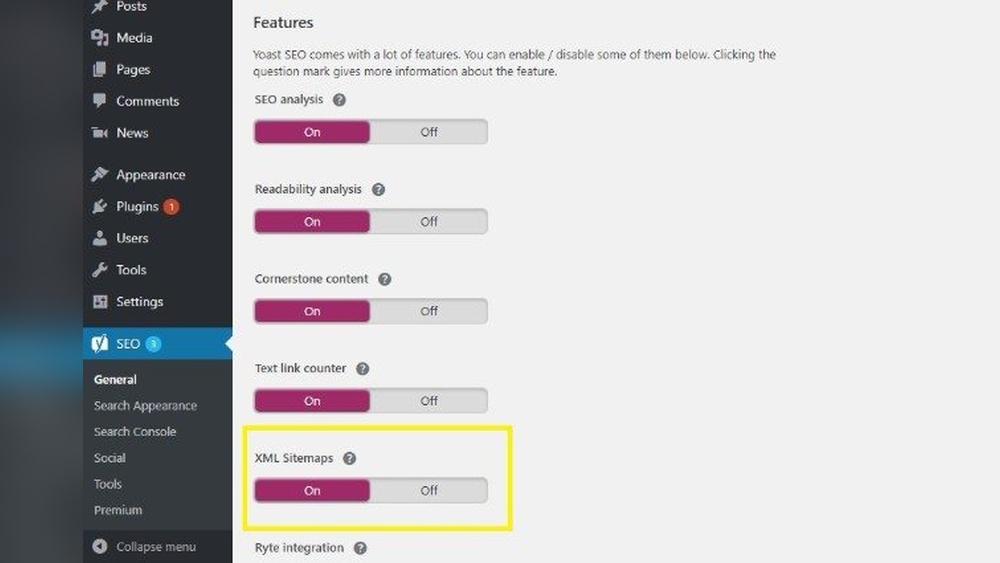
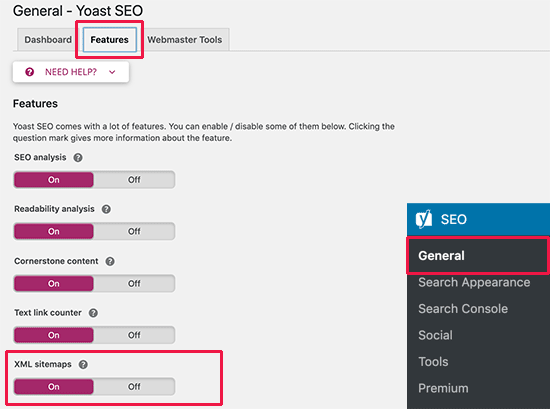
Yoast SEO is a well-known plugin for SEO and sitemaps. After installing Yoast, it automatically creates a sitemap. You can find it by adding /sitemap_index.xml to your website URL. The plugin updates the sitemap as you add new content. It also supports different post types like pages and posts. The setup is simple and beginner-friendly. Yoast offers control over what to include or exclude.
Using Google Xml Sitemaps Plugin
This plugin focuses only on sitemaps. It is lightweight and easy to use. Install and activate the plugin. It will generate a sitemap for your site automatically. The plugin notifies search engines like Google and Bing when you update content. It supports all types of WordPress pages. You can customize the sitemap settings in the plugin dashboard. This plugin is great if you want a dedicated sitemap tool.
Other Popular Plugins
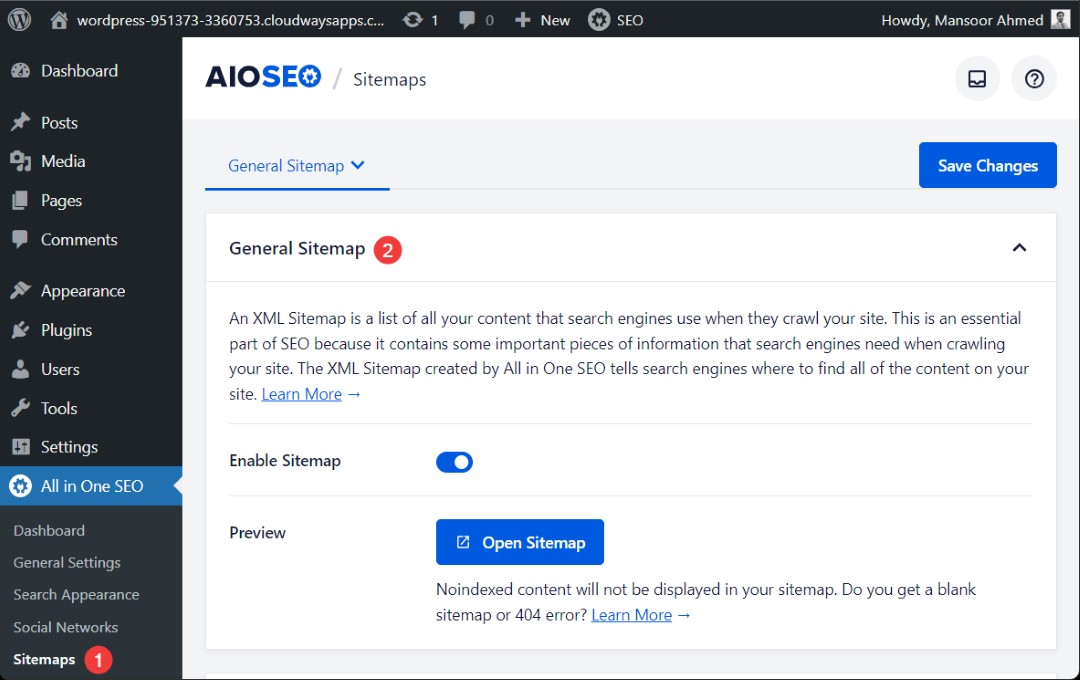
Several other plugins also help create sitemaps. Rank Math SEO offers sitemap features along with SEO tools. All in One SEO Pack generates sitemaps and improves site SEO. XML Sitemap & Google News feeds plugin focuses on sitemaps for news sites. Each plugin has unique options and settings. Choose one that fits your website needs and ease of use. Most plugins work well and keep your sitemap updated automatically.
Manually Adding A Sitemap
Manually adding a sitemap in WordPress helps search engines find your pages quickly. It gives you full control over the sitemap files. This method works well if you want a simple, direct setup without plugins.
Generating Sitemap Files
First, create your sitemap files. Use online sitemap generators like XML-Sitemaps.com. Enter your website URL and start the scan. Download the sitemap files after the scan finishes. Usually, you get a file named sitemap.xml.
Uploading To WordPress
Next, upload the sitemap files to your WordPress site. Connect to your site using an FTP client or your web host’s file manager. Place the sitemap.xml file in the root folder of your website. This folder is where your WordPress files live, often called “public_html.”
Linking Sitemap In Robots.txt
Finally, tell search engines where to find your sitemap. Edit your robots.txt file in the root folder. Add the line: Sitemap: https://yourwebsite.com/sitemap.xml. Save the file. This step helps search engines find your sitemap fast and index your site better.
Submitting Sitemap To Search Engines
Submitting your sitemap to search engines helps them find and index your website pages faster. It improves your site’s visibility in search results. Search engines use sitemaps to understand your website structure. This makes crawling easier and more efficient.
Most website owners submit sitemaps to Google and Bing. These two search engines cover the majority of web traffic. Each platform has a simple process to add your sitemap URL. Monitoring your sitemap status ensures it works correctly.
Submitting To Google Search Console
Open Google Search Console and log in. Select your website from the dashboard. Click on “Sitemaps” in the left menu. Enter your sitemap URL in the “Add a new sitemap” box. Click “Submit” to send your sitemap to Google. Google will start crawling your pages soon after.
Submitting To Bing Webmaster Tools
Go to Bing Webmaster Tools and sign in. Choose your website on the dashboard. Find the “Sitemaps” section in the menu. Type your sitemap URL and click “Submit.” Bing will process your sitemap quickly. This helps Bing understand your site better.
Monitoring Sitemap Status
Check your sitemap status regularly in both tools. Look for errors or warnings that may appear. Fix any issues such as broken links or unreachable pages. Keep your sitemap updated when you add new content. Monitoring keeps your website healthy in search engines.
Maintaining Your Sitemap
Maintaining your sitemap is crucial for keeping your WordPress site visible to search engines. A well-maintained sitemap helps search engines find your latest content quickly. It also ensures old or broken links don’t confuse search engines. Regular care improves your site’s SEO and user experience.
Regular Updates With New Content
Every time you add a new post or page, update your sitemap. This lets search engines know about fresh content fast. Many WordPress SEO plugins update sitemaps automatically. Check your sitemap often to confirm new URLs appear. This keeps your site’s index current and complete.
Fixing Sitemap Errors
Errors in your sitemap can stop search engines from crawling your site properly. Use tools like Google Search Console to find sitemap errors. Fix issues such as broken links or incorrect URLs quickly. Clear errors improve your site’s crawl rate and ranking.
Removing Outdated Urls
Old pages or posts that no longer exist should be removed from your sitemap. This prevents search engines from following dead links. Regularly review your sitemap to delete these outdated URLs. Keeping your sitemap clean helps maintain your website’s health and SEO.
Troubleshooting Sitemap Issues
Sitemap issues can stop search engines from finding your website pages. Fixing these problems helps improve your site’s visibility. This section covers common sitemap troubles and how to solve them.
Common Sitemap Errors
Errors in sitemaps often include broken links or wrong URLs. These mistakes confuse search engines and reduce your site’s ranking. Check your sitemap for outdated or missing links regularly. Use online tools to validate your sitemap format. Make sure the sitemap follows XML standards exactly.
Plugin Conflicts
Plugins can sometimes clash and cause sitemap problems. Two plugins may try to create sitemaps at the same time. This creates duplicate or corrupted sitemaps. Disable extra sitemap plugins and keep only one active. Clear your website cache after changing plugins. Test your sitemap after each plugin update.
Ensuring Proper Indexing
Google and other search engines must read your sitemap correctly. Submit your sitemap to Google Search Console for faster indexing. Check for any errors or warnings in the console. Use the robots.txt file to allow search engines to access your sitemap. Keep your sitemap updated as you add or remove pages.
Credit: www.wpbeginner.com
Frequently Asked Questions
What Is A Sitemap In WordPress?
A sitemap is a file listing all important pages on your WordPress site. It helps search engines find and index your content faster.
Why Should I Add A Sitemap To WordPress?
Adding a sitemap improves your website’s SEO. It ensures search engines crawl your site efficiently and discover new content quickly.
How Do I Create A Sitemap In WordPress?
You can create a sitemap using plugins like Yoast SEO or Google XML Sitemaps. These tools generate and update sitemaps automatically.
Where Do I Submit My WordPress Sitemap?
Submit your sitemap URL to Google Search Console and Bing Webmaster Tools. This helps search engines index your site faster and more accurately.
Conclusion
Adding a sitemap helps search engines find your pages fast. It improves your site’s visibility and ranking. Keep your sitemap updated to show new content. Use simple tools or plugins to create and submit it. Regularly check your sitemap for errors or broken links.
A clear sitemap guides both users and search engines well. Start adding your sitemap today to boost your WordPress site’s reach. Easy steps, big impact.



