
Are you looking to make selling on your WordPress site easier and faster? Adding a PayPal button can be the game-changer you need.
It lets your visitors pay you instantly, without any hassle or complicated steps. In this guide, you’ll learn exactly how to add a PayPal button to your WordPress site, step by step. By the end, you’ll have a simple way to boost your sales and give your customers a smooth checkout experience.
Ready to get started? Let’s dive in!
Credit: qodeinteractive.com
Benefits Of Paypal Buttons
PayPal buttons offer many benefits for websites selling products or services. They make payments easier and faster. Visitors can pay with just a click. This helps businesses grow and improves the user experience.
Boosting Online Sales
PayPal buttons help increase sales by making checkout simple. Customers do not need to enter long payment details. They can pay using their PayPal account or credit card. This quick process reduces cart abandonment. More sales happen because the buying steps are fewer and clearer.
Simplifying Payments
PayPal buttons make payment simple for both sellers and buyers. No need for complex coding or extra tools. The button handles payments securely and smoothly. Buyers can use different payment options without leaving the site. This ease reduces confusion and speeds up transactions.
Enhancing Customer Trust
PayPal is a well-known and trusted brand worldwide. Seeing the PayPal button gives customers confidence to pay. It shows the site uses safe payment methods. This trust lowers buyer hesitation and builds loyalty. Secure payments help protect buyer and seller information.
Preparing Your Paypal Account
Adding a PayPal button to your WordPress site helps you accept payments quickly. It lets visitors buy products or donate without leaving your page. This guide explains simple ways to add the button. Choose the best method that fits your skills and needs.
Using Paypal’s Button Code
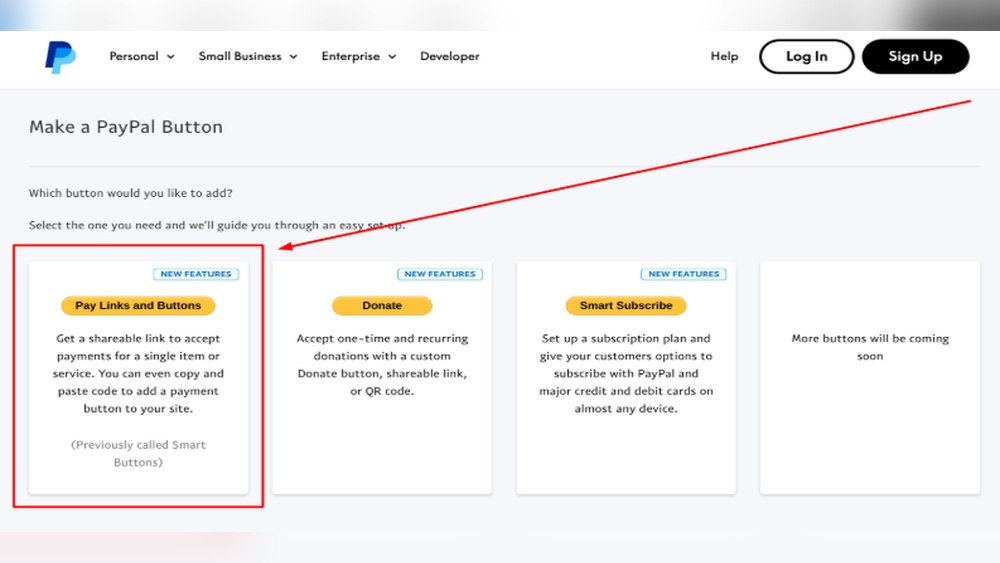
PayPal provides a button code for your site. First, log in to your PayPal account. Go to the “Tools” or “PayPal Buttons” section. Create a new button by choosing the type you want. Customize the text, price, and other options.
After setup, PayPal generates an HTML code. Copy this code to your clipboard. This code contains everything needed for the button to work.
Embedding Code In WordPress Editor
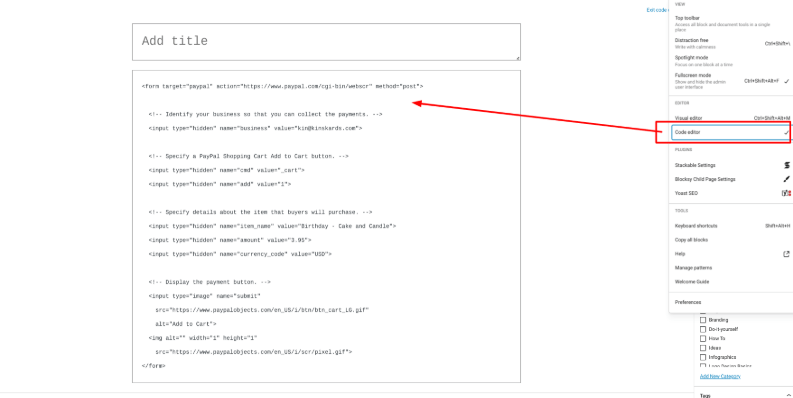
Open your WordPress dashboard and go to the page or post. Switch to the “Text” or “HTML” editor mode. Paste the PayPal button code where you want the button to appear.
Update or publish the page. View it to check the button is visible and works. This method is quick and doesn’t need extra plugins.
Adding Buttons Via Plugins
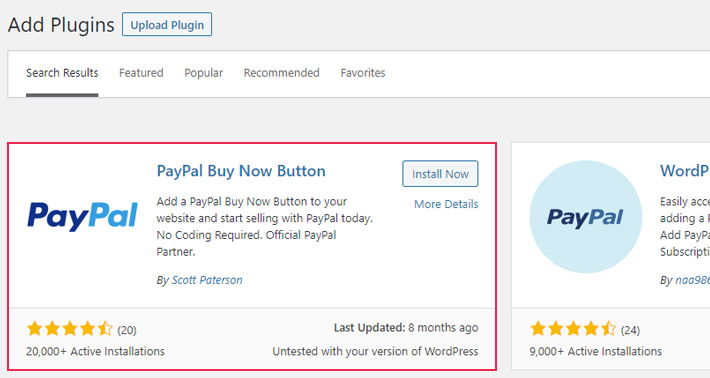
Some WordPress plugins simplify adding PayPal buttons. Search for plugins like “PayPal Button” or “Easy PayPal.” Install and activate the plugin from your dashboard.
Most plugins offer a user-friendly form to create buttons. Save your button and use a shortcode to place it anywhere. This method suits beginners and adds flexibility.
Adding Paypal Button To WordPress
Customizing PayPal buttons on your WordPress site helps match your brand style. It also improves user experience and increases trust. You can change the button’s look, set payment options, and support multiple currencies. Small tweaks can make your payment process smooth and clear for visitors.
Each customization option is easy to adjust. It does not require coding skills. Let’s explore how to personalize your PayPal button to fit your site perfectly.
Changing Button Style
PayPal offers different button styles to fit your website’s design. Choose from classic, modern, or minimalist looks. You can change the button size, color, and shape easily. Pick a style that stands out but matches your site’s colors. This helps visitors recognize the button and click it confidently.
Adjusting Payment Settings
Set the payment options to suit your needs. Define the amount customers pay or allow them to enter a custom amount. Choose if buyers can add notes or select quantities. You can also enable recurring payments for subscriptions. Clear payment settings reduce confusion and speed up checkout.
Localizing Button For Different Currencies
Make your PayPal button work for customers worldwide. Select the currency your customers use most. PayPal supports many currencies, so buyers see prices in their local money. This makes your site more user-friendly and encourages global sales. Local currency also builds trust and avoids extra fees for buyers.
Credit: www.hostpapa.com
Customizing Paypal Buttons
Testing and troubleshooting are key steps after adding a PayPal button to your WordPress site. They help confirm the button works correctly for your visitors. Problems can stop payments or confuse users. Simple tests can catch issues early.
Check the button’s function on different devices and browsers. Fix common problems with clear steps. Make sure the button looks good and works on phones and tablets. This section guides you through these tasks.
Verifying Button Functionality
First, click the PayPal button to see if it opens the payment page. Use a test account or sandbox mode to avoid real charges. Confirm the product details and price are correct. Complete a test payment to check the whole process. Ensure you get confirmation emails for the transaction.
Fixing Common Issues
If the button does not work, check the PayPal email ID entered. Confirm the button code matches the one from PayPal. Clear your browser cache and reload the page. Disable conflicting plugins that may block the button. Review your site’s SSL certificate to ensure secure payments.
Ensuring Mobile Compatibility
Open your site on different smartphones and tablets. Make sure the PayPal button fits the screen and is easy to tap. Test the payment flow on mobile browsers like Chrome and Safari. Adjust button size or style in your WordPress theme if needed. A smooth mobile experience helps increase sales.
Testing And Troubleshooting
Optimizing payments on your WordPress site improves customer satisfaction and boosts sales. Small changes make payment smooth and secure. Focus on easy steps that build trust and clarity.
Enhancing User Experience
Place the PayPal button where visitors see it quickly. Use clear labels like “Pay with PayPal” to avoid confusion. Ensure the button works well on phones and tablets. Test the payment process to fix errors fast. A simple checkout keeps buyers happy.
Securing Transactions
Enable SSL on your website to protect data. SSL shows customers your site is safe. Use PayPal’s built-in security features for extra protection. Monitor transactions for suspicious activity regularly. Security builds trust and prevents fraud.
Tracking Sales And Analytics
Connect PayPal with Google Analytics for detailed sales data. Track which products sell best and when. Use this data to improve your marketing and stock. Regular tracking helps you understand customer behavior. Adjust your strategy based on real numbers.

Credit: www.youtube.com
Frequently Asked Questions
How Do I Create A Paypal Button For WordPress?
To create a PayPal button, log in to PayPal, go to “Tools,” and select “PayPal Buttons. ” Customize your button and copy the HTML code. Then, paste the code into your WordPress post or page using the HTML block.
Can I Add A Paypal Button Without A Plugin?
Yes, you can add a PayPal button without a plugin by using PayPal’s button generator. Copy the generated HTML code and insert it directly into a WordPress HTML block or widget. This method is simple and avoids extra plugins.
Is Adding A Paypal Button Safe For Transactions?
Yes, adding a PayPal button is safe. PayPal uses secure encryption to protect transactions. Your customers’ payment data is handled by PayPal, ensuring secure and trusted payment processing on your WordPress site.
What Are The Best WordPress Plugins For Paypal Buttons?
Popular plugins include “PayPal Buy Now Button,” “WP PayPal Button,” and “Easy PayPal Button. ” These plugins simplify button creation and management, offer customization, and integrate seamlessly with WordPress for better user experience.
Conclusion
Adding a PayPal button to your WordPress site is simple and fast. It helps you accept payments safely online. Just follow the steps carefully, and your button will be ready soon. This small change can improve your website’s user experience.
Visitors can pay with ease and trust. Keep your site updated and check the button regularly. This way, you ensure smooth transactions every time. Start today and make your WordPress site more user-friendly.



