
Are you wondering how much space WordPress will take up on your server or hosting plan? Whether you’re starting a new website or managing an existing one, knowing the storage needs is crucial.
Too little space can slow down your site, while too much can waste your budget. You’ll discover exactly how much space WordPress requires and what factors can change that number. By the end, you’ll feel confident about planning your site’s storage without any guesswork.
Keep reading to get the clear answers you need!
Credit: wp-rocket.me
WordPress Storage Basics
Understanding how much space WordPress uses helps you manage your website better. Storage affects your hosting choice and site speed. WordPress storage mainly involves core files, database, and media files. Each part takes different amounts of space. Knowing these basics saves you from surprises later.
Core Files Size
The WordPress core files are the platform’s foundation. These files include the main system and default themes. They usually take about 20 to 30 MB of space. The size can grow with updates and added features. These files are essential but not very large.
Database Storage
The database stores your website content and settings. It holds posts, pages, comments, and user info. The database size varies by the amount of content. Small sites might use just a few megabytes. Large sites with many posts and users need more space. Optimizing the database keeps it from growing too big.
Media Files Impact
Media files include images, videos, and audio. These files usually take the most space on your site. High-quality images and videos can quickly use gigabytes. Compressing media files helps save storage. Regularly removing unused media also frees up space. Media management is key to controlling your WordPress storage.

Credit: wordpress.com
Factors Affecting WordPress Space
The amount of space WordPress uses depends on several key factors. These factors can change the total size of your website. Understanding them helps manage your hosting space better. It also keeps your site running smoothly.
Themes And Plugins
Themes and plugins add features and design to your site. Each theme and plugin takes up space on your server. Some themes are large with many files. Some plugins have many functions, increasing their size. Using many plugins can quickly increase the space used.
Content Volume
Content includes posts, pages, images, and videos. More content means more space is needed. High-quality images and videos take much more space than text. Regularly adding content will increase your website size. Managing content size helps control your total space use.
Cache And Backup Files
Cache files speed up your website by storing data temporarily. These files can grow large over time. Backup files save copies of your website for safety. Backups also take a lot of space. Regular cleanup of cache and old backups saves space and keeps your site efficient.
Estimating Storage Needs
Estimating the storage space WordPress requires helps plan hosting needs. Space depends on content type, media files, and plugins used. Different websites need different amounts of storage.
Understanding typical storage needs helps avoid paying for extra space. It also prevents running out of space and slowing down the site.
Small Blogs
Small blogs usually have fewer pages and posts. They often use fewer images and simple themes. These sites need around 500 MB to 1 GB of space. This includes WordPress files, content, and some media.
Most shared hosting plans can handle this size easily. Regular backups and updates keep the blog running smoothly.
Medium Websites
Medium websites have more pages, posts, and media files. They may include videos, galleries, and custom plugins. These sites often require 2 to 5 GB of storage.
A managed hosting plan with good storage suits medium sites well. Keeping images optimized saves space and improves speed.
Large Portals
Large portals have thousands of pages and heavy content. They store many images, videos, and downloadable files. These sites can need 10 GB or more of storage space.
High-capacity servers or cloud hosting work best for large portals. Regular cleaning of unused files helps maintain space.
Managing WordPress Storage
Managing WordPress storage is essential for a fast and efficient website. Over time, files and data can take up a lot of space. This can slow down your site and increase hosting costs. Regular storage management keeps your site running smoothly and saves space.
Optimizing Media
Images and videos use the most space on WordPress. Compress images before uploading to reduce file size. Use tools that keep quality but shrink files. Delete old or unused media files. Choose the right format, like JPEG for photos and PNG for graphics. This saves space and speeds up page loading.
Cleaning Database
Your WordPress database stores all content and settings. Over time, it fills with old data like post revisions and spam comments. Remove these unnecessary items regularly. Use plugins or manual tools to clean the database. A smaller database improves site speed and reduces storage needs.
Removing Unused Plugins
Unused plugins still take up space and may cause security risks. Delete plugins that you no longer use. Keep only essential plugins active. This reduces storage use and helps maintain site performance. Regular plugin review keeps your WordPress lean and fast.
Hosting And Storage Options
Choosing the right hosting and storage option affects your WordPress site’s speed and space. Different plans offer varying limits on how much data you can store. Understanding these options helps you pick the best fit for your website’s needs.
Shared Hosting Limits
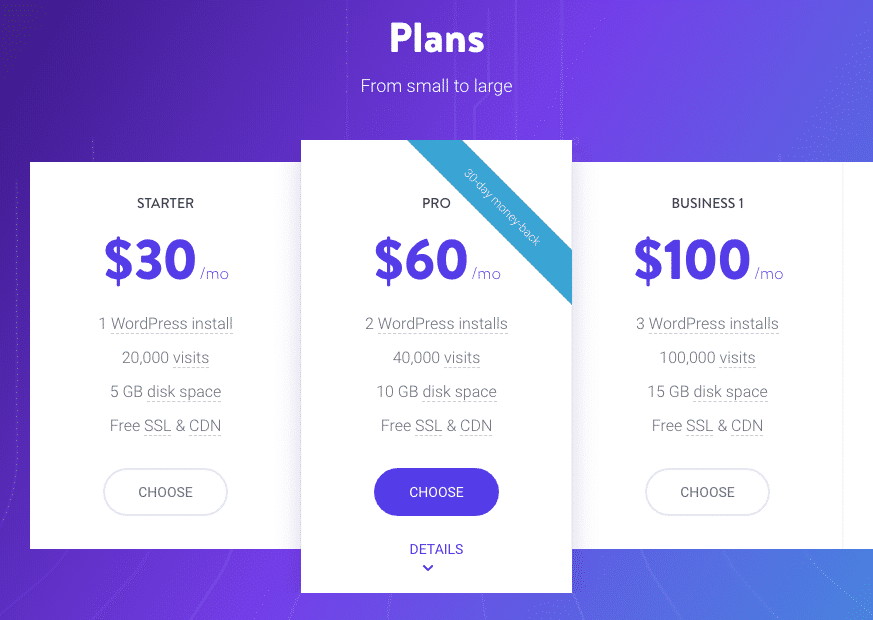
Shared hosting is the most affordable option. Many websites share the same server and storage space. Storage limits usually range between 1 GB and 50 GB. This space includes WordPress files, themes, plugins, and media uploads. It suits small blogs or simple sites with low traffic.
Performance can slow down if many sites use heavy storage or resources. Shared hosting is not ideal for large or fast-growing websites.
Vps And Dedicated Servers
VPS (Virtual Private Server) offers more control and storage than shared hosting. You get a portion of a server’s resources dedicated to your site. Storage can range from 20 GB to several hundred GB. This suits medium to large websites with higher traffic.
Dedicated servers give full server access. Storage space depends on the hardware you choose. These servers can handle large files and many visitors easily. They require more technical knowledge and cost more than shared hosting.
Cloud Storage Solutions
Cloud hosting stores your website data on multiple servers. It offers flexible storage that grows with your site. You pay only for the space and resources you use. This option supports high-traffic sites and large media files smoothly.
Cloud storage can connect with WordPress using plugins or custom setups. It improves site speed and uptime by distributing data. This makes cloud hosting a strong choice for expanding websites.

Credit: wp-rocket.me
Frequently Asked Questions
How Much Space Does A Default WordPress Install Use?
A default WordPress install uses about 20-30 MB of disk space. This includes core files without themes or plugins. It’s lightweight but grows as you add content and features.
Does WordPress Database Size Affect Storage Space?
Yes, the WordPress database stores all site content and settings. Its size increases with posts, comments, and metadata. Database size impacts overall storage, especially on large websites.
How Much Space Do WordPress Themes And Plugins Require?
Themes and plugins vary in size but generally add 1-50 MB each. More plugins and complex themes increase storage needs. Choose lightweight options to save space.
Can Media Files Increase WordPress Storage Usage?
Absolutely, media files like images, videos, and audio consume the most space. Optimizing media size and using external hosting can reduce WordPress storage demands.
Conclusion
WordPress uses space for files, themes, plugins, and content. The size depends on your site’s needs and updates. Regular cleaning helps keep the space under control. Choosing lightweight themes and plugins saves storage. Backups and images also take up room.
Managing space well keeps your site fast and easy to use. Keep an eye on your hosting limits and adjust as needed. Simple steps make a big difference in storage use. Your website will run smoothly with good space habits.



