
Are you thinking about building a website with WordPress but unsure how much it will cost you each month? You’re not alone.
Understanding WordPress expenses can be confusing, especially with so many options and add-ons available. What if you could get a clear, simple breakdown of what to expect? Knowing your monthly costs upfront helps you plan better and avoid surprises. Keep reading, and you’ll discover exactly how much WordPress can cost you every month—and how to make the most of your budget.
WordPress Pricing Basics
Understanding WordPress pricing basics helps you plan your website budget. WordPress offers different options, from free to paid versions. The cost depends on your needs and choices. This section explains the main pricing points clearly.
Free Vs Paid Versions
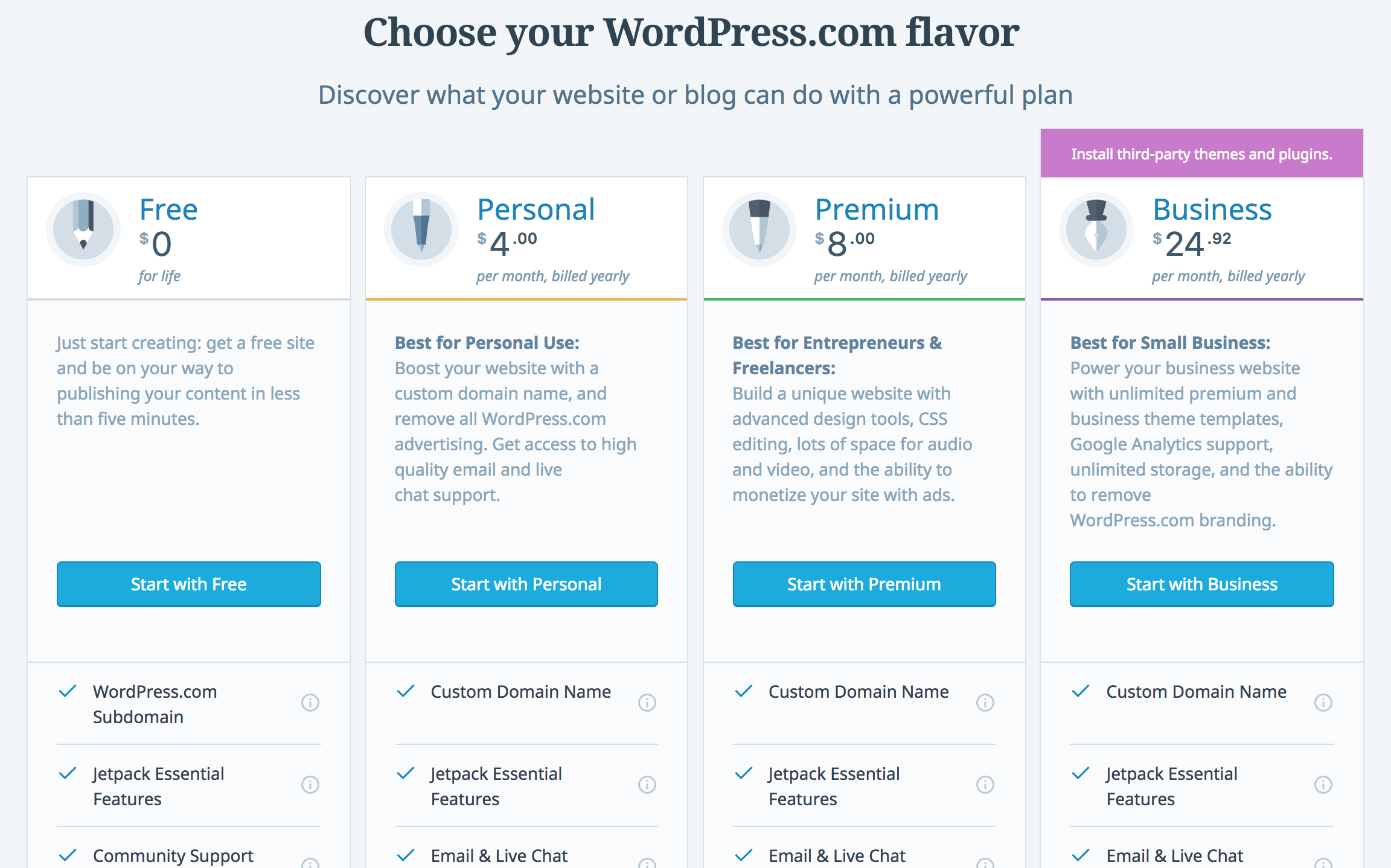
The free version of WordPress is easy to start with. It includes basic features and limited themes. You get a WordPress.com subdomain like yoursite.wordpress.com. This option suits blogs or small personal sites.
Paid versions offer more tools and control. You can use your own domain name. Paid plans include extra storage, themes, and plugins. They also remove WordPress ads. Business and e-commerce sites benefit from paid versions.
Factors Influencing Cost
Several factors affect WordPress cost per month. The type of hosting you choose matters. Shared hosting is cheaper, while managed hosting costs more. Domain registration usually costs extra each year.
Choosing premium themes or plugins adds to the price. Some plugins require monthly fees for updates and support. Hiring developers or designers increases your budget too.
WordPress Hosting Options
Choosing the right hosting option affects your WordPress site’s speed and cost. Hosting means where your website lives online. Different types of hosting serve different needs. Some are cheaper but slower. Others cost more but offer better performance. Let’s explore three common hosting options for WordPress sites.
Shared Hosting Costs
Shared hosting means many websites share one server. This option is usually the cheapest. Prices often start at $3 to $10 per month. It suits small sites and beginners. But shared servers can be slow if many sites use resources at once. It is simple to set up and manage. Many shared hosts offer one-click WordPress installs.
Managed WordPress Hosting
Managed WordPress hosting focuses only on WordPress sites. It costs more, typically $15 to $50 each month. This hosting improves site speed and security. The host handles updates, backups, and security checks. It is great for busy sites or businesses. Users get expert support for WordPress issues. It saves time and reduces technical worries.
Vps And Dedicated Servers
VPS means Virtual Private Server. It divides a physical server into several private spaces. Dedicated servers give you a whole server alone. Both options cost more, starting around $30 to over $100 monthly. They offer high speed and full control. VPS suits growing sites needing more resources. Dedicated servers are best for very large or high-traffic sites. You manage these servers or hire someone to do it.
Domain Name Expenses
Domain name expenses are a key part of WordPress costs. Your domain name is your website’s address on the internet. It helps visitors find your site easily. Choosing and maintaining a domain requires some fees. Understanding these fees helps you plan your budget better.
Domain Registration Fees
Registering a domain name means buying it for the first time. This fee varies based on the domain extension like .com, .net, or .org. Usually, it costs between $10 and $20 per year. Some unique or premium domains may cost more. The registration fee gives you the right to use that name.
Renewal Costs
Renewal costs are the fees to keep your domain active each year. These fees often match the registration price but can increase over time. Missing renewal payments can cause loss of your domain. Renewals are essential to maintain your website’s presence online. Setting reminders helps avoid accidental expiration.
Themes And Design Costs
The cost of WordPress themes and design varies. It depends on the choices you make. Themes control how your website looks. Design affects user experience and brand image. Understanding these costs helps plan your budget well.
Some themes are free, while others need payment. Custom design services cost more but offer unique looks. Let’s explore each option and their costs.
Free Themes
WordPress offers many free themes. These themes are easy to install and use. They provide basic design and layout options. Free themes suit small blogs or simple websites. You save money but get limited features. Support and updates may be less frequent.
Premium Themes
Premium themes cost between $20 and $100. They offer advanced features and better designs. These themes often include support and updates. Premium themes have more customization options. They suit growing websites needing professional looks. You pay once or annually depending on the seller.
Custom Design Services
Custom design services create unique themes for your site. Designers build themes matching your brand and needs. Costs range from a few hundred to thousands of dollars. Custom designs offer full control over appearance and features. They require more time but improve site identity. Ideal for businesses wanting a standout website.
Plugins And Extensions
Plugins and extensions add power to your WordPress site. They help you add features without coding. These tools can affect your monthly cost. Understanding their types helps you plan your budget.
Free Plugins
Free plugins come at no cost. They offer basic features for many needs. Thousands of free plugins exist in the WordPress directory. You can install and use them easily. They suit small websites or beginners.
Premium Plugins
Premium plugins require a one-time or yearly payment. They often provide advanced features and support. Prices vary from $10 to $100 or more. Premium plugins improve site security, SEO, and design. They fit growing websites needing more tools.
Subscription-based Services
Some plugins work on a subscription model. You pay monthly or yearly to keep using them. These services include regular updates and customer help. Subscriptions range from a few dollars to hundreds each month. They suit businesses needing constant improvements and support.
Credit: javalogix.ca
Maintenance And Security Fees
Maintenance and security fees affect your monthly WordPress costs. These fees keep your site safe and running smoothly. Without them, your site may face risks or downtime. Planning for these costs helps avoid surprises.
Backup Solutions
Backups protect your site from data loss. Many services offer daily or weekly backups. Some plugins have free plans, but paid options provide more features. Backup costs depend on the storage size and frequency. Regular backups allow quick recovery after problems.
Security Services
Security services guard your site against attacks. They include firewalls, malware scanning, and spam protection. Basic tools are often free, but advanced features come with fees. Paid security plans reduce hacking risks and data breaches. Keeping your site secure builds visitor trust.
Update And Support Plans
Updates keep WordPress, themes, and plugins working well. Support plans offer help with technical issues. Some hosts include updates and support in their fees. Others charge monthly or yearly for these services. Regular updates fix bugs and improve security.
Additional Costs To Consider
WordPress itself can be affordable, but extra costs can add up fast. These costs depend on your site needs and goals. Knowing them helps you plan your budget better.
Seo And Marketing Tools
SEO tools help your site appear on search engines. Many plugins offer free versions, but premium ones cost $10 to $50 monthly. Marketing tools like email services also charge fees. These tools improve site traffic and sales.
E-commerce Features
Online stores need extra features like payment gateways and shipping options. WooCommerce is free but extensions often cost $20 to $100 each. Monthly fees may apply for payment processors. Running a store requires a bigger budget.
Content Creation Services
Good content attracts visitors and builds trust. Hiring writers or designers costs between $50 and $300 per piece. Some use content tools for editing and images, which may also charge monthly fees. Quality content is important for success.
Credit: litextension.com
Cost Comparison By Website Type
WordPress costs vary depending on the website type you choose. Each type has different needs and features. These affect the monthly cost. Understanding the cost differences helps you plan your budget better.
Personal Blogs
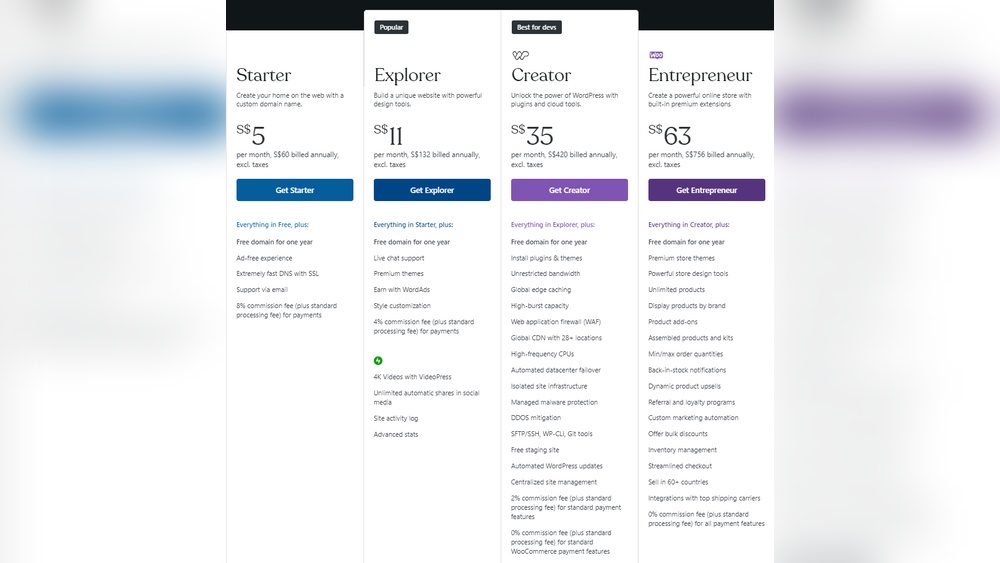
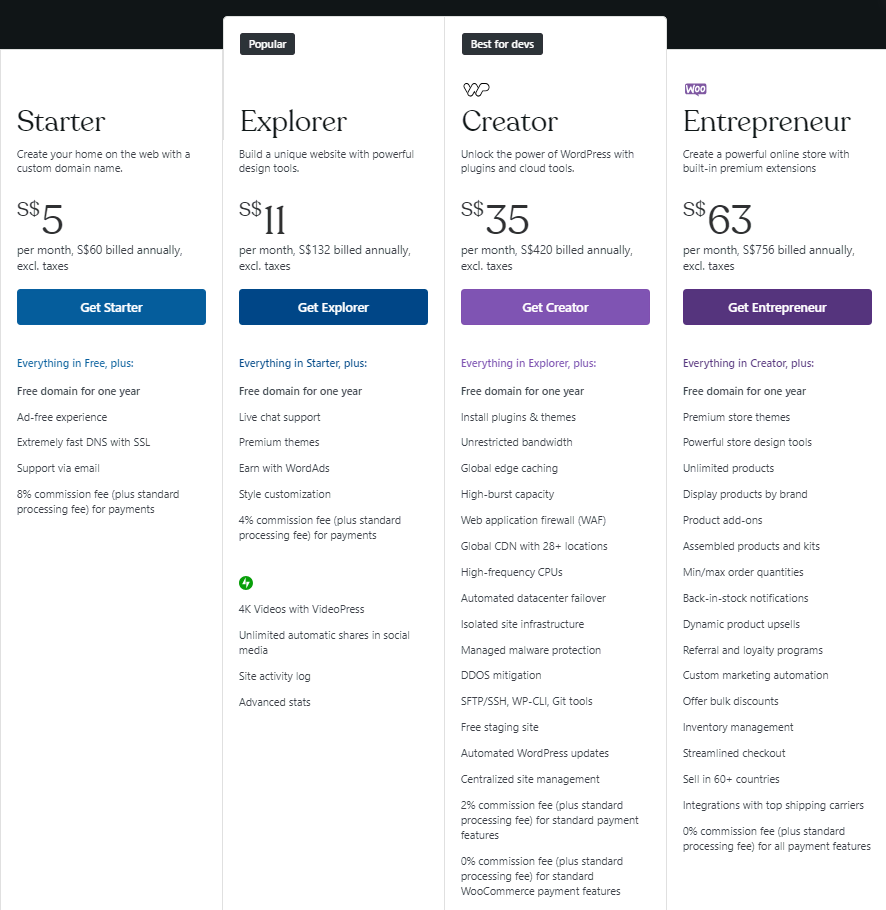
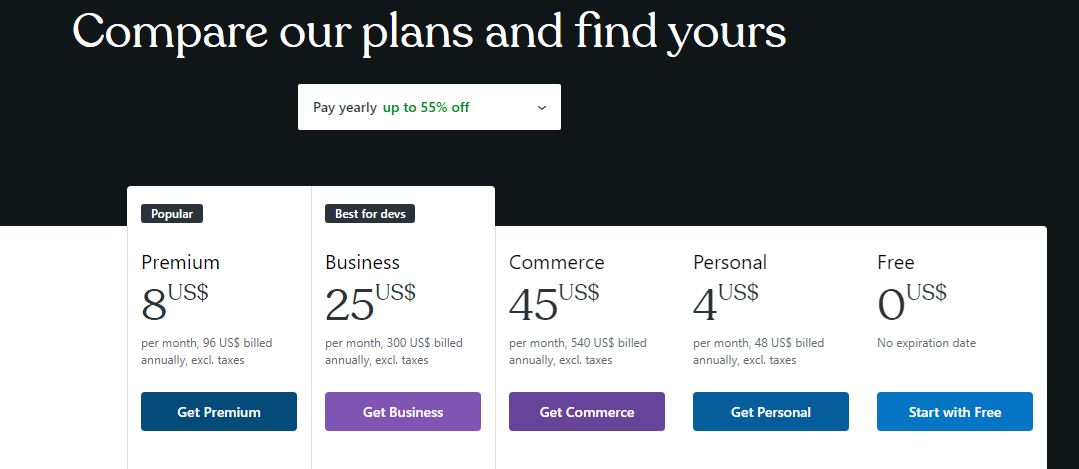
Personal blogs usually have simple needs. Hosting and a basic theme are enough. Many bloggers use the free WordPress.com plan. Paid plans range from $4 to $8 per month. This covers more storage and removes ads. Extra plugins or custom themes might cost more.
Business Websites
Business websites need more features than blogs. They require professional themes and plugins for marketing. Hosting should be faster and more reliable. Monthly costs start around $25. This includes premium support and better security. Costs increase with extra tools like SEO and email marketing.
Online Stores
Online stores need special plugins like WooCommerce. They require strong hosting to handle traffic and transactions. Monthly costs usually start at $30. Payment gateways and SSL certificates add extra costs. More products or advanced features increase the price. Security and speed are very important for stores.
Tips To Reduce WordPress Expenses
WordPress costs can add up quickly if not managed well. Small changes in spending make a big difference over time. Saving money on WordPress does not mean lowering quality. It means choosing smart options that fit your needs.
Below are some easy tips to keep your WordPress expenses low and your site running smoothly.
Choosing The Right Hosting
Hosting affects speed, security, and cost. Pick a host that matches your website size and traffic. Shared hosting is cheaper and good for small sites. Avoid paying for features you do not use. Look for hosts with good reviews and support. Some offer free SSL and backups, saving extra costs.
Balancing Free And Paid Tools
WordPress has many free plugins and themes. Use free tools for basic functions like SEO and contact forms. Paid tools often add features but cost more. Test free versions before buying. Only pay for tools that bring real value. This balance keeps your site affordable and effective.
Diy Vs Professional Help
Doing things yourself saves money but takes time. Learn simple tasks like updates and content creation. Hire professionals for complex work like design or security. This approach avoids costly mistakes. Spending on experts only when needed keeps your budget in check.
Credit: kinsta.com
Frequently Asked Questions
How Much Does WordPress Cost Monthly?
WordPress itself is free, but hosting and premium features cost extra. Hosting plans typically range from $3 to $30 per month. Paid themes and plugins may add to monthly expenses depending on your website needs.
Are There Any Hidden WordPress Monthly Fees?
No hidden fees exist for WordPress core. However, additional costs like premium themes, plugins, and hosting services are separate. These can increase monthly expenses based on your website’s complexity and requirements.
What Affects The Monthly WordPress Cost Most?
Hosting quality and plan type impact costs most. Shared hosting is cheaper, while managed WordPress hosting costs more but offers better performance. Premium themes, plugins, and custom development also increase monthly expenses.
Can I Use WordPress For Free Without Monthly Costs?
Yes, WordPress. com offers a free plan with limited features and WordPress branding. For full control and no ads, you’ll need paid hosting and possibly premium plugins, which incur monthly costs.
Conclusion
WordPress costs vary based on your needs and choices. Basic plans start low but can rise with extra features. Hosting, themes, and plugins add to monthly expenses. Small sites may cost less than larger, complex ones. Budgeting helps keep control over your spending.
Choose plans that fit your website goals well. WordPress offers flexibility for many budgets. Start simple, then upgrade as your site grows. Understanding costs helps avoid surprises later. Your website success depends on smart spending decisions.



