
Are you thinking about creating a WordPress website but wondering how much it will cost? You’re not alone.
Knowing the true expenses upfront can save you from surprises later. Whether you want a simple blog or a full online store, understanding the costs involved is key to planning your budget. You’ll discover exactly what affects the price and how to make smart choices that fit your needs and wallet.
Keep reading to find out how much you really need to invest to get your WordPress site up and running smoothly.
Budget Factors For WordPress Sites
Creating a WordPress website involves several budget factors. Each element has its own cost. Knowing these can help plan your budget clearly. Costs vary widely depending on your choices. Understanding key expenses makes budgeting easier.
Domain Name Expenses
A domain name is your website’s address. Prices usually range from $10 to $20 per year. Some special domains may cost more. Choose a domain that fits your brand and is easy to remember.
Hosting Plans And Pricing
Hosting stores your website online. Shared hosting is the cheapest option, starting around $3 to $10 per month. Managed WordPress hosting costs more but offers better speed and security. Choose a plan based on your site’s traffic and needs.
Theme Costs
The theme controls how your site looks. Free themes are available but have limited features. Premium themes range from $30 to $100. Paid themes offer more customization and support. Pick a theme that matches your style and purpose.
Plugin Fees
Plugins add extra functions to your site. Many plugins are free, but some require payment. Paid plugins may cost $20 to $100 or more. Essential plugins include SEO, security, and backups. Budget for plugins based on your website needs.
Design And Development Charges
Custom design and development can increase costs. Hiring a freelancer or agency may cost from a few hundred to several thousand dollars. Simple sites cost less, complex ones cost more. DIY options save money but need time and skills.
Cost Breakdown By Website Type
The cost of creating a WordPress website varies by the type of site you want. Each type has different needs and features. These differences affect the total cost. Understanding these can help you plan your budget better.
Some sites need only basic features, while others need advanced tools. The price depends on hosting, themes, plugins, and design work. Below is a cost breakdown by website type to guide you.
Personal Blogs
Personal blogs are the simplest type of WordPress site. They usually need a basic theme and a few plugins. Hosting costs can start as low as $3 to $10 per month. Themes can be free or cost around $30 to $60. Plugins for SEO and social sharing may add $20 to $50. Total cost for a personal blog often stays under $150 yearly.
Business Websites
Business websites need a professional look and more features. These include contact forms, booking systems, and security plugins. Hosting costs range from $10 to $30 per month. Premium themes cost $50 to $100. Plugins and extras add $50 to $200. You might also pay for custom design, which can raise costs. Total yearly costs usually range from $300 to $1,000.
E-commerce Stores
E-commerce stores require more powerful tools for selling products. You need a payment gateway, inventory management, and security. Hosting costs start around $20 and can go higher. Premium e-commerce themes cost $60 to $120. Plugins for payment and shipping add $100 to $300. SSL certificates and security tools may add extra costs. Expect to spend $500 to $2,000 or more yearly.
Portfolio Sites
Portfolio sites showcase work like photos or designs. They need a clean, visual design and easy navigation. Hosting fees range from $5 to $20 per month. Themes designed for portfolios cost $40 to $80. Plugins for galleries and sliders add $20 to $50. Overall, portfolio sites cost between $150 and $500 yearly.
Diy Vs Professional Help
Deciding between building a WordPress website yourself or hiring a professional is a key step. Both choices have clear benefits and costs. Understanding these differences helps you pick the best path for your needs.
Advantages Of Diy
Building your own site saves money on labor costs. You learn valuable skills like web design and content management. Changes and updates happen quickly without waiting for someone else. Many tools and templates make the process easier. You control every detail of the site’s look and feel.
When To Hire Experts
Experts bring experience that ensures a polished, functional site. Complex features or custom designs often need professional skills. Time is saved by letting professionals handle technical tasks. Professionals can optimize your site for speed and SEO. Hiring is smart if you want a unique brand identity.
Cost Implications
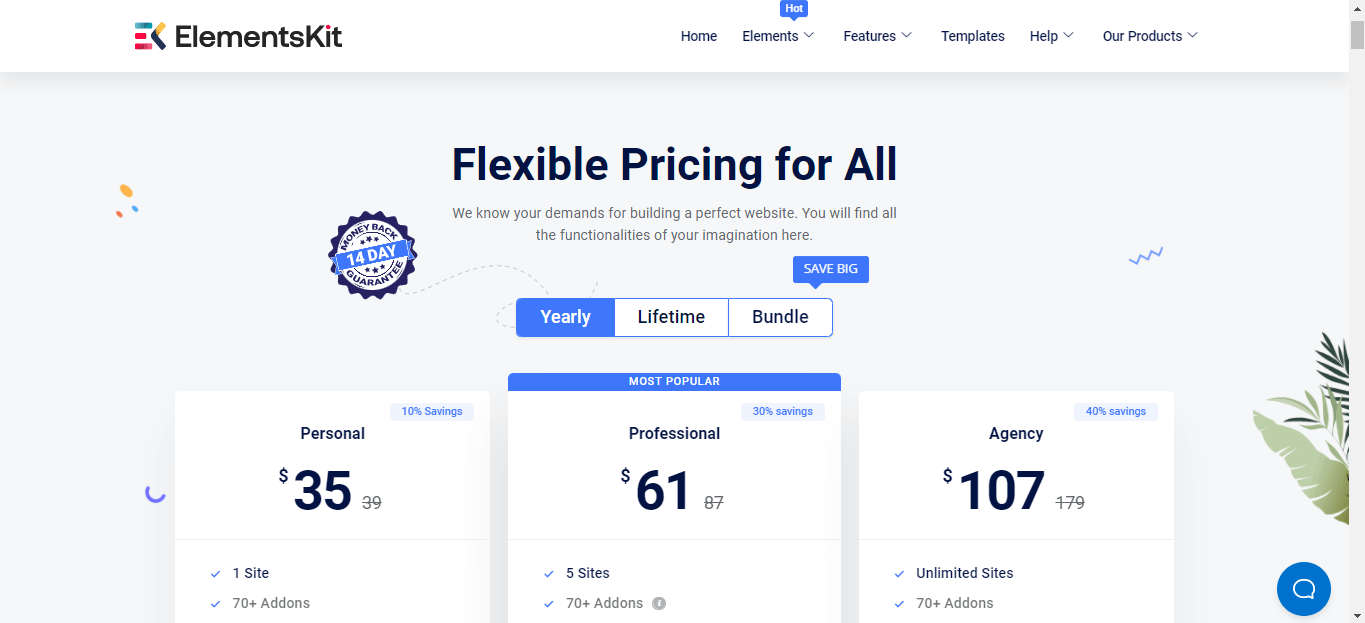
DIY costs mainly include hosting, domain, and premium themes or plugins. Professional help adds fees for design, development, and ongoing support. DIY suits small budgets but requires time and effort. Professionals cost more but reduce errors and improve quality. Choose based on your budget and goals.
Credit: wpmet.com
Hidden And Recurring Costs
Building a WordPress website is not just a one-time expense. Many costs hide beneath the surface. These costs keep your site running smoothly and safely. Knowing these helps you plan your budget well. Recurring costs can add up over time.
Maintenance And Updates
WordPress and its plugins need regular updates. Updates fix bugs and add features. Without updates, your site may break or slow down. Maintenance tasks include fixing errors and improving speed. Hiring help for these tasks can cost money. Skipping maintenance risks your website’s performance and security.
Security And Backup Services
WordPress sites face security threats daily. Using security services helps block hackers and malware. Backup services save copies of your site. Backups protect your data if something goes wrong. These services often require monthly or yearly fees. They are essential to avoid data loss and downtime.
Premium Support Plans
Some WordPress users buy premium support plans. These plans offer faster help and expert advice. Support can include troubleshooting and fixing website issues. Plans vary in price depending on the level of service. Premium support can save time and reduce stress. It is useful for those without technical skills.
Tips To Save Money
Creating a WordPress website can be affordable with smart choices. Saving money is possible without losing quality or functionality. Simple steps help you build a great site on a budget. Focus on areas where costs add up fast. Use these tips to keep expenses low while making a solid website.
Choosing Free Themes And Plugins
Free themes offer good design without cost. Many have strong support and updates. Pick themes that suit your site’s style and goals. Free plugins add important features at no price. Use only the plugins you need to avoid slow loading. Check reviews and ratings for quality before installing.
Selecting Affordable Hosting
Hosting costs vary widely. Shared hosting plans often cost less and work well for new sites. Look for hosts with good uptime and customer support. Avoid extra services that increase monthly fees. Choose plans that offer easy WordPress installation. Compare options carefully to find the best deal.
Optimizing Website Features
Limit the number of pages and features to essentials. Simple designs load faster and cost less to maintain. Compress images to reduce file size and speed up loading. Avoid heavy scripts and unnecessary animations. Use caching plugins to improve performance without extra cost. Regularly update your site to keep it secure and efficient.
Credit: www.elegantthemes.com
Estimating Total Costs
Estimating the total cost to create a WordPress website depends on many factors. These include design, features, and whether you hire help. Costs can vary widely from a simple blog to a complex e-commerce site. Knowing these price ranges helps you plan your budget better. Below are typical budgets for different website types.
Basic Website Budget
A basic WordPress website costs between $100 and $500. This budget covers a domain name and hosting. You can use free themes and plugins to keep costs low. Most of the work you do yourself. Ideal for blogs or small personal sites. Limited custom design and features. Good for simple online presence without extra functions.
Mid-range Website Budget
Mid-range websites usually cost between $500 and $3,000. This budget allows for premium themes and plugins. You can hire a designer for better site appearance. More custom features like contact forms or galleries are possible. Hosting is faster and more reliable. Suitable for small businesses or professional portfolios. Balances cost with a polished and functional site.
High-end Website Budget
High-end WordPress websites start at $3,000 and can go much higher. This covers custom design and advanced features. Professional developers create unique layouts and integrations. E-commerce tools, membership systems, and SEO services may be included. Hosting uses dedicated servers for speed and security. Best for large companies or complex online stores. Offers full control over look and functionality.
Credit: www.isitwp.com
Frequently Asked Questions
How Much Does A Basic WordPress Website Cost?
A basic WordPress website typically costs between $100 and $500. This includes domain registration, hosting, and a free theme. Additional features or premium themes increase the price. It’s ideal for small blogs or personal sites with minimal functionality.
What Factors Influence WordPress Website Costs?
Costs depend on hosting type, theme choice, plugins, and custom design. Premium themes and plugins add fees. Hiring developers or designers increases costs. Maintenance, security, and SEO tools also affect the budget. These factors vary based on website complexity.
Is WordPress Free To Use For Websites?
WordPress software is free and open-source. However, you must pay for hosting, domain, and premium features. Free themes and plugins are available, but premium ones offer more customization. So, while WordPress itself is free, creating a complete website involves some costs.
Can I Build A WordPress Website Without Coding?
Yes, WordPress offers user-friendly drag-and-drop builders and themes. Many plugins simplify customization without coding knowledge. This makes it accessible for beginners to create professional websites. However, advanced features may require some technical skills or professional help.
Conclusion
Creating a WordPress website costs vary based on your needs. Basic sites need less budget, while advanced features add cost. Hosting, themes, and plugins affect the final price. Planning your website goals helps control expenses. Choose wisely to get value without overspending.
Start small, then grow as needed. Building a site can fit many budgets and goals. Keep your focus clear, and costs stay manageable.



