
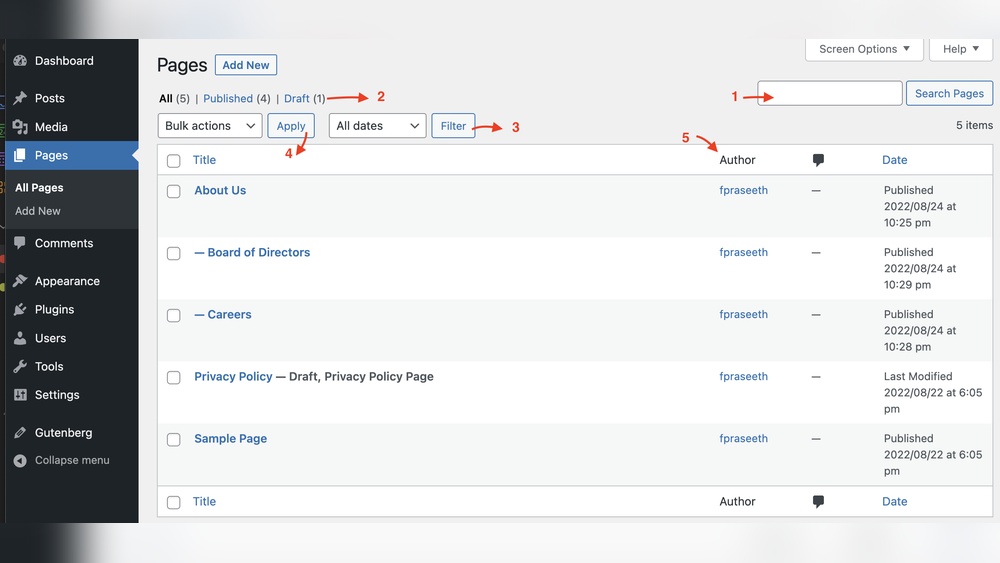
Are you wondering how many pages you can have on your WordPress site? Whether you’re building a simple blog or a large business website, knowing the limits can help you plan better.
Imagine creating all the pages you need without worrying about running out of space or slowing down your site. You’ll discover exactly how many pages WordPress allows and what factors might affect that number. By the end, you’ll feel confident to build your site exactly the way you want.
Keep reading to unlock the full potential of your WordPress pages!
WordPress Page Limits
WordPress is a popular platform for building websites. Many users wonder how many pages they can create on WordPress. The answer depends on several factors. These include WordPress settings, database limits, and hosting environment. Understanding these helps you plan your site better.
Default Page Capacity
WordPress does not set a strict limit on page numbers. You can create thousands of pages if needed. The platform handles pages well by default. The system stores pages as a type of post. This means WordPress treats pages like other content types.
Performance may slow down with many pages. But there is no fixed page limit inside WordPress itself.
Database Constraints
Pages are stored in the WordPress database. The database size can limit the number of pages. Larger databases require more resources to run smoothly. Hosting providers set limits on database size. Exceeding these limits can cause errors or slow performance.
Database optimization helps handle more pages. Cleaning unused data keeps the database efficient. Regular backups protect your content as the database grows.
Impact Of Hosting Environment
Your hosting plan affects how many pages WordPress can support. Shared hosting offers limited resources. It may struggle with many pages or high traffic. VPS or dedicated hosting provides more power. These environments support larger sites with many pages.
Server speed, memory, and storage influence page capacity. Good hosting ensures fast page load times. It also supports site growth without issues.

Credit: thepatronsaintofsuperheroes.wordpress.com
Performance Factors
Performance factors greatly affect how many pages your WordPress site can handle. Each page adds more data and requests. This can slow down your site if not managed well. Understanding these factors helps keep your site fast and reliable.
Page Load Speed
Page load speed is how fast your page appears to visitors. More pages can mean more content to load. Slow pages drive visitors away and lower search rankings. Keep images small and avoid heavy scripts. This helps pages load quickly.
Server Response Time
Server response time is how fast your server answers a request. More pages cause more requests, which can slow the server. A slow server delays page loading. Choose good hosting with strong resources. This supports many pages without lag.
Caching Solutions
Caching stores a copy of your pages to serve them faster. It reduces the load on your server. Using caching plugins improves speed even with many pages. Cache can be set for browsers and server sides. This keeps your site smooth and quick.
Managing Large Sites
Managing a large WordPress site can be a challenge. Lots of pages mean more work to keep things clear and user-friendly. Without good management, visitors may feel lost. Organizing content and navigation helps users find information fast. Tools like custom post types can make site management easier and more efficient.
Content Organization
Organize content into clear categories. Group similar pages together for easy access. Use tags and categories to sort topics. This helps both visitors and search engines understand your site better. Keep page titles simple and descriptive. Avoid clutter by limiting unnecessary pages.
Navigation Strategies
Design menus that are easy to use. Use drop-down menus for subpages. Add a search bar for quick page lookup. Breadcrumbs show visitors their location on the site. Keep navigation consistent across all pages. Clear paths reduce frustration and improve user experience.
Using Custom Post Types
Custom post types separate different content types. Use them for products, events, or portfolios. This keeps content organized and easier to manage. They allow unique layouts and features for each content type. Custom post types improve site structure and user experience.

Credit: scrappystickyinkymess.wordpress.com
Technical Boundaries
WordPress allows you to create many pages, but some technical limits exist. These limits depend on your server settings and how WordPress works with PHP and databases. Understanding these limits helps you manage your website better.
Knowing the technical boundaries ensures your site runs smoothly. It also helps avoid errors when you add many pages.
Php And Mysql Limits
WordPress uses PHP to run and MySQL to store data. PHP scripts have limits like maximum execution time and input size. MySQL databases also have size limits and connection limits. These limits can affect how many pages you can add.
Too many pages mean more database queries. This can slow down your site or cause errors if limits are reached.
Memory Allocation
Memory allocation is how much server memory PHP can use. WordPress needs enough memory to load and manage pages. If memory is low, adding many pages can cause your site to crash or load slowly.
You can check and increase memory limits in your hosting settings. This helps handle more pages without problems.
Max Input Vars
Max Input Vars controls how many form inputs PHP can process at once. WordPress uses this for saving page data. If you have many pages or complex menus, this limit can block saving changes.
Raising Max Input Vars in your server settings allows more data to be processed. This helps when working with large sites and many pages.
Optimizing For Scale
Handling a large number of pages on WordPress requires smart planning. Optimizing your site helps keep it fast and smooth. This section covers key ways to improve your site’s performance as it grows.
Database Optimization
Your WordPress database stores all page content and settings. Over time, it collects unused data and slows down. Clean the database regularly by removing old revisions and spam comments. Use plugins that optimize tables and reduce overhead. A tidy database speeds up page loading and server response.
Content Delivery Networks
Content Delivery Networks (CDNs) store copies of your pages worldwide. They deliver content faster by using servers near visitors. CDNs reduce the load on your main server. This improves speed even with many pages or high traffic. Choose a reliable CDN to help your site handle more visitors smoothly.
Efficient Theme And Plugin Use
Some themes and plugins use more resources than others. Pick lightweight themes designed for speed and efficiency. Limit the number of active plugins to only what you need. Remove plugins that duplicate functions or slow your site. Efficient themes and plugins keep your WordPress running well at scale.
Real-world Examples
Exploring real-world examples helps us understand how many pages WordPress can handle. Many websites run on WordPress with thousands of pages. These examples show the platform’s capacity and limits. They also reveal common challenges and practical solutions.
High-volume WordPress Sites
Some WordPress sites have over 100,000 pages. News portals and e-commerce stores often reach this size. For example, large news websites publish daily articles as individual pages. Online shops list many products, each with its own page. WordPress can support these high-volume sites with proper setup.
Scaling Challenges Faced
Managing many pages can slow down a website. The admin dashboard may become less responsive. Search and navigation get complicated. Hosting resources can strain under heavy traffic. Database size increases, making backups slower. These issues affect user experience and site performance.
Solutions Implemented
Using caching plugins improves page loading speed. Optimizing the database keeps it clean and fast. Dividing content into categories helps visitors find pages easily. Upgrading hosting to dedicated servers or cloud services provides more power. Regular updates and maintenance keep the site stable. These steps help WordPress run large sites smoothly.
Credit: wp-slimstat.com
Frequently Asked Questions
How Many Pages Can WordPress Support On One Site?
WordPress has no built-in limit on pages. You can add thousands of pages depending on your hosting and site performance. Proper optimization ensures your site runs smoothly even with many pages.
Does The Number Of Pages Affect WordPress Site Speed?
Yes, having many pages can impact site speed if not optimized. Use caching, content delivery networks, and optimized images to maintain fast loading times on large WordPress sites.
Can I Organize Thousands Of WordPress Pages Easily?
Yes, WordPress offers page hierarchies and plugins to organize content. Use categories, tags, and custom menus to keep large sites user-friendly and well-structured.
Are There Hosting Limits On WordPress Page Numbers?
Hosting providers may limit storage and bandwidth, indirectly affecting page count. Choose a hosting plan that supports your site’s size and expected traffic for optimal performance.
Conclusion
WordPress lets you create many pages without limits. You can build small sites or large ones easily. Just keep your site organized and user-friendly. Too many pages may slow down your website. Always focus on quality over quantity for best results.
Managing pages well helps visitors find what they want. Start with what you need and add pages as you grow. WordPress gives you freedom to expand your site anytime.



