
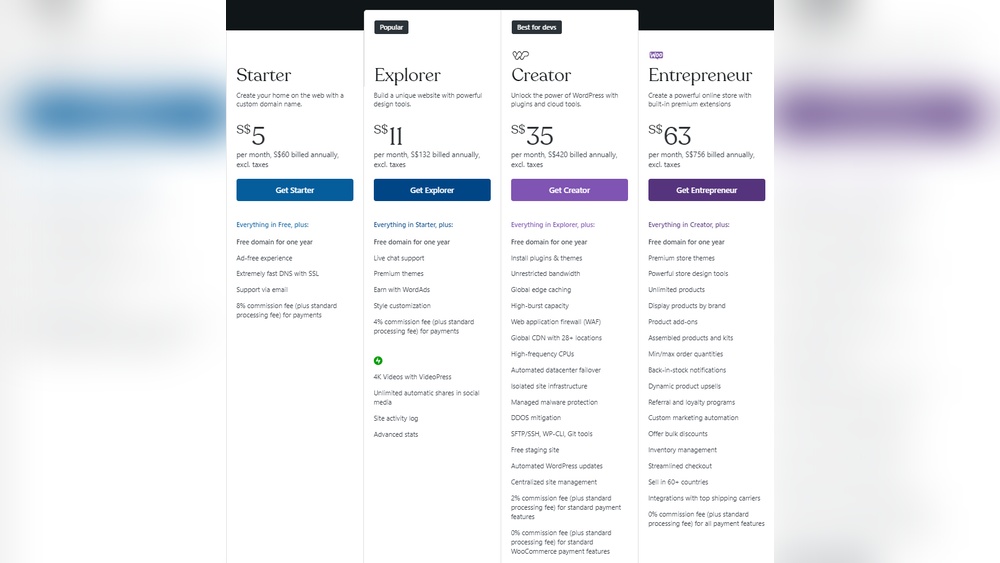
Are you thinking about building a website with WordPress but worried about the costs? You’re not alone.
Many people wonder, “How expensive is WordPress really? ” The answer isn’t as simple as you might think. Depending on your choices, WordPress can be surprisingly affordable or a bit more costly. You’ll discover the real expenses behind WordPress, so you can make smart decisions without overspending.
Keep reading to find out what you need to budget for and how to get the most value for your money.

Credit: www.youtube.com
Base Costs Of WordPress
Understanding the base costs of WordPress helps you plan your budget. WordPress itself is free to use, but some essential expenses can add up. These costs include the version you choose, domain name, and hosting services. Knowing these basics makes your WordPress journey clear and simple.
Free Vs Paid Versions
WordPress offers two main options: free and paid versions. The free version lets you create a basic site on WordPress.com. It includes WordPress hosting but has limitations on themes and plugins. Paid plans unlock more features, custom themes, and plugins. These plans range from a few dollars to higher costs for business use. The choice depends on your site needs and budget.
Domain And Hosting Fees
A domain name is your website address. It usually costs around $10 to $15 per year. Hosting stores your website files online. Hosting prices vary widely, from $3 to $30 per month. Shared hosting is cheaper and good for small sites. Managed WordPress hosting costs more but offers better speed and support. Both domain and hosting are necessary expenses for a live site.
Themes And Design Expenses
The cost of themes and design plays a big role in WordPress expenses. Your website’s look depends on the theme you choose. Some themes are free, while others come with a price. Custom designs add another layer of cost. Understanding these options helps plan your budget well.
Free Themes
WordPress offers many free themes in its directory. These themes are easy to install and use. They suit simple blogs or small websites. Free themes come with basic features. Support may be limited, but they are good for starting out. Updates happen regularly to keep them safe.
Premium Themes
Premium themes cost between $30 and $100 on average. They offer more features and customization options. These themes often include better design and support. Buyers get regular updates and bug fixes. Premium themes suit businesses needing a professional look. The cost is a one-time fee or yearly subscription.
Custom Design Costs
Custom website design can be costly. Prices vary based on the designer and project size. Small custom sites may start around $500. Large or complex designs can go above $5,000. Custom design gives a unique, tailored look. It fits specific branding and functionality needs.
Plugin And Functionality Costs
WordPress plugins add features to your website. They can be free or cost money. Some plugins are basic, while others offer advanced tools. The costs depend on what you need for your site.
Essential Free Plugins
Many plugins come at no cost. These cover basics like SEO, security, and contact forms. Free plugins suit small sites or beginners. You get good functionality without spending money. Updates and support may be limited with free options.
Paid Plugins And Add-ons
Paid plugins offer extra features and better support. Prices range from a few dollars to hundreds per year. Some plugins require add-ons for full use. Paid plugins often include updates and help. This cost adds up if your site needs many tools.
Custom Plugin Development
Custom plugins fit your specific needs. They cost more than pre-made options. Developers charge based on complexity and time. Custom work ensures unique functions for your site. It is a good choice for special business requirements.
Maintenance And Updates
Maintaining a WordPress website involves regular updates and care. These tasks keep your site secure and running smoothly. Updates include the WordPress core, themes, and plugins. Skipping updates can cause errors or security risks. Maintenance also means backups and fixing small issues fast. You can manage these tasks yourself or hire help. Each choice has different costs and benefits.
Diy Maintenance
Doing maintenance yourself saves money. You control when and how to update. Many updates happen with one click inside WordPress. Learning a few basic steps can prevent big problems later. Backups are easy with free plugins. Regular checks help spot errors early. Time is the main cost here. You spend hours learning and managing your site. Mistakes can happen if you miss steps. Still, many site owners prefer this hands-on approach.
Professional Support Services
Hiring experts costs more but reduces your workload. Professionals handle updates, backups, and fixes fast. They monitor your site for security threats. This service often includes 24/7 support. Monthly fees vary based on the service level. Some plans cover emergencies and performance checks. You get peace of mind knowing experts manage your site. This option suits busy owners or less technical users. It ensures your site stays updated and safe without your direct effort.
Hidden And Additional Expenses
WordPress may seem cheap at first. The software itself is free. But costs add up fast beyond the basics. These hidden expenses affect your budget more than you expect. They cover important services and tools needed to keep your site safe and effective. Understanding these extra costs helps you plan better and avoid surprises.
Security Measures
WordPress sites face many online threats. You must protect your site from hackers and malware. Security plugins and firewalls often require paid plans. Some hosts offer security features, but they may cost more. Regular updates and monitoring are also needed to keep your site safe. These security steps add to your expenses but protect your investment.
Seo And Marketing Tools
Good SEO tools help your site rank well on search engines. Many SEO plugins have free versions but limited features. Premium plans offer better keyword tracking and optimization tips. Marketing tools for email, social media, and ads also cost money. These tools help attract visitors and grow your audience. You pay for better features and higher limits.
Backup Solutions
Backing up your website is essential. Accidents and server failures can happen anytime. Free backup plugins exist but often have limits on storage or frequency. Paid backup solutions offer automatic, regular backups with easy restores. Some hosting plans include backups, but check the details. Investing in backups protects your data and avoids costly downtime.
Credit: www.wpbeginner.com
Comparing WordPress To Alternatives
Comparing WordPress to other website builders helps to understand its cost and value. Many platforms offer different pricing models and features. Knowing these differences guides you to the best choice for your needs. Let’s explore the cost and value WordPress offers against its alternatives.
Cost Differences
WordPress itself is free. Costs come from hosting, themes, and plugins. Hosting can range from a few dollars to more per month. Premium themes and plugins add extra fees. Other platforms may charge monthly fees that include hosting and features.
Some website builders have fixed prices. This includes hosting, support, and templates. These prices can be higher than WordPress hosting alone. Yet, they offer simplicity and ease of use. WordPress may require more setup time.
Value For Money
WordPress gives great control and flexibility. It suits small blogs to large online stores. The wide range of free and paid plugins boosts its power. Alternatives may limit customization and growth options.
Support varies between platforms. Paid builders usually offer direct help. WordPress relies on community forums and tutorials. This suits users comfortable with learning independently.
Overall, WordPress offers strong value for those who want control. Alternatives may cost more but offer easier setup. Choose based on your budget and skill level.
Tips To Save On WordPress Costs
Managing WordPress costs is important for every website owner. Saving money does not mean lowering quality. Smart choices help keep expenses low and site performance high. These tips focus on how to spend wisely.
Choosing The Right Hosting
Hosting affects your budget and site speed. Pick a host that fits your needs and budget. Avoid expensive plans if you just start. Shared hosting often offers good value. Upgrade only when traffic grows.
Leveraging Free Resources
WordPress has many free themes and plugins. Use these to build your site without extra cost. Free tools can cover most basic needs. Check reviews to find reliable options. Avoid buying paid plugins unless necessary.
Prioritizing Essential Features
Focus on features that improve user experience. Add only what your site truly needs. Extra features can increase costs and slow down the site. Keep your website simple and functional. This saves money and keeps visitors happy.

Credit: thecodeaccelerator.com
Frequently Asked Questions
How Much Does WordPress Cost To Start?
WordPress itself is free to use and install. However, costs include hosting, domain registration, and premium themes or plugins, which can range from $3 to $100+ monthly depending on your needs.
Are WordPress Plugins Expensive?
Many WordPress plugins are free. Premium plugins vary in price, usually between $10 and $100 annually, depending on features. Choose plugins carefully to avoid unnecessary expenses.
Does WordPress Hosting Affect Overall Cost?
Yes, hosting plans significantly impact total costs. Shared hosting is cheaper ($3-$10/month), while managed WordPress hosting offers better performance but costs more ($20-$50/month).
Is WordPress More Affordable Than Other Platforms?
WordPress can be more affordable because it offers free software and flexible pricing. Costs depend on hosting, themes, and plugins, often making it budget-friendly compared to proprietary platforms.
Conclusion
WordPress costs vary depending on your needs. Basic sites can be very cheap or even free. Adding themes, plugins, and hosting raises expenses. Custom designs and advanced features cost more. Planning your budget helps avoid surprises later. WordPress offers flexibility for all budgets.
Choose wisely based on what you want. Building a website doesn’t have to be costly. With smart choices, WordPress fits most budgets well.



