
Are you thinking about building a website but worried it might be too complicated? You’re not alone.
Many people wonder, “How easy is it to use WordPress? ” The good news is, WordPress is designed with you in mind—whether you’re a complete beginner or have some experience. Imagine having a powerful tool that lets you create and manage your website without needing to learn coding or hire expensive help.
You’ll discover just how simple WordPress can be, and by the end, you’ll feel ready to take control of your own website. Keep reading to find out why WordPress might be the easiest choice you’ve ever made.

Credit: www.tentononline.com
Getting Started With WordPress
Getting started with WordPress is simple and quick. This platform is designed for users of all skill levels. You do not need to be a tech expert to create a website. WordPress offers many tools that help you build your site easily.
This section covers the first steps. It helps you pick hosting, install WordPress, and explore the dashboard. Each step is explained clearly to make your start smooth and stress-free.
Choosing The Right Hosting
Hosting is where your website lives on the internet. Choose a host that supports WordPress well. Look for reliable service with good speed and security. Many hosts offer WordPress-specific plans. These plans come with easy setup and updates.
Pick a hosting plan that fits your budget and needs. Shared hosting works for beginners. It is affordable and simple. If you expect more traffic, consider VPS or managed WordPress hosting. These options give more power and control.
Installing WordPress Quickly
Most hosts provide one-click WordPress installation. This means you can install WordPress in minutes. Follow the host’s instructions to start. You will need to set a site name and admin password. Keep this information safe.
Manual installation is also possible but takes more steps. It involves downloading WordPress and uploading files via FTP. For beginners, one-click install is the easiest way to begin.
Exploring The Dashboard
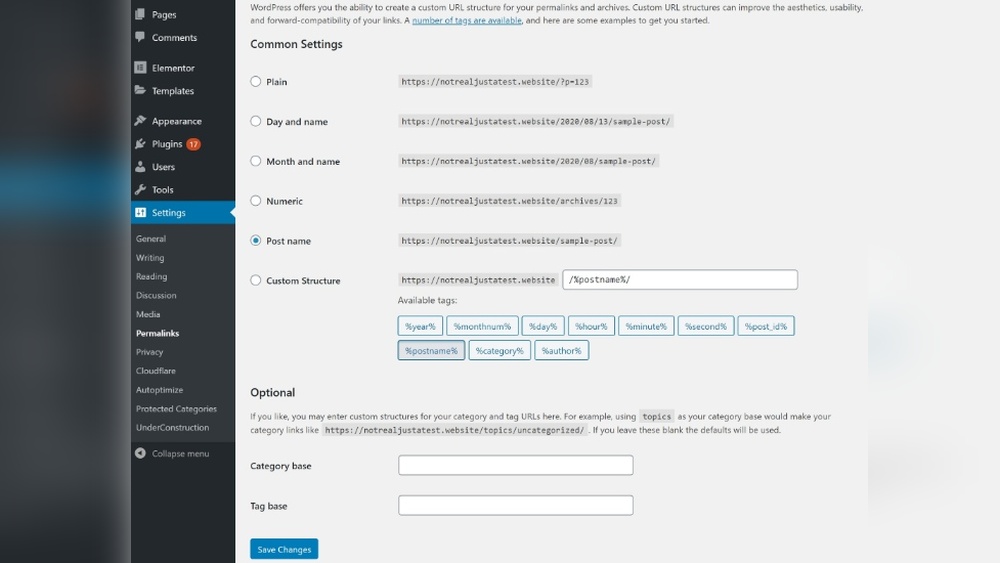
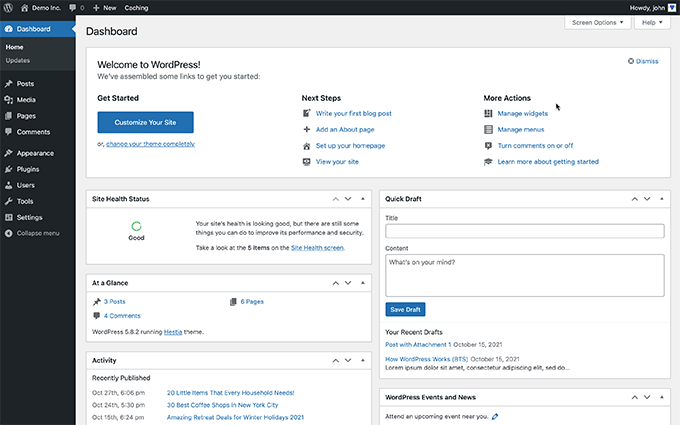
The WordPress dashboard is your control center. It lets you manage posts, pages, and settings. The menu on the left side shows all options. Hover over items to see more choices.
Start by creating your first post or page. Use the block editor to add text, images, and media. The dashboard also allows you to install themes and plugins. These tools customize your site’s look and function.
Customizing Your Website
Customizing your WordPress website is simple and flexible. You can make it look and work the way you want. This section explains how to choose themes, add features with plugins, and edit content using the block editor.
Selecting Themes
The first step is picking a theme. Themes control your website’s design and layout. WordPress offers thousands of free and paid themes. You can preview themes before activating them. Changing themes is quick and does not affect your content. Themes let you change colors, fonts, and styles easily.
Using Plugins For Extra Features
Plugins add new functions to your website. You can find plugins for contact forms, SEO, security, and more. Installing plugins takes just a few clicks. Activate or deactivate them anytime. Plugins help you customize your site without coding knowledge. Choose only the plugins you need to keep your site fast.
Editing With The Block Editor
The block editor makes content editing easy and visual. You add blocks for text, images, videos, and other media. Each block is separate, so you can move or style them independently. The editor shows a live preview of your content. No need for technical skills. Editing feels like working with simple building blocks.
Creating Content Easily
Creating content in WordPress is simple and direct. The platform is built to help users focus on writing and designing without hassle. Whether writing a blog post, adding pictures, or setting up navigation, WordPress keeps everything easy to manage.
Writing Posts And Pages
WordPress uses a block editor that breaks content into small, manageable parts. Each block can be a paragraph, image, heading, or list. This helps organize ideas clearly. You can quickly add, move, or delete blocks as needed. The editor also shows a live preview, so you see how your content looks immediately.
Creating a new post or page takes just a few clicks. The interface is clean and not crowded with confusing options. You get a simple toolbar with all the basics like bold, italics, links, and alignment. This makes writing fast and smooth, even for beginners.
Adding Media And Galleries
Uploading photos and videos is straightforward in WordPress. You can drag and drop files or select them from your computer. The media library stores all your files in one place, ready for reuse. Adding images to posts or pages is just a click away.
Creating galleries is also easy. WordPress offers built-in gallery blocks that arrange images neatly. You pick your photos, choose a layout, and insert the gallery anywhere on the page. This lets you show multiple images without extra tools or plugins.
Managing Menus And Navigation
Menus control how visitors move around your site. WordPress makes menu management simple. You can create new menus or edit existing ones from the admin panel. Adding pages, posts, or custom links to menus takes only a few steps.
Drag and drop options help arrange menu items in the right order. You can create dropdown menus for better organization. This setup improves user experience by making navigation clear and easy to use.
Credit: www.wpbeginner.com
Maintaining Your Site
Maintaining your WordPress site keeps it running smoothly and safely. Regular care prevents errors and security problems. It also improves site speed and user experience. Simple steps make maintenance easy for everyone.
Updating WordPress And Plugins
WordPress and its plugins get updates often. These updates fix bugs and add new features. Keep your site fresh by installing updates quickly. Use the dashboard to check for updates anytime. Updating helps your site stay secure and fast.
Backing Up Your Website
Backups save your site data safely. They protect against accidental loss or hacking. Set up automatic backups for peace of mind. Store backups on a different device or cloud service. Restoring your site is easy with a recent backup.
Ensuring Security
Security protects your site from threats and attacks. Use strong passwords and change them regularly. Install security plugins to monitor and block suspicious activity. Keep all software updated to close security gaps. Regular checks help spot problems early.
Tips For Smooth Website Building
Building a website with WordPress can be smooth and simple. Small tips make a big difference. They help avoid frustration and save time. This section shares useful tips for easy website building.
Follow these ideas to create your site step by step. The process can be clear and enjoyable.
Using Drag-and-drop Builders
Drag-and-drop builders let you design pages without coding. You just move elements like text, images, and buttons. This tool shows changes instantly. It helps you see how your site looks fast. Many builders come with WordPress themes. They make your site look professional. You can customize colors, fonts, and layouts easily. This method suits beginners well.
Leveraging Support Communities
WordPress has many active support communities online. Forums and groups answer questions quickly. Users share tips and solutions from real experience. Joining these groups helps solve problems fast. You learn from others’ mistakes and successes. Support communities also offer tutorials and guides. They keep you updated on new features and plugins.
Avoiding Common Mistakes
Many beginners make simple errors that slow progress. One common mistake is using too many plugins. This can make your site slow and hard to manage. Another is ignoring backups. Always save your site regularly to avoid data loss. Avoid choosing complicated themes that confuse you. Pick clear, simple designs. Clear structure and content help visitors find information quickly.
Credit: themeisle.com
Frequently Asked Questions
How Beginner-friendly Is WordPress To Use?
WordPress is very beginner-friendly with an intuitive interface. It offers easy setup, customizable themes, and drag-and-drop plugins. Users can create websites without coding knowledge, making it ideal for beginners.
Can I Customize My Site Easily On WordPress?
Yes, WordPress allows easy customization through thousands of themes and plugins. You can change layouts, colors, and features without coding, giving full control over your website’s appearance and functionality.
Is WordPress Suitable For Non-technical Users?
Absolutely. WordPress requires no coding skills for basic use. Its user-friendly dashboard simplifies content management, making it accessible for non-technical users to build and maintain websites.
How Quickly Can I Launch A WordPress Website?
You can launch a WordPress website within a few hours. With ready themes and plugins, setup is fast, allowing you to publish content quickly and efficiently.
Conclusion
WordPress offers a simple way to build websites. It does not need coding skills. Many themes and plugins help customize sites easily. Users can create blogs, stores, or portfolios fast. The platform is friendly for beginners and flexible for experts.
Support and tutorials are widely available online. Starting with WordPress can save time and effort. Anyone can get a website running without stress. A little practice makes the process smoother. WordPress truly makes website creation easy and accessible.



