
Are you ready to build your own WordPress website but don’t know where to start? Setting up a website might sound tricky, but with the right steps, you can have your site up and running quickly.
Imagine having full control over your content, design, and online presence—all without needing to be a tech expert. In this guide, you’ll discover simple, clear instructions that make the process easy and even enjoyable. Keep reading, and by the end, you’ll have the confidence to create a WordPress site that truly represents you or your business.
Choosing A Domain Name
Choosing a domain name is the first step in setting up your WordPress website. It acts as your site’s address on the internet. A good domain name helps visitors find and remember your site easily. It also builds trust and shows professionalism.
Picking the right domain name takes some thought. It should reflect your website’s purpose and be simple to type. A clear and catchy domain name can make a big difference in your site’s success.
Tips For A Memorable Domain
Keep your domain name short and easy to spell. Avoid using numbers or special characters. These can confuse visitors and cause typos. Use words related to your website’s topic or brand.
Choose a name that sounds natural when spoken aloud. This helps people remember and share it with others. Think about your target audience and what they might search for.
Pick a domain that is unique but not too complicated. You want to stand out without making it hard to remember. Check if the name is available on social media for consistency.
Where To Register Your Domain
Register your domain name through a reliable registrar. Popular options include GoDaddy, Namecheap, and Google Domains. These services offer easy management and good customer support.
Compare prices and features before choosing a registrar. Look for free privacy protection to keep your information safe. Make sure the registrar supports the domain extension you want.
After registration, connect your domain to your WordPress hosting. Most hosting providers give guides to help you link your domain quickly. This step makes your website live and accessible to visitors.

Credit: wordpress.org
Selecting A Hosting Provider
Selecting a hosting provider is a key step in setting up your WordPress website. Hosting stores your site’s files and makes them accessible online. The right host ensures your website runs fast and stays online without interruptions. Choosing poorly can lead to slow loading times or frequent downtime.
Many hosting providers offer different plans. Some are better for small blogs, while others suit larger sites. Understanding hosting types and what to check helps pick the best option for your needs.
Types Of Hosting Services
Shared hosting is the most common and affordable option. Many websites share one server’s resources here. It works well for beginners and small sites.
VPS hosting gives more control and power. It uses a virtual server divided into parts for different users. It fits medium-sized websites needing more speed.
Dedicated hosting means renting an entire server. It offers full control, high speed, and security. Big websites or stores often use this type.
Managed WordPress hosting focuses on WordPress sites. It handles updates, backups, and security automatically. This option suits users wanting less technical work.
Factors To Consider When Choosing
Look for uptime guarantees. A good host should offer at least 99.9% uptime. This keeps your site live almost all the time.
Check loading speed. Faster hosting improves user experience and SEO rankings.
Customer support matters. Choose a provider with 24/7 support through chat or phone.
Consider security features like SSL certificates and backups. These protect your site from attacks and data loss.
Review pricing and renewal fees. Some hosts offer low initial prices but high renewal costs.
Ensure the host supports the latest PHP and MySQL versions. This keeps your WordPress site compatible and fast.
Installing WordPress
Installing WordPress is the first step in creating your website. It sets the foundation for your site’s design and content. The process is simple and can be done in a few minutes. There are two main ways to install WordPress: one-click installation and manual installation. Each method suits different needs and skills.
One-click Installation Methods
Many web hosts offer one-click WordPress installation. This method saves time and effort. It usually appears in the hosting control panel as “WordPress installer” or “Softaculous.”
To use it, log in to your hosting account. Find the WordPress installer tool. Click the install button and fill in basic details like site name and admin info. The installer sets up WordPress automatically. After installation, you can log in to your new WordPress site immediately.
Manual Installation Steps
Manual installation gives more control over the setup. It requires downloading WordPress from the official website. Then, upload the files to your web server using FTP.
Create a database in your hosting control panel. Note the database name, username, and password. These details connect WordPress to your database.
Open your website URL in a browser. WordPress will start the installation wizard. Enter the database details and site information. Click “Install” to finish the process. You can now access the WordPress dashboard to start building your site.
Configuring Basic Settings
Configuring basic settings is the first step after installing WordPress. These settings shape how your website looks and works. Correct settings help visitors find your site and improve search engine ranking.
Setting Site Title And Tagline
The site title is the name of your website. It appears in browser tabs and search results. Choose a clear and simple title that describes your site.
The tagline is a short phrase that explains what your site offers. Keep it brief and easy to understand. You can change both by going to Settings > General in your WordPress dashboard.
Adjusting Permalinks For Seo
Permalinks are the URLs of your posts and pages. They should be simple and include keywords. This helps search engines and visitors understand your content.
Go to Settings > Permalinks and select the “Post name” option. This format uses the title of your post in the URL. It looks clean and improves SEO.
Choosing A Theme
Choosing a theme is a crucial step in setting up your WordPress website. It controls the site’s look and feel. A good theme makes your site attractive and easy to navigate. It also affects how visitors interact with your content. Picking the right theme helps you build trust and keep visitors engaged.
Free Vs Premium Themes
Free themes come with no cost. They offer basic design and features. Many free themes are reliable and safe. They fit simple websites well. Premium themes cost money but offer more options. They have advanced features and better support. Premium themes are often updated frequently. They suit complex sites or businesses. Choose based on your budget and needs.
Customizing Your Theme
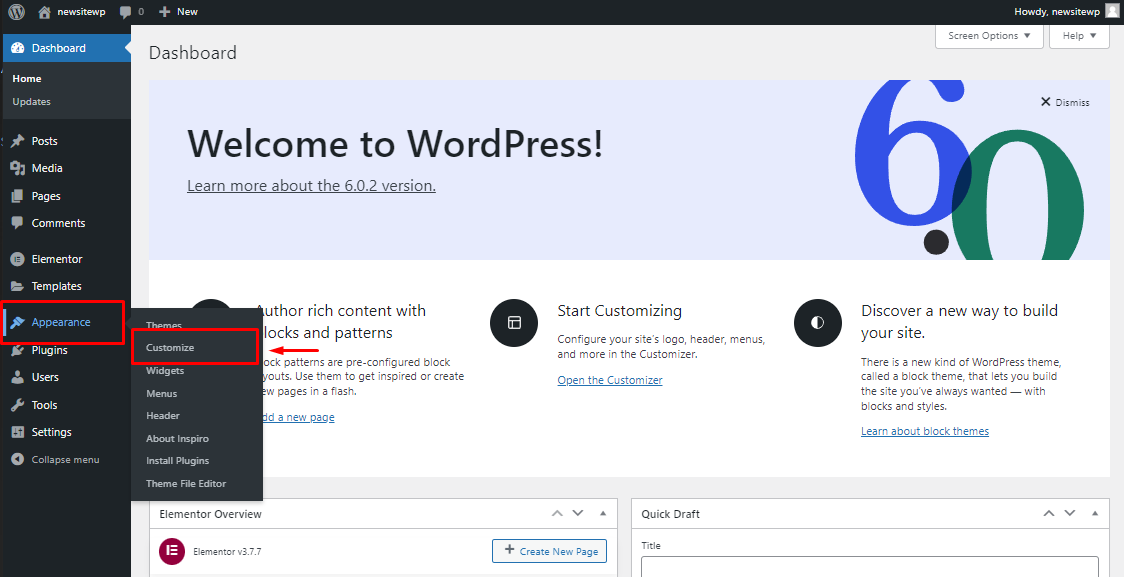
Customization lets you change colors, fonts, and layout. Most themes have easy tools for this. You can add your logo and images. Adjust settings to match your brand style. Customizing helps your site stand out. It also improves user experience. Start with small changes and test often. Keep your design clean and simple.
Installing Essential Plugins
Installing essential plugins is a key step in setting up a WordPress website. Plugins add important features that WordPress does not have by default. They help improve your site’s security, speed, and search engine ranking. Choose plugins carefully to keep your site safe and fast.
Plugins For Security
Security plugins protect your website from hackers and malware. They monitor suspicious activity and block threats. Some popular security plugins include Wordfence, Sucuri, and iThemes Security. These plugins offer firewalls, login protection, and malware scanning. Keeping your site secure builds trust with visitors.
Plugins For Performance
Performance plugins make your website load faster. Fast sites keep visitors happy and improve search rankings. Caching plugins like W3 Total Cache and WP Super Cache save a copy of your pages. Image optimization plugins reduce file sizes without losing quality. Using these plugins helps your site run smoothly.
Plugins For Seo
SEO plugins help your website rank higher on search engines. They guide you to create better content and optimize keywords. Yoast SEO and All in One SEO Pack are popular choices. These plugins provide tools for sitemaps, meta tags, and readability checks. SEO plugins make your site easier to find online.
Creating Key Pages
Creating key pages is vital for a strong WordPress website. These pages guide visitors and share important information. They help build trust and keep users engaged. Focus on clear, simple content for each page.
About Page
The About Page tells your story. Explain who you are and what you do. Keep it honest and friendly. Use a clear headline and a short introduction. Add photos or videos to make it personal. Visitors want to know the person behind the site.
Contact Page
The Contact Page makes it easy to reach you. Include a simple form or your email address. Add a phone number if available. Show your business address or location on a map. Clear contact details build trust and encourage visitors to connect.
Blog Page Setup
The Blog Page shares your latest news and ideas. Set it up to show recent posts first. Use categories to organize content by topic. Make sure the page is easy to navigate. Regular updates keep visitors coming back for more.
Credit: wpmet.com
Optimizing Your Website
Optimizing your WordPress website helps it run better and reach more visitors. A fast, smooth site keeps people interested. It also improves your ranking on search engines like Google.
Focus on key areas to make your site perform well. Two important parts are site speed and mobile responsiveness. Both make your website user-friendly and easy to use.
Improving Site Speed
Fast-loading pages keep visitors from leaving. Start by choosing a good web host. Use caching plugins to store parts of your site. This reduces load time for repeat visitors.
Compress images before uploading them. Large images slow down your site. Use formats like JPEG or WebP for smaller files. Minimize the use of heavy scripts and plugins.
Mobile Responsiveness
Most people use phones to browse websites. A responsive site looks good on all screen sizes. Choose a WordPress theme that adjusts to mobiles and tablets.
Test your site on different devices. Make sure buttons and links are easy to tap. Avoid large text or images that break the layout. A mobile-friendly site keeps visitors longer and improves SEO.
Launching Your Website
Launching your WordPress website is an exciting step. It means your site is ready for visitors. Before you go live, take time to prepare. This ensures a smooth experience for your audience. A well-launched site can attract and keep visitors. Let’s explore the key steps to launch your site successfully.
Final Checks
Start by reviewing every page carefully. Check for broken links or missing images. Test your site on different devices and browsers. Make sure it looks good on phones and tablets. Confirm that all contact forms work correctly. Verify your site loads fast enough. Speed affects user experience and search ranking. Set up basic SEO settings like meta titles and descriptions. Ensure your website has clear navigation for easy use.
Promoting Your Site
Tell people about your new website. Share it on social media platforms you use. Ask friends or colleagues to visit and share it too. Consider joining online groups related to your site topic. Write blog posts or articles to attract visitors. Use simple keywords to help people find your site. Submit your site to search engines for indexing. Keep your content fresh to encourage repeat visits. Promotion helps your site grow steadily over time.
Credit: sendlayer.com
Frequently Asked Questions
What Are The Basic Steps To Set Up A WordPress Website?
First, choose a domain and hosting provider. Next, install WordPress via your host’s control panel. Then, select a theme and customize it. Finally, add essential plugins and create content to launch your site.
How Do I Choose The Best Hosting For WordPress?
Look for hosting with fast speed, strong security, and excellent customer support. Managed WordPress hosting can simplify maintenance and updates. Compare pricing and features before deciding.
Do I Need Coding Skills To Build A WordPress Site?
No coding skills are necessary. WordPress offers a user-friendly interface with drag-and-drop editors and customizable themes. Basic knowledge helps but is not required to start.
How Can I Secure My WordPress Website Effectively?
Use strong passwords, keep WordPress updated, install security plugins, and enable SSL. Regularly back up your site to prevent data loss and monitor for suspicious activity.
Conclusion
Setting up a WordPress website is easier than you think. Follow each step carefully and take your time. Choose a good hosting service and pick a simple theme. Add important pages and useful plugins to improve your site. Keep your site updated and secure for best results.
Practice makes perfect, so keep learning as you build. Soon, your website will look great and work well. Start today and enjoy sharing your ideas online.



