
Are you wondering if WordPress supports PHP 8.2? If you rely on WordPress for your website, knowing whether it works smoothly with the latest PHP version is crucial.
Using the right PHP version can boost your site’s speed, security, and performance. But switching without the right information can cause unexpected problems. You’ll discover exactly how WordPress handles PHP 8. 2 and what it means for your site. Keep reading to make sure your website stays fast, safe, and up-to-date.
Credit: help.10web.io
WordPress And Php Compatibility
WordPress runs on PHP, a popular programming language. Compatibility between WordPress and PHP is key for website performance and security. Using the right PHP version ensures smooth operation and fewer errors.
PHP updates bring improvements that help WordPress sites load faster and stay safe. Understanding which PHP versions WordPress supports helps site owners keep their websites updated.
Current Php Versions Supported
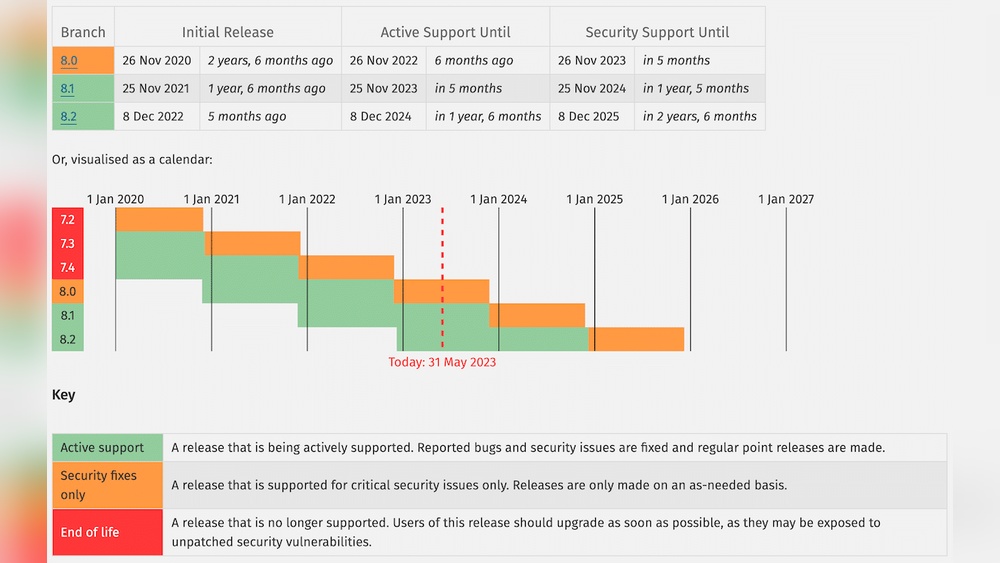
WordPress supports PHP versions from 7.4 to 8.1 officially. Support for PHP 8.2 is still limited as it is very new. Some plugins and themes may not work well on PHP 8.2 yet. It is best to check compatibility before upgrading.
Importance Of Php Updates For WordPress
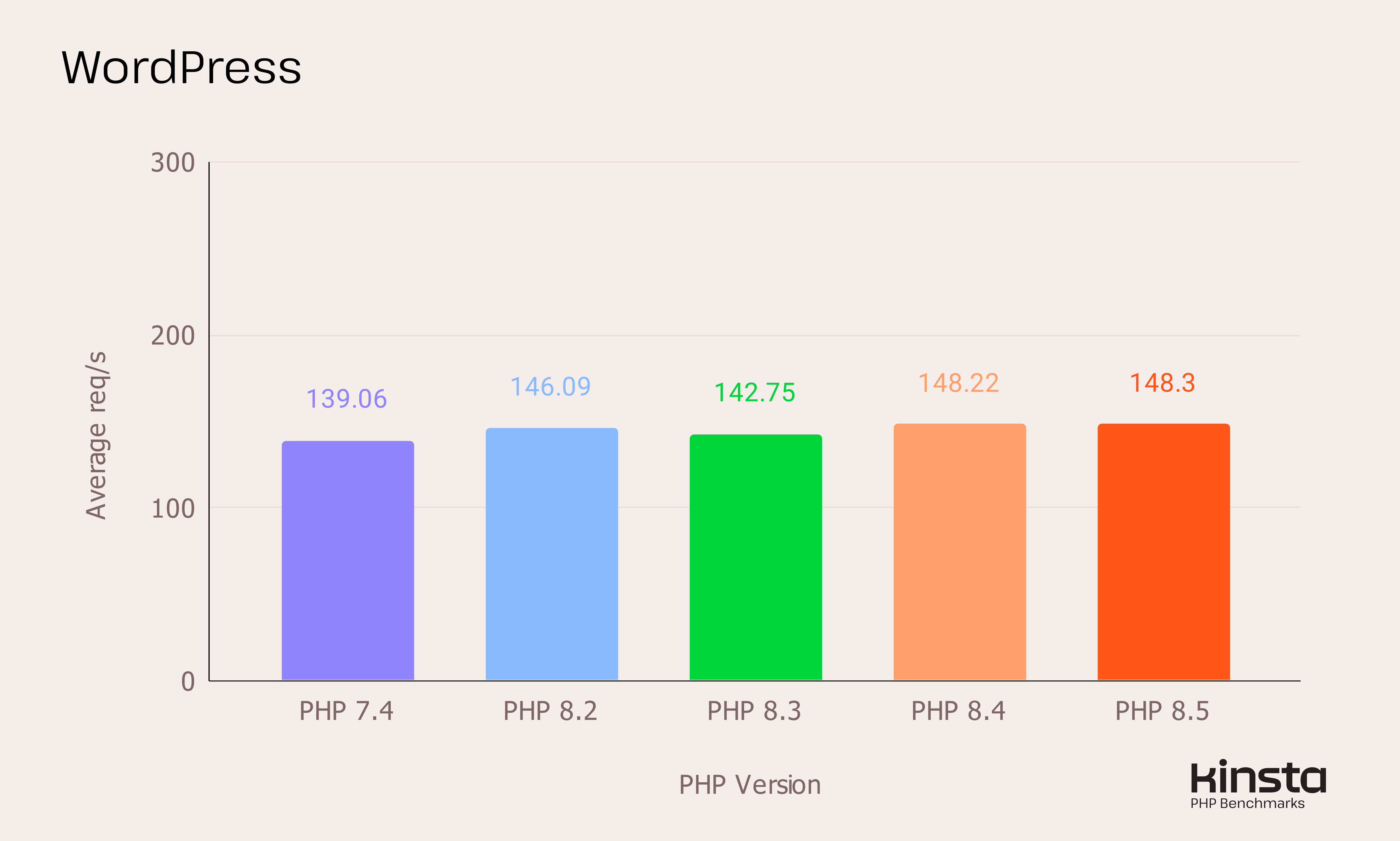
Updating PHP improves site speed and security. Older PHP versions get fewer security fixes. Newer PHP versions use less server resources. This means faster loading times for visitors. Staying updated also keeps WordPress plugins and themes running smoothly.
Credit: kinsta.com
Features Of Php 8.2
PHP 8.2 brings many new features and improvements. These changes help developers write better and faster code. It also increases security and makes PHP more efficient. Understanding these features helps you see why PHP 8.2 is important for WordPress users and developers.
New Functionalities
PHP 8.2 introduces readonly classes, making properties immutable. This helps avoid accidental changes in data. It also adds support for true type properties, increasing code clarity. Deprecation of dynamic properties forces cleaner coding practices. These features improve the way developers write PHP scripts.
Performance Improvements
PHP 8.2 runs faster due to optimizations in the core engine. The Just-In-Time (JIT) compiler has been enhanced for better speed. Memory usage is reduced, which helps large applications run smoothly. These improvements make PHP 8.2 ideal for websites needing quick load times.
Security Enhancements
PHP 8.2 strengthens security by fixing known vulnerabilities. It enforces stricter type checks to avoid errors. New warning messages help catch potential bugs early. These changes protect websites from common attacks and data leaks. Improved security is a key reason to adopt PHP 8.2.
WordPress Support For Php 8.2
WordPress continues to evolve with new versions of PHP. PHP 8.2 brings improvements and new features that can affect WordPress sites. Understanding WordPress support for PHP 8.2 helps site owners plan updates safely.
Running WordPress on the latest PHP version can boost speed and security. Yet, compatibility with WordPress core, plugins, and themes is key. This section explores WordPress support for PHP 8.2 in detail.
Official Compatibility Status
WordPress officially supports PHP 8.2 starting with version 6.3. Earlier versions may work but lack full testing. The WordPress team tests the core extensively with PHP 8.2 to ensure stability. Security patches and bug fixes address compatibility issues.
Core Updates And Php 8.2
The WordPress core adapts to PHP 8.2 changes through regular updates. Deprecated functions and new syntax in PHP 8.2 require code adjustments. Developers review and update core files to prevent errors. These updates maintain smooth performance on PHP 8.2 environments.
Plugin And Theme Compatibility
Plugins and themes vary in PHP 8.2 support. Many popular plugins update quickly to match new PHP versions. Some older or less maintained plugins may cause conflicts or warnings. Testing plugins and themes in a staging site ensures safe PHP 8.2 upgrades.

Credit: 10up.com
Benefits Of Using Php 8.2 With WordPress
PHP 8.2 offers many improvements that help WordPress run better. It makes websites faster and more secure. Developers find it easier to build and update sites.
Using PHP 8.2 means better performance and a smoother experience for visitors. It also helps keep your site safe from threats. The new features make coding simpler and more efficient.
Speed And Efficiency Gains
PHP 8.2 processes code faster than older versions. This reduces the time your WordPress site takes to load pages. Visitors spend less time waiting.
Efficient code means your server uses fewer resources. This can lower hosting costs and handle more visitors. The speed boost improves overall user experience.
Enhanced Security Measures
PHP 8.2 includes updates that close security gaps. WordPress sites become harder targets for hackers. New features protect sensitive data better.
Regular updates in PHP help prevent common attacks. Using PHP 8.2 keeps your site safer than older versions. Security improvements build trust with your visitors.
Developer Advantages
Developers benefit from clearer and simpler code syntax. PHP 8.2 introduces features that reduce coding errors. This speeds up development and debugging.
New tools in PHP 8.2 improve compatibility with WordPress plugins and themes. Developers can create better features and fix issues faster. This helps maintain a reliable website.
Challenges And Risks
Using PHP 8.2 with WordPress brings several challenges and risks. It is a new version and not all themes and plugins support it yet. This can cause problems that affect your website’s performance and stability.
Understanding these challenges helps you avoid issues and keep your site running smoothly.
Potential Compatibility Issues
Some WordPress plugins and themes may not work well with PHP 8.2. Older code often uses functions that PHP 8.2 no longer supports. This causes errors or broken features. Custom code and third-party extensions are most at risk.
Check plugin and theme updates before upgrading. Developers may release fixes for PHP 8.2 compatibility.
Common Errors And How To Fix Them
Common errors include deprecated function warnings and fatal errors. These happen when code tries to use removed or changed PHP features. Fixing these requires updating the code. You can also disable error reporting to avoid showing errors on your live site.
Use debugging tools and error logs to find problems. Ask developers or support forums for help if needed.
Backup And Testing Recommendations
Always back up your entire website before upgrading PHP. This keeps your data safe if something goes wrong. Use a staging site to test PHP 8.2 first. This lets you check for errors without affecting visitors.
Test all important functions, plugins, and themes on the staging site. Only switch your live site to PHP 8.2 after confirming everything works well.
How To Upgrade WordPress To Php 8.2
Upgrading your WordPress site to PHP 8.2 improves speed and security. It also ensures your website stays compatible with the latest tools. The upgrade process needs careful steps to avoid errors or downtime. Follow this guide to update your WordPress site safely and smoothly.
Preparing Your Website
Start by backing up your entire website. This includes files and the database. A backup protects your data if something goes wrong. Next, check your current WordPress version. Make sure it supports PHP 8.2. Also, update all plugins and themes to their latest versions. Outdated plugins may not work well with PHP 8.2. Finally, test your site on a staging environment if possible. This helps catch problems before the live upgrade.
Step-by-step Upgrade Process
Access your hosting control panel or server dashboard. Find the PHP version settings. Select PHP 8.2 from the available options. Save the changes and wait for the server to update. After switching PHP versions, clear your website cache. This removes old files that may cause conflicts. Check your site’s frontend and backend for errors. If you find issues, revert to the previous PHP version immediately.
Post-upgrade Checks
Review your site’s performance after the upgrade. Look for faster loading times and smooth operation. Test all key features like forms, login, and shopping carts. Use a plugin compatibility checker to scan for problems. Keep an eye on error logs for hidden issues. Regularly update WordPress, themes, and plugins to maintain compatibility. Your website will stay secure and run better with PHP 8.2.
Alternatives If Php 8.2 Is Not Supported
WordPress may not fully support PHP 8.2 yet. This can cause issues with themes and plugins. There are ways to keep your site safe and functional while waiting for full support. These alternatives help avoid problems and keep your website running smoothly.
Using Older Php Versions Safely
Many WordPress sites still use PHP 7.4 or 8.0. These versions receive security updates and are stable. Choose a PHP version that works well with your WordPress setup. Keep your site secure by updating to the latest supported PHP version your site can handle. Avoid unsupported PHP versions to prevent security risks.
Waiting For Official Support
WordPress developers test new PHP versions before support. Waiting allows them to fix bugs and issues. Updates come regularly to improve compatibility. Patience helps ensure your site runs without errors on PHP 8.2. Check WordPress news and forums for official announcements.
Contacting Developers For Updates
Plugin and theme developers often update their code for new PHP versions. Reach out to them for status updates. They may offer beta versions or workarounds. Reporting issues helps developers prioritize fixes. Active communication keeps your site ready for PHP 8.2.
Frequently Asked Questions
Does WordPress Support Php 8.2 Currently?
Yes, WordPress supports PHP 8. 2 with recent updates. However, full compatibility depends on your themes and plugins being updated as well.
What Are Benefits Of Using Php 8.2 With WordPress?
PHP 8. 2 offers improved performance, better type safety, and new features. These enhancements help WordPress run faster and more securely.
Are All WordPress Plugins Compatible With Php 8.2?
Not all plugins are compatible yet. Always check plugin updates and test in a staging environment before upgrading to PHP 8. 2.
How To Check If My WordPress Site Supports Php 8.2?
Use a compatibility plugin or check with your hosting provider. Backup your site before upgrading PHP to avoid issues.
Conclusion
WordPress supports PHP 8. 2 with some care. Make sure your themes and plugins are updated. Older code may cause errors or slow your site. Testing on a staging site helps avoid problems. Using the latest PHP version improves speed and security.
Keep backups before making changes. Stay informed about updates from WordPress and PHP. This helps your website run smoothly and safely. Choose PHP 8. 2 if your setup is ready. It can give your site a good boost.



